filebeat模块使用#
1. filebeat模块概述#
filebeat模块是官方提供的一种对各种中间件进行日志采集的解决方案。
2. 还原nginx的访问日志格式#
1
|
root@elk01:/etc/filebeat# vim /etc/nginx/nginx.conf
|
 1
 2
 3
 4
 5
 6
 7
 8
 9
10
11
12
13
14
15
16
17
18
19
|
...
#log_format dawn_nginx_json '{"@timestamp":"$time_iso8601",'
        #                          '"host":"$server_addr",'
        #                          '"clientip":"$remote_addr",'
        #                          '"SendBytes":$body_bytes_sent,'
        #                          '"responsetime":$request_time,'
        #                          '"upstreamtime":"$upstream_response_time",'
        #                          '"upstreamhost":"$upstream_addr",'
        #                          '"http_host":"$host",'
        #                          '"uri":"$uri",'
        #                          '"domain":"$host",'
        #                          '"xff":"$http_x_forwarded_for",'
        #                          '"referer":"$http_referer",'
        #                          '"tcp_xff":"$proxy_protocol_addr",'
        #                          '"http_user_agent":"$http_user_agent",'
        #                          '"status":"$status"}';
        #access_log  /var/log/nginx/access.log  dawn_nginx_json;
        access_log /var/log/nginx/access.log;
...
|
1
2
3
|
root@elk01:/etc/filebeat# nginx -t
nginx: the configuration file /etc/nginx/nginx.conf syntax is ok
nginx: configuration file /etc/nginx/nginx.conf test is successful
|
3. 重启nginx的配置#
1
2
3
4
5
|
root@elk01:/etc/filebeat# >/var/log/nginx/access.log
root@elk01:/etc/filebeat# systemctl reload nginx
root@elk01:/etc/filebeat# tail -f /var/log/nginx/access.log
11.0.1.1 - - [18/Oct/2026:20:46:20 +0800] "GET / HTTP/1.1" 200 266 "-" "Mozilla/5.0 (Windows NT 10.0; Win64; x64) AppleWebKit/537.36 (KHTML, like Gecko) Chrome/155.0.0.0 Safari/537.36 Edg/155.0.0.0"
11.0.1.1 - - [18/Oct/2026:20:46:20 +0800] "GET /phone.jpg HTTP/1.1" 200 49378 "http://11.0.1.111/" "Mozilla/5.0 (Windows NT 10.0; Win64; x64) AppleWebKit/537.36 (KHTML, like Gecko) Chrome/155.0.0.0 Safari/537.36 Edg/155.0.0.0"
|
4. filebeat启用,禁用和查看模块#
 1
 2
 3
 4
 5
 6
 7
 8
 9
10
11
12
13
14
15
16
17
18
19
20
21
22
23
24
25
26
27
28
29
30
31
32
33
34
35
36
37
38
39
40
41
42
43
44
45
46
47
48
49
50
51
52
53
54
55
56
57
58
59
60
61
62
63
64
65
66
67
68
69
70
71
72
73
74
75
76
77
78
79
80
81
82
83
84
85
86
87
|
root@elk01:/etc/filebeat# ll modules.d/ | egrep "tomcat|nginx"
-rw-r--r-- 1 root root   784 May 30  2024 nginx.yml.disabled
-rw-r--r-- 1 root root   623 May 30  2024 tomcat.yml.disabled

root@elk01:/etc/filebeat# filebeat modules enable nginx tomcat
Enabled nginx
Enabled tomcat

root@elk01:/etc/filebeat# ll modules.d/ | egrep "tomcat|nginx"
-rw-r--r-- 1 root root   784 May 30  2024 nginx.yml
-rw-r--r-- 1 root root   623 May 30  2024 tomcat.yml

root@elk01:/etc/filebeat# filebeat modules list # 查看启用的列表
Enabled:
nginx
tomcat

Disabled:
activemq
apache
auditd
aws
awsfargate
azure
barracuda
bluecoat
cef
checkpoint
cisco
coredns
crowdstrike
cyberark
cyberarkpas
cylance
elasticsearch
envoyproxy
f5
fortinet
gcp
google_workspace
googlecloud
gsuite
haproxy
ibmmq
icinga
iis
imperva
infoblox
iptables
juniper
kafka
kibana
logstash
microsoft
misp
mongodb
mssql
mysql
mysqlenterprise
nats
netflow
netscout
o365
okta
oracle
osquery
panw
pensando
postgresql
proofpoint
rabbitmq
radware
redis
santa
snort
snyk
sonicwall
sophos
squid
suricata
system
threatintel
traefik
zeek
zookeeper
zoom
zscaler
|
1
2
3
4
5
6
|
root@elk01:/etc/filebeat# filebeat modules disable nginx tomcat
Disabled nginx
Disabled tomcat
root@elk01:/etc/filebeat# ll modules.d/ | egrep "tomcat|nginx"
-rw-r--r-- 1 root root   784 May 30  2024 nginx.yml.disabled
-rw-r--r-- 1 root root   623 May 30  2024 tomcat.yml.disabled
|
所谓的启用模块,本质上是将"/etc/filebeat/modules.d/“目录下的”.yml.disabled"文件更名为".yml"
5. 使用模块采集nginx日志#
启用nginx模块并修改配置文件
 1
 2
 3
 4
 5
 6
 7
 8
 9
10
|
root@elk01:/etc/filebeat# vim modules.d/nginx.yml
- module: nginx
  access:
    enabled: true
    var.paths: ["/var/log/nginx/access.log*"]
  error:
    enabled: true
    var.paths: ["/var/log/nginx/error.log*"]
  ingress_controller:
    enabled: false
|
编写filebeat配置文件
1
|
root@elk01:/etc/filebeat# vim config/13-modules_nginx-to-es.yaml
|
 1
 2
 3
 4
 5
 6
 7
 8
 9
10
11
12
13
14
15
16
17
18
19
20
21
22
23
24
25
26
|
filebeat.config.modules:
  # 注意,此处的"${path.config}"对应的路径是/etc/filebeat目录
  path: ${path.config}/modules.d/*.yml
  # 支持热加载
  reload.enabled: true
  # 指定每间隔多长时间检测一次“${path.config}/modules.d/*.yml”
  reload.period: 5s

#output.console:
#  pretty: true

output.elasticsearch:
  hosts:
  - "http://11.0.1.111:9200"
  - "http://11.0.1.112:9200"
  - "http://11.0.1.113:9200"
  index: "dawn-log-modules-nginx"

# 禁用索引的生命周期(Index Lifecycle Management,简称"ilm"),如果不禁用则忽略自定义索引名称
setup.ilm.enabled: false
# ES的索引模板名称,和ES最好别冲突
setup.template.name: "dawn-modules"
# ES索引模板的匹配模式
setup.template.pattern: "dawn-log*"
# 如果索引模板已经存在,是否覆盖,推荐设置为false
setup.template.overwrite: false
|
启动filebeat实例
1
2
3
4
|
root@elk01:/etc/filebeat# filebeat test config -c config/13-modules_nginx-to-es.yaml
Config OK
root@elk01:/etc/filebeat# rm -rf /var/lib/filebeat/
root@elk01:/etc/filebeat# filebeat -e -c config/13-modules_nginx-to-es.yaml
|
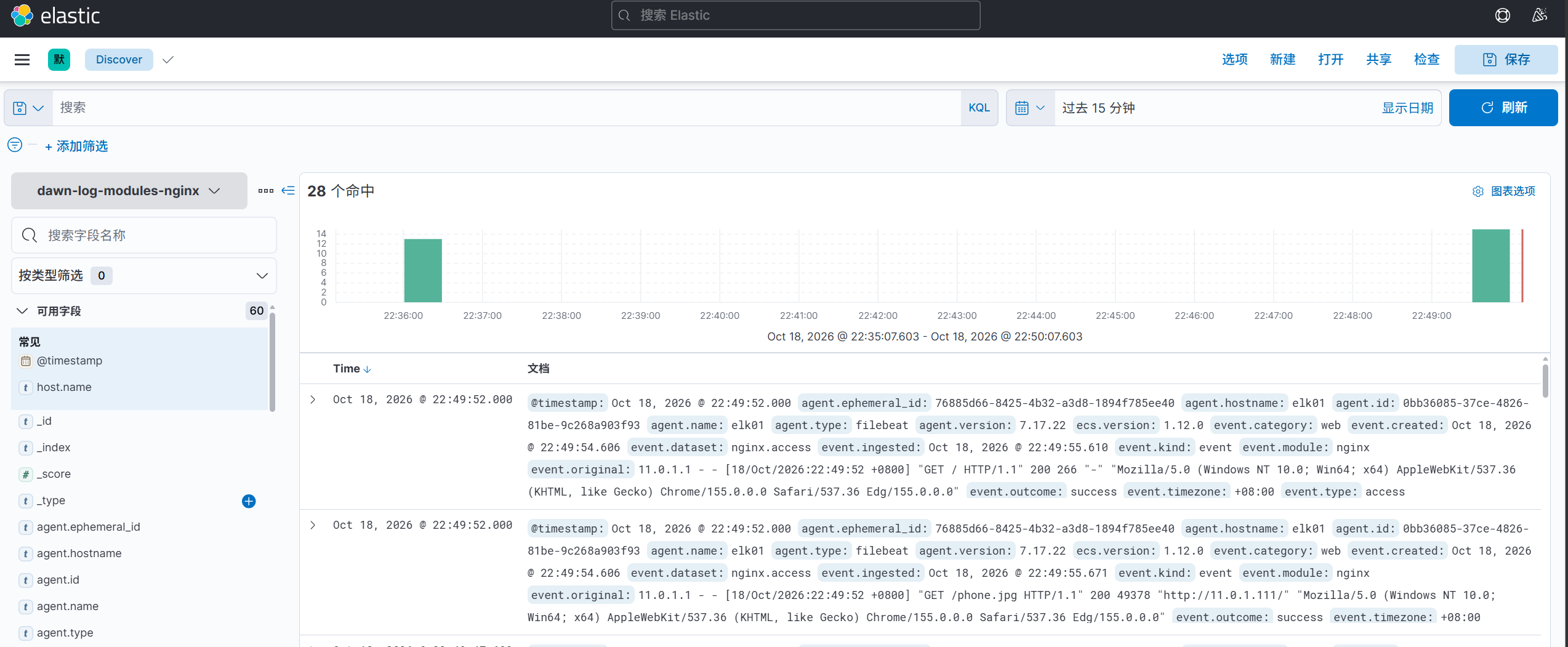
kibana查看数据