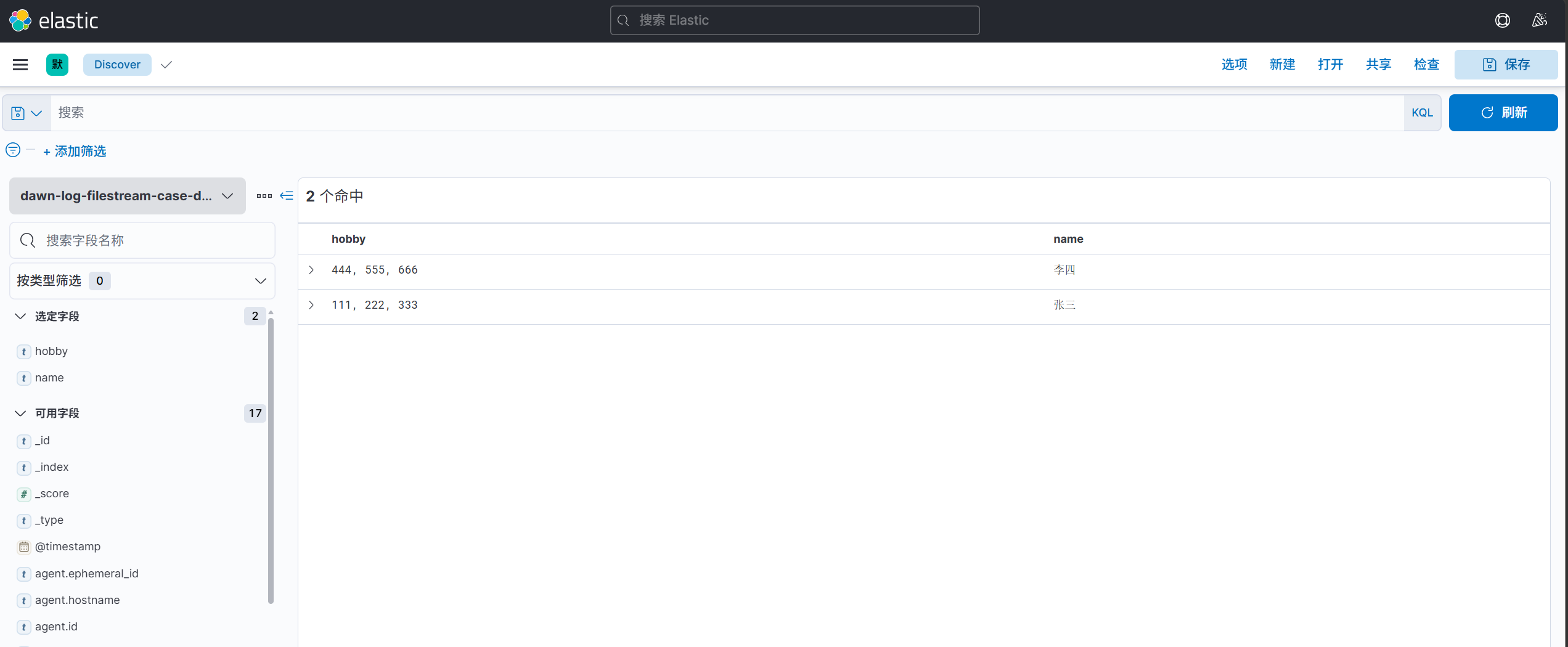
filebeat的filestream解析json格式日志 1. 编写配置文件 1 root@elk01:/etc/filebeat# vim config/10-filestream-to-es.yaml 1 2 3 4 5 6 7 8 9 10 11 12 13 14 15 16 17 18 19 20 21 22 23 24 25 26 27 28 29 30 31 32 33 34 35 filebeat.inputs: - type: filestream paths: - /var/log/nginx/access.log # 配置解析 parsers: # 解析json格式 - ndjson: # 将解析的数据放在哪个字段,若为""代表放在顶级字段中 # target: "zlm" target: "" # 对哪个字段进行解析,若不指定,则默认会对message字段进行解析,并删除该字段。 message_key: message output.elasticsearch: hosts: - "http://11.0.1.111:9200" - "http://11.0.1.112:9200" - "http://11.0.1.113:9200" index: "dawn-log-filestream-nginx" # 禁用索引的生命周期(Index Lifecycle Management,简称"ilm"),如果不禁用则忽略自定义索引名称 setup.ilm.enabled: false # ES的索引模板名称 setup.template.name: "dawn" # ES索引模板的匹配模式 setup.template.pattern: "dawn-log*" # 如果索引模板已经存在,是否覆盖,推荐设置为false setup.template.overwrite: false # 设置索引模板 setup.template.settings: # 设置索引的分片数量 index.number_of_shards: 5 # 设置索引的副本数量 index.number_of_replicas: 0 2. 启动filebeat实例 1 2 root@elk01:/etc/filebeat# rm -fr /var/lib/filebeat/ root@elk01:/etc/filebeat# filebeat -e -c config/10-filestream-to-es.yaml filebeat的filestream实现多行匹配 1. 编写配置文件 1 root@elk01:/etc/filebeat# vim config/11-filestream_multiple-to-es.yaml 1 2 3 4 5 6 7 8 9 10 11 12 13 14 15 16 17 18 19 20 21 22 23 24 25 26 27 28 29 30 31 32 filebeat.inputs: - type: filestream paths: - /dawn/softwares/apache-tomcat-10.1.25/logs/catalina.out parsers: - multiline: type: pattern pattern: '^\d{2}' negate: true match: after output.elasticsearch: hosts: - "http://11.0.1.111:9200" - "http://11.0.1.112:9200" - "http://11.0.1.113:9200" index: "dawn-log-filestream-tomcat-errorlog" # 禁用索引的生命周期(Index Lifecycle Management,简称"ilm"),如果不禁用则忽略自定义索引名称 setup.ilm.enabled: false # ES的索引模板名称 setup.template.name: "dawn" # ES索引模板的匹配模式 setup.template.pattern: "dawn-log*" # 如果索引模板已经存在,是否覆盖,推荐设置为false setup.template.overwrite: false # 设置索引模板 setup.template.settings: # 设置索引的分片数量 index.number_of_shards: 5 # 设置索引的副本数量 index.number_of_replicas: 0 2. 启动filebeat实例 1 2 root@elk01:/etc/filebeat# rm -rf /var/lib/filebeat/ root@elk01:/etc/filebeat# filebeat -e -c config/11-filestream_multiple-to-es.yaml filestream综合案例 1. 测试文件 1 2 3 4 5 6 7 8 9 root@elk01:/etc/filebeat# vim /tmp/apps.json { "name": "张三", "hobby": ["111","222","333"] } { "name": "李四", "hobby": ["444","555","666"] } 2. 编写配置文件 1 root@elk01:/etc/filebeat# vim config/12-filestream_json_multiple_line-to-es.yaml 1 2 3 4 5 6 7 8 9 10 11 12 13 14 15 16 17 18 19 20 21 22 23 24 25 26 27 28 29 30 31 32 33 34 35 36 filebeat.inputs: - type: filestream paths: - /tmp/apps.json parsers: - multiline: type: count count_lines: 4 - ndjson: target: "" message_key: message #output.console: # pretty: true output.elasticsearch: hosts: - "http://11.0.1.111:9200" - "http://11.0.1.112:9200" - "http://11.0.1.113:9200" index: "dawn-log-filestream-case-demo" # 禁用索引的生命周期(Index Lifecycle Management,简称"ilm"),如果不禁用则忽略自定义索引名称 setup.ilm.enabled: false # ES的索引模板名称 setup.template.name: "dawn" # ES索引模板的匹配模式 setup.template.pattern: "dawn-log*" # 如果索引模板已经存在,是否覆盖,推荐设置为false setup.template.overwrite: false # 设置索引模板 setup.template.settings: # 设置索引的分片数量 index.number_of_shards: 5 # 设置索引的副本数量 index.number_of_replicas: 0 3. 启动filebeat实例 1 2 root@elk01:/etc/filebeat# rm -rf /var/lib/filebeat/ root@elk01:/etc/filebeat# filebeat -e -c config/12-filestream_json_multiple_line-to-es.yaml