ES的JVM基础环境优化

1. 修改ES的JVM大小

1
root@elk01:/etc/filebeat# vim /etc/elasticsearch/jvm.options
1
2
3
4
...
# 学习环境推荐为256M,生产环境建议设置为物理内存一半,但不建议超过32GB
-Xms256m
-Xmx256m

2. 拷贝配置文件

1
2
3
4
5
6
root@elk01:/etc/filebeat# scp /etc/elasticsearch/jvm.options 11.0.1.112:/etc/elasticsearch
root@11.0.1.112's password:
jvm.options                                                                               100% 3484   895.4KB/s   00:00
root@elk01:/etc/filebeat# scp /etc/elasticsearch/jvm.options 11.0.1.113:/etc/elasticsearch
root@11.0.1.113's password:
jvm.options                                                                               100% 3484     2.0MB/s   00:00

3. 重启服务

1
2
3
root@elk01:/etc/filebeat# systemctl restart elasticsearch.service
root@elk02:~# systemctl restart elasticsearch.service
root@elk03:~# systemctl restart elasticsearch.service

logstash环境搭建

1. 概述

用于处理日志,聚合日志,分析的功能。功能丰富但比较笨重,目前ELK的市场逐渐被EFK替代。

filebeat很多功能基本是都是基于logstash为原型使用Golang编程语言重写的。轻量级的日志采集工具。

Logstash是免费且开放的服务器端数据处理管道,能够从多个来源采集数据,转换数据,然后将数据发送到您最喜欢的“存储库”中。

2. 下载logstash

1
root@elk03:~# wget https://artifacts.elastic.co/downloads/logstash/logstash-7.17.22-amd64.deb

3. 安装logstash

1
root@elk03:~# dpkg -i logstash-7.17.22-amd64.deb

4. 添加logstash命令到PATH环境变量

1
2
root@elk03:~# ln -svf /usr/share/logstash/bin/logstash /usr/local/sbin/
'/usr/local/sbin/logstash' -> '/usr/share/logstash/bin/logstash'

5. 编写logstash的配置文件

 1
 2
 3
 4
 5
 6
 7
 8
 9
10
11
root@elk03:~# cd /etc/logstash/
root@elk03:/etc/logstash# mkdir config
root@elk03:/etc/logstash# vim config/01-stdin-to-stdout.conf
input {
  stdin {}
}


output {
  stdout {}
}

6. 启动logstash实例

 1
 2
 3
 4
 5
 6
 7
 8
 9
10
11
12
13
14
15
root@elk03:/etc/logstash# logstash -f config/01-stdin-to-stdout.conf
...	
{
      "@version" => "1",
    "@timestamp" => 2026-10-18T16:37:36.202Z,
       "message" => "",
          "host" => "elk03"
}
111111111
{
      "@version" => "1",
    "@timestamp" => 2026-10-18T16:37:55.092Z,
       "message" => "111111111",
          "host" => "elk03"
}

logstash处理自定义业务的日志

1. 准备Python脚本生成数据

 1
 2
 3
 4
 5
 6
 7
 8
 9
10
11
12
13
14
15
16
17
18
19
20
21
22
23
24
25
26
27
28
root@elk03:~# vim generate_log.py
#!/usr/bin/env python
# -*- coding: UTF-8 -*-
# @author : Jason Yin

import datetime
import random
import logging
import time
import sys

LOG_FORMAT = "%(levelname)s %(asctime)s [com.dawn.%(module)s] - %(message)s "
DATE_FORMAT = "%Y-%m-%d %H:%M:%S"

# 配置root的logging.Logger实例的基本配置
logging.basicConfig(level=logging.INFO, format=LOG_FORMAT, datefmt=DATE_FORMAT, filename=sys.argv[1]
, filemode='a',)
actions = ["浏览页面", "评论商品", "加入收藏", "加入购物车", "提交订单", "使用优惠券", "领取优惠券",
 "搜索", "查看订单", "付款", "清空购物车"]

while True:
    time.sleep(random.randint(1, 5))
    user_id = random.randint(1, 10000)
    # 对生成的浮点数保留2位有效数字.
    price = round(random.uniform(15000, 30000),2)
    action = random.choice(actions)
    svip = random.choice([0,1])
    logging.info("DAU|{0}|{1}|{2}|{3}".format(user_id, action,svip,price))
1
2
3
root@elk03:~# apt update
root@elk03:~# apt install python-is-python3
root@elk03:~# python generate_log.py  /tmp/apps.log

2. 编写配置文件

1
root@elk03:/etc/logstash# vim config/02-file-to-stdout.conf
 1
 2
 3
 4
 5
 6
 7
 8
 9
10
11
12
13
14
15
16
17
18
19
20
21
22
23
24
25
26
27
28
29
30
31
32
33
34
35
36
37
38
39
40
41
42
43
44
45
46
47
48
49
input {
  # 输入类型是一个file,代表的是文本文件
  file {
    # 指定的文件的路径,可以指定多个
    path => ["/tmp/apps.log"]
    # 指定从源文件采集的位置,有效值为: beginning, end(默认值)。
    start_position => "beginning"
  }
}

filter {
  mutate {
      # 对指定字段进行切分,本案例是将message字段按照"|"进行切分
      split => { "message" => "|" }

      # 添加字段
      add_field => { 
         "other" => "%{[message][0]}"
         "userId" => "%{[message][1]}" 
         "action" => "%{[message][2]}"
         "svip" => "%{[message][3]}"
         "price" => "%{[message][4]}" 

      }
  }

  mutate {
      split => { "other" => " "}
      add_field => {
         datetime => "%{[other][1]} %{[other][2]}"
      }

      # 移除字段
      remove_field => [ "message" , "other", "@version"]
  }

  mutate {
     convert => {
       "price" => "float"
       "userId" => "integer"
     }
  }
}

output {
 # stdout {}

 elasticsearch {}
}

3. 启动实例

1
root@elk03:/etc/logstash# logstash -r -f config/02-file-to-stdout.conf

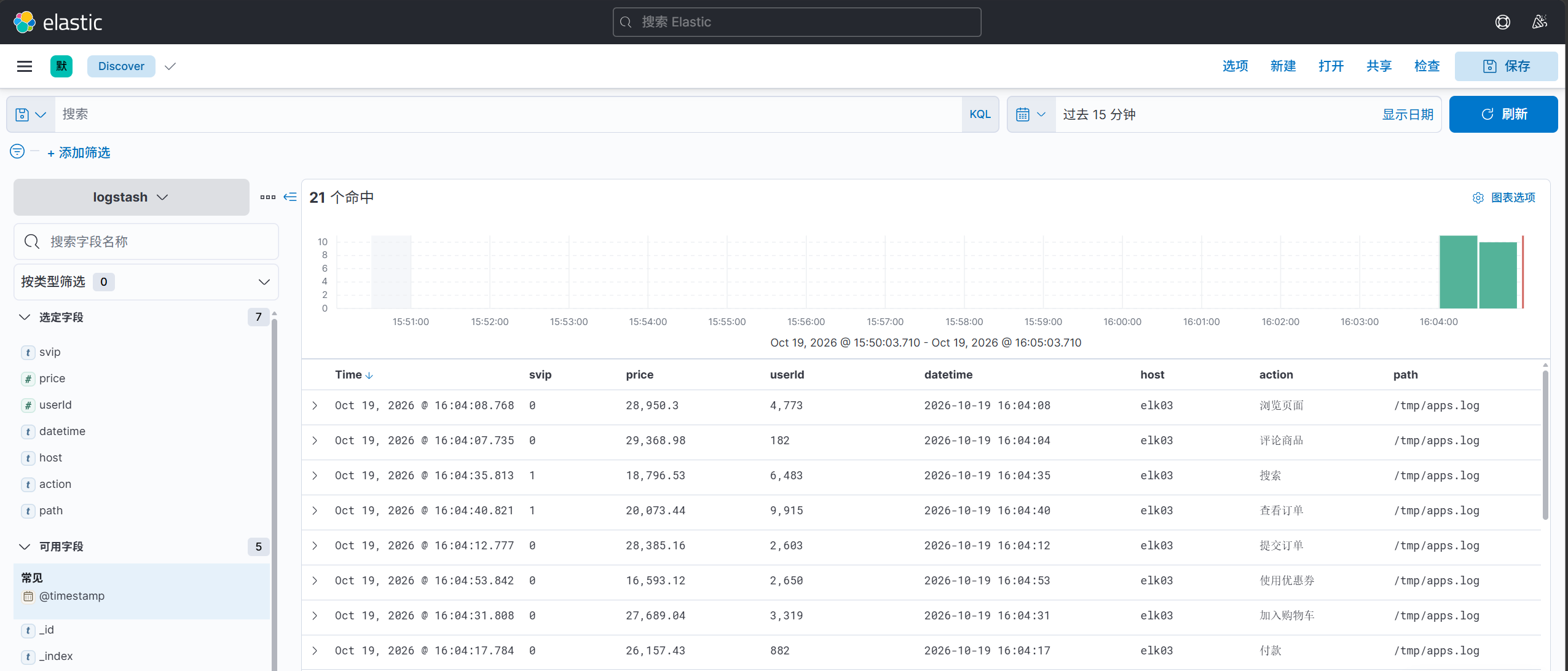
image-20261019160619411