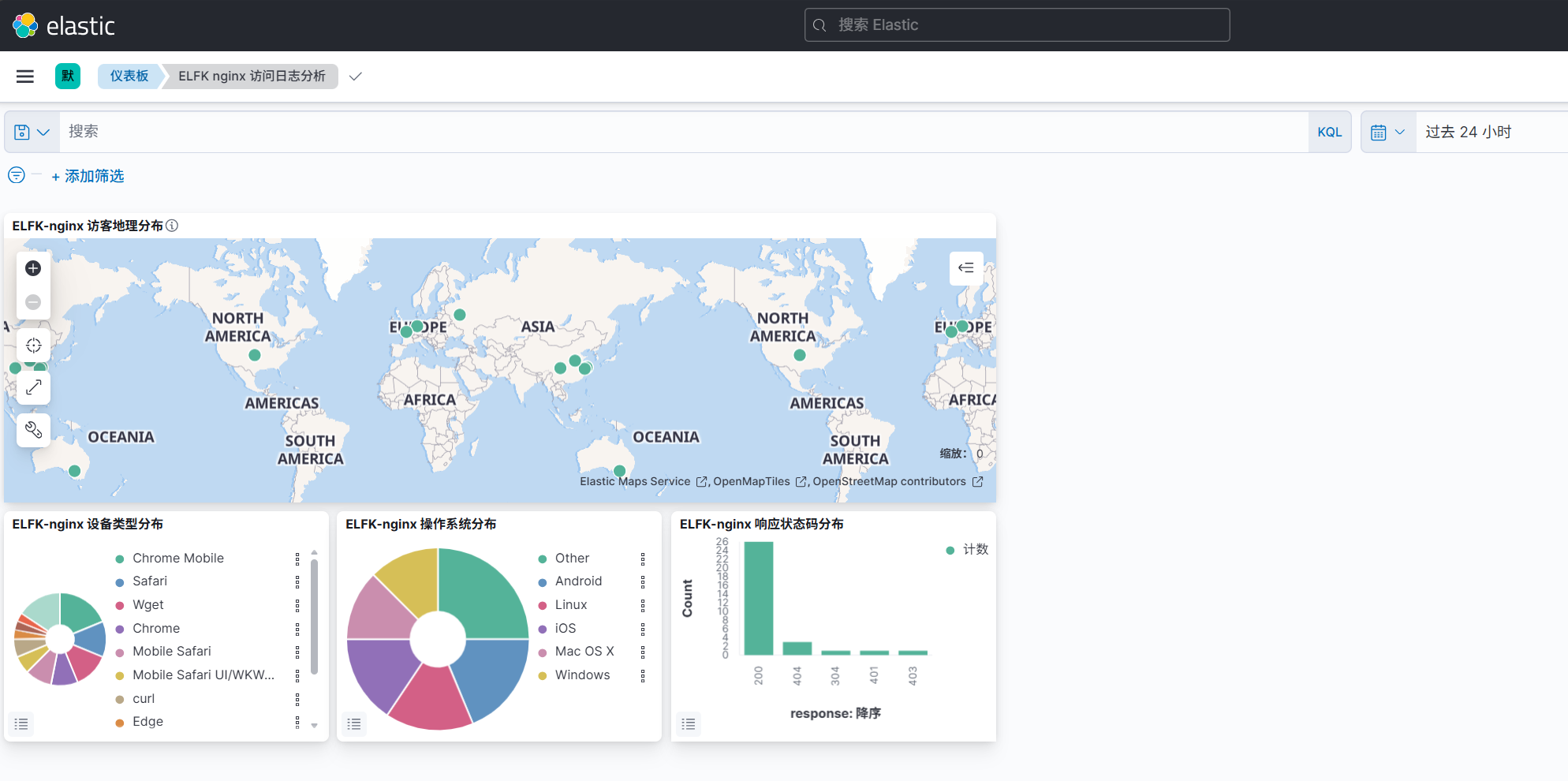
基于ELFK架构分析nginx访问日志#
1. logstash代码#
1
|
root@elk03:/etc/logstash# vim config/05-beats-filter-es.conf
|
 1
 2
 3
 4
 5
 6
 7
 8
 9
10
11
12
13
14
15
16
17
18
19
20
21
22
23
24
25
26
27
28
29
30
31
32
33
34
35
36
37
38
39
40
41
42
43
44
45
46
47
48
49
50
51
52
53
54
55
56
57
58
59
60
61
|
input {
  # 接收beats组件的数据,此处指filebeat
  beats {
    port => 9999
  }
}

filter {
   mutate {
     remove_field => [ "ecs","agent","tags","input","@version" ]
   }

   # 基于正则匹配nginx的访问日志并解析相应格式,提取任意文本类型。
   # nginx 日志为 combined 格式,改用 HTTPD_COMBINEDLOG(= COMMONLOG + referrer + agent)
   grok {
     match => {
       message => "%{HTTPD_COMBINEDLOG}"
     }
   }

   # 基于公网地址分析经纬度,城市的名称等信息,指定本地 geoip 数据库
   # 注意: 内网 IP(如 11.0.1.1)不会生成 geoip 字段,仅对公网 IP 生效
   geoip {
     source => "clientip"
     database => "/etc/logstash/GeoLite2-City.mmdb"
   }

   # geoip 插件的 location 是 {lat,lon} 对象,ES 动态映射不会将其识别为 geo_point,(只有 [lon,lat] 数组/GeoJSON/geohash 字符串才会)
   # 用 ruby 过滤器把经纬度拼成 [lon,lat] 数组字段 dawn-geo,动态映射为 geo_point
   ruby {
     code => "event.set('[dawn-geo]', [event.get('[geoip][longitude]'), event.get('[geoip][latitude]')]) if event.get('[geoip][longitude]')"
   }

   # 基于agent字段分析用户的设备类型,将分析的结果存储在"dawn-device"字段中
   useragent {
     source => "agent"

     target => "dawn-device"
   }

   mutate {
     rename => {
       "host" => "dawn-host"
       "agent" => "dawn-agent"
     }
   }

   date {
      match => ["timestamp","dd/MMM/yyyy:HH:mm:ss Z"]
   }
}

output {
 # stdout {}

  elasticsearch {
     hosts => ["http://11.0.1.111:9200","http://11.0.1.112:9200","http://11.0.1.113:9200"]
     index => "dawn-logstash-nginx-%{+yyyy.MM.dd}"
  }

}
|
1
|
root@elk03:/etc/logstash# logstash -rf config/05-beats-filter-es.conf
|
2. 启动filebeat#
1
|
root@elk01:/etc/filebeat# vim config/14-modules_nginx-to-logstash.yaml
|
 1
 2
 3
 4
 5
 6
 7
 8
 9
10
11
12
13
14
|
filebeat.config.modules:
  # 此处的"${path.config}"对应的路径是/etc/filebeat目录
  path: ${path.config}/modules.d/*.yml
  # 支持热加载
  reload.enabled: true
  # 指定每间隔多长时间检测一次"${path.config}/modules.d/*.yml"
  reload.period: 5s

#output.console:
#  pretty: true

# 将数据推送logstash
output.logstash:
  hosts: ["11.0.1.113:9999"]
|
1
2
|
root@elk01:/etc/filebeat# rm -rf /var/lib/filebeat/
root@elk01:/etc/filebeat# filebeat -e -c config/14-modules_nginx-to-logstash.yaml
|
3. Kibana 索引模式与可视化#
3.1 建索引模式#
Stack Management → Index Patterns → Create:dawn-logstash-nginx-*,Time field 选 @timestamp。
3.2 可视化(3 个)+ 地理分布(Maps 1 个)#
| 可视化 |
类型 |
聚合字段 |
| ELFK-nginx 访客地理分布 |
Maps 应用对象(面板类型 map) |
dawn-geo,ES_SEARCH 文档图层 |
| ELFK-nginx 设备类型分布 |
Pie |
dawn-device.name,terms |
| ELFK-nginx 操作系统分布 |
Pie |
dawn-device.os,terms |
| ELFK-nginx 响应状态码分布 |
Vertical Bar(类型名 histogram) |
response,terms |
3.3 仪表板#
把 3 个可视化和 1 个 Maps 面板拖进同一个 Dashboard 即可,布局:地图通栏,下面三张图各占 1/3。
仪表板地址:http://11.0.1.114:5601/app/dashboards#/view/788cabb0-cbda-11f1-9207-335bca41b28c
Maps 对象地址:http://11.0.1.114:5601/app/maps#/map/a78a0830-cbe0-11f1-9207-335bca41b28c
3.4 效果字段速查#
- geoip:
country_name / country_code2 / continent_code / timezone / latitude / longitude / city_name / location
- dawn-device:
name(浏览器)/ os(操作系统)/ os_name / os_version / device(设备)
- nginx:
clientip / request / response / bytes / referrer / timestamp
4. 项目整合: ELFK架构分析出图展示#
filebeat(采集)→ logstash(grok 解析 + geoip + useragent + date)→ elasticsearch(三节点存储)→ kibana(索引模式 + 地图/饼图/柱状图仪表板)