Keystone 서비스#
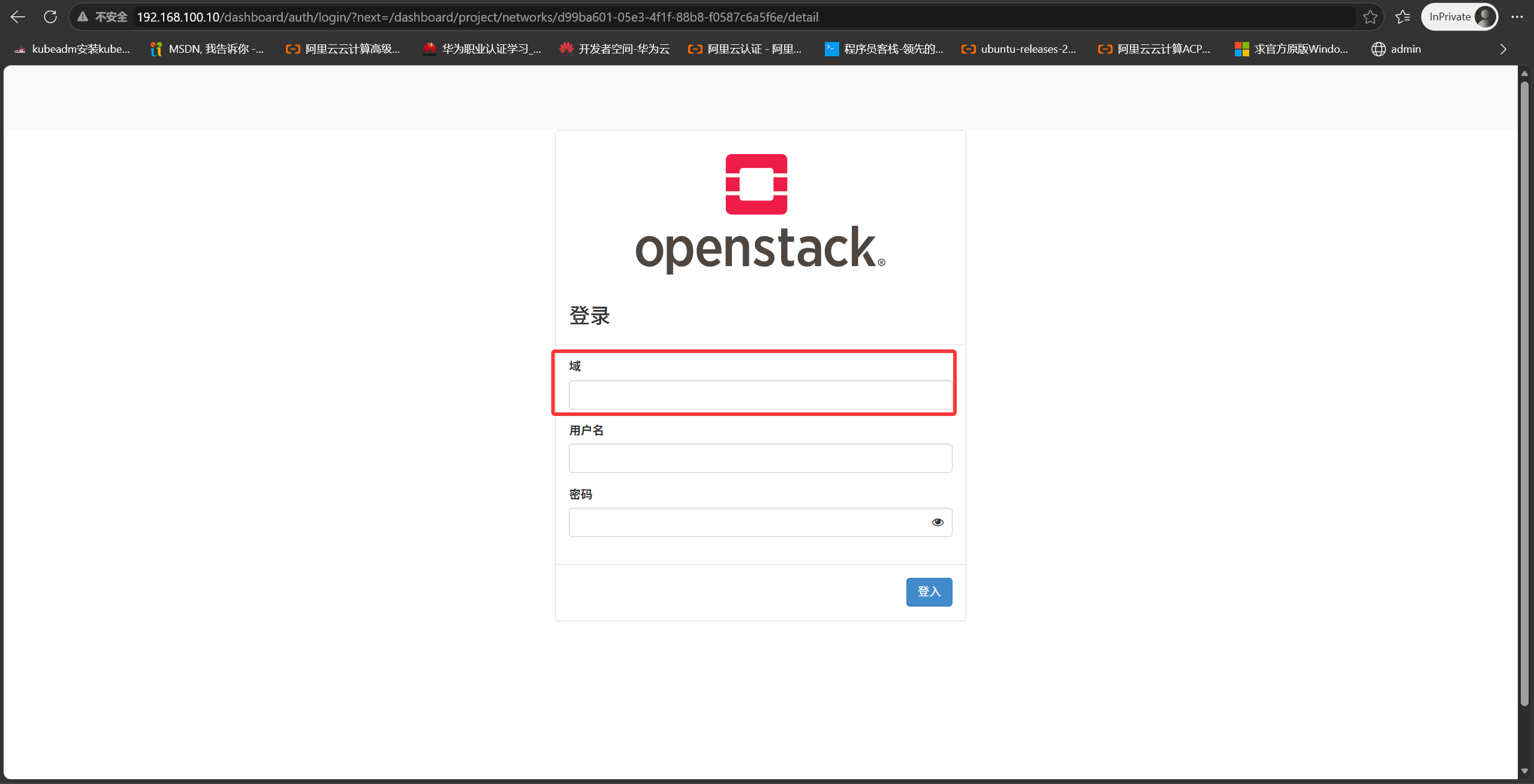
OpenStack 다중 도메인 지원
1
2
|
[root@Controller ~]# vim /etc/openstack-dashboard/local_settings
OPENSTACK_KEYSTONE_MULTIDOMAIN_SUPPORT = True
|
시스템의 모든 서비스 나열
1
|
[root@Controller ~(keystone_admin)]# openstack service list
|
Keystone 주소 및 API 인터페이스
1
|
OS_AUTH_URL=http://192.168.100.10:5000/v3
|
- 모든 서비스는 Keystone 주소를 알고 있습니다. 사용자 토큰이 유효한지 Keystone에 검증을 요청해야 하기 때문입니다
- Keystone은 모든 서비스의 주소를 알고 있습니다. 모든 서비스는 생성 시 Keystone에 등록하기 때문입니다
엔드포인트 주소
1
|
[root@Controller ~(keystone_admin)]# openstack endpoint list
|
각 서비스에는 엔드포인트 주소 3개가 있으며, 이 3개의 URL은 같을 수도 다를 수도 있습니다
public url — 외부 사용자가 접근하는 URL 주소
admin url — 관리자가 접근하는 URL 주소
internal url — 내부 컴포넌트 간 접근용 URL 주소
클라우드 서버 제공 흐름
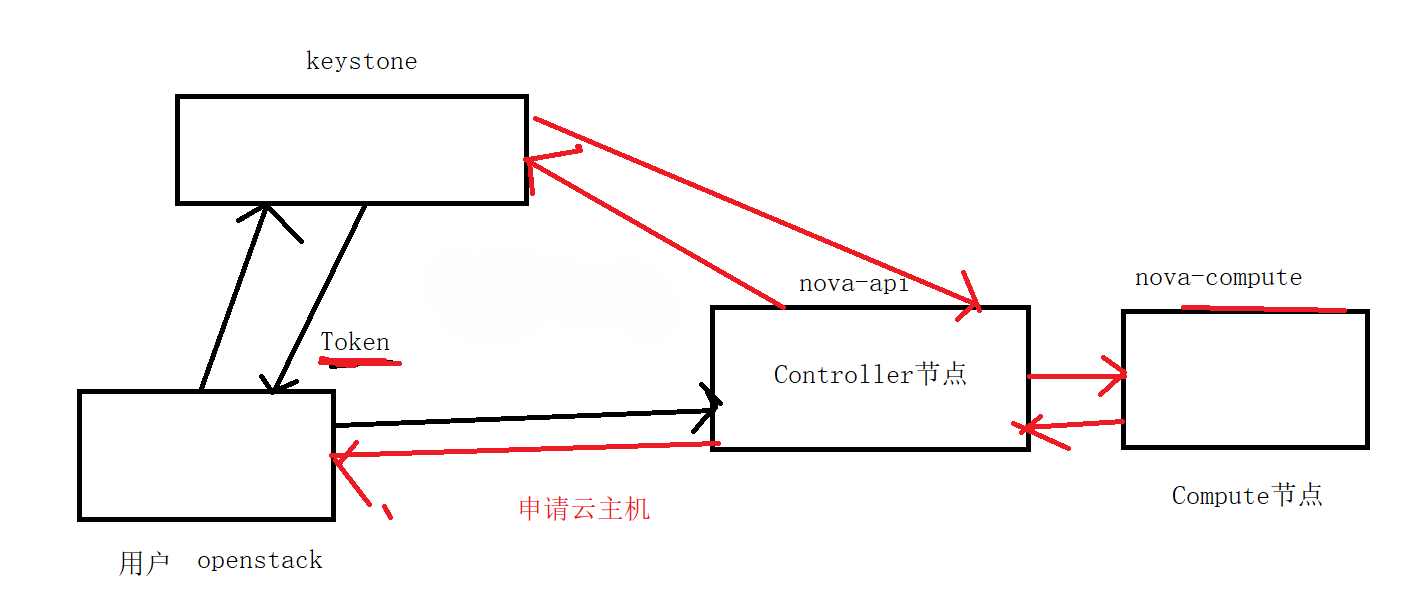
- 사용자가 Keystone에 사용자 이름과 비밀번호로 인증을 요청하고, 인증에 성공하면 Keystone이 토큰을 발급합니다. 사용자는 그 토큰으로 nova-api에 클라우드 서버 생성 요청을 보냅니다
- nova-api는 Keystone에 도움을 요청해 해당 토큰이 유효한지 검증하고, 성공하면 결과를 반환합니다
- nova-api가 요청을 nova-compute 호스트로 전달합니다
- nova-compute 호스트가 사용자 요청 정보에 따라 클라우드 서버를 생성하고 결과를 nova-api에 반환합니다
- nova-api가 결과를 사용자에게 반환하고, 클라우드 서버 생성이 완료되며 해당 호스트 정보는 데이터베이스에 기록됩니다
nova-api에 서버 생성 요청을 보낼 때 저는 nova-api 주소를 모릅니다. 하지만 Keystone 주소는 알고 있습니다. Keystone에 nova-api 주소를 질의합니다. Keystone은 모든 서비스의 엔드포인트 주소를 저장하고 있으므로, 저는 Keystone 주소만 알면 됩니다. 다음은 Keystone 주소를 확인하고 이를 통해 다른 주소를 조회하는 방법입니다.
 1
 2
 3
 4
 5
 6
 7
 8
 9
10
11
12
13
14
15
16
17
18
19
20
21
22
23
24
25
26
27
28
29
30
31
32
33
34
35
36
37
38
39
40
41
42
43
44
45
46
47
48
49
50
51
52
53
54
55
56
57
58
59
60
61
62
63
64
65
66
67
68
69
70
71
72
73
74
75
76
77
78
79
80
81
82
83
84
85
86
87
88
89
90
91
92
93
94
95
|
[root@Controller ~(keystone_zlm)]# grep -E "^connection\s*=.*keystone" /etc/keystone/*.conf
/etc/keystone/keystone.conf:connection=mysql+pymysql://keystone_admin:c3fa63522e1f4586@192.168.100.10/keystone
# 用户名:keystone_admin
# 密码:c3fa63522e1f4586
[root@Controller ~(keystone_zlm)]# mysql -u keystone_admin  -p -D keystone
Enter password:
Reading table information for completion of table and column names
You can turn off this feature to get a quicker startup with -A

Welcome to the MariaDB monitor.  Commands end with ; or \g.
Your MariaDB connection id is 15494
Server version: 10.3.27-MariaDB MariaDB Server

Copyright (c) 2000, 2018, Oracle, MariaDB Corporation Ab and others.

Type 'help;' or '\h' for help. Type '\c' to clear the current input statement.

MariaDB [keystone]> SELECT s.type AS service_type,
    ->        e.interface,
    ->        e.url
    -> FROM endpoint e
    -> JOIN service s ON e.service_id = s.id
    -> ORDER BY s.type, e.interface;
+----------------+-----------+--------------------------------------------------+
| service_type   | interface | url                                              |
+----------------+-----------+--------------------------------------------------+
| alarming       | admin     | http://192.168.100.10:8042                       |
| alarming       | internal  | http://192.168.100.10:8042                       |
| alarming       | public    | http://192.168.100.10:8042                       |
| cloudformation | admin     | http://192.168.100.10:8000/v1                    |
| cloudformation | internal  | http://192.168.100.10:8000/v1                    |
| cloudformation | public    | http://192.168.100.10:8000/v1                    |
| compute        | admin     | http://192.168.100.10:8774/v2.1/%(tenant_id)s    |
| compute        | internal  | http://192.168.100.10:8774/v2.1/%(tenant_id)s    |
| compute        | public    | http://192.168.100.10:8774/v2.1/%(tenant_id)s    |
| identity       | admin     | http://192.168.100.10:5000                       |
| identity       | internal  | http://192.168.100.10:5000                       |
| identity       | public    | http://192.168.100.10:5000                       |
| image          | admin     | http://192.168.100.10:9292                       |
| image          | internal  | http://192.168.100.10:9292                       |
| image          | public    | http://192.168.100.10:9292                       |
| metering       | admin     | http://192.168.100.10:8777                       |
| metering       | internal  | http://192.168.100.10:8777                       |
| metering       | public    | http://192.168.100.10:8777                       |
| metric         | admin     | http://192.168.100.10:8041                       |
| metric         | internal  | http://192.168.100.10:8041                       |
| metric         | public    | http://192.168.100.10:8041                       |
| network        | admin     | http://192.168.100.10:9696                       |
| network        | internal  | http://192.168.100.10:9696                       |
| network        | public    | http://192.168.100.10:9696                       |
| object-store   | admin     | http://192.168.100.10:8080/v1/AUTH_%(tenant_id)s |
| object-store   | internal  | http://192.168.100.10:8080/v1/AUTH_%(tenant_id)s |
| object-store   | public    | http://192.168.100.10:8080/v1/AUTH_%(tenant_id)s |
| orchestration  | admin     | http://192.168.100.10:8004/v1/%(tenant_id)s      |
| orchestration  | internal  | http://192.168.100.10:8004/v1/%(tenant_id)s      |
| orchestration  | public    | http://192.168.100.10:8004/v1/%(tenant_id)s      |
| placement      | admin     | http://192.168.100.10:8778/placement             |
| placement      | internal  | http://192.168.100.10:8778/placement             |
| placement      | public    | http://192.168.100.10:8778/placement             |
| volumev2       | admin     | http://192.168.100.10:8776/v2/%(tenant_id)s      |
| volumev2       | internal  | http://192.168.100.10:8776/v2/%(tenant_id)s      |
| volumev2       | public    | http://192.168.100.10:8776/v2/%(tenant_id)s      |
| volumev3       | admin     | http://192.168.100.10:8776/v3/%(tenant_id)s      |
| volumev3       | internal  | http://192.168.100.10:8776/v3/%(tenant_id)s      |
| volumev3       | public    | http://192.168.100.10:8776/v3/%(tenant_id)s      |
+----------------+-----------+--------------------------------------------------+
39 rows in set (0.001 sec)

MariaDB [keystone]> SELECT s.type AS service_type,
    ->        e.interface,
    ->        e.url
    -> FROM endpoint e
    -> JOIN service s ON e.service_id = s.id
    -> WHERE e.interface = 'public'
    -> ORDER BY s.type;
+----------------+-----------+--------------------------------------------------+
| service_type   | interface | url                                              |
+----------------+-----------+--------------------------------------------------+
| alarming       | public    | http://192.168.100.10:8042                       |
| cloudformation | public    | http://192.168.100.10:8000/v1                    |
| compute        | public    | http://192.168.100.10:8774/v2.1/%(tenant_id)s    |
| identity       | public    | http://192.168.100.10:5000                       |
| image          | public    | http://192.168.100.10:9292                       |
| metering       | public    | http://192.168.100.10:8777                       |
| metric         | public    | http://192.168.100.10:8041                       |
| network        | public    | http://192.168.100.10:9696                       |
| object-store   | public    | http://192.168.100.10:8080/v1/AUTH_%(tenant_id)s |
| orchestration  | public    | http://192.168.100.10:8004/v1/%(tenant_id)s      |
| placement      | public    | http://192.168.100.10:8778/placement             |
| volumev2       | public    | http://192.168.100.10:8776/v2/%(tenant_id)s      |
| volumev3       | public    | http://192.168.100.10:8776/v3/%(tenant_id)s      |
+----------------+-----------+--------------------------------------------------+
13 rows in set (0.000 sec)

MariaDB [keystone]>
|
OpenStack 배포 시 서비스 생성
- 데이터베이스에 들어가 데이터베이스(예: glance)를 생성합니다
- 데이터베이스 사용자 glance를 생성하고, glance 데이터베이스의 모든 테이블에 대한 ALL(조회·추가·수정·삭제) 권한을 부여합니다
- glance 서비스를 생성하고 glance-api 주소(엔드포인트 주소)를 데이터베이스에 등록합니다
사용자가 glance-api에 접근해야 할 때 Keystone에 요청을 보내고, Keystone 데이터베이스에서 glance api 엔드포인트 주소를 조회합니다
1
2
|
#示例 如果将zlm用户加入admin角色,那他就拥有了admin角色权限
[root@Controller ~(keystone_admin)]# openstack role add --user zlm --project LMandMY_HOME admin
|
사용자가 nova-api에 요청을 보내면 nova-api는 Keystone에 사용자 신원과 토큰 유효 기간을 검증합니다. 클라우드 서버 생성 권한이 있는지는 판단하지 않으며, 권한 여부는 각 서비스의 정책 파일에 따라 결정됩니다
1
2
3
4
5
6
7
8
9
|
[root@Controller nova]# cd /etc/openstack-dashboard/
[root@Controller openstack-dashboard]# ls
cinder_policy.json  keystone_policy.json  neutron_policy.json  nova_policy.json
glance_policy.json  local_settings        nova_policy.d
[root@Controller nova(keystone_user)]# cp /etc/openstack-dashboard/glance_policy.json /etc/glance/policy.json
[root@Controller nova(keystone_user)]# openstack image create --container-format bare
--disk-format qcow2 --file /root/cirros-0.3.5-x86_64-disk.img --public    test2
[root@Controller nova(keystone_user)]# chgrp glance /etc/glance/policy.json
[root@Controller nova(keystone_user)]# systemctl restart openstack-glance-api.service
|
Nova 서비스#
컨트롤러 노드
nova-api 모듈
nova-scheduler 모듈
nova-conductor 모듈
nova-novncproxy 모듈
컴퓨트 노드
nova-compute 모듈
nova-api
외부로 제공되는 REST 인터페이스 처리 담당
전달된 파라미터의 유효성 검증과 제약 검사를 수행합니다
요청된 리소스에 대해 쿼터(quota) 검증 및 예약을 수행합니다
리소스 생성·수정·삭제·조회 등
가상 머신 라이프사이클의 진입점
수평 확장 형태로 배포 가능
nova-conductor
nova-compute의 데이터베이스 직접 접근을 분리합니다. 사용자가 클라우드 서버 생성을 요청해 성공하면 nova-conductor 모듈이 해당 정보를 데이터베이스에 기록합니다
database — 해당 컴포넌트 관련 정보(클라우드 서버 정보, 이미지 정보, 네트워크 정보 등)를 저장합니다
nova-scheduler
OpenStack 환경에 여러 컴퓨트 노드가 있을 때 사용자가 클라우드 서버를 생성하면 nova-scheduler 모듈이 각 compute 호스트의 가중치에 따라 어느 컴퓨트 노드에서 실행할지 결정합니다
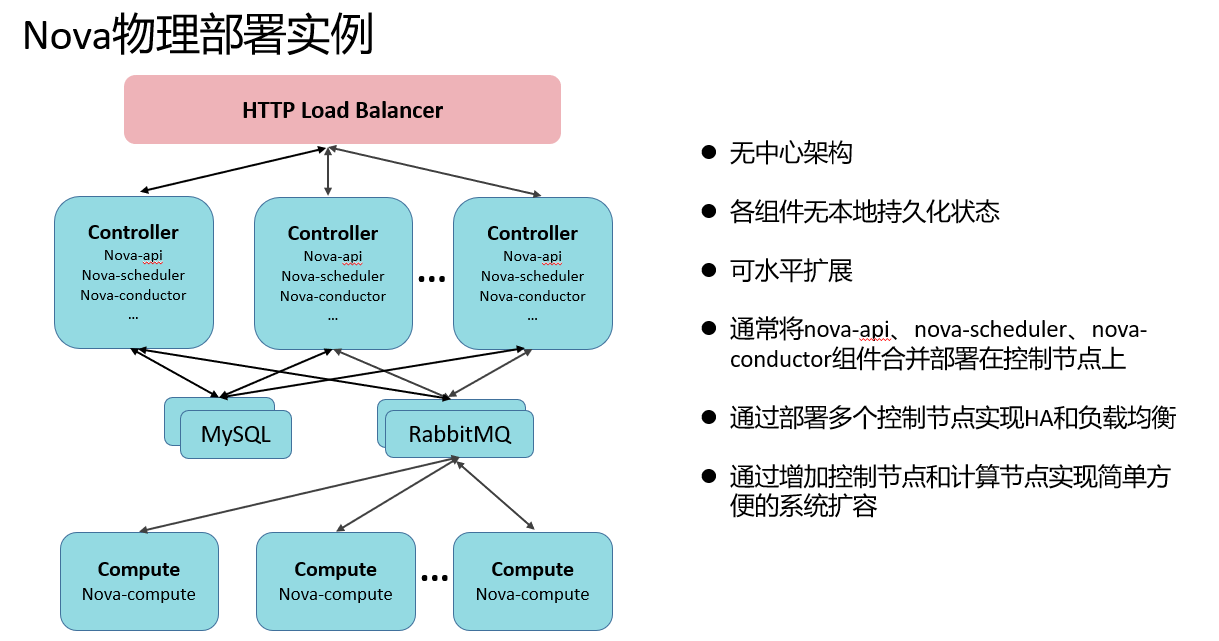
HAProxy가 로드 밸런싱을 제공합니다. 사용자가 nova-api에 접근하려 하면 요청은 먼저 HAProxy로 전달되고, 각 nova-api의 부하 상황에 따라 어떤 API 노드로 보낼지 결정됩니다
MQ — Message Queue(메시지 큐)
하나의 컴포넌트가 여러 모듈로 구성될 때, 모듈 간 통신은 메시지 큐를 거쳐 혼잡 제어 등을 수행합니다
1000명의 사용자가 nova-api에 요청을 보낸 경우
nova-api는 해당 요청을 nova-compute로 보냅니다
nova-api는 이 1000개의 요청을 메시지 큐로 보내고, 메시지 큐는 각 compute 호스트의 메시지 소비 상황과 처리 진도에 따라 순서대로 nova-compute 노드에 전달해 처리합니다
nova-compute
실제로 가상 머신을 구동하는 모듈
nova-novncproxy
동작 원리: nova-compute 호스트는 실행 중인 가상 머신마다 VNC Server 포트를 하나 엽니다
nova-compute 호스트는 해당 포트를 외부에 노출해서는 안 됩니다. 노출하면 인터넷상의 호스트가 그 포트와 가상 머신에 접근할 수 있게 됩니다
이 문제를 해결하기 위해 컨트롤러 노드에서 nova-novncproxy 서비스를 띄워 외부에 제공합니다. 사용자가 해당 가상 머신 콘솔에 접근하면 요청이 먼저 nova-novncproxy로 전달되고, 제공된 정보(가상 머신 UUID, 토큰 등)로 그 가상 머신이 어느 nova-compute에서 실행 중인지 조회한 뒤 해당 Compute 호스트로 요청을 전달합니다.
VNC로 가상 머신을 여는 동작 원리
vncserver — 5900 포트
vncviewer — vncviewer
클라이언트에 vncviewer를 설치할 필요는 없으며, 해당 기능은 브라우저 HTML에 통합되어 있습니다(noVNC 프로토콜)
Glance 및 Swift 서비스#
I. 클라우드 서버 배포:
사용자가 클라우드 서버 배포 명령을 보내 검증을 통과하면 nova-compute 호스트가 glance 이미지 서버에서 로컬(클라우드 서버는 로컬에 배포)로 이미지를 내려받습니다 — /var/lib/nova/instances/_base/
클라우드 서버가 부팅되면 차분 디스크가 생성되며, 새로 쓰는 데이터는 그 차분 디스크에 기록됩니다
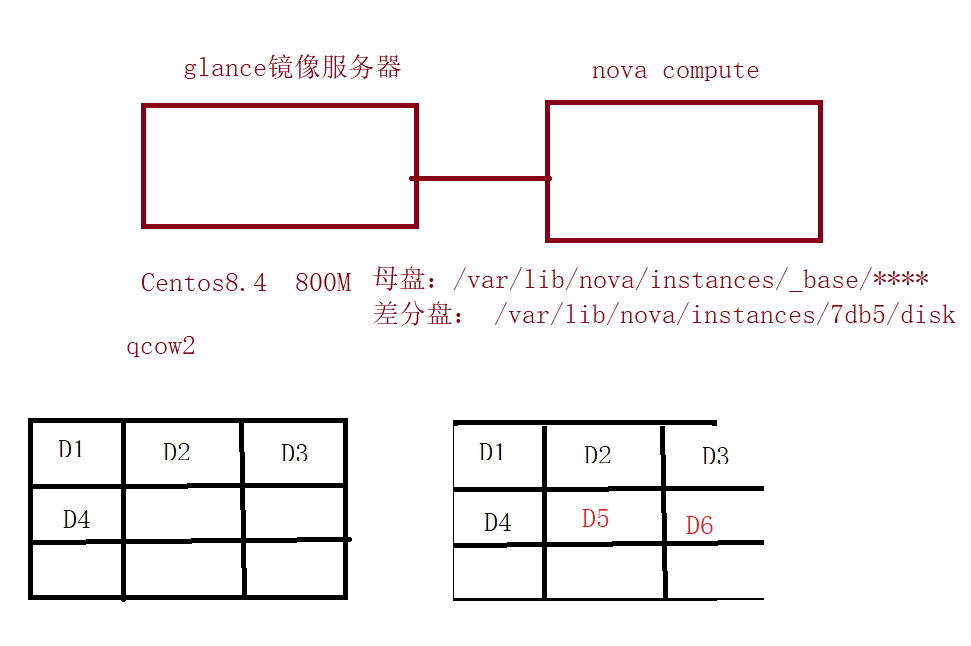
실습: glance 이미지를 glance 로컬 디스크가 아닌 Swift 오브젝트 스토리지에 저장하기
 1
 2
 3
 4
 5
 6
 7
 8
 9
10
11
12
13
14
15
16
17
18
|
[root@Controller ~]# cd /etc/glance/
[root@Controller glance]# cp glance-api.conf glance-api.conf.bak
[root@Controller ~]# vim /etc/glance/glance-api.conf
3057 stores=file,http,swift
3111 default_store=swift
3982 swift_store_region = RegionOne
4032 swift_store_endpoint_type = publicURL
4090 swift_store_container = public
4118 swift_store_large_object_size = 5120
4142 swift_store_large_object_chunk_size = 100
4160 swift_store_create_container_on_put = True
4182 swift_store_multi_tenant = True
4230 swift_store_admin_tenants = services
4382 swift_store_auth_version = 2
4391 swift_store_auth_address = http://192.168.100.10:5000/v3
4399 swift_store_user = zlm
4408 swift_store_key = 000000
[root@Controller ~]# systemctl restart openstack-glance-api.service
|
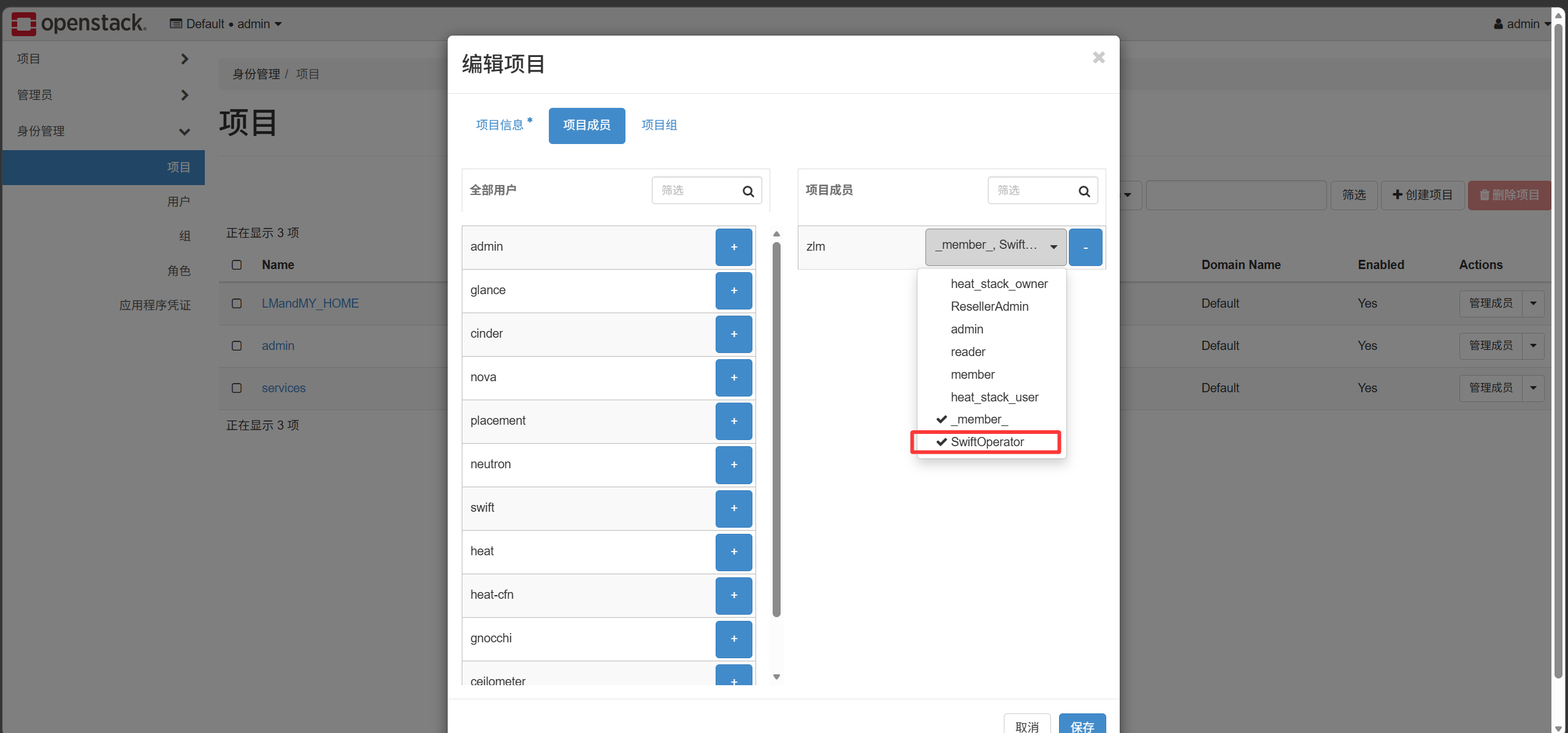
참고: zlm 사용자는 swiftOperator 역할을 부여받아야 Swift에 대한 작업 권한을 가집니다