01. GitLab 관련 사이트#
-
공식 사이트: https://about.gitlab.com/
-
국내 미러: https://mirrors.tuna.tsinghua.edu.cn/gitlab-ce/yum/
02. GitLab 배포#
 1
 2
 3
 4
 5
 6
 7
 8
 9
10
11
12
13
14
15
16
17
18
19
20
21
22
23
24
25
26
27
28
29
30
|
I. 환경 준비
1、OS: CentOS 7.9
2、메모리: 실습 4G, 운영 최소 8G
3、방화벽 비활성화 및 SELinux 끄기

II. GitLab RPM 패키지 다운로드
[root@gitlab ~]# wget https://mirrors.tuna.tsinghua.edu.cn/gitlab-ce/yum/el7/gitlab-ce-16.9.8-ce.0.el7.x86_64.rpm

III. GitLab 설치
# 설치 중 의존성 설치가 필요함
[root@gitlab ~]# rpm -ivh gitlab-ce-16.9.8-ce.0.el7.x86_64.rpm
warning: gitlab-ce-16.9.8-ce.0.el7.x86_64.rpm: Header V4 RSA/SHA1 Signature, key ID f27eab47: NOKEY
error: Failed dependencies:
    policycoreutils-python is needed by gitlab-ce-16.9.8-ce.0.el7.x86_64
# 의존성 설치
[root@gitlab ~]# yum -y install policycoreutils-python
# 의존성 설치 후 GitLab 설치 계속
[root@gitlab ~]# rpm -ivh gitlab-ce-16.9.8-ce.0.el7.x86_64.rpm
warning: gitlab-ce-16.9.8-ce.0.el7.x86_64.rpm: Header V4 RSA/SHA1 Signature, key ID f27eab47: NOKEY
Preparing...                          ################################# [100%]
Updating / installing...
   1:gitlab-ce-16.9.8-ce.0.el7        ################################# [100%]

IV. 시작 전 도메인 또는 IP 접근 설정
[root@gitlab ~]#  vim /etc/gitlab/gitlab.rb
...
external_url 'http://11.0.1.200'
...
설정 후 다음 명령 실행:
[root@gitlab ~]# gitlab-ctl reconfigure
|
03. GitLab 구성 요소#
1
2
3
4
5
6
7
|
nginx:           정적 웹 서버
gitlab-workhorse: 경량 리버스 프록시
logrotate:       로그 파일 관리 도구
postgresql:      데이터베이스
redis:           캐시 데이터베이스
sidekiq:         백그라운드 큐 작업 실행(비동기). (Ruby)
unicorn: Rack 애플리케이션용 HTTP 서버이며, GitLab Rails 앱이 이 서버에서 호스팅됨. (Ruby 웹 서버, 주로 Ruby로 작성)
|
04. GitLab 자주 쓰는 명령어#
1
2
3
4
5
|
gitlab-ctl start                # GitLab 시작 (gitlab-ctl reconfigure 후 서비스 자동 시작)
gitlab-ctl status               # GitLab 전체 서비스 운영 상태 확인
gitlab-ctl stop                 # GitLab 서비스 정지
gitlab-ctl stop nginx           # 개별 서비스 정지
gitlab-ctl tail                 # 전체 서비스 로그 보기
|
05. GitLab 웹 설정#
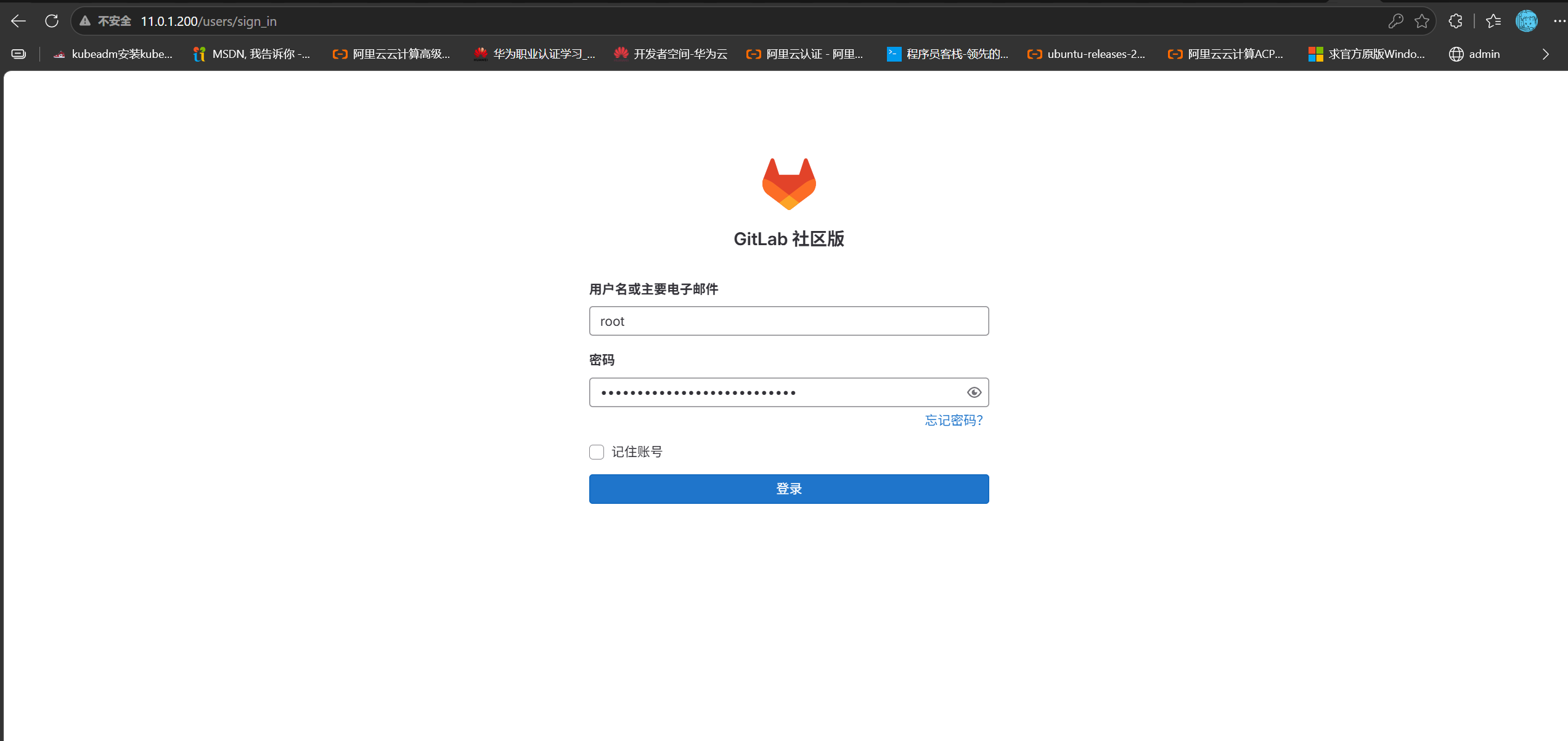
GitLab 로그인: 11.0.1.200
1. 로그인 비밀번호#
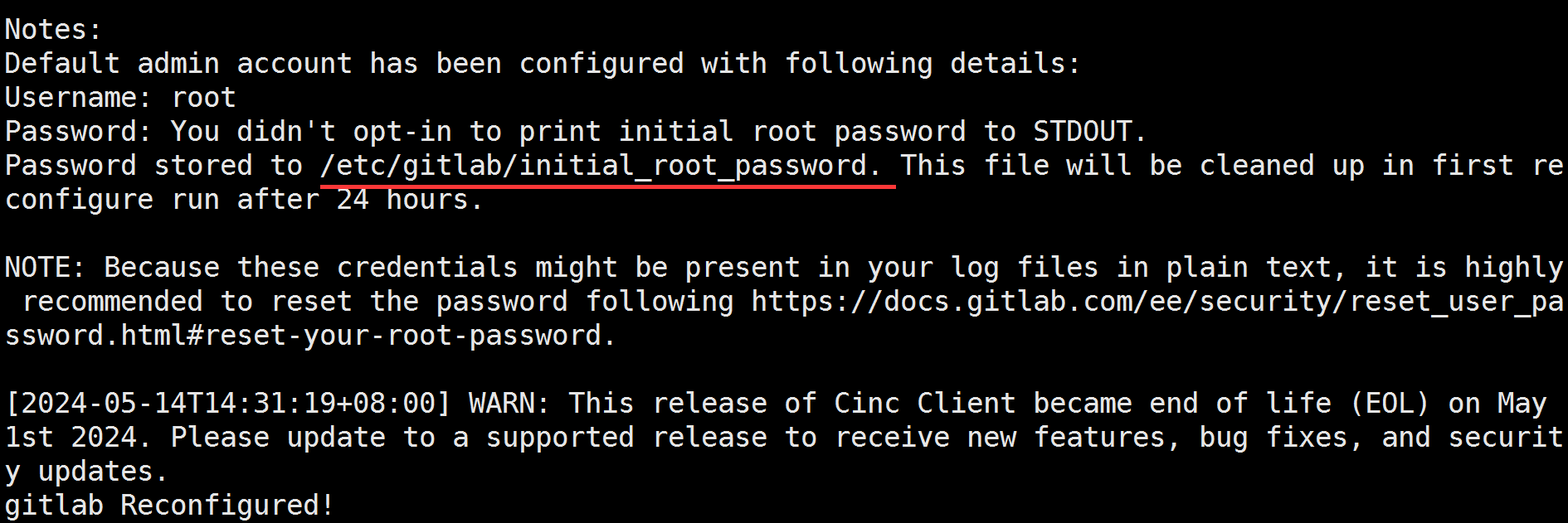
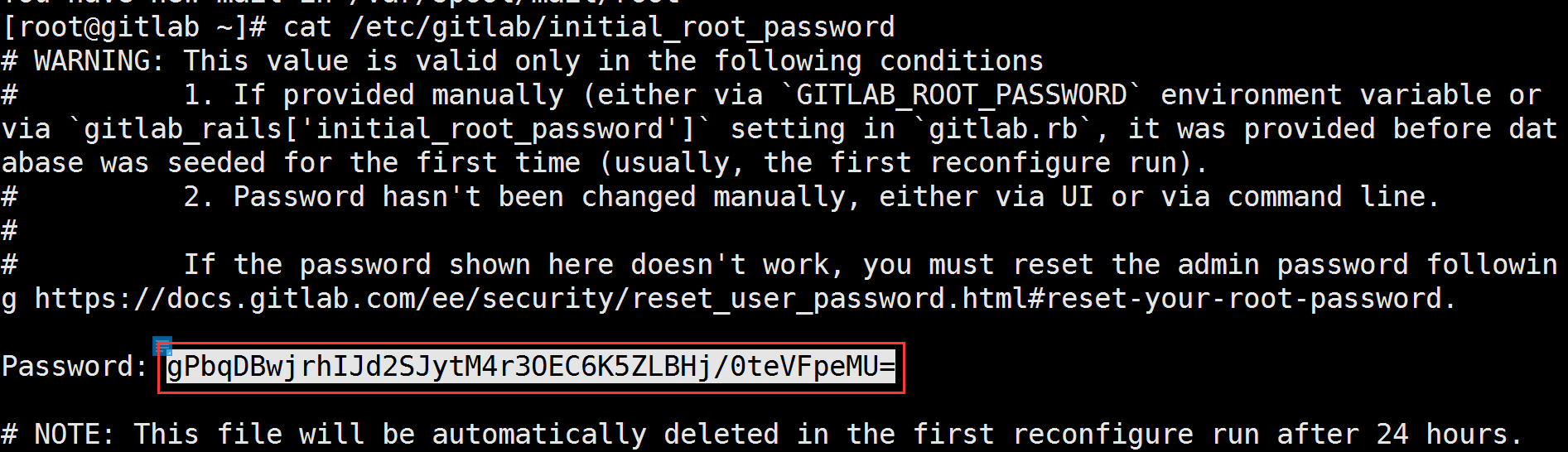
gitlab-ctl reconfigure 완료 후 비밀번호 저장 위치를 안내함:
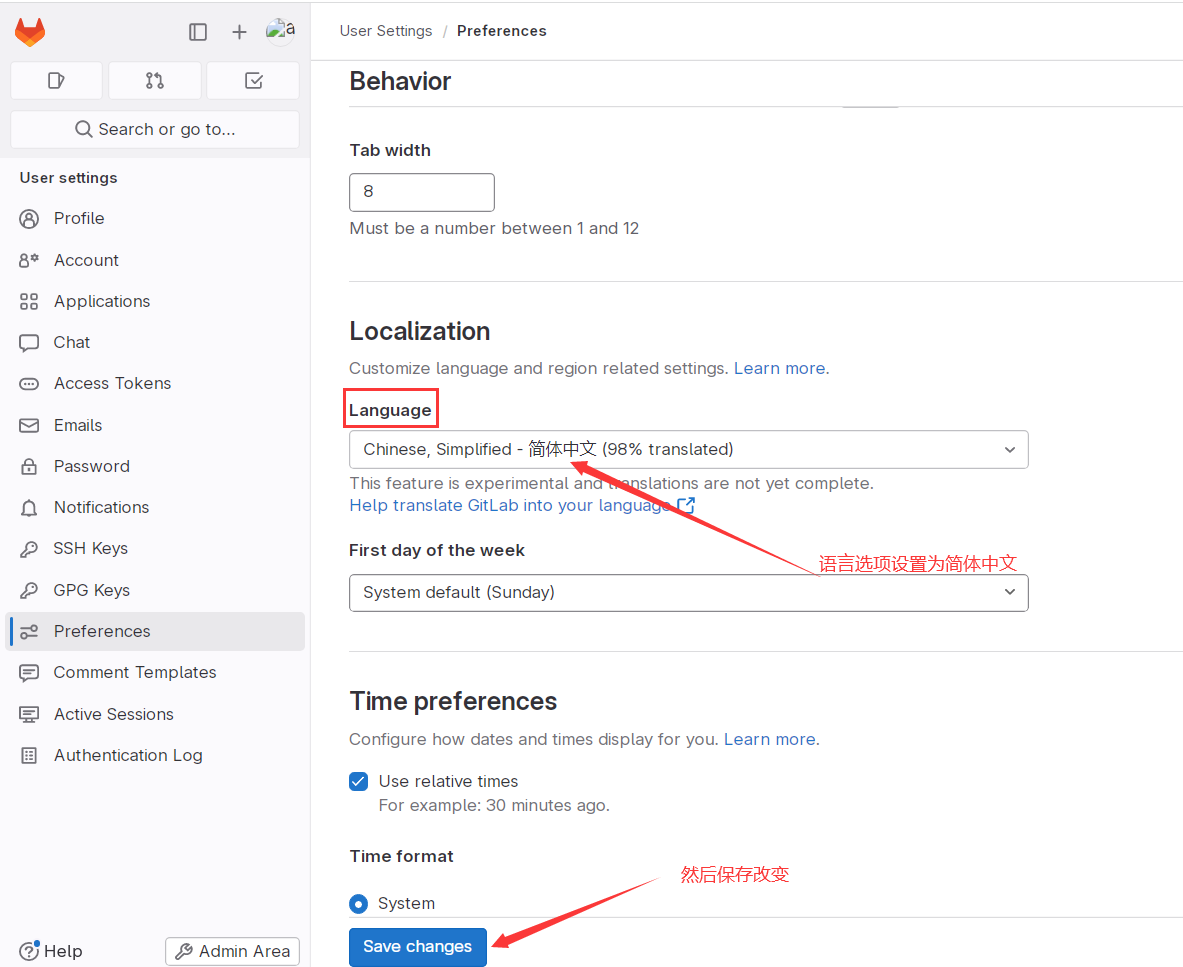
2. UI 언어를 중국어로 설정#
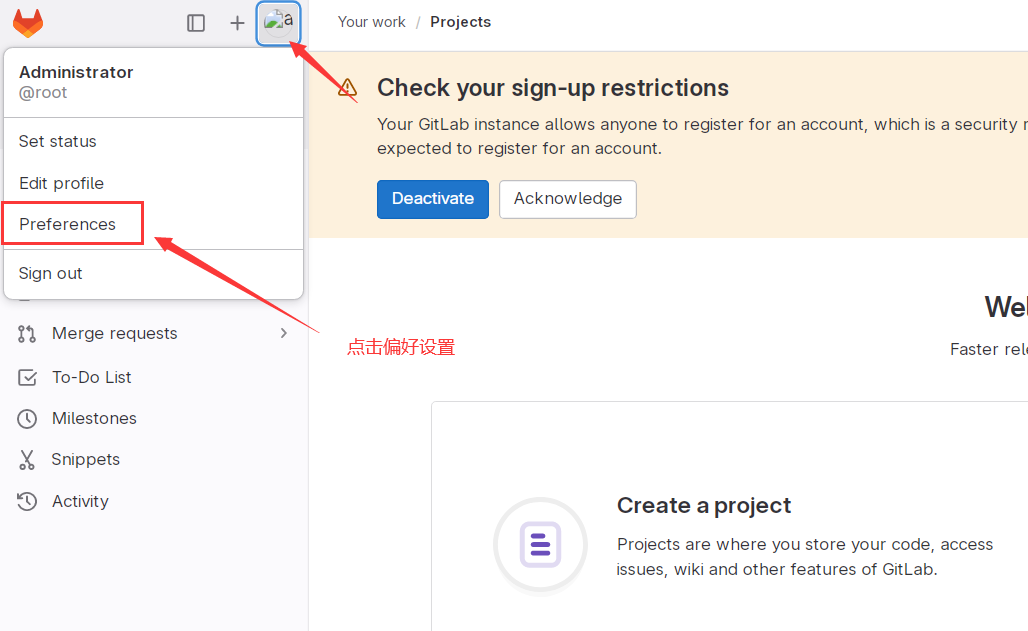
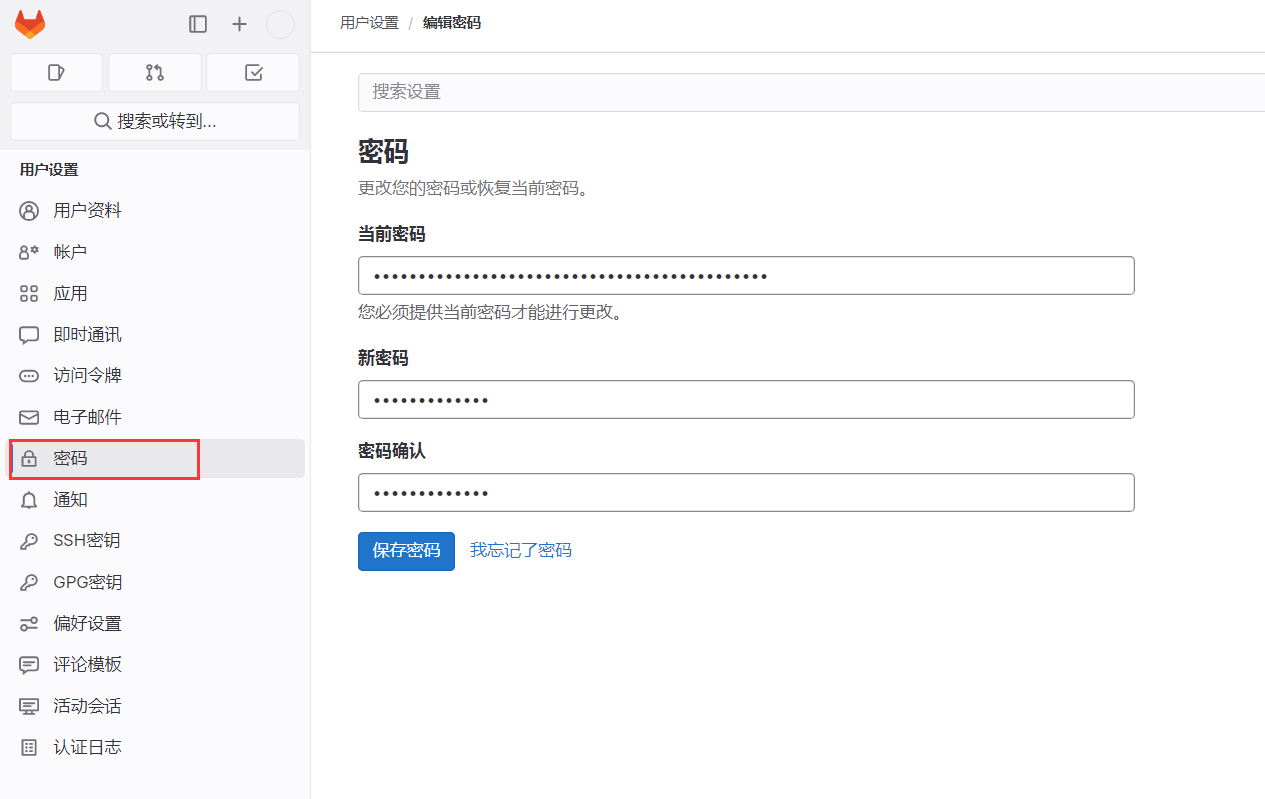
3. 기본 비밀번호 변경#
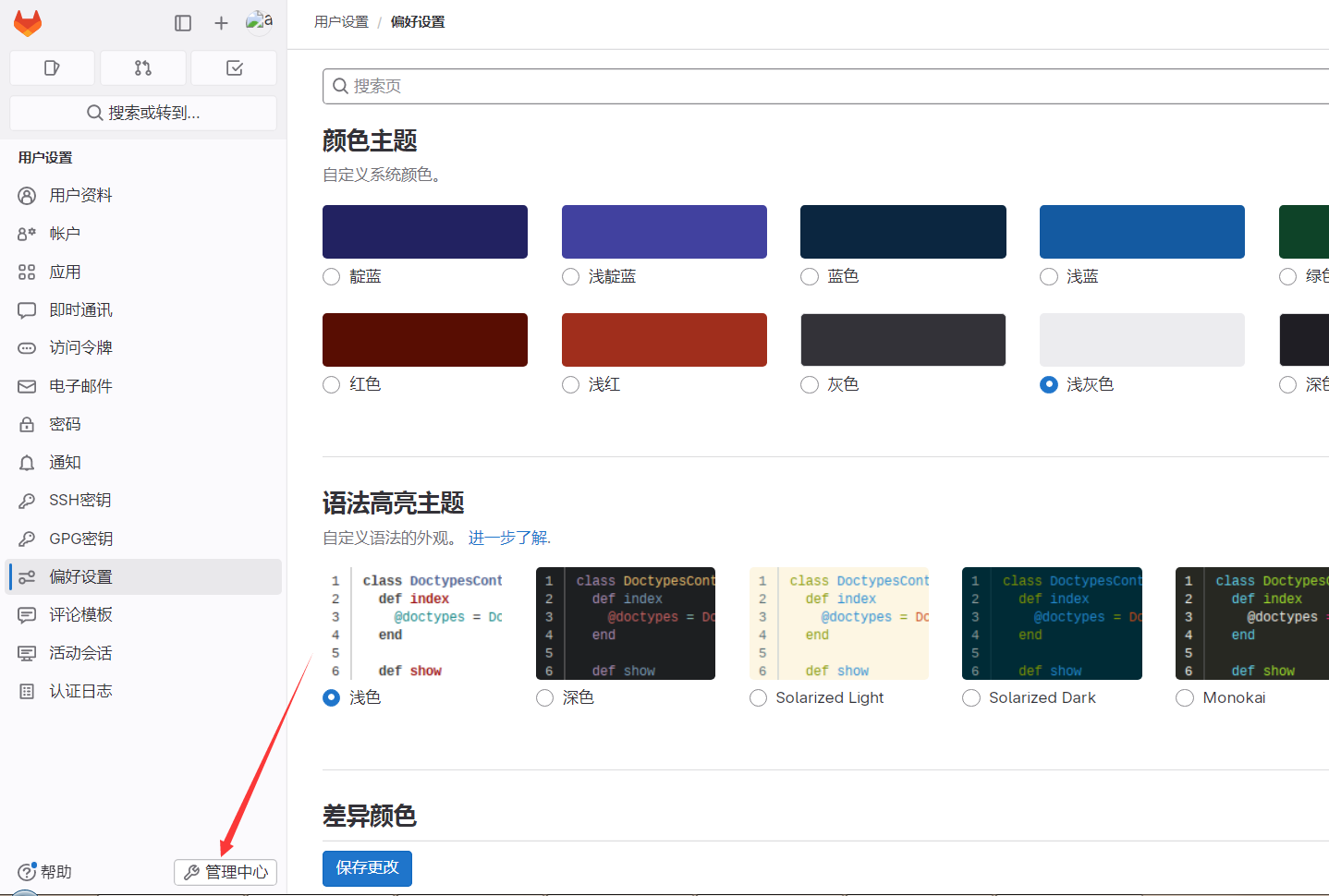
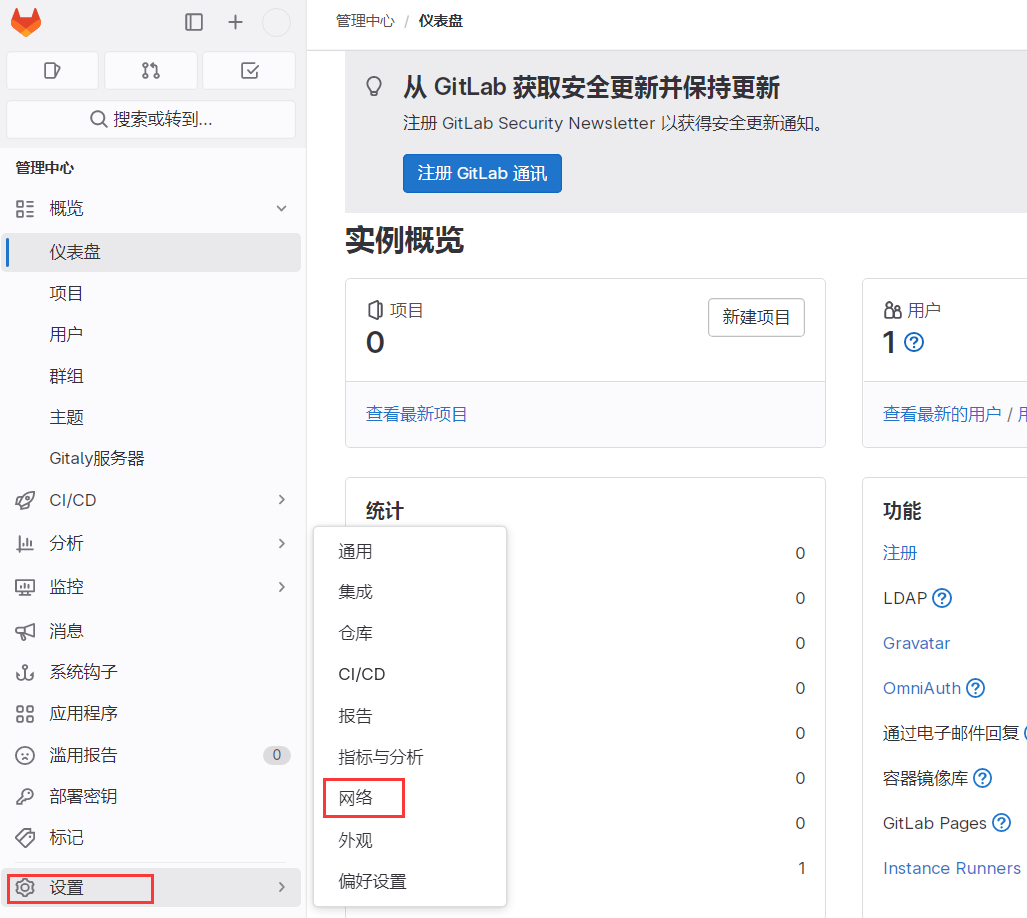
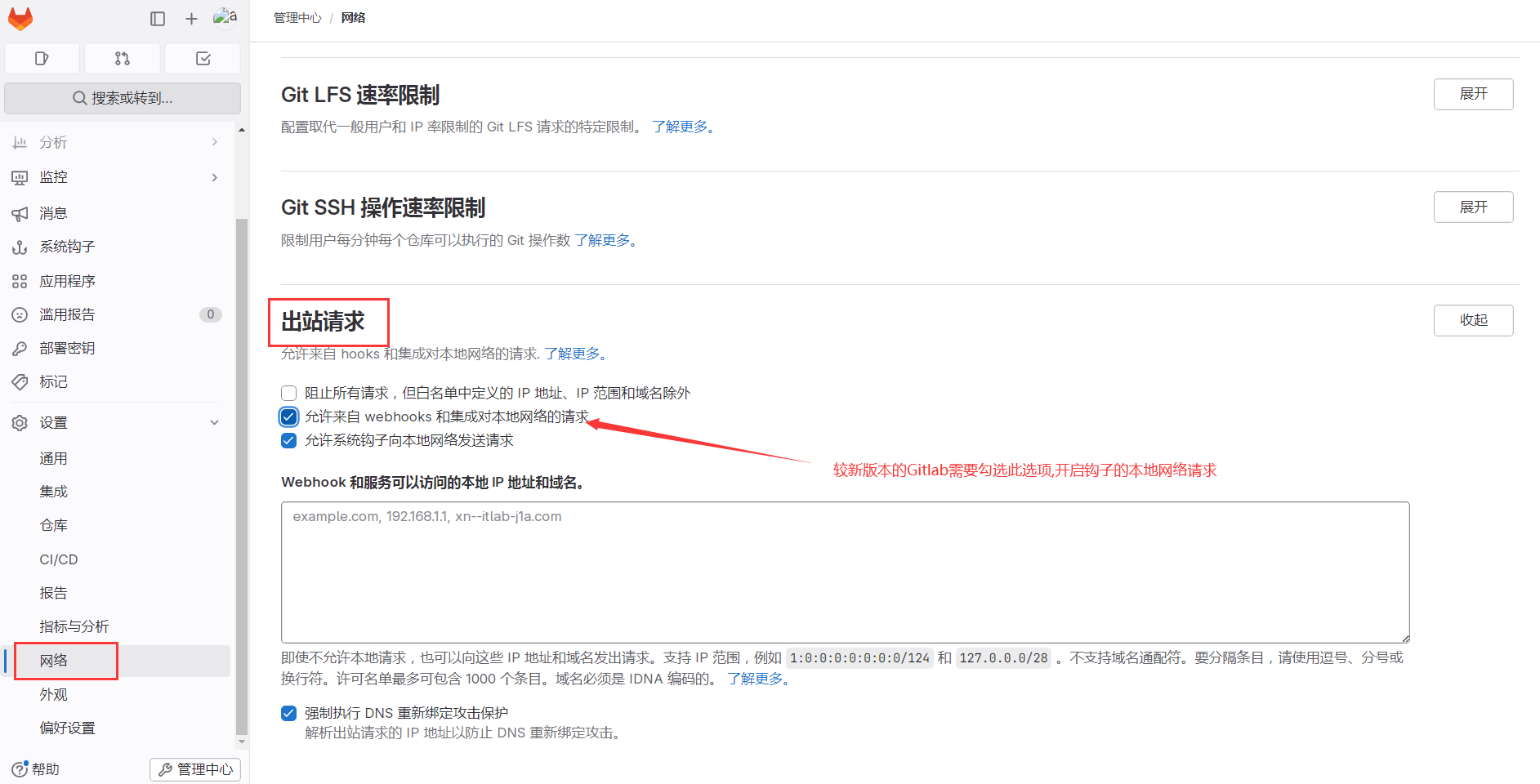
4. 웹훅용 로컬 네트워크 요청 허용#
06. GitLab 실전#
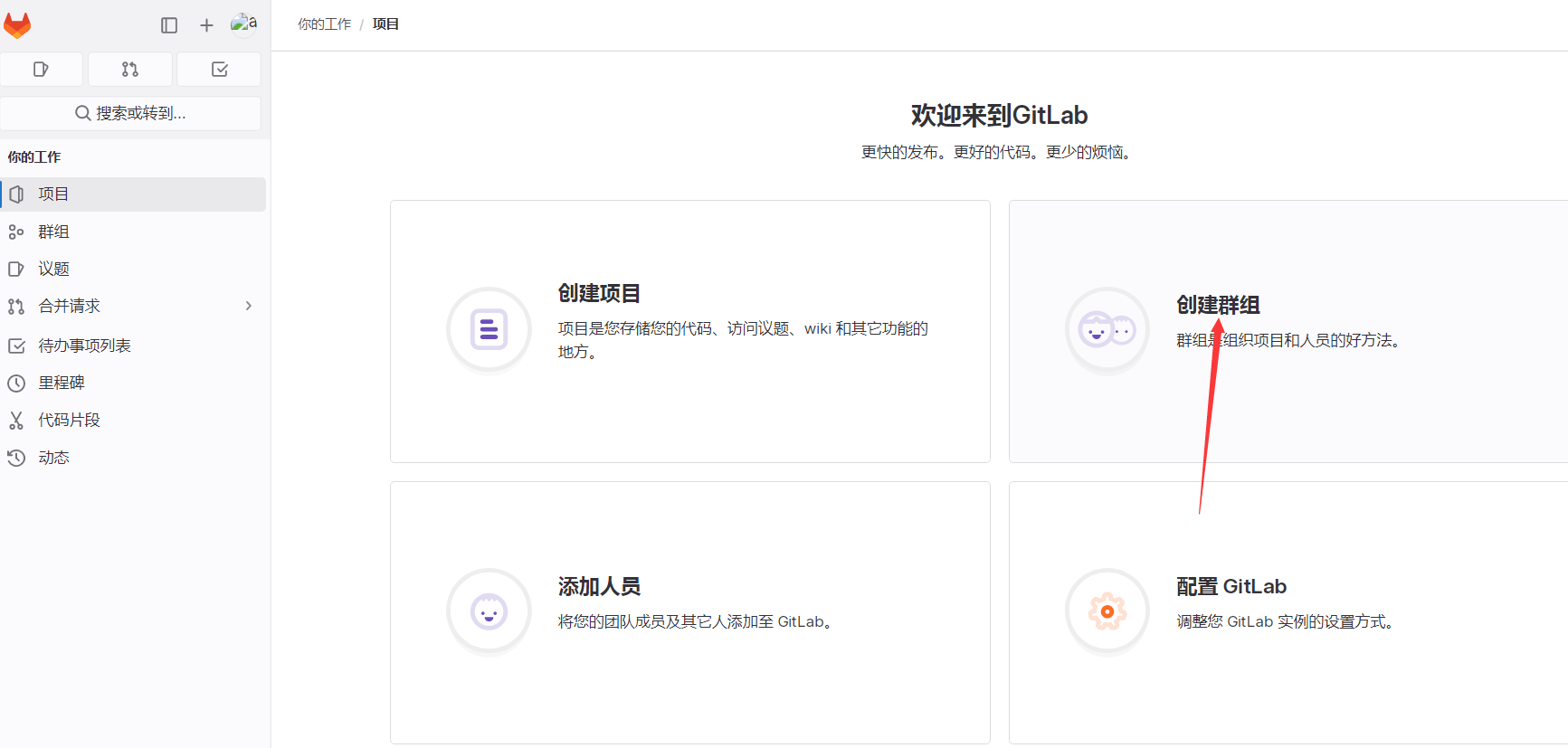
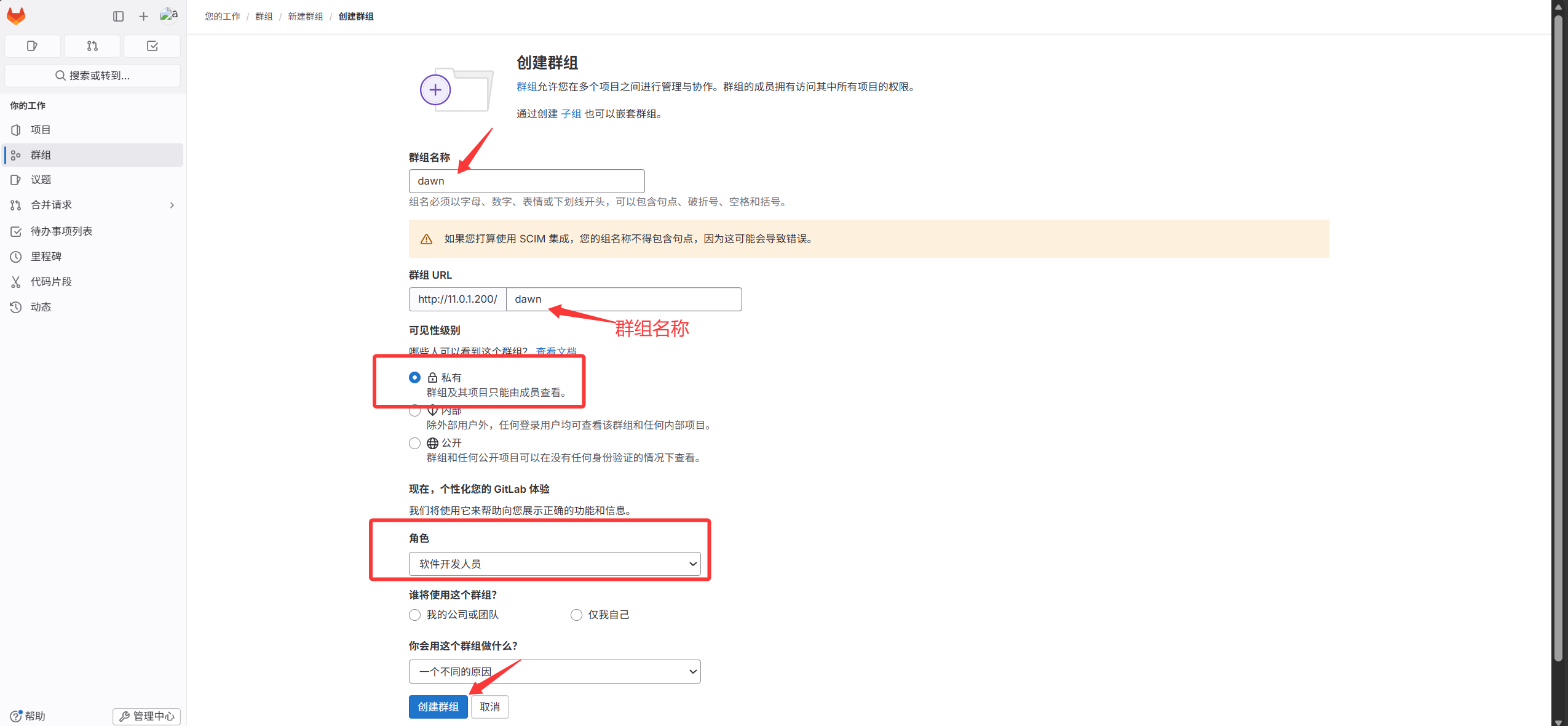
1. 그룹 만들기#
2. 그룹 아래 프로젝트 생성#
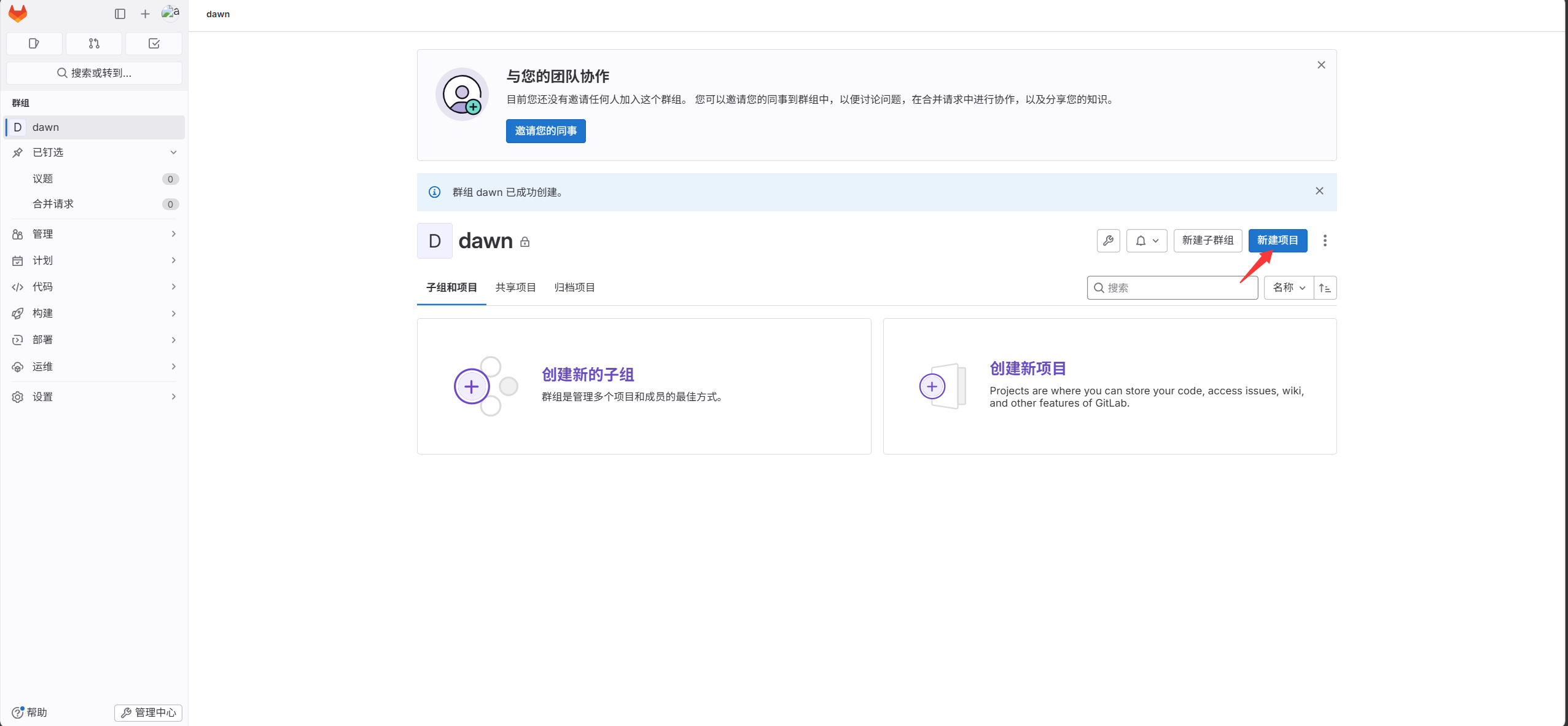
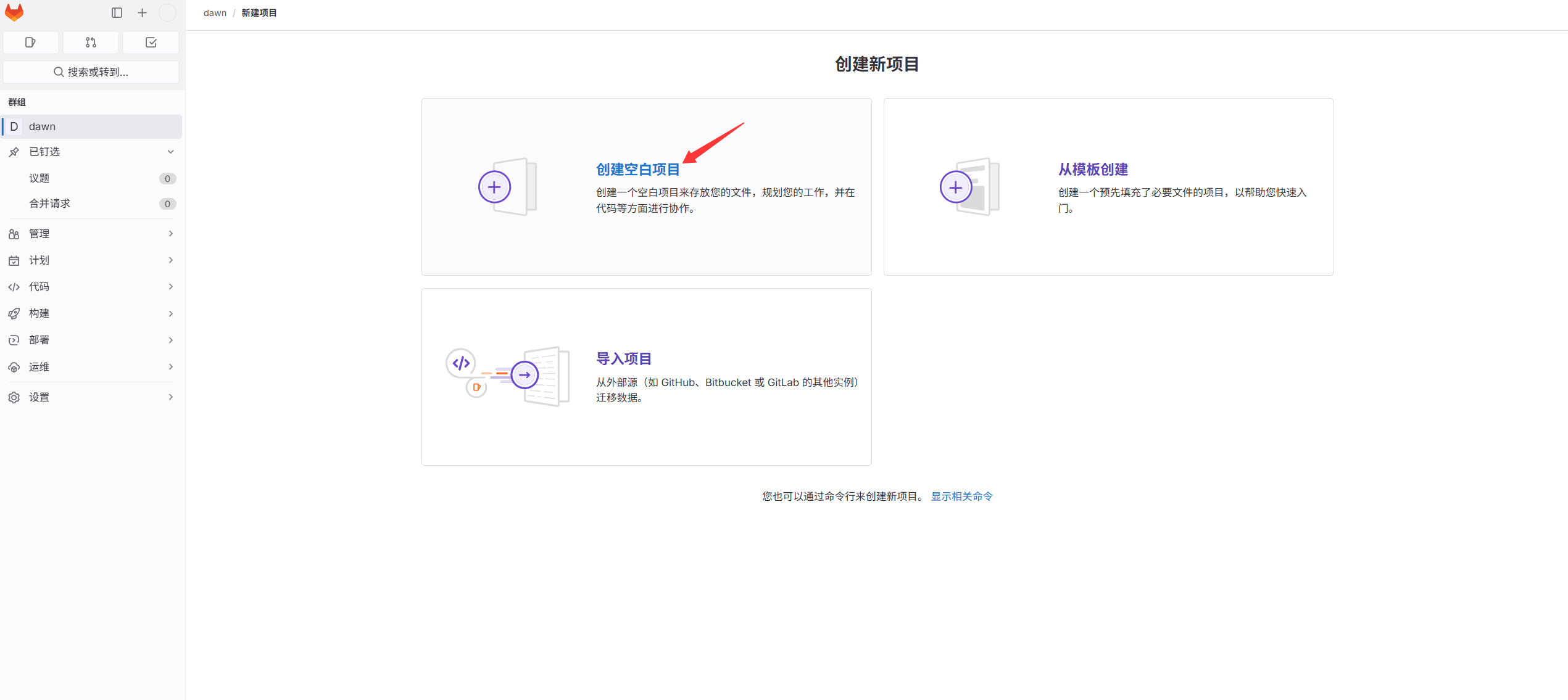
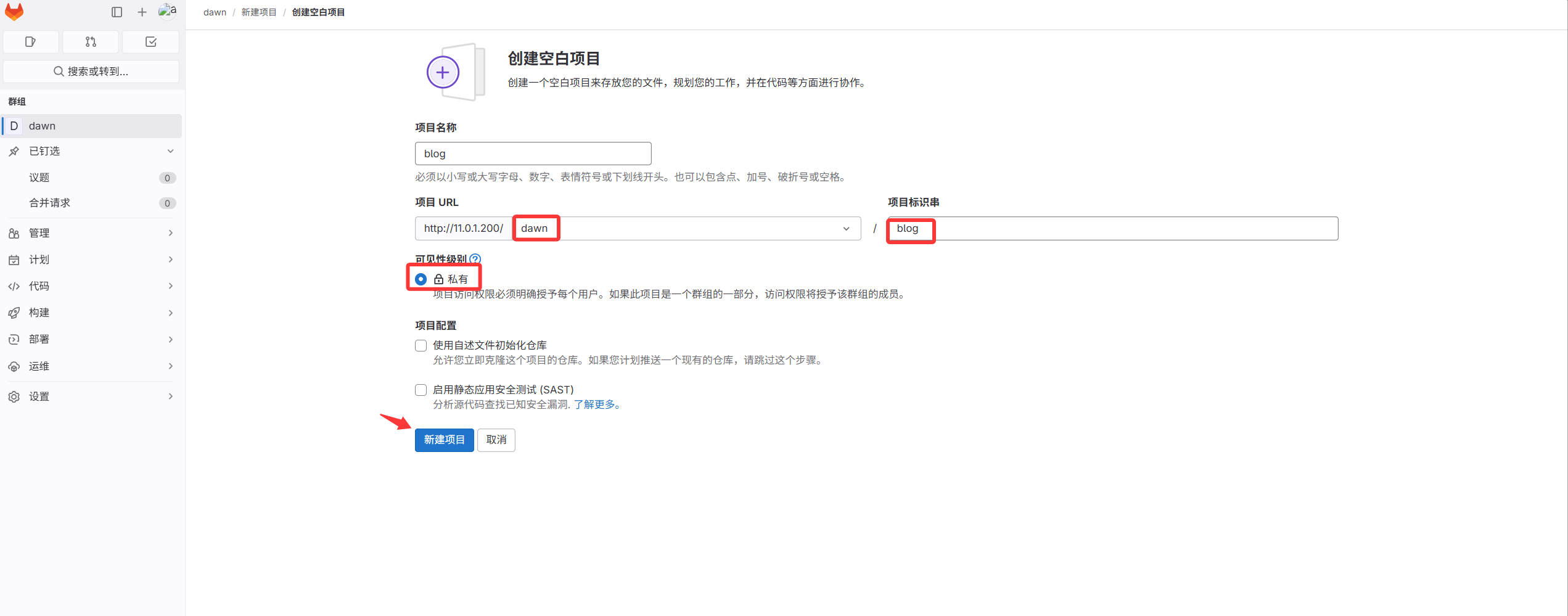
첫 번째 코드 저장소가 만들어졌지만 비어 있음. 이어서 코드 업로드
3. 프로젝트에 코드 커밋#
프로젝트 생성 후 blog 코드를 이 프로젝트에 업로드해야 함
서버와 코드 저장소 연결 방식은 두 가지
첫째: 사용자 이름과 비밀번호로 연결
둘째: SSH 키 인증(키리스) 방식으로 연결
우리는 키 인증 방식 사용: 편리하고 보안성이 높음
- 키 페어 생성(여기서는 GitLab 서버를 직접 사용)
 1
 2
 3
 4
 5
 6
 7
 8
 9
10
11
12
13
14
15
16
17
18
19
20
21
22
23
24
25
26
27
28
29
30
|
[root@gitlab ~]#ssh-keygen
Generating public/private rsa key pair.
Enter file in which to save the key (/root/.ssh/id_rsa):
Created directory '/root/.ssh'.
Enter passphrase (empty for no passphrase):
Enter same passphrase again:
Your identification has been saved in /root/.ssh/id_rsa.
Your public key has been saved in /root/.ssh/id_rsa.pub.
The key fingerprint is:
SHA256:j3FozajJdufxM0ZRtgPa2ZNSwWKvo8bvxbMJl8F5V3M root@gitlab
The key's randomart image is:
+---[RSA 2048]----+
|             ... |
|            + =  |
|           + X +E|
|         =. =.B.+|
|        S +  ++oo|
|     . + =  +. +.|
|      = o.+o..*  |
|     . . o+o++ + |
|         ..++oo  |
+----[SHA256]-----+

키 페어 확인:
[root@gitlab ~]# ll .ssh/
total 8
-rw------- 1 root root 1679 May 14 15:02 id_rsa         # 개인키
-rw-r--r-- 1 root root  393 May 14 15:02 id_rsa.pub     # 공개키
[root@gitlab ~]#cat .ssh/id_rsa.pub
ssh-rsa AAAAB3NzaC1yc2EAAAADAQABAAABAQDJGpCKL64eidZ3I/nAVNCNJwD8yeDqelZP0GUTwlcp6IdKaZ7wUOIRDCtGn5r+YnOCKNwMhUNzb3VCOSVLDVIE0x53dPrCMK4OKLmZ6OtTYFBveGOZWWwdYyGQITx2eP7zOSBxeW3AnEWcya/UZdiZrYXA/d29DWjMjCt5QAxOit0EWSir1Z4i2MkTPuljOmjk6A55XAoem0WJRdg/d8KKIiCdcGrj4adYq2kNJ8oYH/9QcnpASUW/ANhzrALnLIX2WaH/p0T3gisLvk2KDUe3rVKD3XaKDlyLgWIViQFm3Me6L2e4taRFiu3VdsbfFfzjDevfDtLaqKLOqPtaczlF root@gitlab
|
- 생성한 공개키를 GitLab UI의 SSH 키 관리 페이지에 붙여넣기
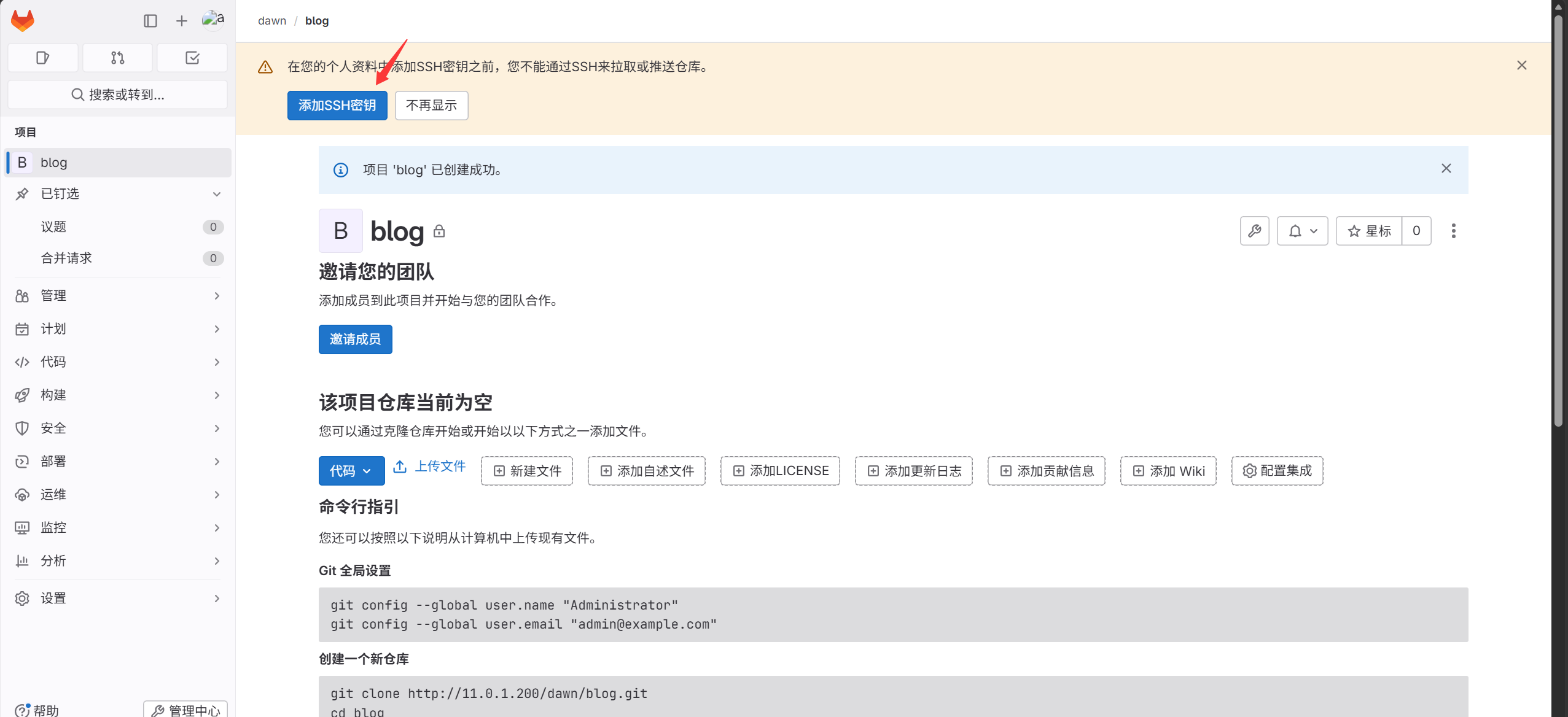
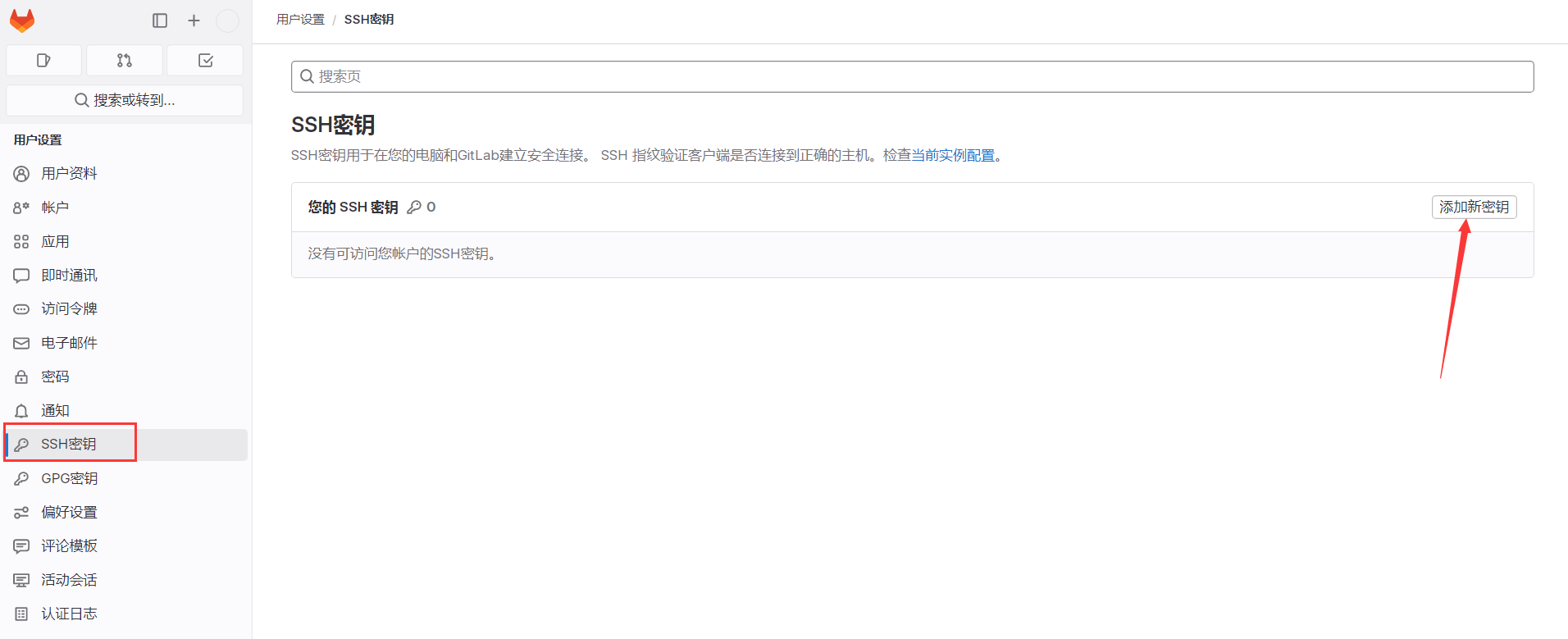
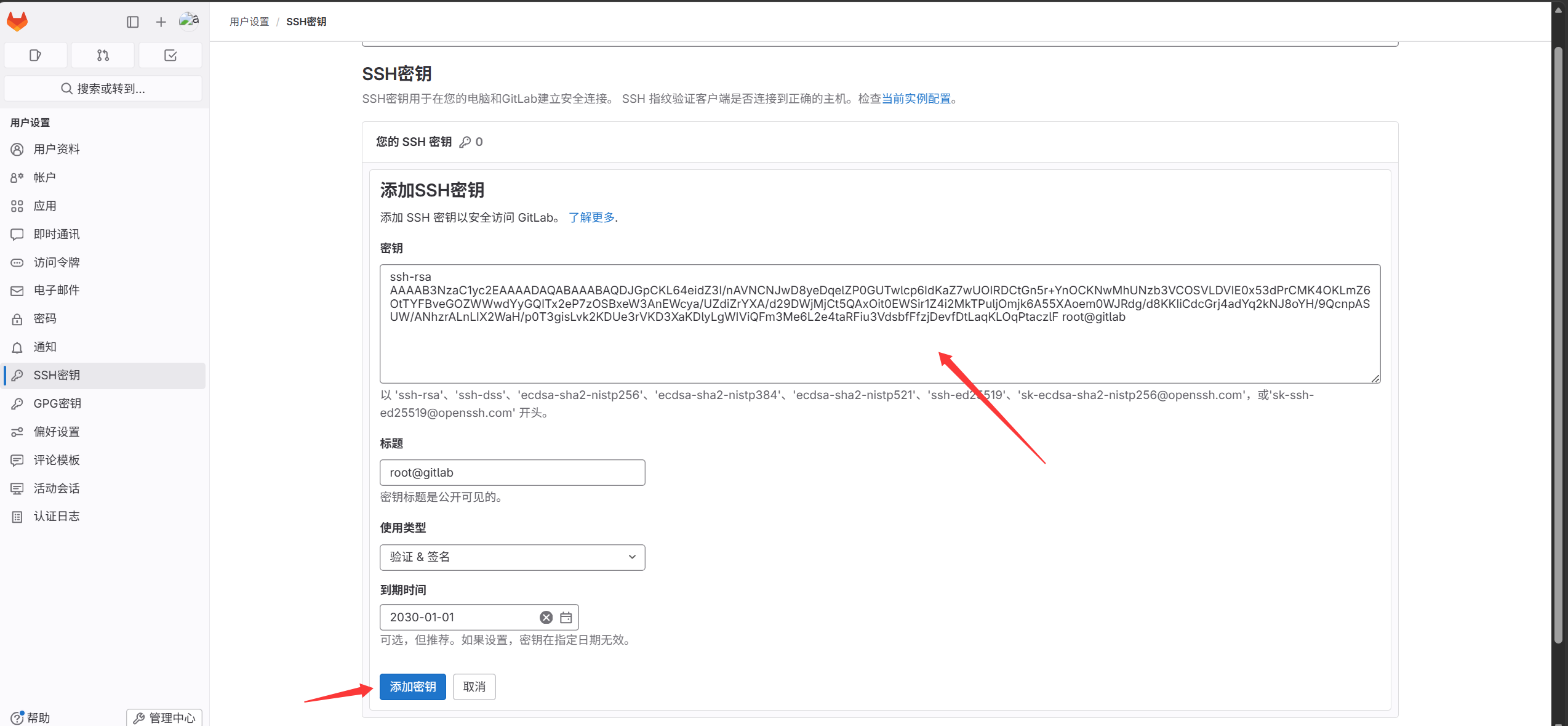
서버와 GitLab UI 간 SSH 키 인증 완료. 이어서 코드를 blog 프로젝트에 푸시
코드를 푸시하는 방법은 두 가지:
- 빈 저장소를 로컬에 클론한 뒤 코드를 복사하고 원격 GitLab 에 커밋
프로젝트 안에서 프로젝트 URL 확인
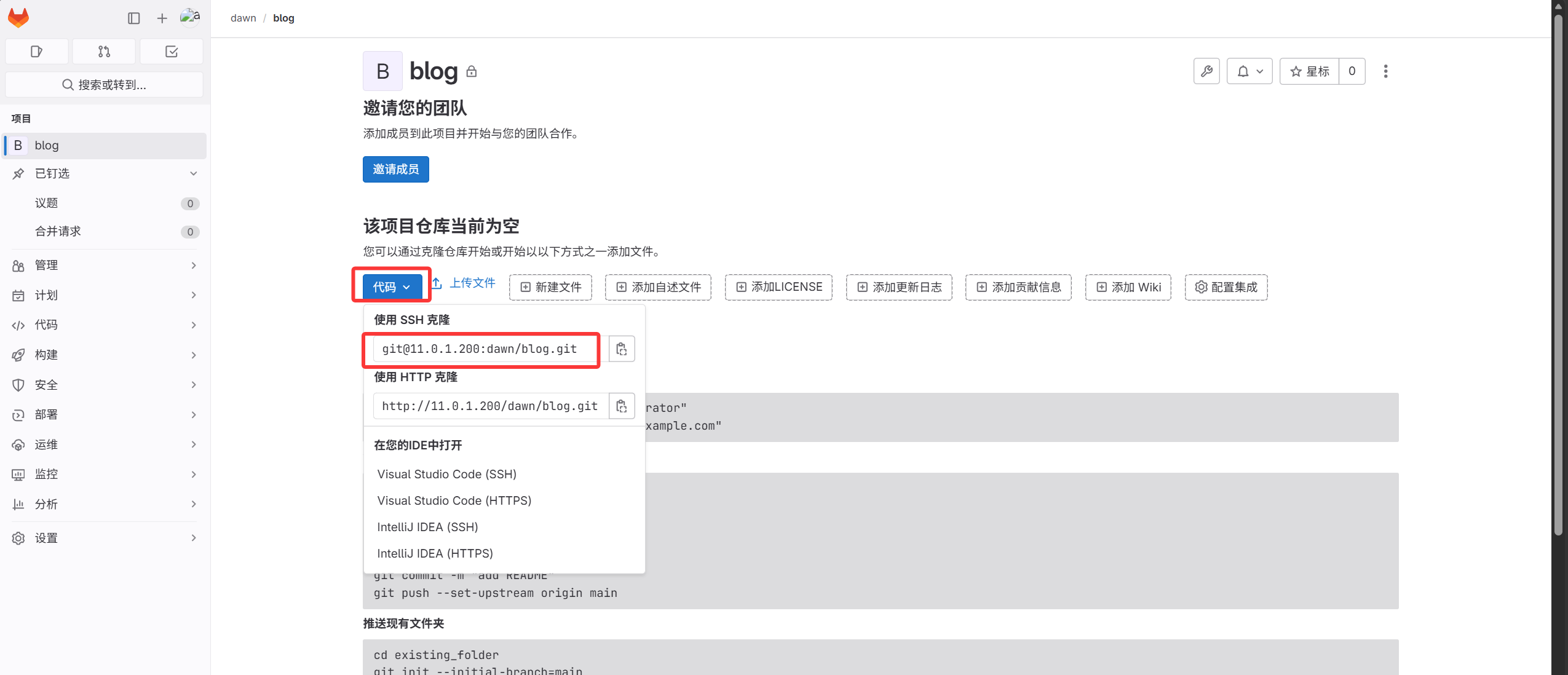
 1
 2
 3
 4
 5
 6
 7
 8
 9
10
11
12
13
14
15
16
17
18
19
20
21
22
23
24
25
26
27
28
29
30
31
32
33
34
35
36
37
38
39
40
41
42
43
44
45
46
47
48
49
50
|
1. 링크를 복사하여 실행
[root@gitlab ~]#git clone git@11.0.1.200:dawn/blog.git
Cloning into 'blog'...
The authenticity of host '11.0.1.200 (11.0.1.200)' can't be established.
ECDSA key fingerprint is SHA256:Ldn1vBzBEFxynXs0qBNr0XzJ2lTx/0caMuK5yJtb+Zo.
ECDSA key fingerprint is MD5:3d:1d:28:3f:33:ec:ee:c1:69:83:af:14:a3:7f:79:ac.
Are you sure you want to continue connecting (yes/no)? yes
Warning: Permanently added '11.0.1.200' (ECDSA) to the list of known hosts.
warning: remote HEAD refers to nonexistent ref, unable to checkout.

2. blog 저장소가 로컬에 내려받아졌는지 확인
[root@gitlab ~]#ll
total 1176964
drwxr-xr-x 3 root root         18 Oct  1 14:43 blog
-rw-r--r-- 1 root root   84579612 Oct  1 14:35 blog_backup_20261001-1435.tar.gz
drwxr-xr-x 3 root root         18 Sep 30 19:14 dawn
-rw-r--r-- 1 root root 1120627456 Sep 30 23:12 gitlab-ce-16.9.8-ce.0.el7.x86_64.rpm

3. blog 디렉터리로 이동
[root@gitlab ~]#cd blog/

4. 코드 압축 해제:
[root@gitlab blog]#tar xf /root/blog_backup_20261001-1435.tar.gz -C .

5. 코드를 로컬 저장소에 커밋
[root@gitlab blog]#git add .
[root@gitlab blog]#git commit -m "DAWN’s Blog"
[master (root-commit) 5af4246] DAWN’s Blog
 3 files changed, 112 insertions(+)
 create mode 100644 blog_state.txt
 create mode 160000 myblog
 create mode 160000 myblog-deploy

6. 코드를 원격 GitLab 의 blog 저장소에 푸시
GitLab 저장소를 직접 클론했으므로 로컬 디렉터리에 원격 blog 프로젝트 주소가 이미 있음
원격 저장소 확인:
[root@gitlab blog]#git remote -v
origin  git@11.0.1.200:dawn/blog.git (fetch)
origin  git@11.0.1.200:dawn/blog.git (push)

로컬 master 를 원격 origin 에 푸시
[root@gitlab blog]#git push -u origin master
Counting objects: 3, done.
Delta compression using up to 2 threads.
Compressing objects: 100% (3/3), done.
Writing objects: 100% (3/3), 1.23 KiB | 0 bytes/s, done.
Total 3 (delta 0), reused 0 (delta 0)
To git@11.0.1.200:dawn/blog.git
 * [new branch]      master -> master
Branch master set up to track remote branch master from origin.
|
blog 프로젝트 확인, 코드 업로드 성공
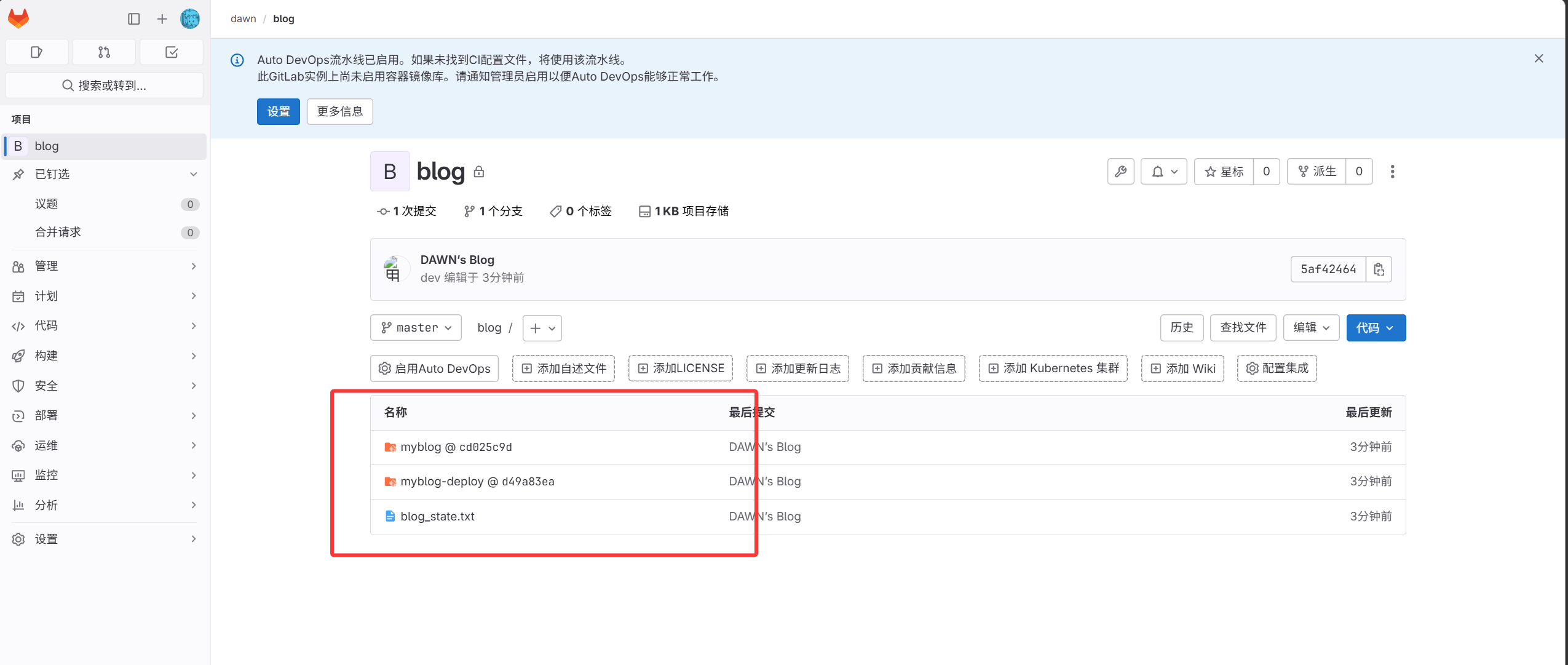
- 로컬 Git 저장소를 원격 GitLab 에 푸시
 1
 2
 3
 4
 5
 6
 7
 8
 9
10
11
12
13
14
15
16
17
18
19
20
21
22
23
24
25
26
27
28
29
30
31
32
33
34
35
36
37
38
39
40
41
42
|
1. 로컬 저장소 구성
[root@gitlab ~]#mkdir dawn
[root@gitlab ~]#cd dawn
2. 저장소 초기화
[root@gitlab dawn]#git init
3. 코드 업로드
[root@gitlab dawn]#touch a.txt
[root@gitlab dawn]#git add .
[root@gitlab dawn]#git commit -m "test_v1"
[master (root-commit) 815c600] test_v1
 1 file changed, 0 insertions(+), 0 deletions(-)
 create mode 100644 a.txt

4. GitLab 의 blog 저장소를 로컬 원격으로 설정
[root@gitlab dawn]#git remote add origin git@11.0.1.200:dawn/blog.git
5. 로컬 내용을 원격에 푸시(원격에 이미 내용이 있어 바로 푸시하면 오류; 원격 내용을 보존하려면 먼저 pull 병합 후 푸시)
[root@gitlab dawn]#git pull origin master
warning: no common commits
remote: Enumerating objects: 3, done.
remote: Counting objects: 100% (3/3), done.
remote: Compressing objects: 100% (3/3), done.
remote: Total 3 (delta 0), reused 0 (delta 0), pack-reused 0
Unpacking objects: 100% (3/3), done.
From 11.0.1.200:dawn/blog
 * branch            master     -> FETCH_HEAD
Merge made by the 'recursive' strategy.
 blog_state.txt | 110 ++++++++++++++++++++++++++++++++++++
 myblog         |   1 +
 myblog-deploy  |   1 +
 3 files changed, 112 insertions(+)
 create mode 100644 blog_state.txt
 create mode 160000 myblog
 create mode 160000 myblog-deploy
[root@gitlab dawn]#git push -u origin master
Counting objects: 6, done.
Delta compression using up to 2 threads.
Compressing objects: 100% (3/3), done.
Writing objects: 100% (5/5), 462 bytes | 0 bytes/s, done.
Total 5 (delta 1), reused 0 (delta 0)
To git@11.0.1.200:dawn/blog.git
   5af4246..0242e0a  master -> master
Branch master set up to track remote branch master from origin.
|
- 일반 계정 dev 생성
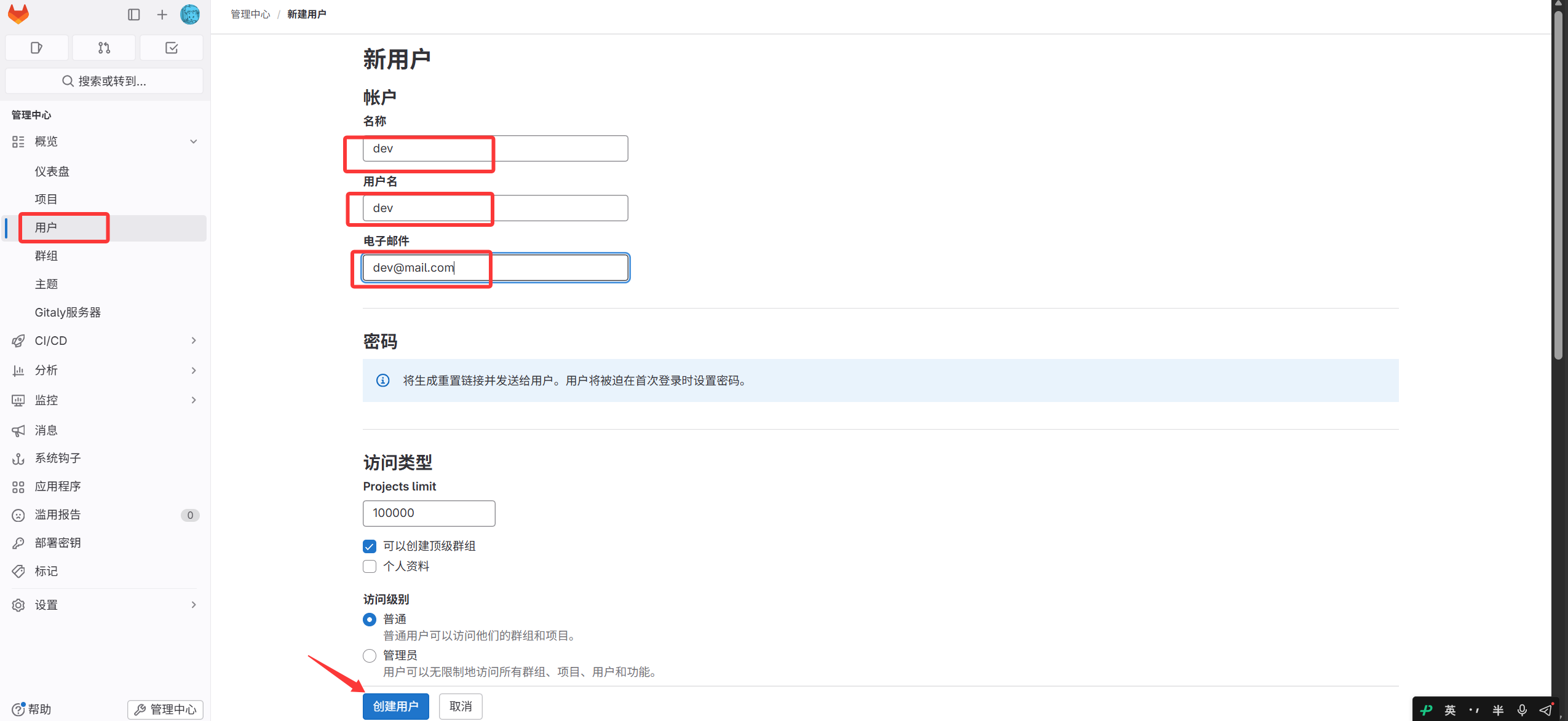
생성 후 dev 비밀번호 변경 — 로그아웃하지 말고 사용자 화면의 편집 클릭
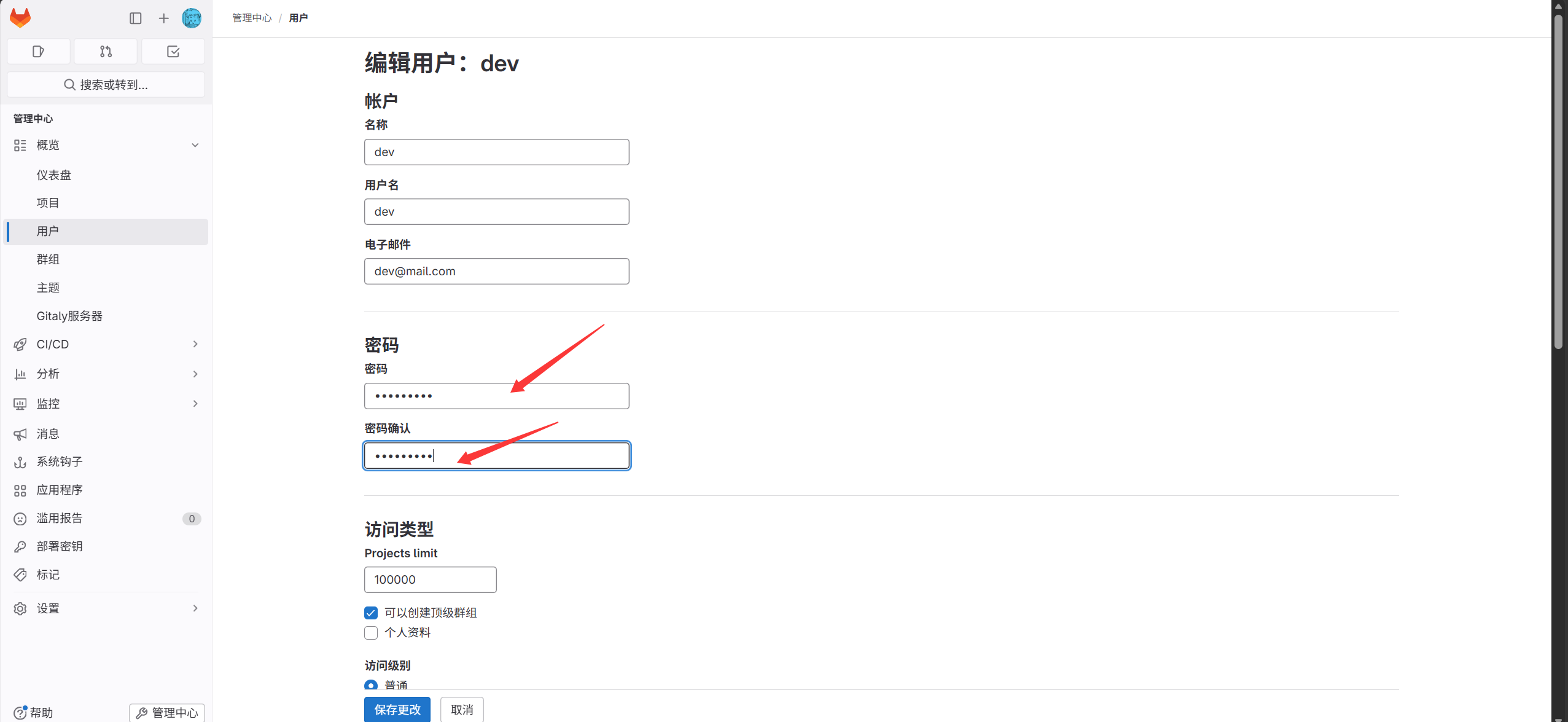
이후 dev 로 GitLab 로그인(첫 로그인 시 비밀번호 변경 필요)
- dev 사용자를 dawn 그룹에 추가
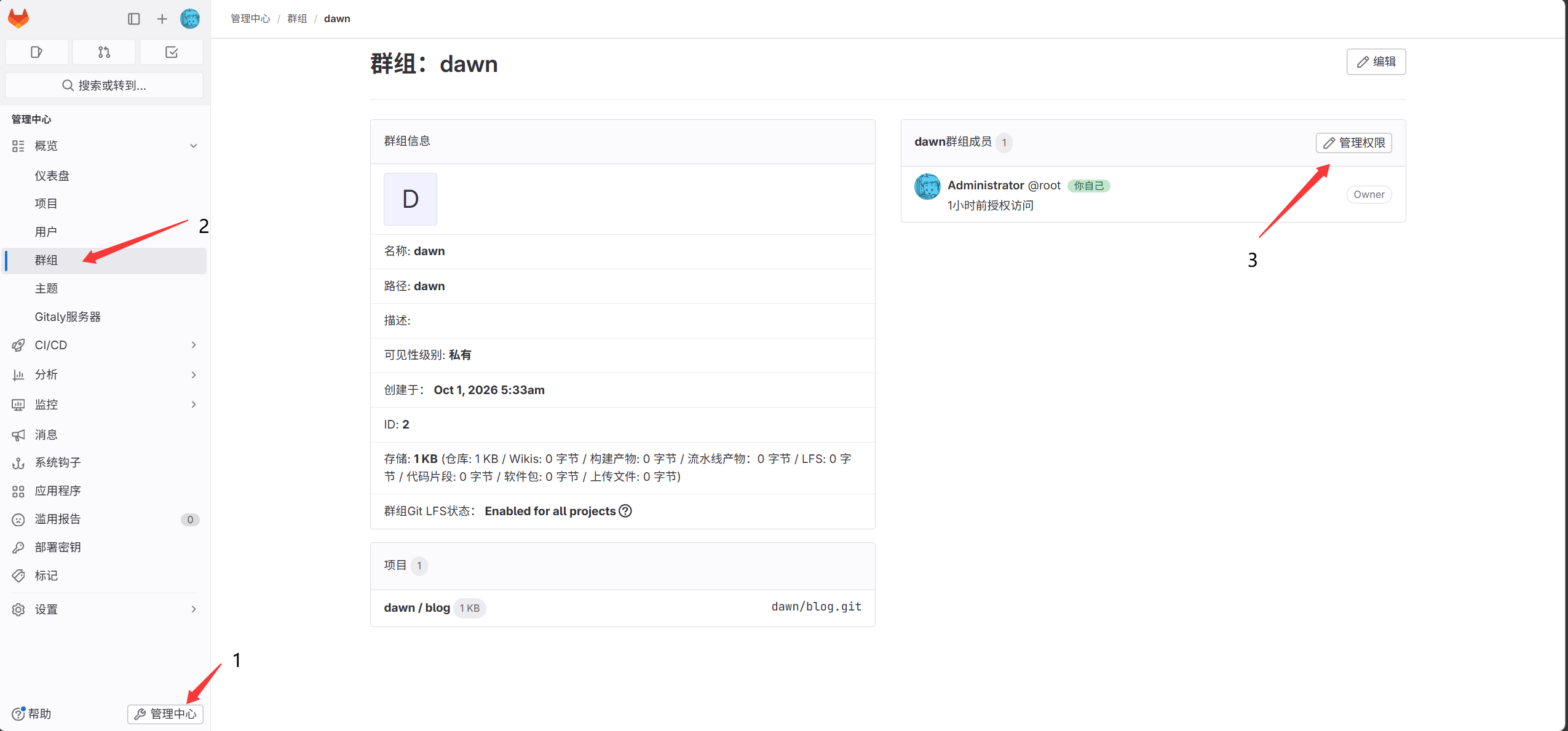
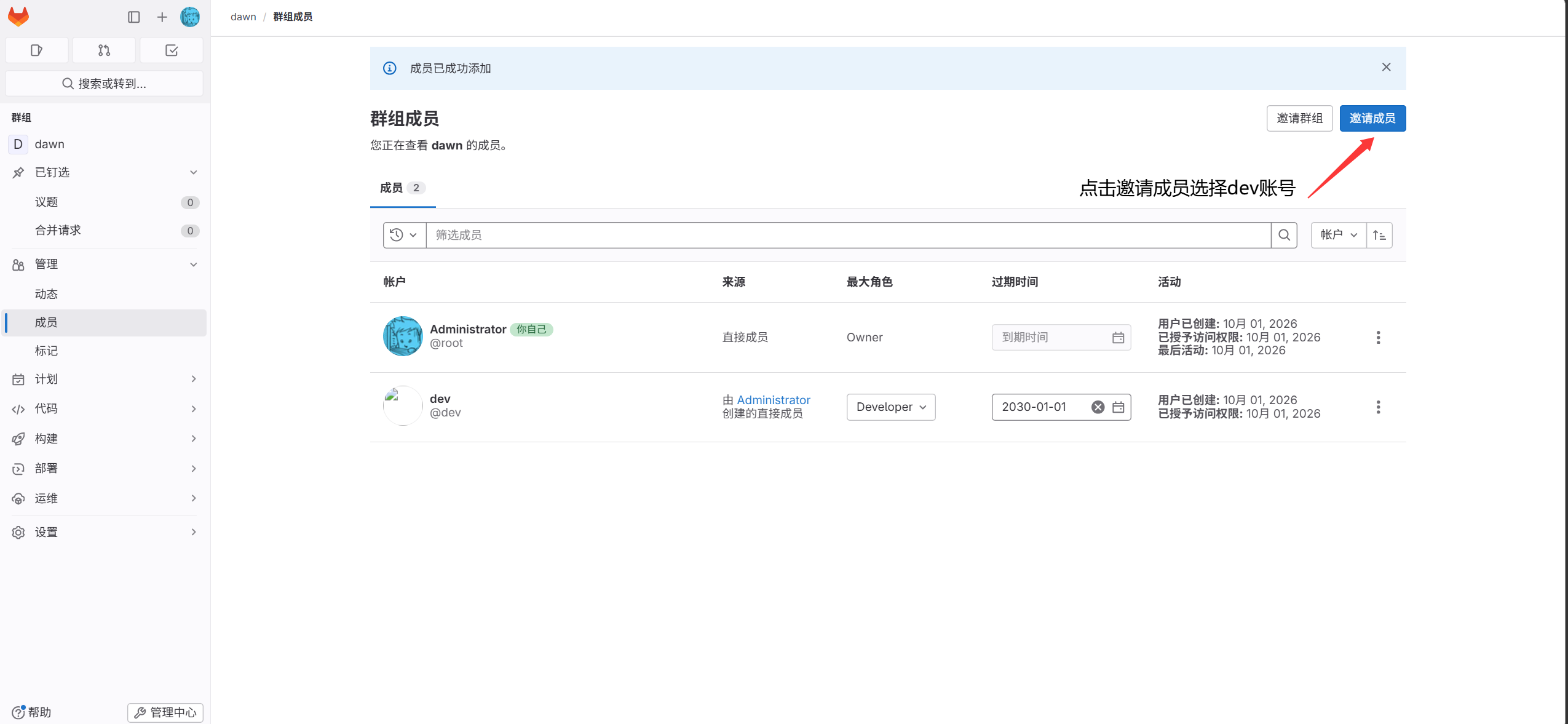
- dev 서버에서 키 페어 생성
1
|
[root@lb01 ~]#ssh-keygen
|
- 생성한 공개키를 dev 계정의 SSH 키 페이지에 복사
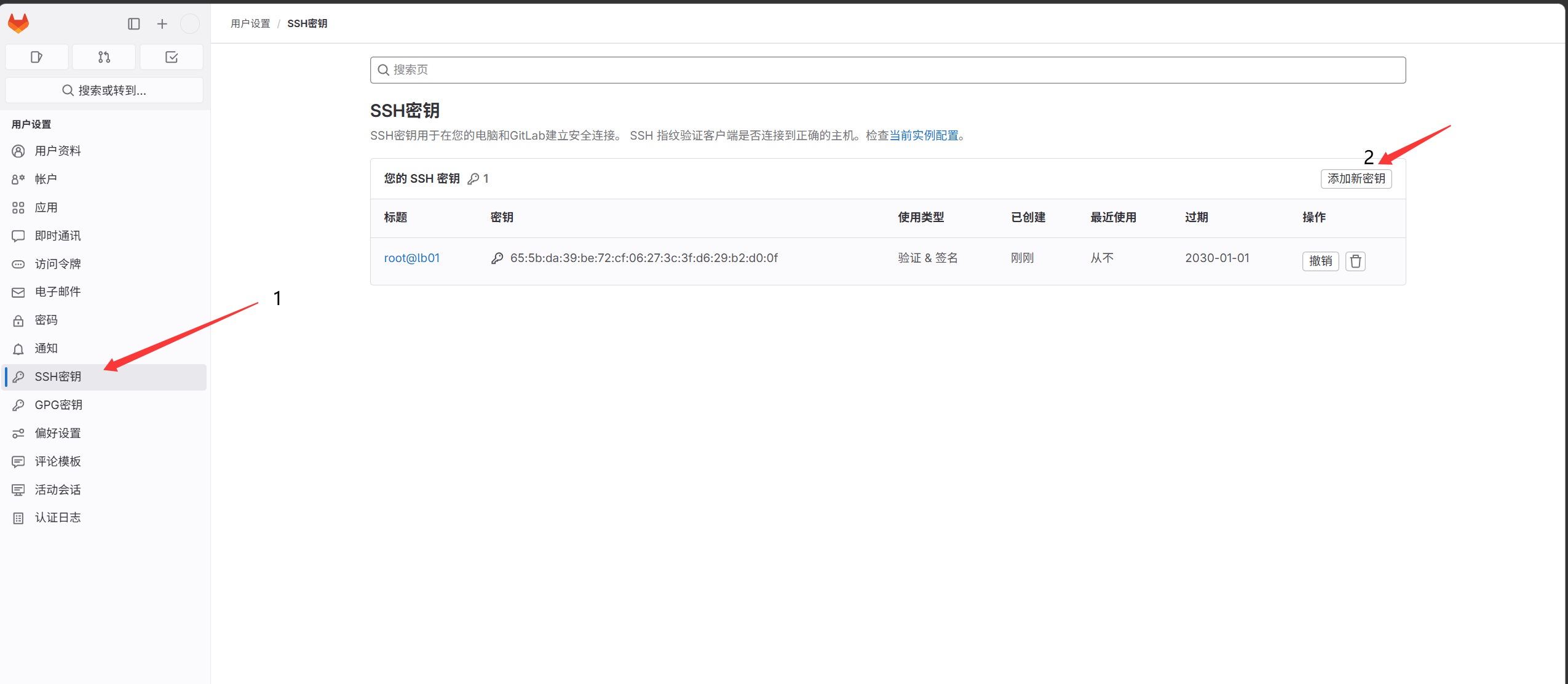
- 코드를 dev 호스트 11.0.1.5 에 클론
 1
 2
 3
 4
 5
 6
 7
 8
 9
10
11
12
13
|
[root@lb01 ~]#git clone git@11.0.1.200:dawn/blog.git
Cloning into 'blog'...
The authenticity of host '11.0.1.200 (11.0.1.200)' can't be established.
ECDSA key fingerprint is SHA256:Ldn1vBzBEFxynXs0qBNr0XzJ2lTx/0caMuK5yJtb+Zo.
ECDSA key fingerprint is MD5:3d:1d:28:3f:33:ec:ee:c1:69:83:af:14:a3:7f:79:ac.
Are you sure you want to continue connecting (yes/no)? yes
Warning: Permanently added '11.0.1.200' (ECDSA) to the list of known hosts.
remote: Enumerating objects: 8, done.
remote: Counting objects: 100% (8/8), done.
remote: Compressing objects: 100% (6/6), done.
remote: Total 8 (delta 1), reused 0 (delta 0), pack-reused 0
Receiving objects: 100% (8/8), done.
Resolving deltas: 100% (1/1), done.
|
- 코드 수정 후 원격 저장소에 업로드
 1
 2
 3
 4
 5
 6
 7
 8
 9
10
11
12
13
14
15
16
17
18
19
20
21
22
23
24
25
26
|
11.0.1.5 의 사용자 설정
[root@lb01 blog]#git config --global user.email "dev@mail.com"
[root@lb01 blog]#git config --global user.name "dev"
[root@lb01 blog]#vim a.txt
123
[root@lb01 blog]#git commit -am "123"
원격 저장소에 커밋
[root@lb01 blog]#git push -u origin master
Counting objects: 5, done.
Compressing objects: 100% (2/2), done.
Writing objects: 100% (3/3), 257 bytes | 0 bytes/s, done.
Total 3 (delta 1), reused 0 (delta 0)
remote: GitLab: You are not allowed to push code to protected branches on this project.To git@11.0.1.200:dawn/blog.git
 ! [remote rejected] master -> master (pre-receive hook declined)
error: failed to push some refs to 'git@11.0.1.200:dawn/blog.git'
# master 브랜치로의 푸시는 허용되지 않음

다른 브랜치에 푸시:
1. dev 브랜치 생성
[root@lb01 blog]#git branch dev
[root@lb01 blog]#git branch
  dev
* master

2. dev 브랜치를 원격에 푸시
[root@lb01 blog]#git push -u origin dev
|
병합 요청(MR)
- dev 계정에서 병합 요청 생성
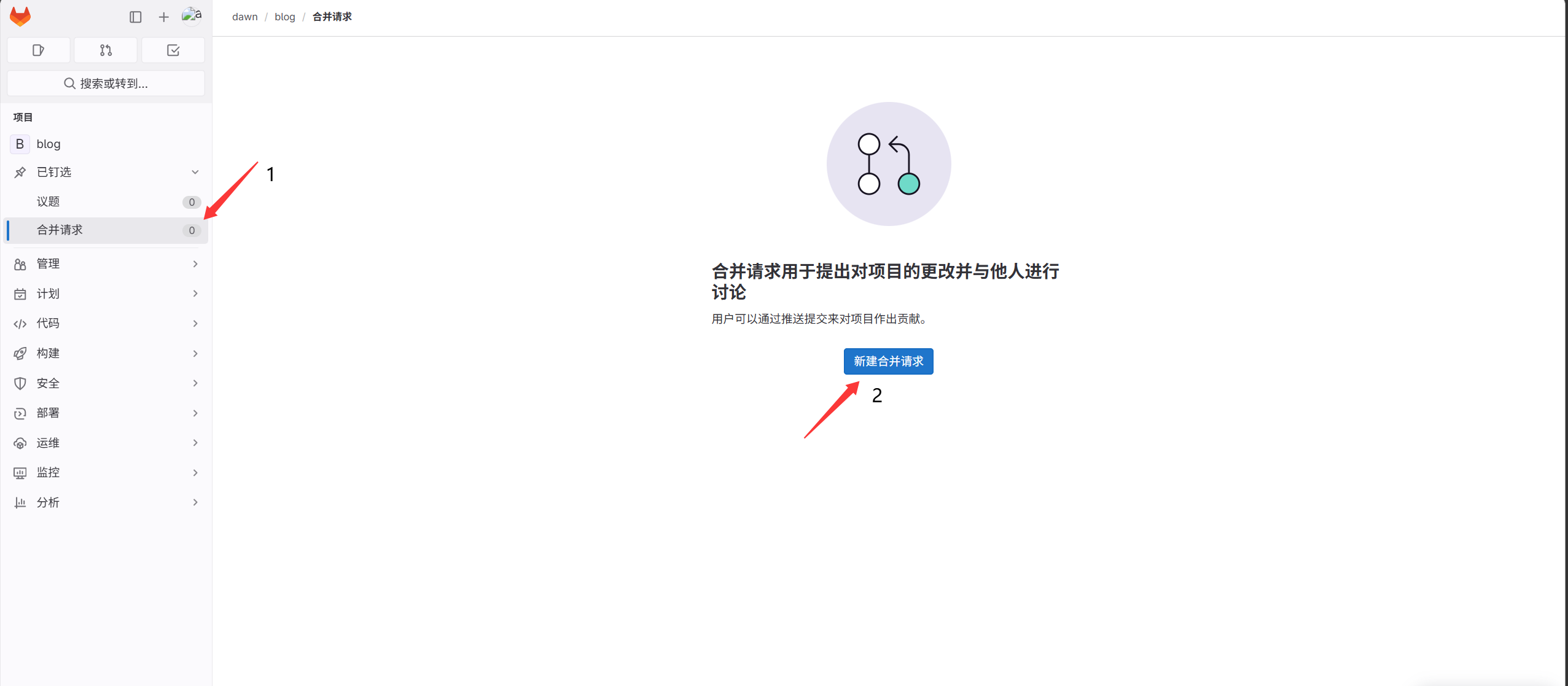
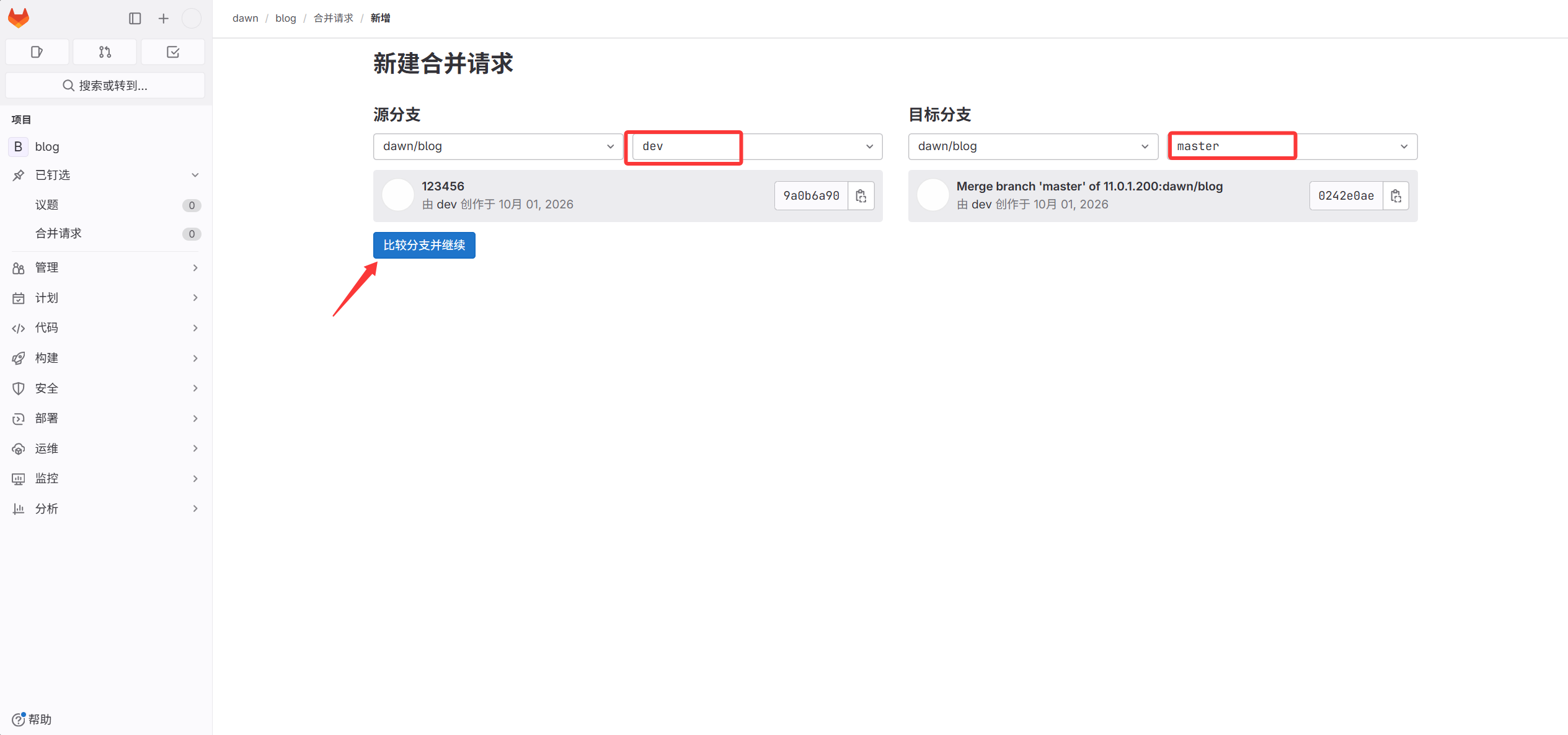
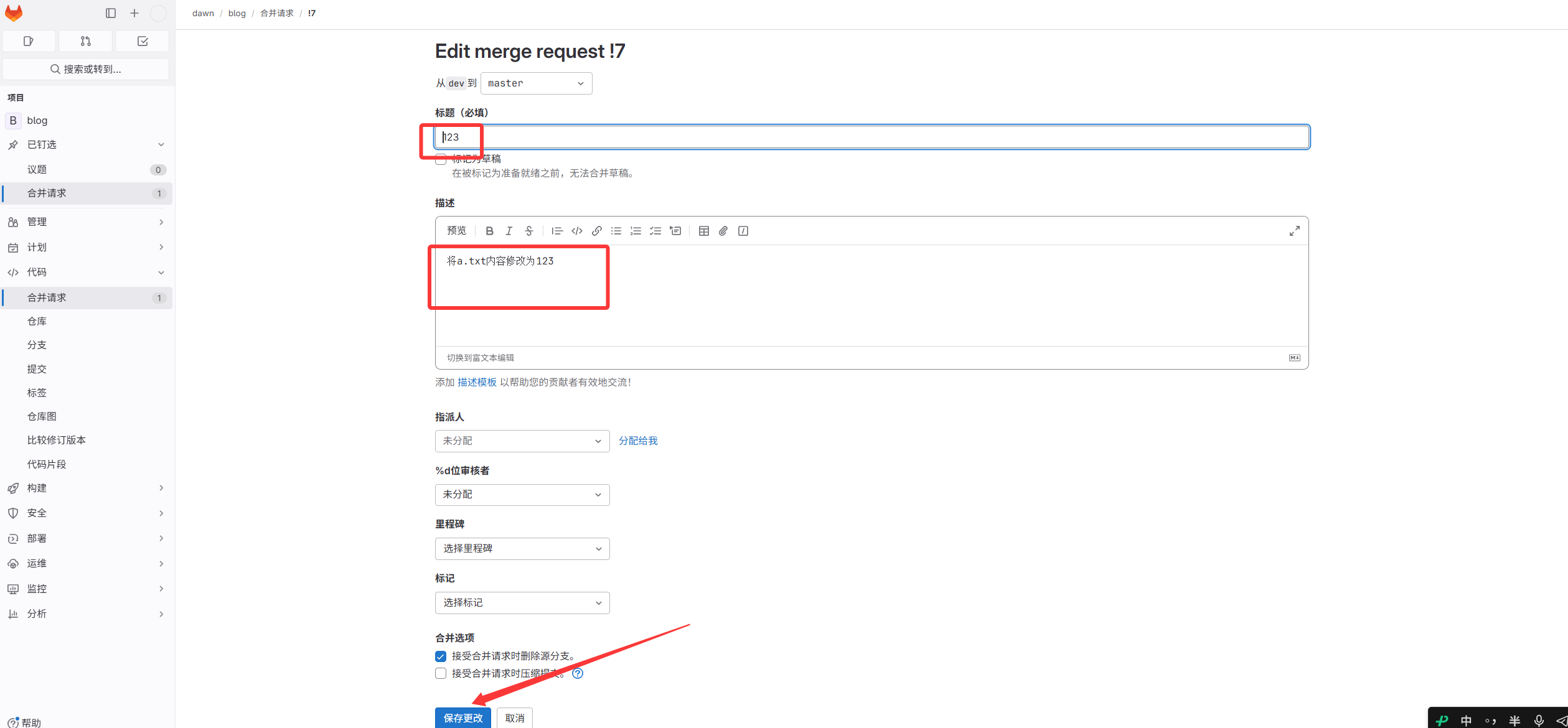
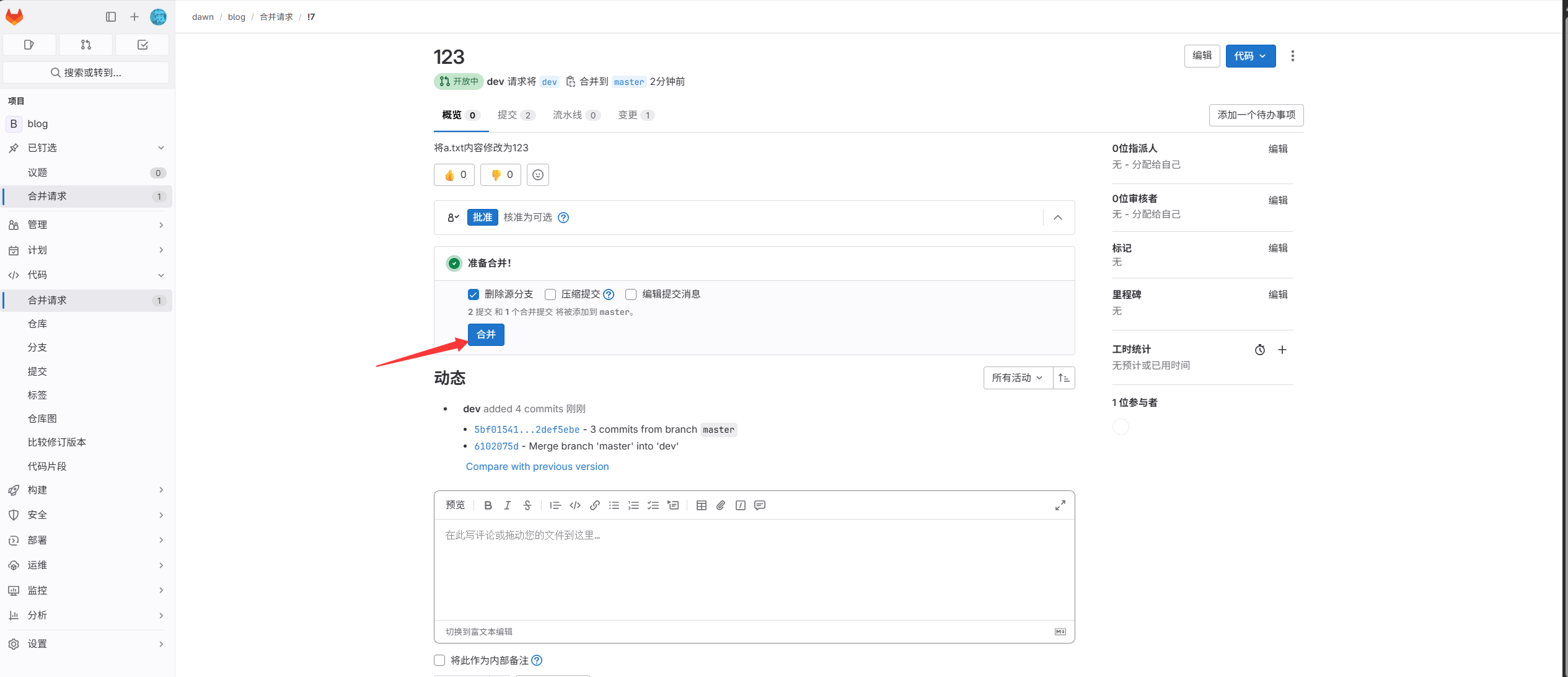
- root 계정에서 병합 승인 후 원본 dev 브랜치 삭제
- 웹 서버에서 코드 다운로드
1
2
|
[root@web01 ~]#git clone http://11.0.1.200/dawn/blog.git
사용자 이름과 비밀번호 입력
|