01. SonarQube 概要#
1
2
3
|
1. SonarQube は Java で開発されており、Open JDK 8 が必要
2. SonarQube は MySQL データベースに依存し、少なくとも 5.6 以上
3. SonarQube の小規模インスタンスは最低 4G、大規模インスタンスは 16G のメモリが必要
|
02. デプロイ#
1. JDK 実行環境をインストール#
 1
 2
 3
 4
 5
 6
 7
 8
 9
10
11
12
13
14
15
16
17
|
[root@sonarqube ~]#ll
total 166040
-rw-r--r-- 1 root root 170023183 Oct  1 22:32 jdk-8u181-linux-x64.rpm
[root@sonarqube ~]#rpm -ivh jdk-8u181-linux-x64.rpm
warning: jdk-8u181-linux-x64.rpm: Header V3 RSA/SHA256 Signature, key ID ec551f03: NOKEY
Preparing...                          ################################# [100%]
Updating / installing...
   1:jdk1.8-2000:1.8.0_181-fcs        ################################# [100%]
Unpacking JAR files...
        tools.jar...
        plugin.jar...
        javaws.jar...
        deploy.jar...
        rt.jar...
        jsse.jar...
        charsets.jar...
        localedata.jar...
|
2. データベースをインストール#
 1
 2
 3
 4
 5
 6
 7
 8
 9
10
11
12
13
14
15
16
17
18
19
20
21
22
23
24
25
26
27
28
29
30
31
32
33
34
35
36
37
38
39
40
41
42
43
|
# 1. MySQL 公式 Yum リポジトリ設定ファイルをダウンロード
[root@sonarqube ~]#wget dev.mysql.com/get/mysql-community-release-el6-5.noarch.rpm

# 2. MySQL リポジトリをインストール
[root@sonarqube ~]#rpm -ivh mysql-community-release-el6-5.noarch.rpm
Preparing...                          ################################# [100%]
Updating / installing...
   1:mysql-community-release-el6-5    ################################# [100%]

# 3. MySQL サーバーをインストール
[root@sonarqube ~]# yum install mysql-community-server -y
[root@sonarqube ~]#mysql --version
mysql  Ver 14.14 Distrib 5.6.51, for Linux (x86_64) using  EditLine wrapper

# 4. MySQL サービスを起動
[root@sonarqube ~]#service mysqld start
Starting mysqld (via systemctl):
                                                           [  OK  ]
[root@sonarqube ~]#netstat -ntpl
Active Internet connections (only servers)
Proto Recv-Q Send-Q Local Address           Foreign Address         State       PID/Program name
tcp        0      0 127.0.0.1:25            0.0.0.0:*               LISTEN      1227/master
tcp        0      0 0.0.0.0:22              0.0.0.0:*               LISTEN      1008/sshd
tcp6       0      0 ::1:25                  :::*                    LISTEN      1227/master
tcp6       0      0 :::3306                 :::*                    LISTEN      3113/mysqld
tcp6       0      0 :::22                   :::*                    LISTEN      1008/sshd

# 5. パスワードを設定
[root@sonarqube ~]# mysqladmin -uroot password 000000

# 6. sonarqube データベースを作成
[root@sonarqube ~]# mysql -uroot -p000000 -e "CREATE DATABASE sonarqube DEFAULT CHARACTER SET utf8;"

[root@sonarqube ~]#mysql -u root -p000000 -e "show databases"
Warning: Using a password on the command line interface can be insecure.
+--------------------+
| Database           |
+--------------------+
| information_schema |
| mysql              |
| performance_schema |
| sonarqube          |
+--------------------+
|
3. SonarQube をインストール#
 1
 2
 3
 4
 5
 6
 7
 8
 9
10
11
12
13
14
15
16
17
18
19
20
21
22
23
24
25
26
27
28
29
30
31
32
33
34
35
36
37
38
39
40
41
42
43
44
45
46
47
48
49
50
51
52
53
54
55
56
57
58
59
60
61
|
# 1. SonarQube パッケージをアップロード
[root@sonarqube ~]# cd /usr/local/
[root@sonarqube local]#ll sonarqube-7.0.zip
-rw-r--r-- 1 root root 155709573 Oct  1 22:50 sonarqube-7.0.zip

# 2. 現在のディレクトリに展開
[root@sonarqube local]#yum install -y unzip
[root@sonarqube local]# unzip sonarqube-7.0.zip
[root@sonarqube local]# ln -s sonarqube-7.0 sonarqube

# 3. プラグインをインストール:
既定のプラグインを削除:
[root@sonarqube ~]# rm -rf /usr/local/sonarqube/extensions/plugins/*

プラグインをアップロード:
[root@sonarqube ~]#ll sonar_plugins.tar.gz
-rw-r--r-- 1 root root 45106788 Oct  1 22:56 sonar_plugins.tar.gz
[root@sonarqube ~]#tar xf sonar_plugins.tar.gz -C /usr/local/sonarqube/extensions/plugins/
[root@sonarqube ~]#ll /usr/local/sonarqube/extensions/plugins/
total 4
drwxr-xr-x 2 1000 1000 4096 Oct 24  2019 plugins
[root@sonarqube ~]# cd /usr/local/sonarqube/extensions/plugins/
[root@sonarqube plugins]# mv plugins/* .
[root@sonarqube plugins]#rm -fr plugins/

# 4. 一般ユーザーを作成
[root@sonarqube ~]# useradd sonarqube

# 5. コードの所有者を sonarqube に変更
[root@sonarqube ~]# chown -R sonarqube.sonarqube /usr/local/sonarqube/
[root@sonarqube ~]# ll /usr/local/sonarqube/
total 12
drwxr-xr-x 8 sonarqube sonarqube  136 Feb  2  2018 bin
drwxr-xr-x 2 sonarqube sonarqube   50 May 15 15:09 conf
-rw-r--r-- 1 sonarqube sonarqube 7651 Feb  2  2018 COPYING
drwxr-xr-x 2 sonarqube sonarqube   24 Feb  2  2018 data
drwxr-xr-x 7 sonarqube sonarqube  150 Feb  2  2018 elasticsearch
drwxr-xr-x 4 sonarqube sonarqube   40 Feb  2  2018 extensions
drwxr-xr-x 9 sonarqube sonarqube  138 Feb  2  2018 lib
drwxr-xr-x 2 sonarqube sonarqube    6 Feb  2  2018 logs
drwxr-xr-x 2 sonarqube sonarqube   24 Feb  2  2018 temp
drwxr-xr-x 9 sonarqube sonarqube 4096 Feb  2  2018 web

# 6. データベース接続を設定

[root@sonarqube ~]#vim /usr/local/sonarqube/conf/sonar.properties
...
sonar.jdbc.username=root            # データベースユーザー名
sonar.jdbc.password=000000      # データベースパスワード

#----- Embedded Database (default)
# H2 embedded database server listening port, defaults to 9092
#sonarqube.embeddedDatabase.port=9092

#----- MySQL 5.6 or greater
# Only InnoDB storage engine is supported (not myISAM).
# Only the bundled driver is supported. It can not be changed.
sonar.jdbc.url=jdbc:mysql://localhost:3306/sonarqube?useUnicode=true&characterE
ncoding=utf8&rewriteBatchedStatements=true&useConfigs=maxPerformance&useSSL
=false          # ローカル接続を有効化
...
|
4. SonarQube を起動#
1
2
|
SonarQube は root では起動できず、一般ユーザーで実行する必要がある
[root@sonarqube ~]# su - sonarqube -c "/usr/local/sonarqube/bin/linux-x86-64/sonar.sh start"
|
5. リモートアクセストークンを設定#
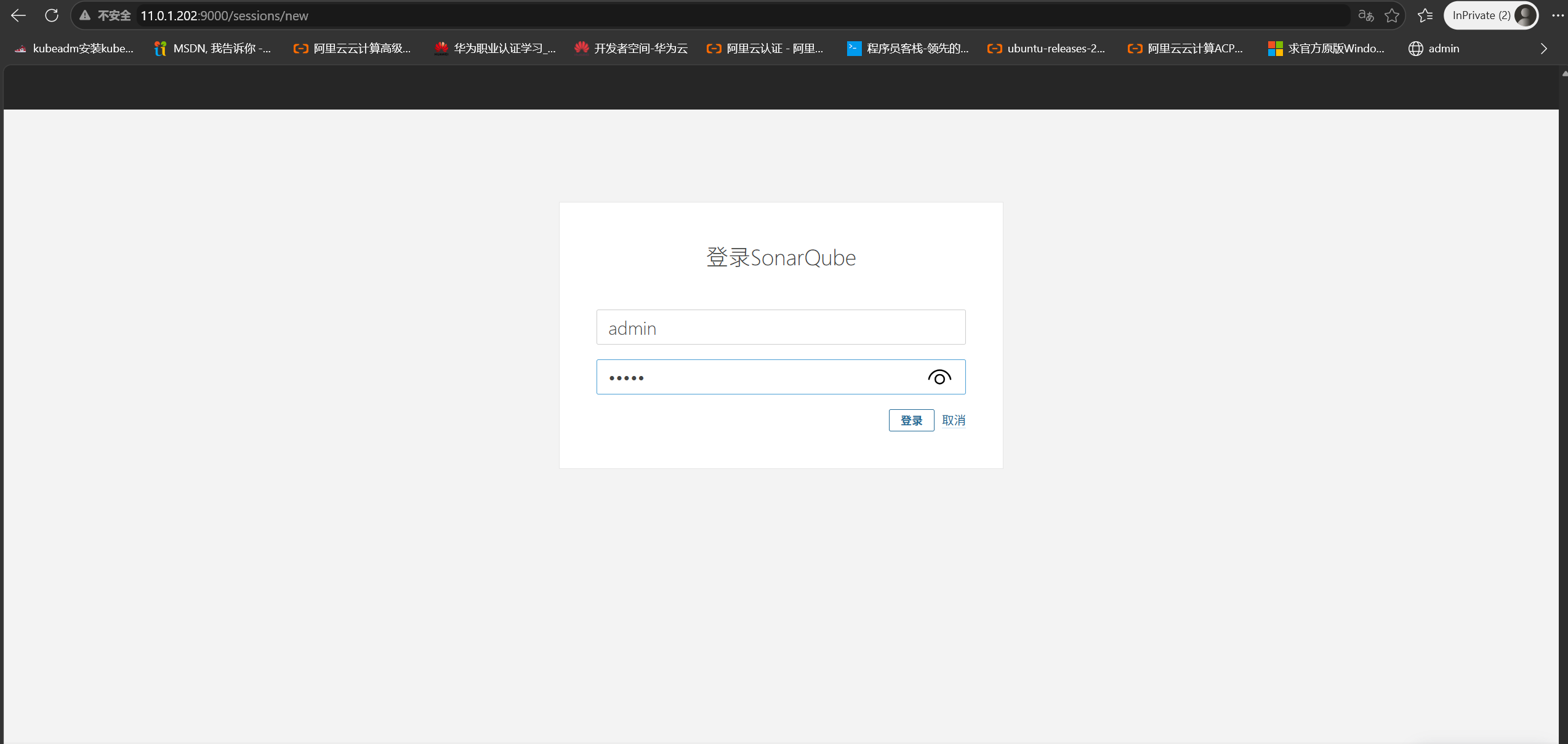
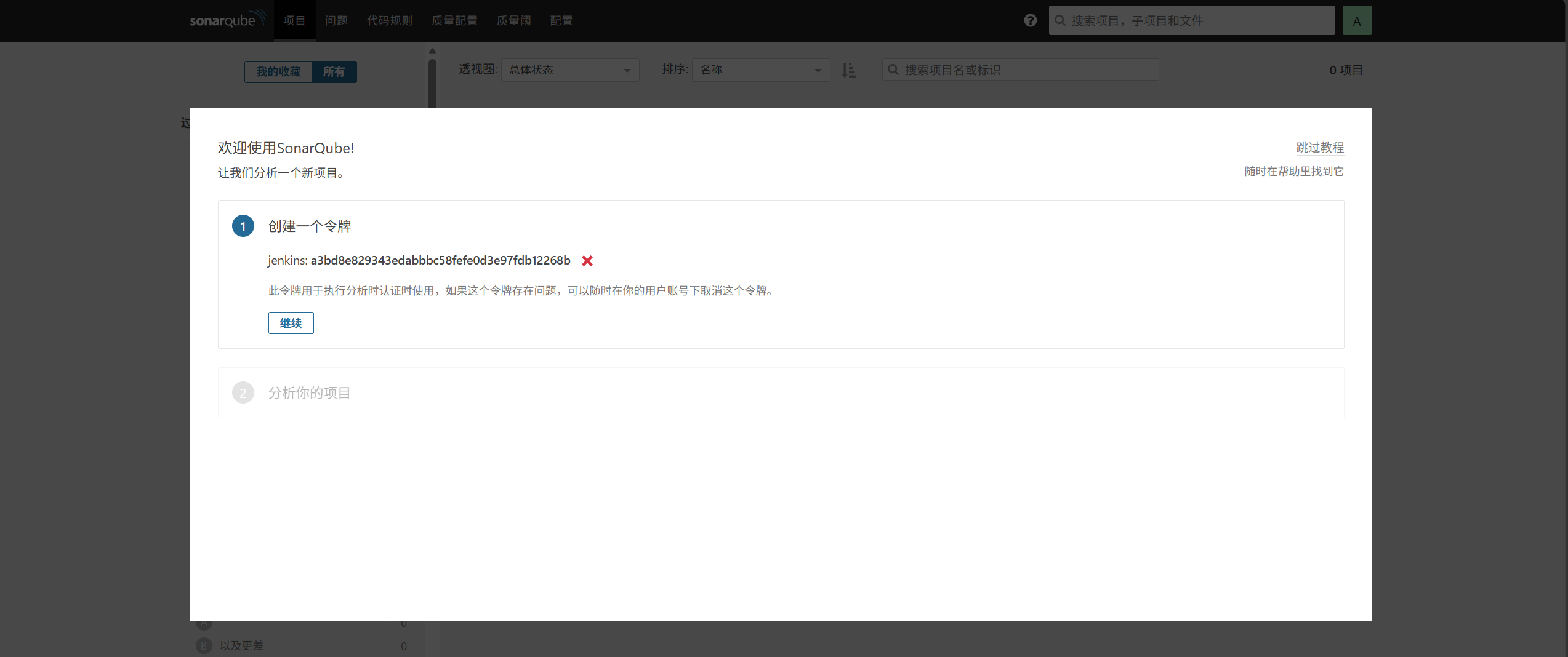
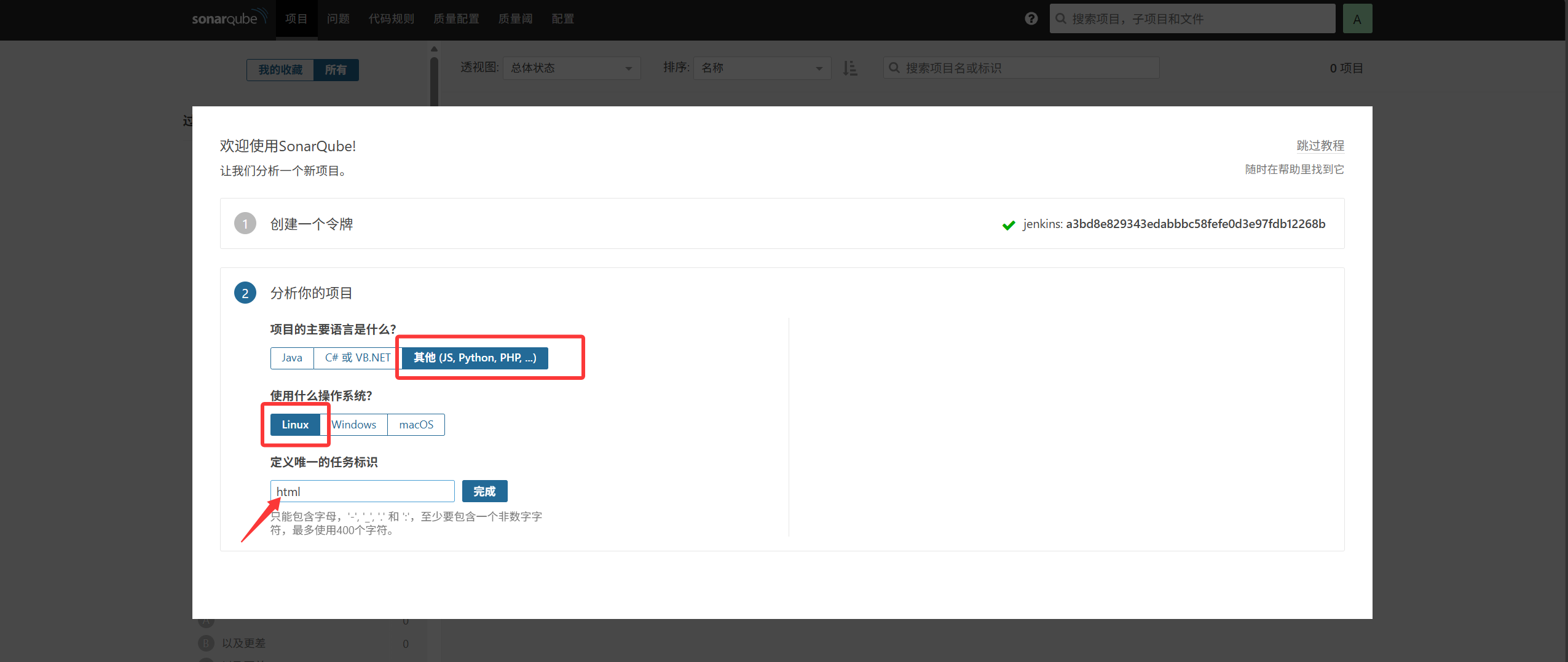
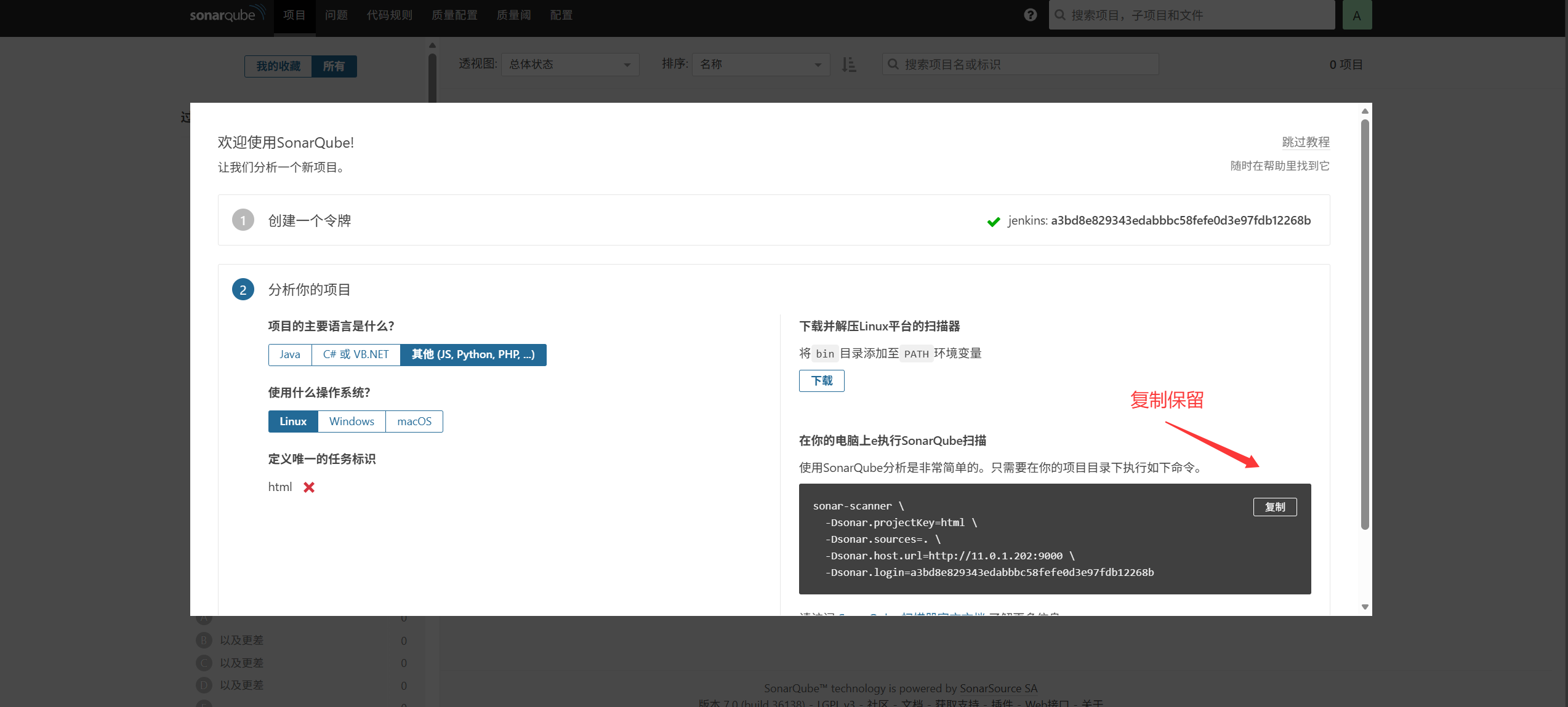
起動後はポート 9000 で、ブラウザで http://11.0.1.202:9000/about を開き、admin / admin でログインし、トークンを生成する(一度しか表示されないので控えておく)。
1
2
3
4
5
|
[root@jenkins ~]# sonar-scanner \
  -Dsonar.projectKey=html \
  -Dsonar.sources=. \
  -Dsonar.host.url=http://11.0.1.202:9000 \
  -Dsonar.login=a3bd8e829343edabbbc58fefe0d3e97fdb12268b
|
6. クライアントのデプロイ#
クライアントIP: 11.0.1.201
 1
 2
 3
 4
 5
 6
 7
 8
 9
10
11
12
13
14
15
16
17
18
19
20
21
22
23
24
25
26
27
28
29
30
31
32
33
|
# 1. クライアントをアップロード
[root@jenkins ~]# cd /usr/local/
[root@jenkins ~]#ll sonar-scanner-cli-4.2.0.1873-linux.zip
-rw-r--r-- 1 root root 42397119 Oct  2 00:09 sonar-scanner-cli-4.2.0.1873-linux.zip

# 2. 展開してシンボリックリンクを作成
[root@jenkins local]#yum install -y unzip
[root@jenkins local]#unzip /root/sonar-scanner-cli-4.2.0.1873-linux.zip
[root@jenkins local]# ln -s sonar-scanner-4.2.0.1873-linux sonar

# 3. グローバル PATH 変数を設定
[root@jenkins ~]# export PATH="$PATH:/usr/local/sonar/bin/"

# 4. 変数を /etc/profile に永続化
[root@jenkins ~]# vim /etc/profile
..
export PATH="$PATH:/usr/local/sonar/bin/"

# 5. クライアントからサーバーにコードをスキャンして解析テスト
/var/lib/jenkins/workspace/test_job/ 配下の blog コードを SonarQube にプッシュしてテスト
[root@jenkins ~]#cd /var/lib/jenkins/workspace/test_job/
[root@jenkins test_job]#ll
total 8
-rw-r--r-- 1 root root    7 Oct  1 20:32 a.txt
-rw-r--r-- 1 root root 3634 Oct  1 20:32 blog_state.txt
-rw-r--r-- 1 root root    0 Oct  1 21:12 c.txt
drwxr-xr-x 2 root root    6 Oct  1 20:32 myblog
drwxr-xr-x 2 root root    6 Oct  1 20:32 myblog-deploy
[root@jenkins test_job]#sonar-scanner \
  -Dsonar.projectKey=html \
  -Dsonar.sources=. \
  -Dsonar.host.url=http://11.0.1.202:9000 \
  -Dsonar.login=a3bd8e829343edabbbc58fefe0d3e97fdb12268b
|
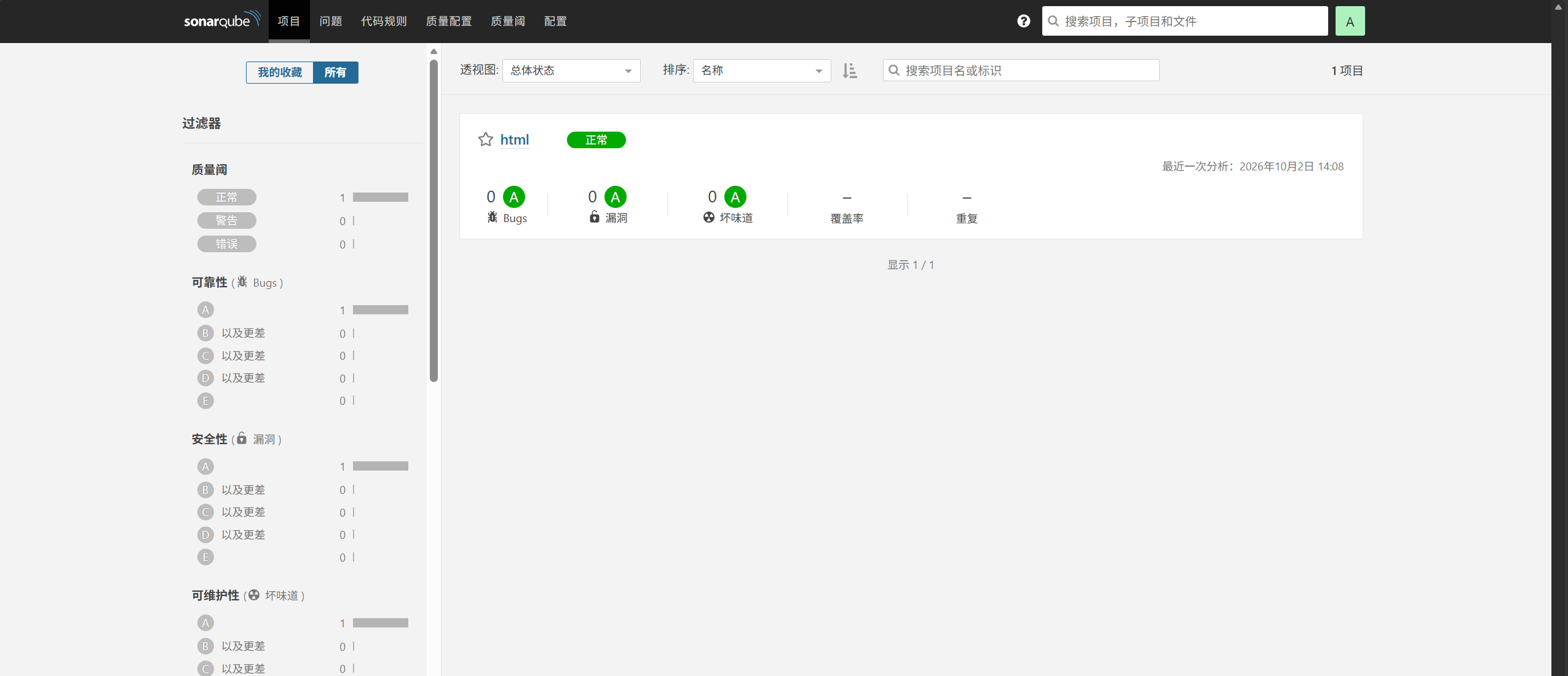
実行成功:
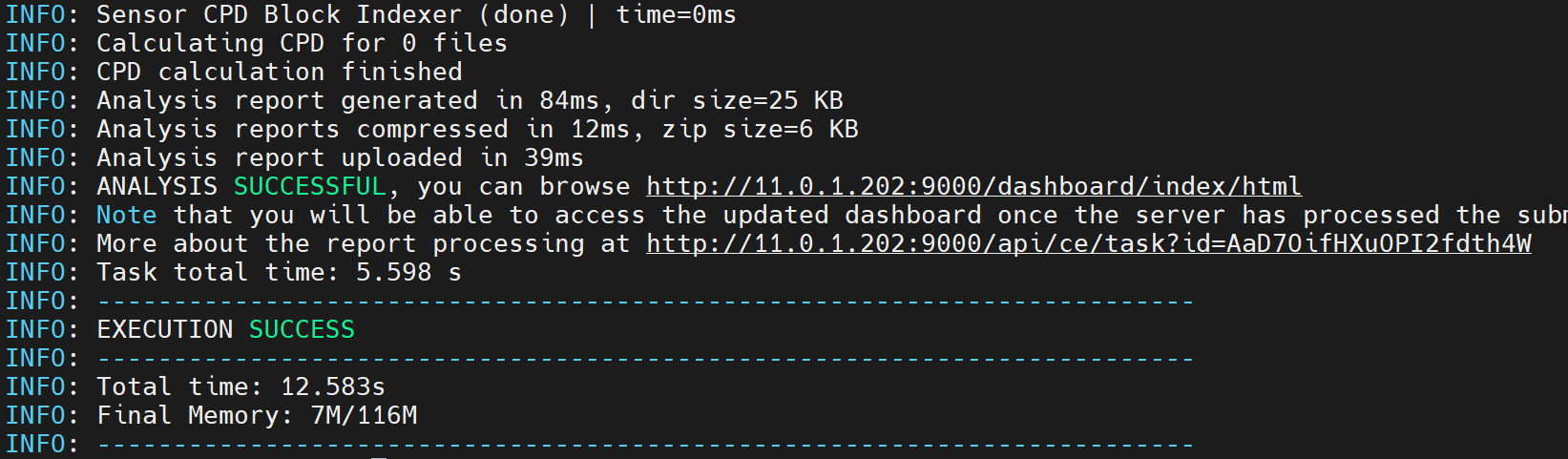
サーバーを確認: アップロード成功