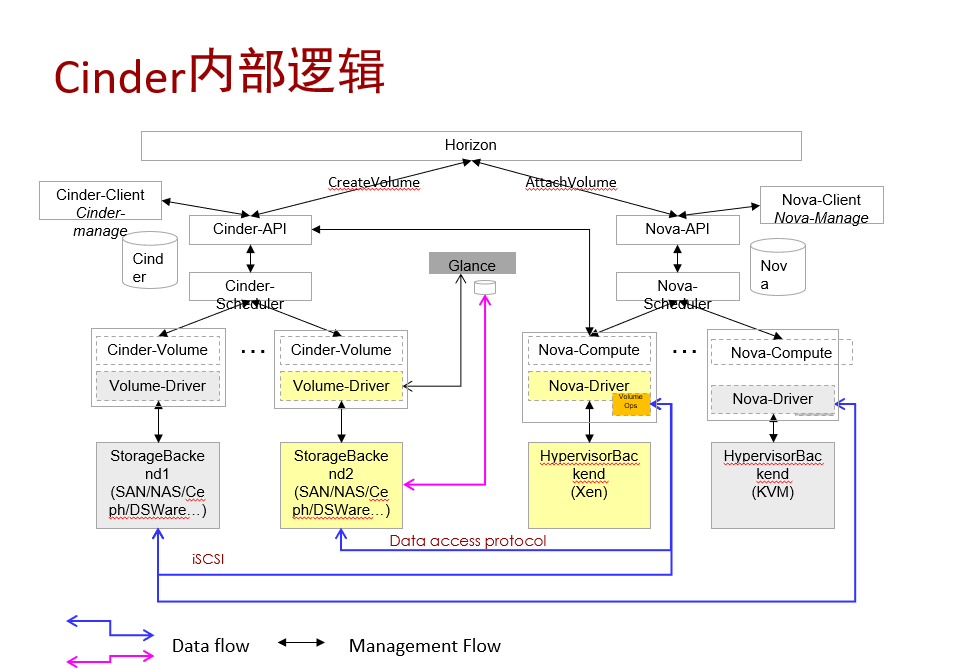
Cinder のボリューム作成とアタッチの構成#
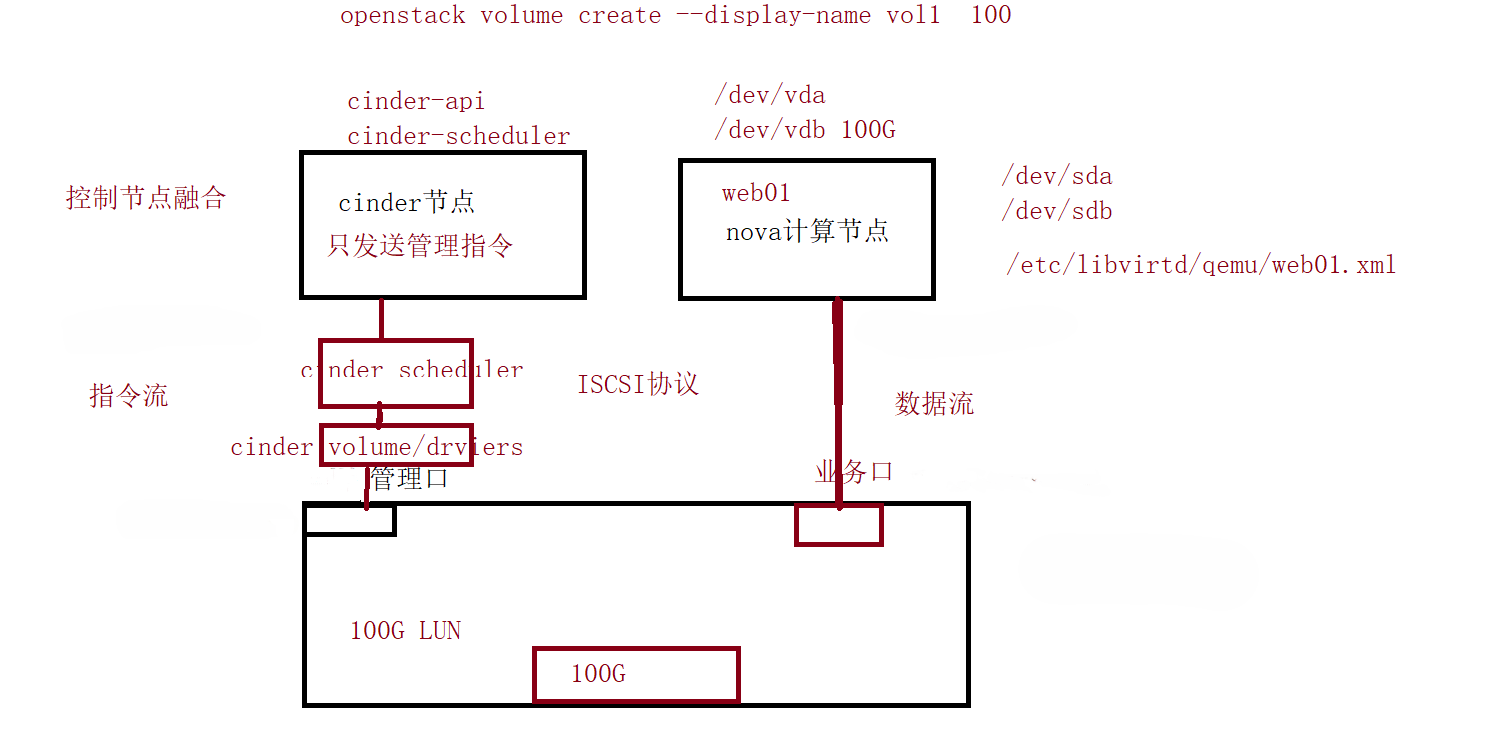
ボリューム作成の流れは cinder ノード(コントローラーノード)が提供し、ボリュームのマウントは nova が提供します
ローカル LVM + iSCSI ボリュームストレージの設定#
- answers.txt 応答ファイルで cinder ボリュームを作成するよう指定します。実験環境では専用のストレージ機器を用意できないため、システムはローカル LVM を cinder ストレージとして採用します
システムは既定で cinder-volumes ボリュームグループを 50G で作成します(ユーザーが手動で指定)
このボリュームグループはコントローラーノード上に作成されます
 1
 2
 3
 4
 5
 6
 7
 8
 9
10
11
12
13
14
15
16
17
18
19
20
21
22
23
24
25
26
27
28
29
30
31
32
33
34
35
36
37
38
39
40
41
42
|
[root@Controller ~]# vgdisplay
  --- Volume group ---
  VG Name               cl
  System ID
  Format                lvm2
  Metadata Areas        1
  Metadata Sequence No  4
  VG Access             read/write
  VG Status             resizable
  MAX LV                0
  Cur LV                3
  Open LV               3
  Max PV                0
  Cur PV                1
  Act PV                1
  VG Size               <99.00 GiB
  PE Size               4.00 MiB
  Total PE              25343
  Alloc PE / Size       25343 / <99.00 GiB
  Free  PE / Size       0 / 0
  VG UUID               K2c9TX-MlXI-k9Ga-CPPm-3zuu-WNoK-mRuUEZ

  --- Volume group ---
  VG Name               cinder-volumes
  System ID
  Format                lvm2
  Metadata Areas        1
  Metadata Sequence No  4
  VG Access             read/write
  VG Status             resizable
  MAX LV                0
  Cur LV                1
  Open LV               0
  Max PV                0
  Cur PV                1
  Act PV                1
  VG Size               <51.50 GiB
  PE Size               4.00 MiB
  Total PE              13183
  Alloc PE / Size       12551 / <49.03 GiB
  Free  PE / Size       632 / <2.47 GiB
  VG UUID               nXhaeU-1PwG-is18-Ef2N-cK5R-9LRk-3ksn1k
|
- /etc/cinder/cinder.conf で LVM ドライバを呼び出し、作成したボリュームグループを認識させます
- このコントローラーノードを ISCSI ストレージ(target)とみなし、ユーザーが作成したボリュームを ISCSI で compute ノードに共有します
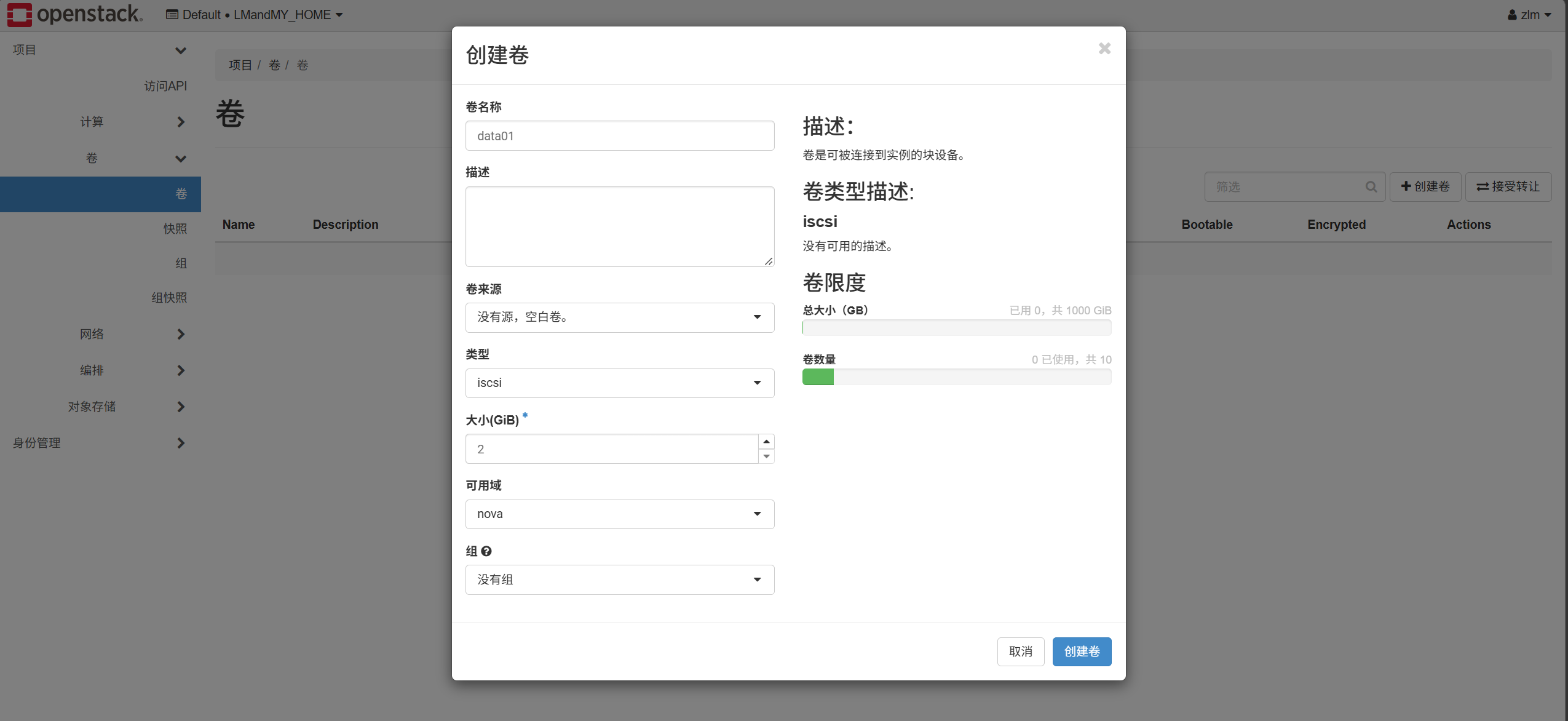
ユーザーが 2G のクラウドディスクを作成すると、システムは自動的に LVM ドライバを呼び出してボリュームグループ内に 2G の LV を作成します
 1
 2
 3
 4
 5
 6
 7
 8
 9
10
11
12
13
14
15
16
17
18
19
20
21
22
23
24
25
26
27
28
29
30
31
32
33
34
35
36
37
38
39
40
41
42
43
44
45
46
47
48
49
50
51
52
53
54
55
56
57
58
59
60
61
62
63
64
65
66
67
68
69
70
71
72
73
74
75
76
77
78
79
80
81
82
83
84
85
86
87
88
89
90
|
[root@Controller ~]# lvdisplay
  --- Logical volume ---
  LV Path                /dev/cl/swap
  LV Name                swap
  VG Name                cl
  LV UUID                f9Aqve-GgxT-gQNg-v0W0-ogyz-1cJT-WIEOMw
  LV Write Access        read/write
  LV Creation host, time localhost.localdomain, 2026-06-27 05:28:10 +0800
  LV Status              available
  # open                 2
  LV Size                <7.88 GiB
  Current LE             2016
  Segments               1
  Allocation             inherit
  Read ahead sectors     auto
  - currently set to     8192
  Block device           253:1

  --- Logical volume ---
  LV Path                /dev/cl/home
  LV Name                home
  VG Name                cl
  LV UUID                5f8ntZ-4pxS-yYFl-3BHC-qKaW-pFsi-2ZGkHg
  LV Write Access        read/write
  LV Creation host, time localhost.localdomain, 2026-06-27 05:28:10 +0800
  LV Status              available
  # open                 1
  LV Size                29.89 GiB
  Current LE             7653
  Segments               1
  Allocation             inherit
  Read ahead sectors     auto
  - currently set to     8192
  Block device           253:2

  --- Logical volume ---
  LV Path                /dev/cl/root
  LV Name                root
  VG Name                cl
  LV UUID                32JpBQ-Ld4z-0bLU-jHuG-iMRC-WLoO-WtcrnT
  LV Write Access        read/write
  LV Creation host, time localhost.localdomain, 2026-06-27 05:28:10 +0800
  LV Status              available
  # open                 1
  LV Size                <61.23 GiB
  Current LE             15674
  Segments               1
  Allocation             inherit
  Read ahead sectors     auto
  - currently set to     8192
  Block device           253:0

  --- Logical volume ---
  LV Name                cinder-volumes-pool
  VG Name                cinder-volumes
  LV UUID                ughXDw-Fl7B-Mbo9-vsHS-OvMy-Pi60-E2GPaa
  LV Write Access        read/write (activated read only)
  LV Creation host, time Controller, 2026-07-08 16:03:29 +0800
  LV Pool metadata       cinder-volumes-pool_tmeta
  LV Pool data           cinder-volumes-pool_tdata
  LV Status              available
  # open                 0
  LV Size                <48.93 GiB
  Allocated pool data    0.00%
  Allocated metadata     10.44%
  Current LE             12525
  Segments               1
  Allocation             inherit
  Read ahead sectors     auto
  - currently set to     8192
  Block device           253:6

  --- Logical volume ---
  LV Path                /dev/cinder-volumes/volume-3561d822-2929-4b47-87c5-25f769f8f44e
  LV Name                volume-3561d822-2929-4b47-87c5-25f769f8f44e
  VG Name                cinder-volumes
  LV UUID                WoSBug-zWc4-wVYn-39xk-MWVw-z3Pj-UOdvok
  LV Write Access        read/write
  LV Creation host, time Controller, 2026-10-05 15:56:30 +0800
  LV Pool name           cinder-volumes-pool
  LV Status              available
  # open                 0
  LV Size                2.00 GiB
  Mapped size            0.00%
  Current LE             512
  Segments               1
  Allocation             inherit
  Read ahead sectors     auto
  - currently set to     8192
  Block device           253:7
|
-
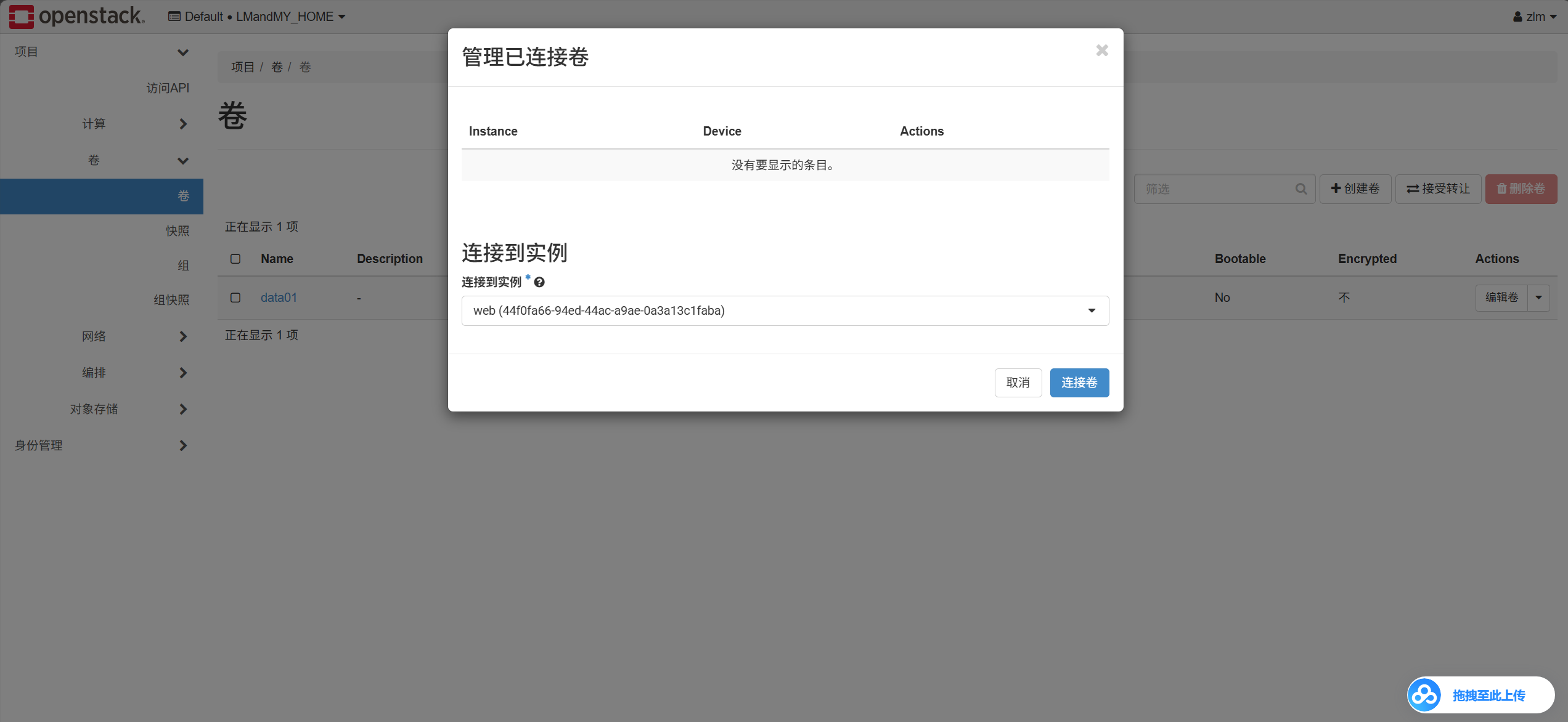
ユーザーがこのボリュームをクラウドサーバー web01 にアタッチすると、cinder はストレージ側に指示を送ります。ストレージ側はその LV を compute ホストに共有し、compute ホストがそのディスクを認識して新しい 2G ディスクが生まれ、libvirt が xml ファイルを呼び出してクラウドサーバーに追加します
 1
 2
 3
 4
 5
 6
 7
 8
 9
10
11
12
13
14
15
16
17
18
19
20
21
22
23
24
25
26
27
28
29
30
31
32
33
34
35
36
37
38
39
40
41
42
43
44
45
46
47
48
49
50
51
52
|
[root@Controller ~]# systemctl status target
● target.service - Restore LIO kernel target configuration
   Loaded: loaded (/usr/lib/systemd/system/target.service; enabled; vendor preset: disabled)
   Active: active (exited) since Mon 2026-10-05 14:18:51 CST; 1h 30min ago
  Process: 1873 ExecStart=/usr/bin/targetctl restore (code=exited, status=0/SUCCESS)
 Main PID: 1873 (code=exited, status=0/SUCCESS)
    Tasks: 0 (limit: 36406)
   Memory: 0B
   CGroup: /system.slice/target.service

Oct 05 14:18:50 Controller systemd[1]: Starting Restore LIO kernel target configuration...
Oct 05 14:18:51 Controller target[1873]: No saved config file at /etc/target/saveconfig.json, ok, exiting
Oct 05 14:18:51 Controller systemd[1]: Started Restore LIO kernel target configuration.
[root@Controller ~]# targetcli
targetcli shell version 2.1.53
Copyright 2011-2013 by Datera, Inc and others.
For help on commands, type 'help'.

/> ls
o- / ......................................................................................................................... [...]
  o- backstores .............................................................................................................. [...]
  | o- block .................................................................................................. [Storage Objects: 1]
  | | o- iqn.2010-10.org.openstack:volume-3561d822-2929-4b47-87c5-25f769f8f44e  [/dev/cinder-volumes/volume-3561d822-2929-4b47-87c5-25f769f8f44e (2.0GiB) write-thru activated]
  | |   o- alua ................................................................................................... [ALUA Groups: 1]
  | |     o- default_tg_pt_gp ....................................................................... [ALUA state: Active/optimized]
  | o- fileio ................................................................................................. [Storage Objects: 0]
  | o- pscsi .................................................................................................. [Storage Objects: 0]
  | o- ramdisk ................................................................................................ [Storage Objects: 0]
  o- iscsi ............................................................................................................ [Targets: 1]
  | o- iqn.2010-10.org.openstack:volume-3561d822-2929-4b47-87c5-25f769f8f44e ............................................. [TPGs: 1]
  |   o- tpg1 .......................................................................................... [no-gen-acls, auth per-acl]
  |     o- acls .......................................................................................................... [ACLs: 1]
  |     | o- iqn.1994-05.com.redhat:1220933cde3c ...................................................... [1-way auth, Mapped LUNs: 1]
  |     |   o- mapped_lun0 ................. [lun0 block/iqn.2010-10.org.openstack:volume-3561d822-2929-4b47-87c5-25f769f8f44e (rw)]
  |     o- luns .......................................................................................................... [LUNs: 1]
  |     | o- lun0  [block/iqn.2010-10.org.openstack:volume-3561d822-2929-4b47-87c5-25f769f8f44e (/dev/cinder-volumes/volume-3561d822-2929-4b47-87c5-25f769f8f44e) (default_tg_pt_gp)]
  |     o- portals .................................................................................................... [Portals: 1]
  |       o- 192.168.100.10:3260 .............................................................................................. [OK]
  o- loopback ......................................................................................................... [Targets: 0]
/>
[root@Compute ~]# cat /etc/iscsi/initiatorname.iscsi
InitiatorName=iqn.1994-05.com.redhat:1220933cde3c
[root@Compute ~]# iscsiadm -m session
tcp: [1] 192.168.100.10:3260,1 iqn.2010-10.org.openstack:volume-3561d822-2929-4b47-87c5-25f769f8f44e (non-flash)
[root@Compute ~]# vim /etc/libvirt/qemu/instance-00000002.xml
    <disk type='block' device='disk'>
      <driver name='qemu' type='raw' cache='none' io='native'/>
      <source dev='/dev/sda'/>
      <target dev='vdb' bus='virtio'/>
      <serial>3561d822-2929-4b47-87c5-25f769f8f44e</serial>
      <address type='pci' domain='0x0000' bus='0x00' slot='0x07' function='0x0'/>
    </disk>
|
ストレージ側の設定
- targetcli パッケージをインストールし、サービスを起動します
1
2
3
4
5
6
7
8
9
|
#yum -y install targetcli
#systemctl enable target --now
#targetcli
/> /backstores/block create dev=/dev/sdb1 name=data01
/> /iscsi create iqn.2024.com.storage:disk
/> /iscsi/ iqn.2024.com.storage:disk/tpg1/acls create iqn.1994-05.com.redhat:b4ff583759f4
/>/iscsi/ iqn.2024.com.storage:disk /tpg1/luns create data01
/> /iscsi/ iqn.2024.com.storage:disk/tpg1/portals create 192.168.100.10:3260
/> saveconfig
|
- ターゲット、業務サーバー、ストレージクライアント
1
2
3
|
[root@Compute ~]# iscsiadm -m discovery -t st -p 192.168.100.10
[root@Compute ~]# iscsiadm -m node -T iqn.2024.com.storage:disk -p 192.168.100.10:3260 -l
#fdisk -l
|
Cinder と NFS ストレージの連携#
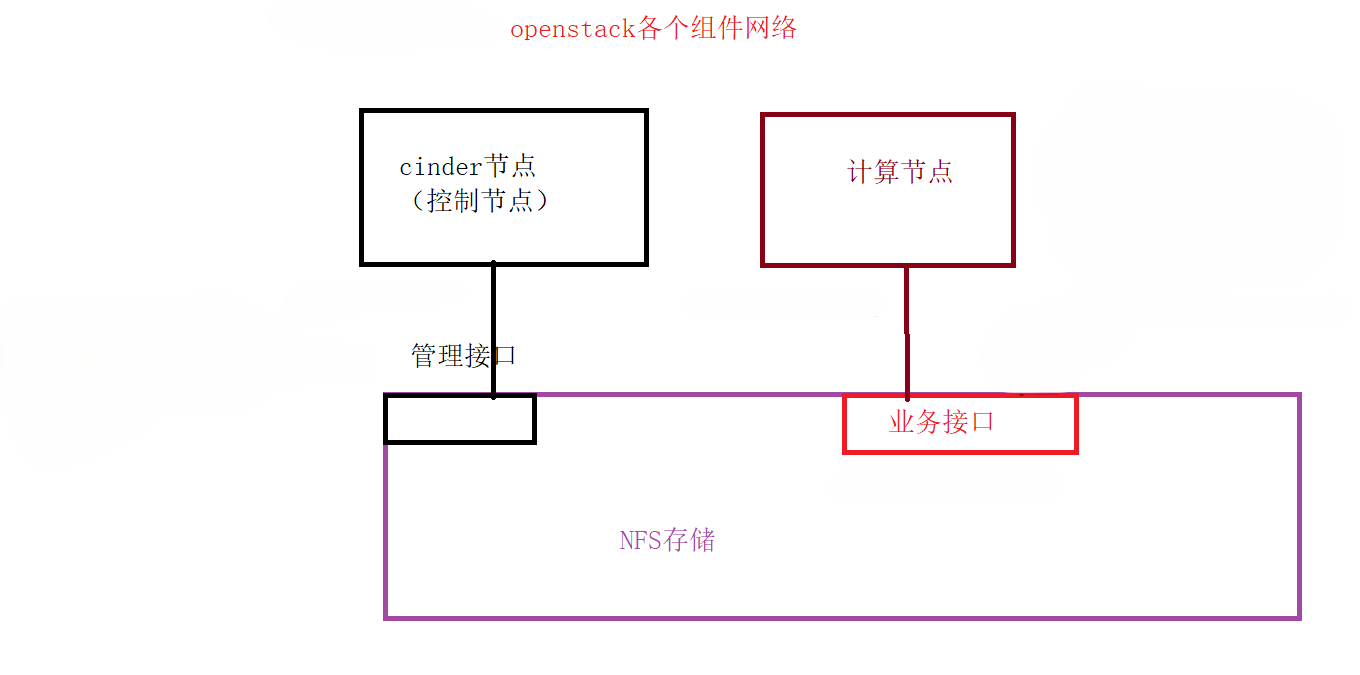
上の図に従ってネットワークを設計・設定します
1. NFS ストレージの設定#
 1
 2
 3
 4
 5
 6
 7
 8
 9
10
11
12
13
14
15
16
17
18
19
20
21
22
23
|
#配置网络
[root@storage ~]# nmcli connection modify ens160 ipv4.addresses 192.168.200.20/24 ipv4.method manual autoconnect yes
[root@storage ~]# nmcli connection down ens160 ; nmcli connection up ens160
[root@storage ~]# cd /etc/sysconfig/network-scripts/
[root@storage network-scripts]# cp ifcfg-ens160 ifcfg-ens192
[root@storage network-scripts]# cat ifcfg-ens192
# Generated by parse-kickstart
TYPE=Ethernet
DEVICE=ens192
ONBOOT=yes
BOOTPROTO=none
NAME=ens192
[root@storage ~]# nmcli connection reload
[root@storage ~]# nmcli connection modify ens192 ipv4.addresses 192.168.8.20/24 ipv4.method manual autoconnect yes
[root@storage ~]# nmcli connection down ens192 ; nmcli connection up ens192
#安装配置安装NFS服务
[root@storage ~]# yum install -y nfs-utils rpcbind
[root@storage ~]# mkdir /storage
[root@storage ~]# cat /etc/exports
/storage   192.168.200.0/24(rw,sync,no_root_squash)
/storage   192.168.8.0/24(rw,sync,no_root_squash)
[root@storage ~]# systemctl enable nfs-server --now
[root@storage ~]# systemctl enable rpcbind --now
|
2. cinder ノードのネットワーク設定(コントローラーノード)#
1
2
3
4
5
6
7
8
|
[root@Controller ~]# cat /etc/sysconfig/network-scripts/ifcfg-ens192
TYPE=Ethernet
NAME=ens192
DEVICE=ens192
ONBOOT=yes
IPADDR=192.168.8.10
NETMASK=255.255.255.0
[root@Controller ~]# systemctl restart network
|
3. コンピュートノードのネットワーク設定#
1
2
|
[root@Compute ~]# nmcli connection modify ens192 ipv4.addresses 192.168.200.10/24 autoconnect yes ipv4.method manual
[root@Compute ~]# nmcli connection down ens192 ; nmcli connection up ens192
|
4. cinder の設定#
 1
 2
 3
 4
 5
 6
 7
 8
 9
10
|
[root@Controller ~]# vim /etc/cinder/cinder.conf
410 default_volume_type=nfs
436 enabled_backends=lvm,nfs666
[nfs666]
volume_backend_name=nfsdata
volume_driver=cinder.volume.drivers.nfs.NfsDriver
nfs_shares_config = /etc/cinder/nfs_shares
[root@Controller ~]# cat /etc/cinder/nfs_shares
storage:/storage
[root@Controller ~]# systemctl restart openstack-cinder-*
|
Cinder ノード
1
2
|
[root@Controller ~]# cat /etc/hosts   ####额外增加一条记录
192.168.8.20 storage
|
コンピュートノード
1
2
3
4
5
6
|
[root@Compute ~]# cat /etc/hosts
192.168.200.20 storage
[root@Controller ~]# source keystonerc_admin
[root@Controller ~(keystone_admin)]# cinder type-create nfs
[root@Controller ~(keystone_admin)]# cinder type-key nfs set volume_backend_name=nfsdata
[root@Controller ~(keystone_admin)]# systemctl restart openstack-cinder-*
|
-
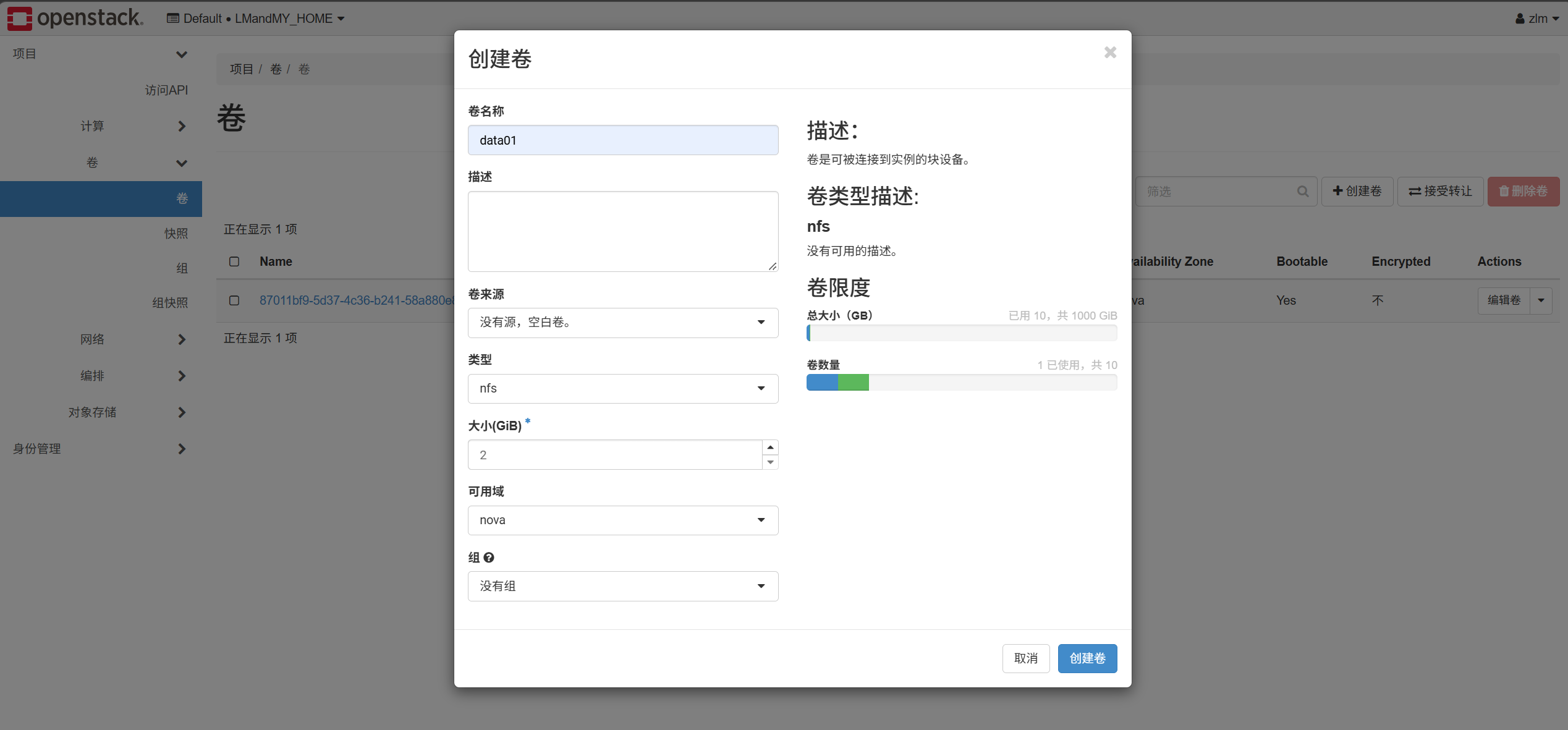
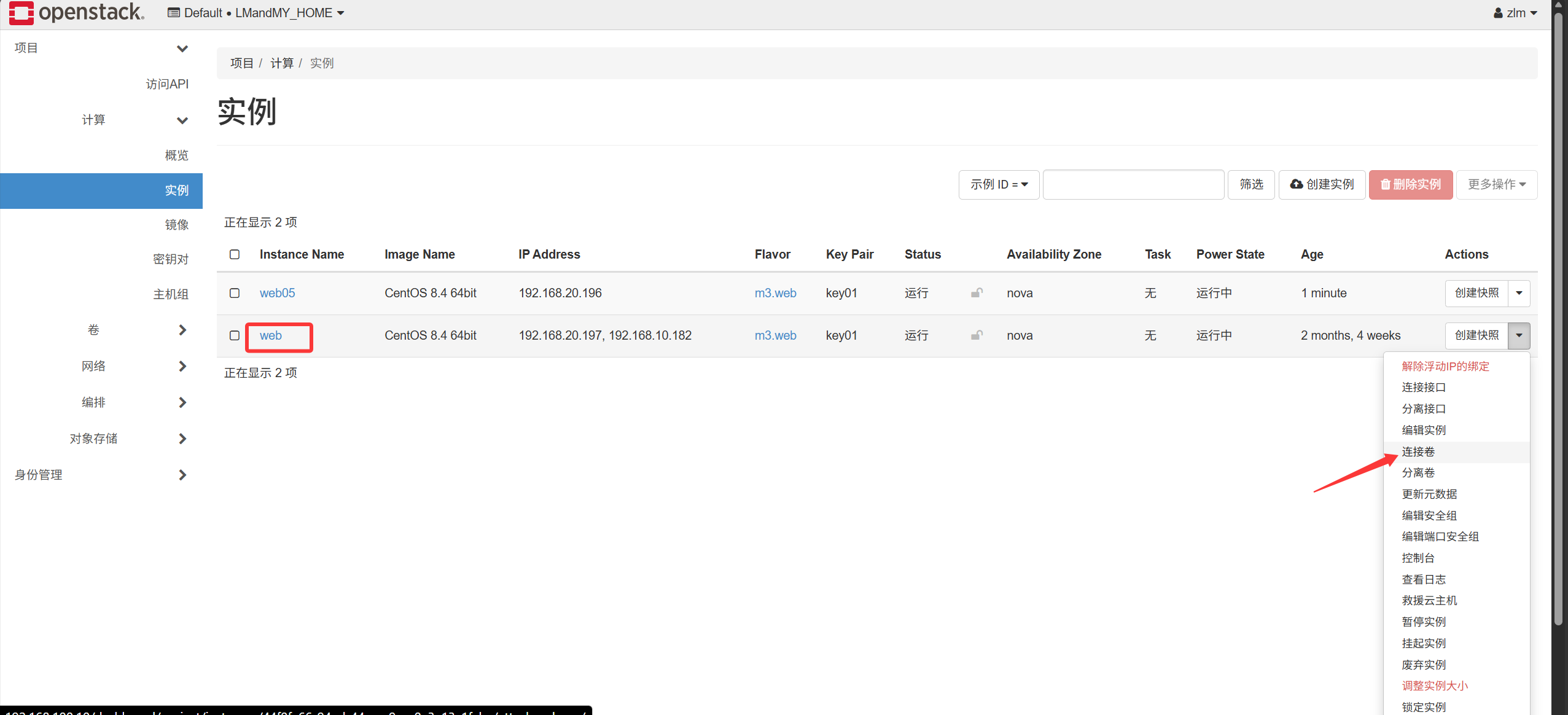
OpenStack の Web 画面でボリュームを作成し、nfs を選択してそのボリュームをクラウドサーバーに関連付けます
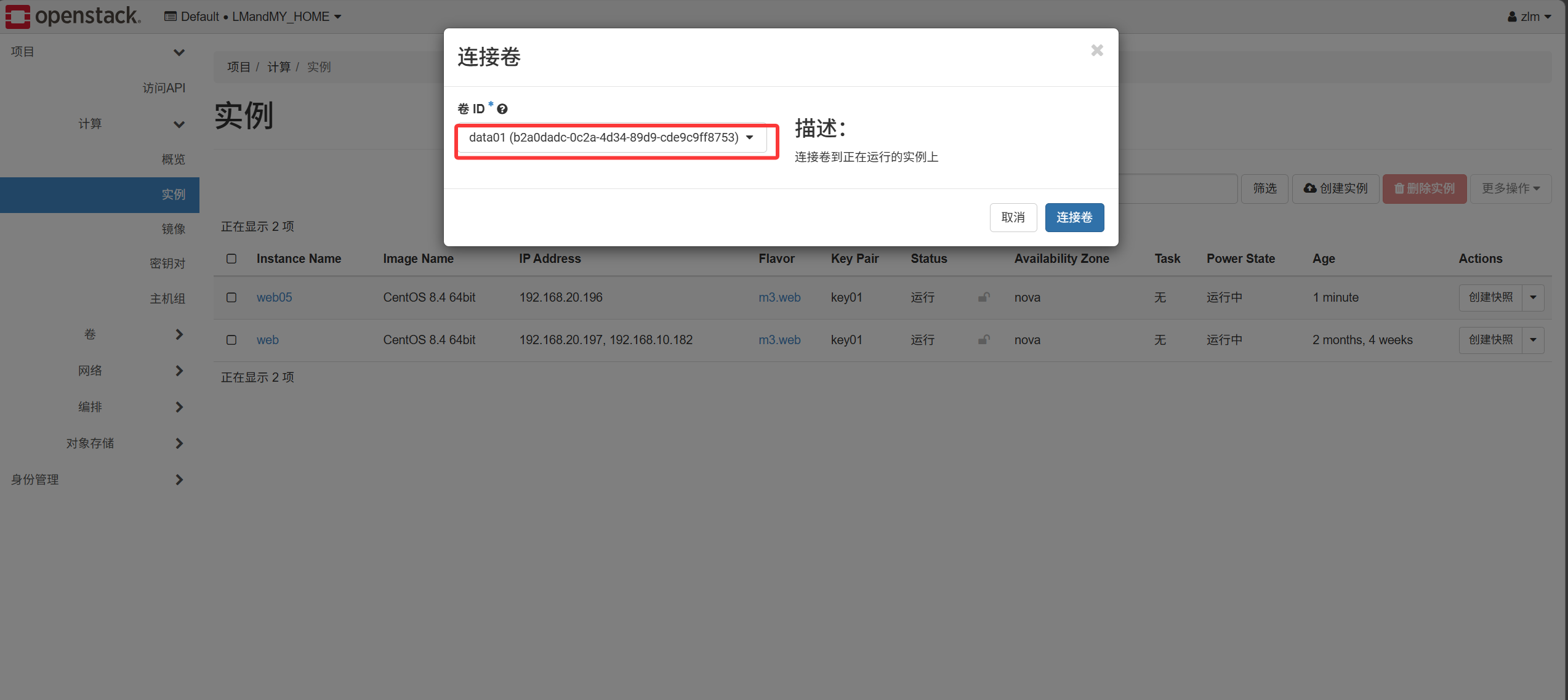
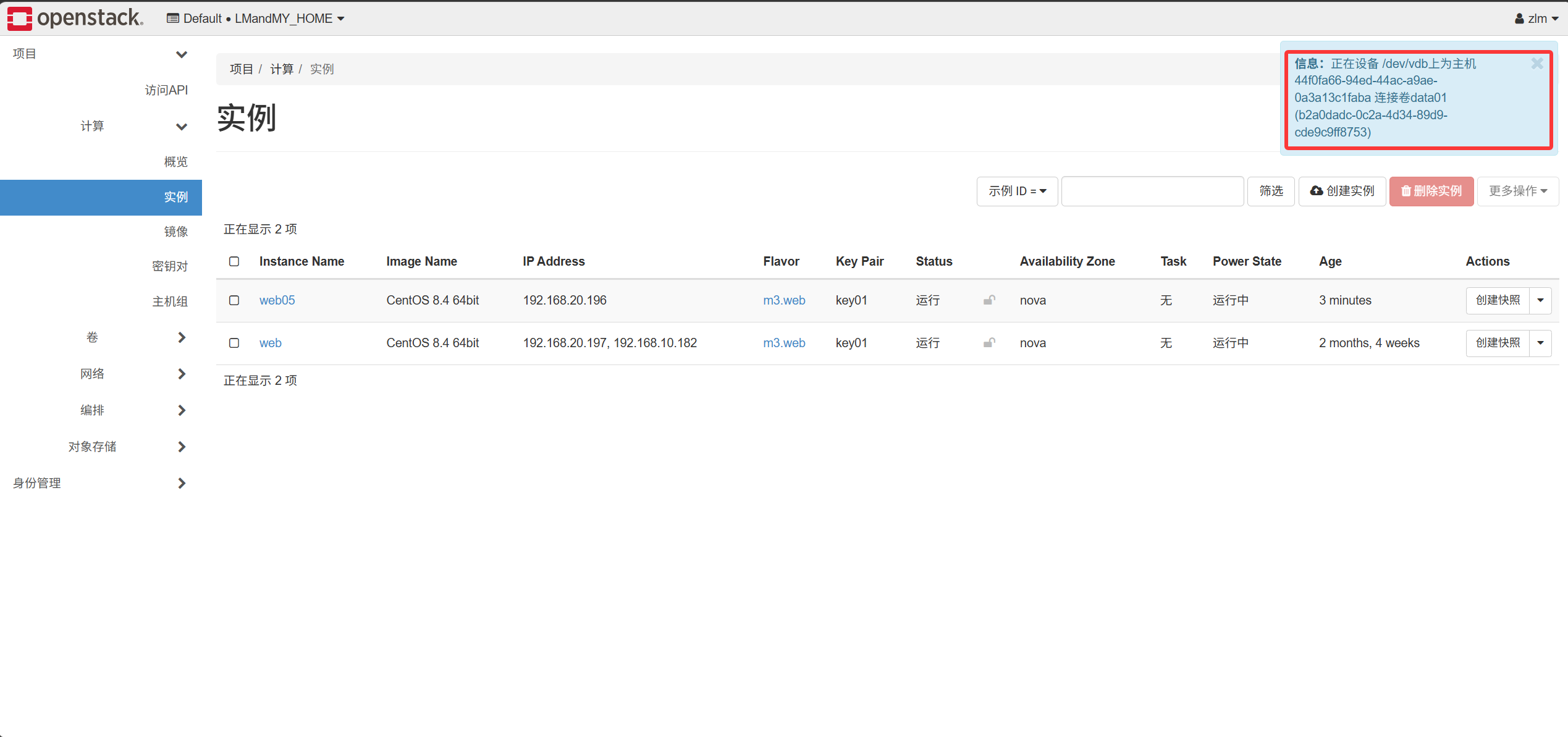
-
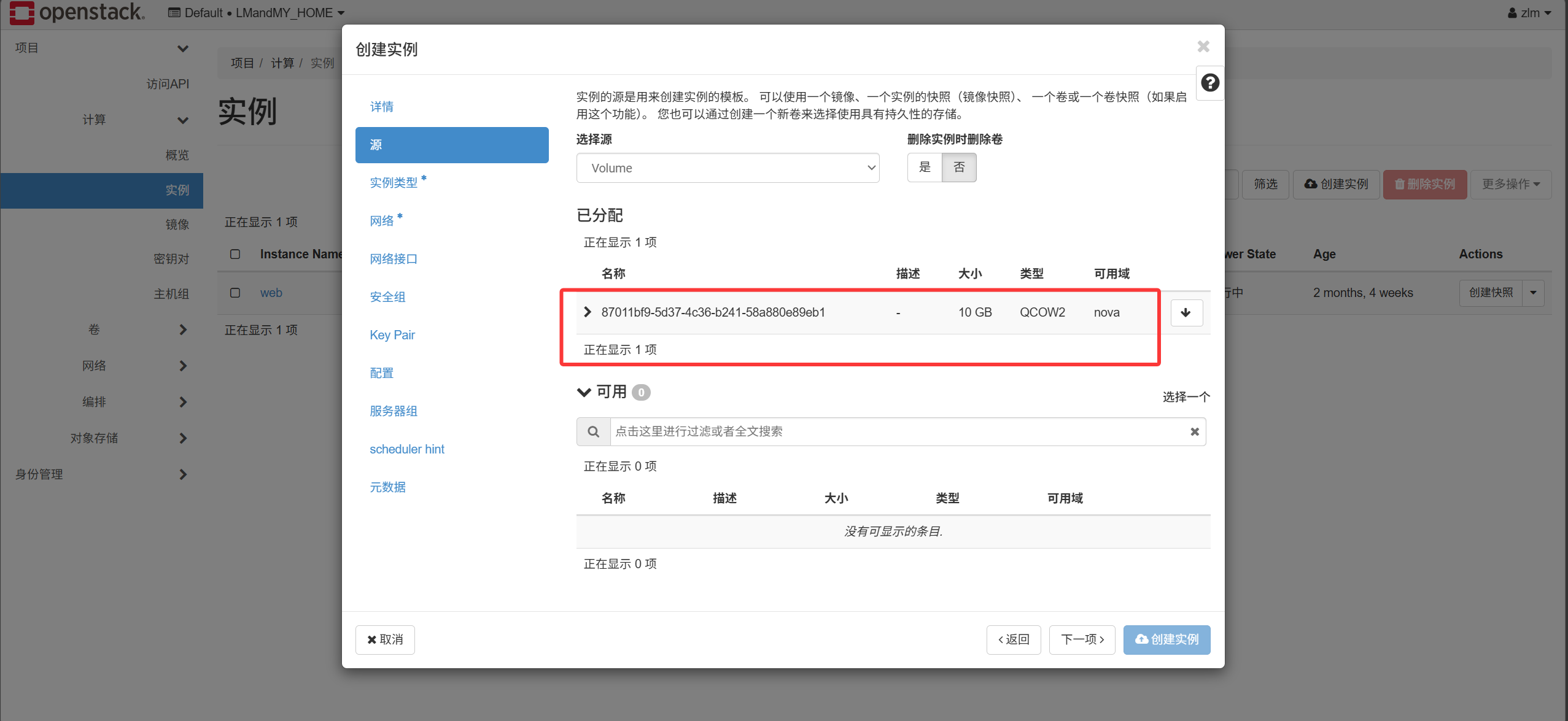
OpenStack の Web 画面でボリュームを作成し、nfs を選択、ソースにイメージを選びます。クラウドサーバー作成時にはソースとして先ほど作成したボリュームを選択します
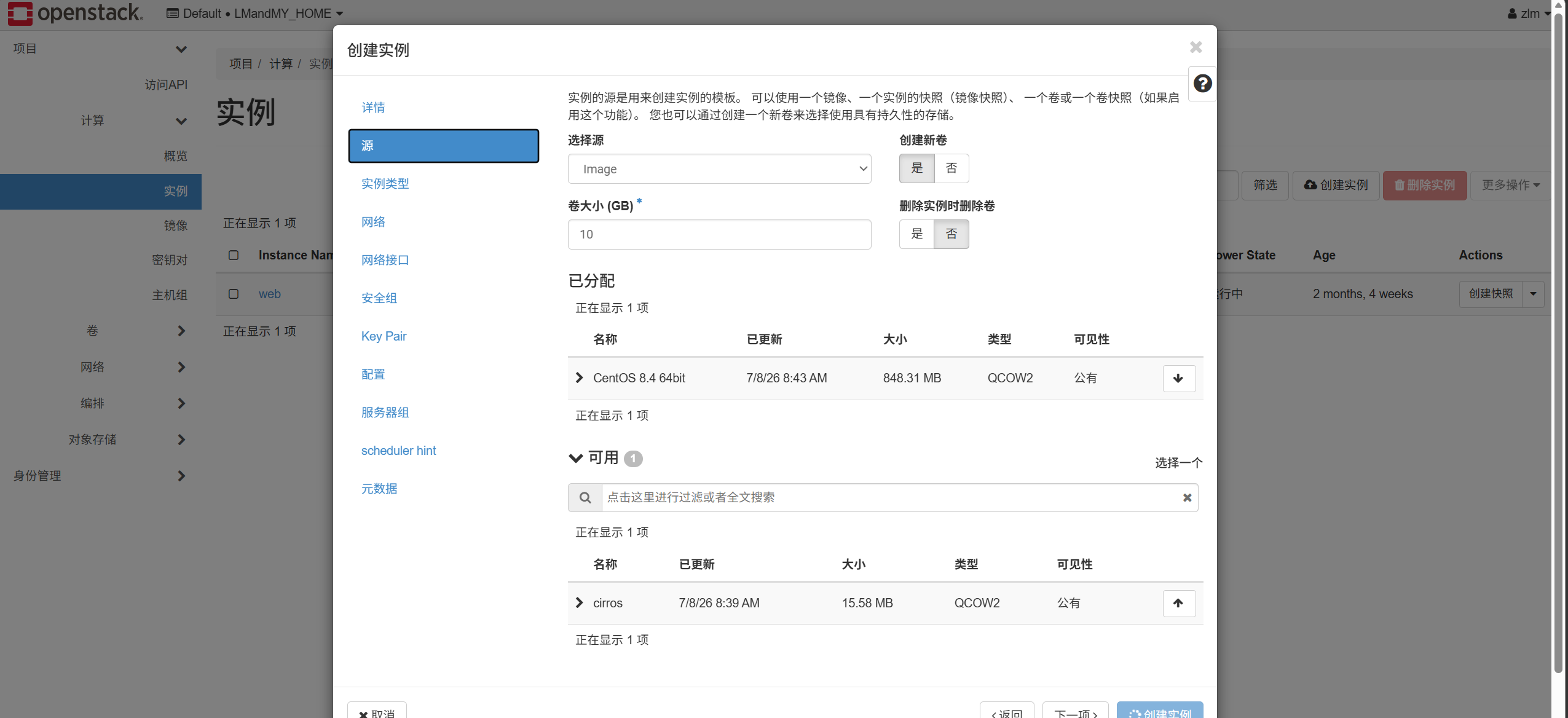
クラウドサーバーを作成し終えると 1 つのボリュームが生成されます
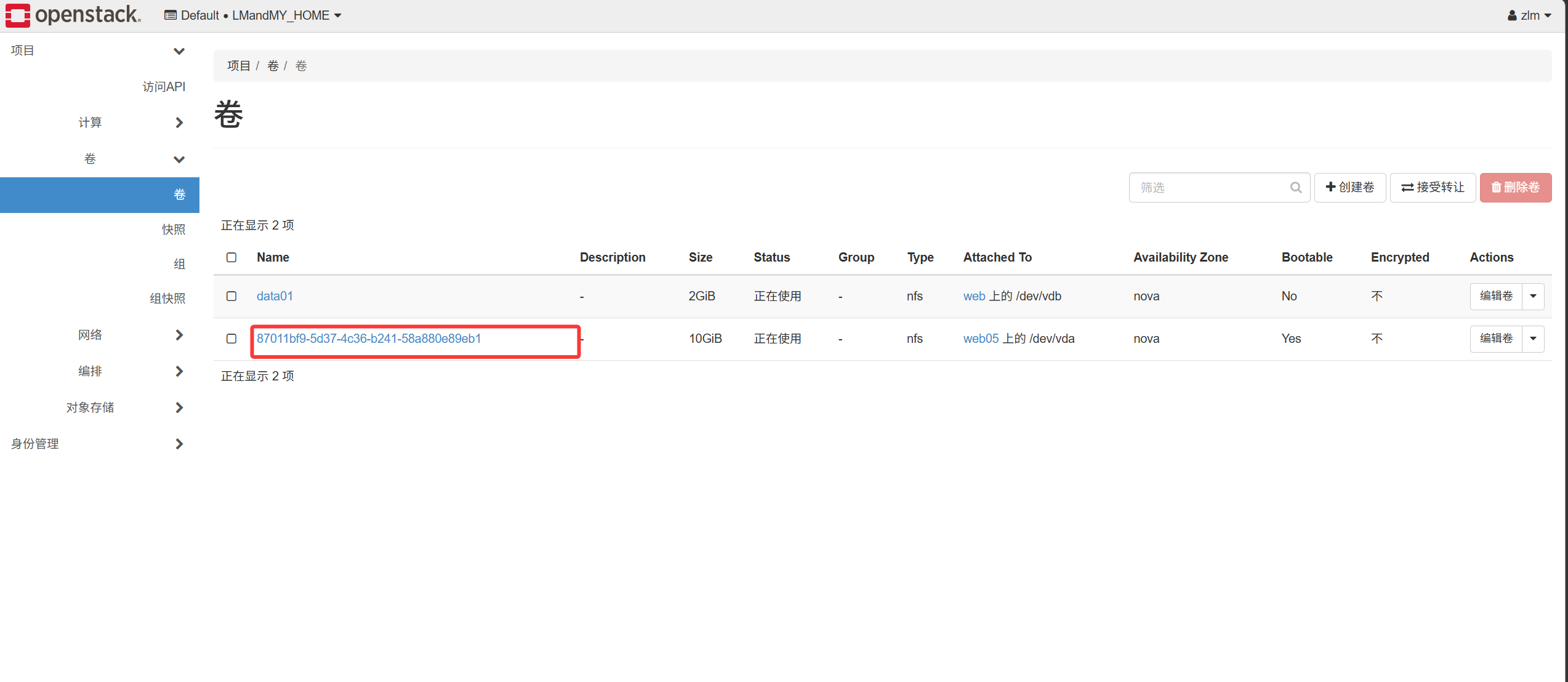
元のクラウドサーバーを削除して再度作成し直すと、このボリュームが利用できるようになります