01. GitLab 関連サイト#
-
公式サイト:https://about.gitlab.com/
-
国内ミラー:https://mirrors.tuna.tsinghua.edu.cn/gitlab-ce/yum/
02. GitLab のデプロイ#
 1
 2
 3
 4
 5
 6
 7
 8
 9
10
11
12
13
14
15
16
17
18
19
20
21
22
23
24
25
26
27
28
29
30
|
I. 環境準備
1、OS:CentOS 7.9
2、メモリ:実験用 4G、本番用 8G 以上
3、ファイアウォールを無効化し、SELinux を無効にする

II. GitLab の RPM パッケージをダウンロード
[root@gitlab ~]# wget https://mirrors.tuna.tsinghua.edu.cn/gitlab-ce/yum/el7/gitlab-ce-16.9.8-ce.0.el7.x86_64.rpm

III. GitLab をインストール
# インストール中に依存関係のインストールが必要
[root@gitlab ~]# rpm -ivh gitlab-ce-16.9.8-ce.0.el7.x86_64.rpm
warning: gitlab-ce-16.9.8-ce.0.el7.x86_64.rpm: Header V4 RSA/SHA1 Signature, key ID f27eab47: NOKEY
error: Failed dependencies:
    policycoreutils-python is needed by gitlab-ce-16.9.8-ce.0.el7.x86_64
# 依存関係をインストール
[root@gitlab ~]# yum -y install policycoreutils-python
# 依存関係インストール後に GitLab のインストールを続行
[root@gitlab ~]# rpm -ivh gitlab-ce-16.9.8-ce.0.el7.x86_64.rpm
warning: gitlab-ce-16.9.8-ce.0.el7.x86_64.rpm: Header V4 RSA/SHA1 Signature, key ID f27eab47: NOKEY
Preparing...                          ################################# [100%]
Updating / installing...
   1:gitlab-ce-16.9.8-ce.0.el7        ################################# [100%]

IV. 起動前にアクセス用ドメインまたは IP を設定
[root@gitlab ~]#  vim /etc/gitlab/gitlab.rb
...
external_url 'http://11.0.1.200'
...
設定後、以下のコマンドを実行:
[root@gitlab ~]# gitlab-ctl reconfigure
|
03. GitLab のコンポーネント#
1
2
3
4
5
6
7
|
nginx:           静的 Web サーバー
gitlab-workhorse: 軽量なリバースプロキシ
logrotate:       ログ管理ツール
postgresql:      データベース
redis:           キャッシュデータベース
sidekiq:         バックグラウンドのキュージョブを実行(非同期)。(Ruby)
unicorn:Rack アプリケーション用 HTTP サーバー。GitLab の Rails アプリはこのサーバーでホストされる。(Ruby Web サーバー、主に Ruby で記述)
|
04. よく使う GitLab コマンド#
1
2
3
4
5
|
gitlab-ctl start                # GitLab を起動(gitlab-ctl reconfigure 後は自動起動)
gitlab-ctl status               # GitLab 全サービスの稼働状態を確認
gitlab-ctl stop                 # GitLab サービスを停止
gitlab-ctl stop nginx           # 個別のサービスを停止
gitlab-ctl tail                 # 全サービスのログを表示
|
05. GitLab Web UI の設定#
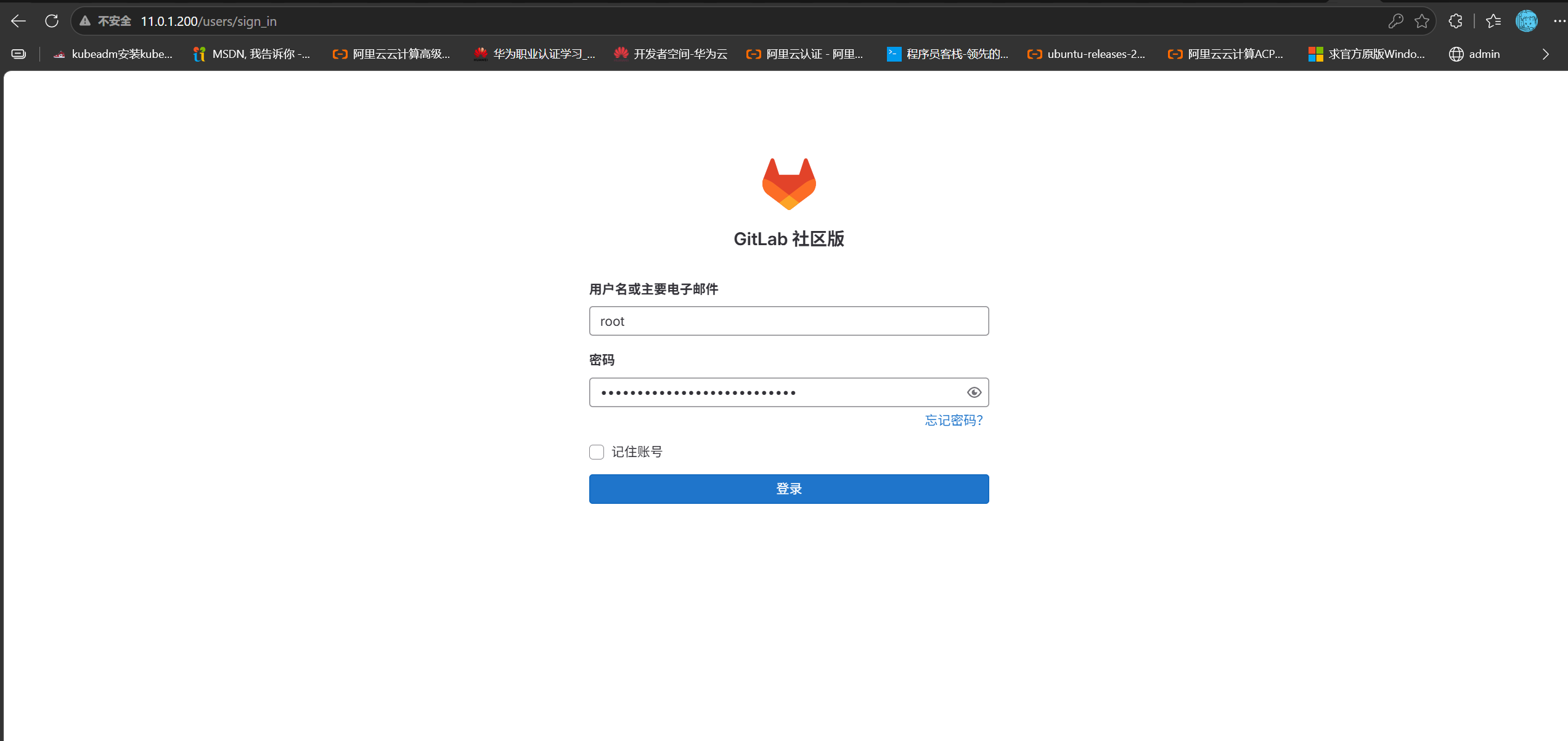
GitLab へログイン:11.0.1.200
1. ログインパスワード#
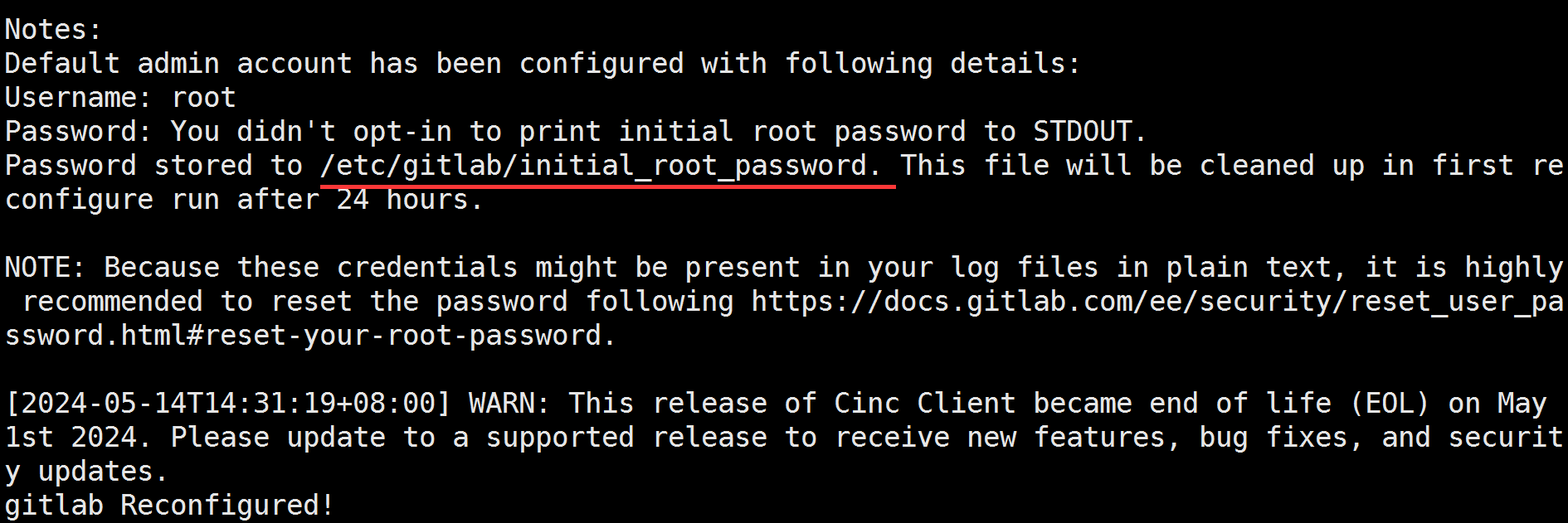
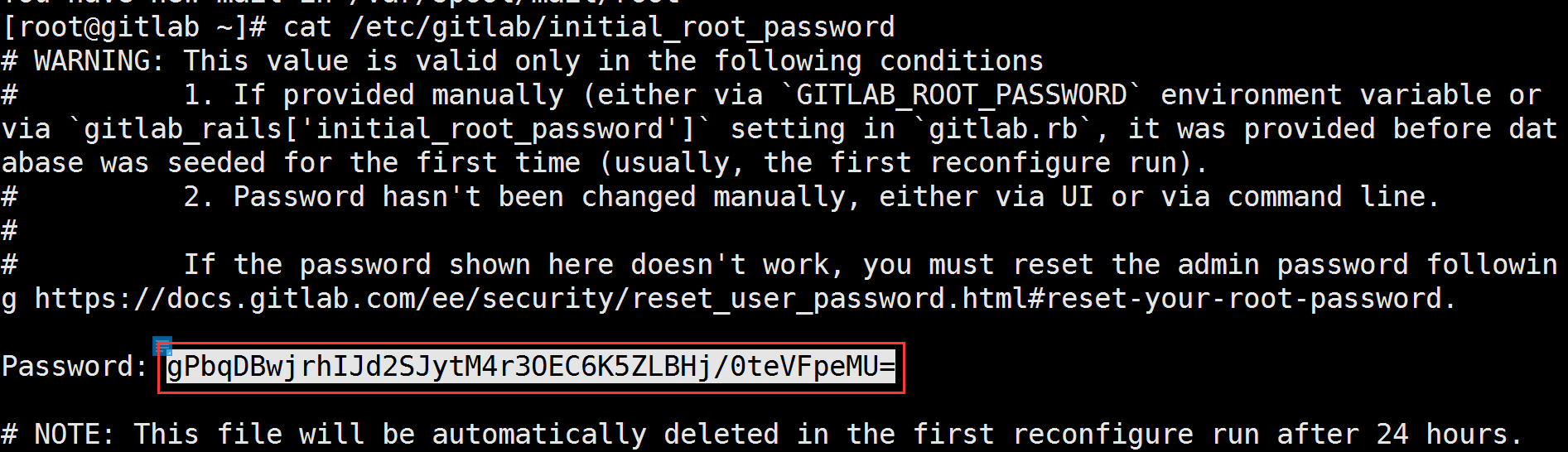
gitlab-ctl reconfigure 完了後、パスワードの保存場所が表示される:
2. UI 言語を中国語にする#
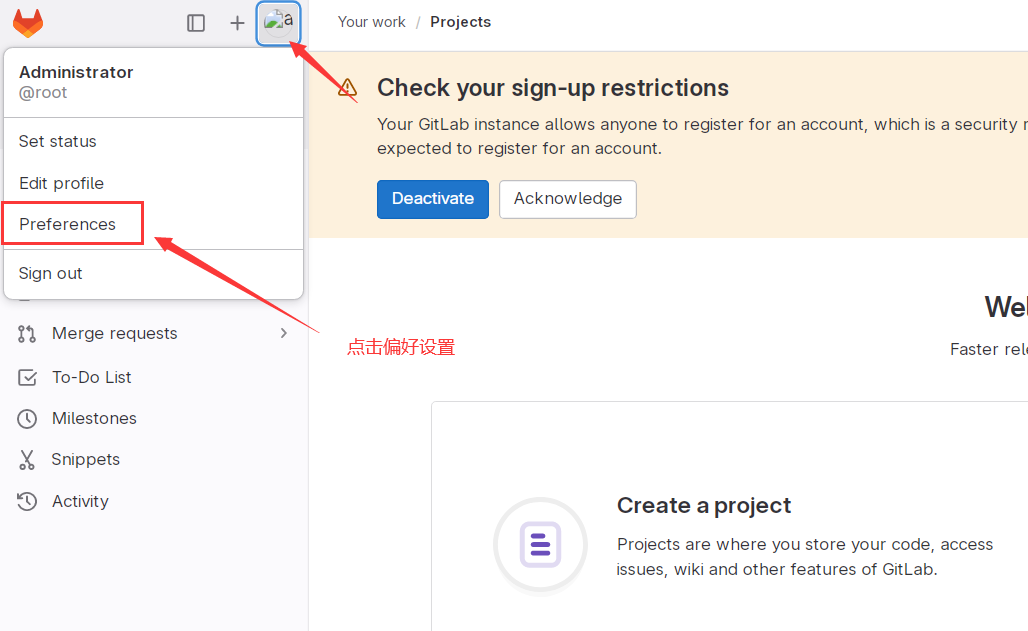
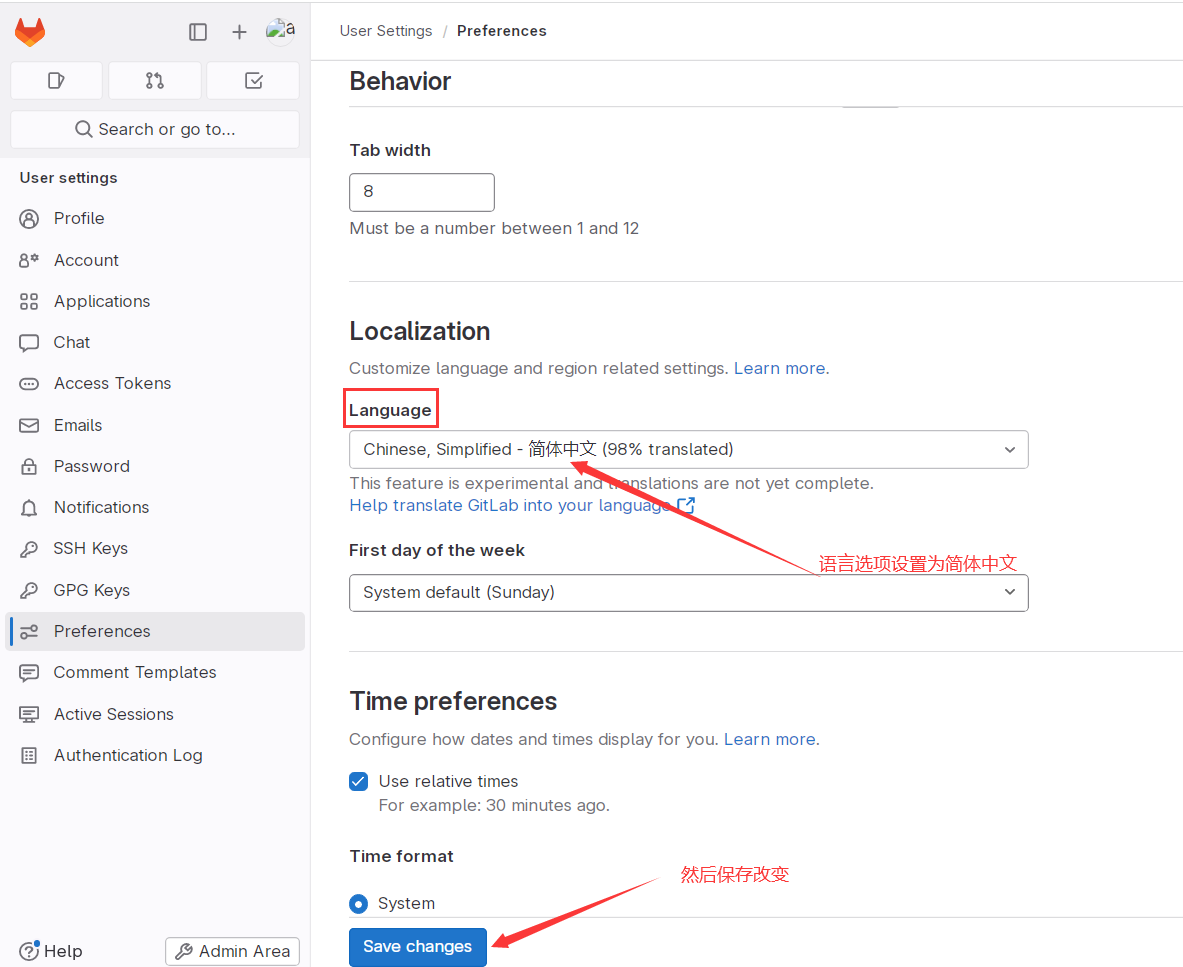
3. デフォルトパスワードを変更#
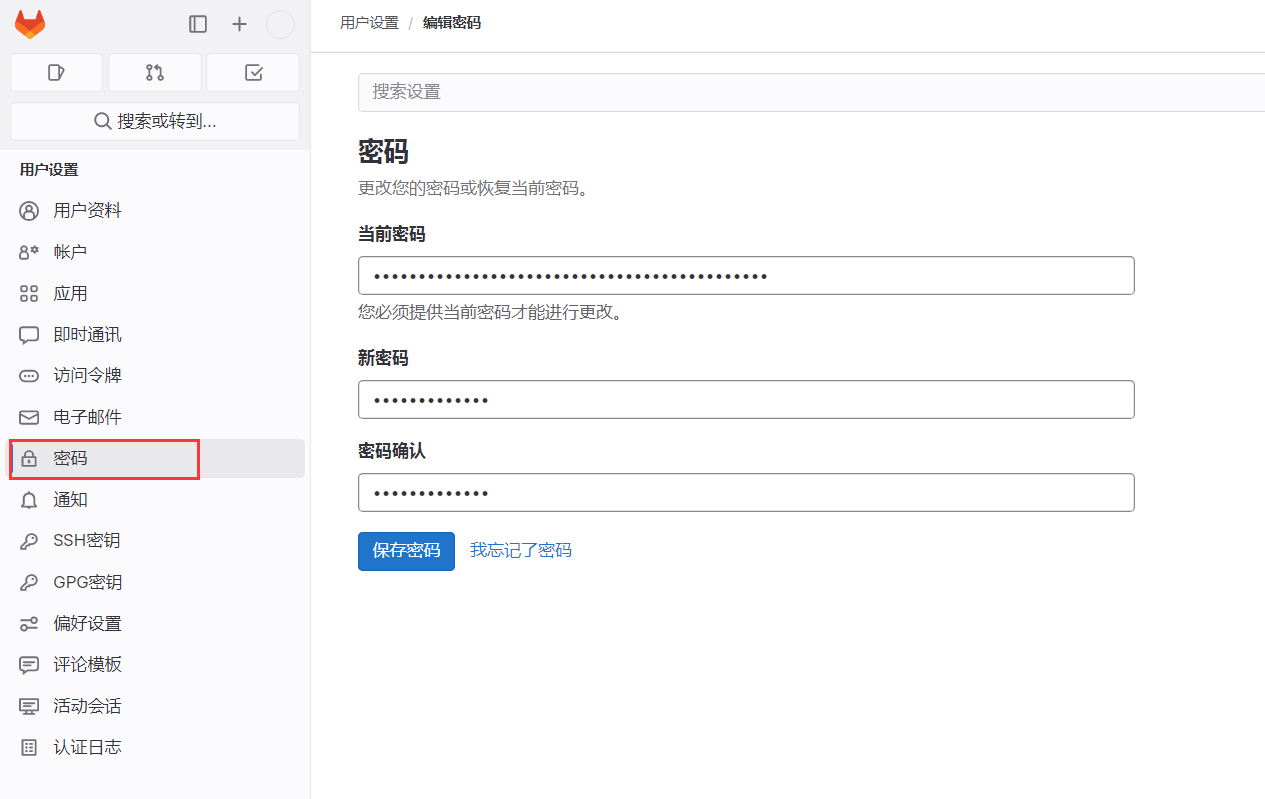
4. Webhook のローカルネットワーク要求を許可#
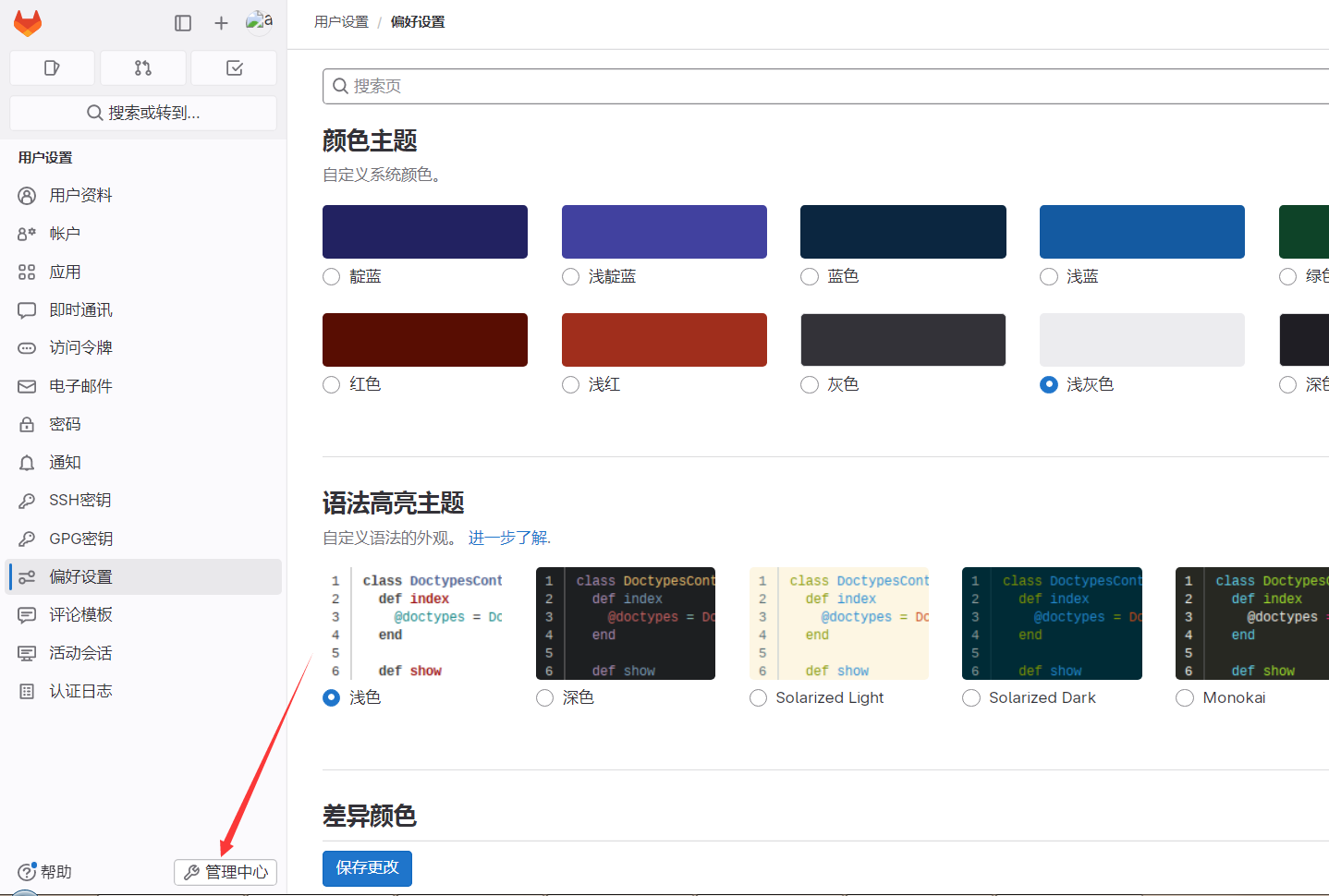
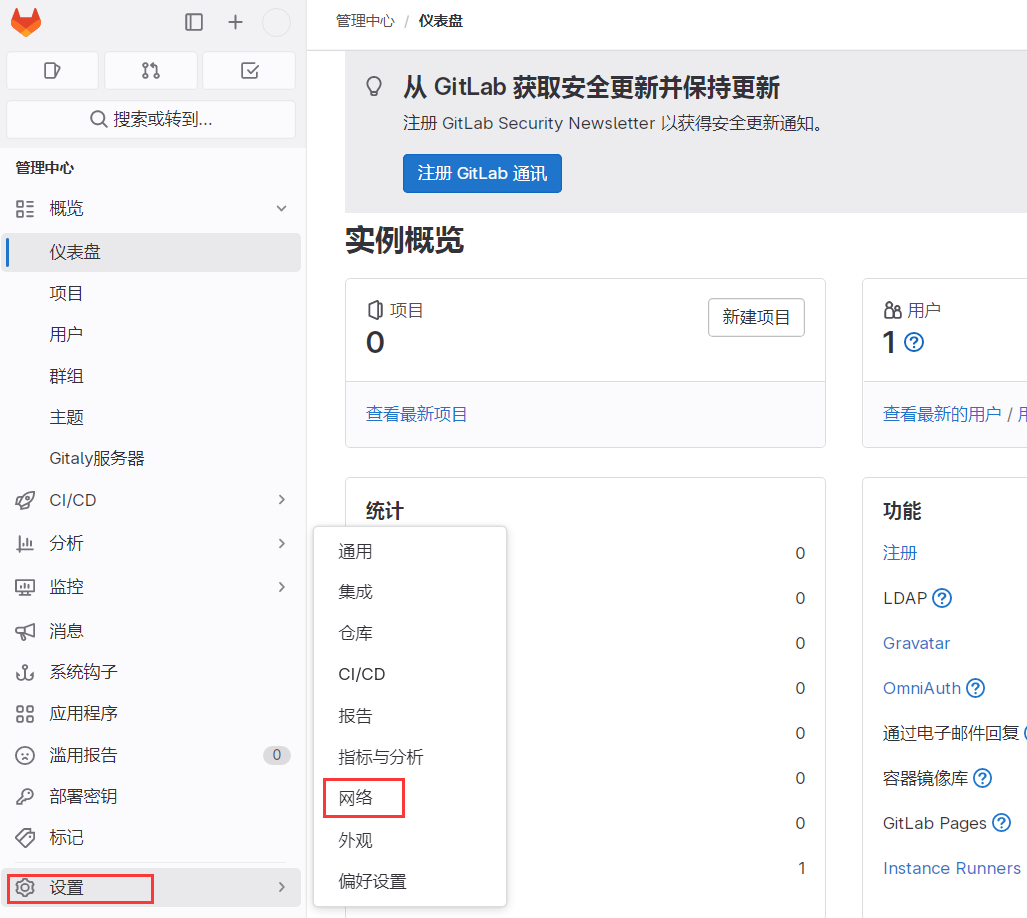
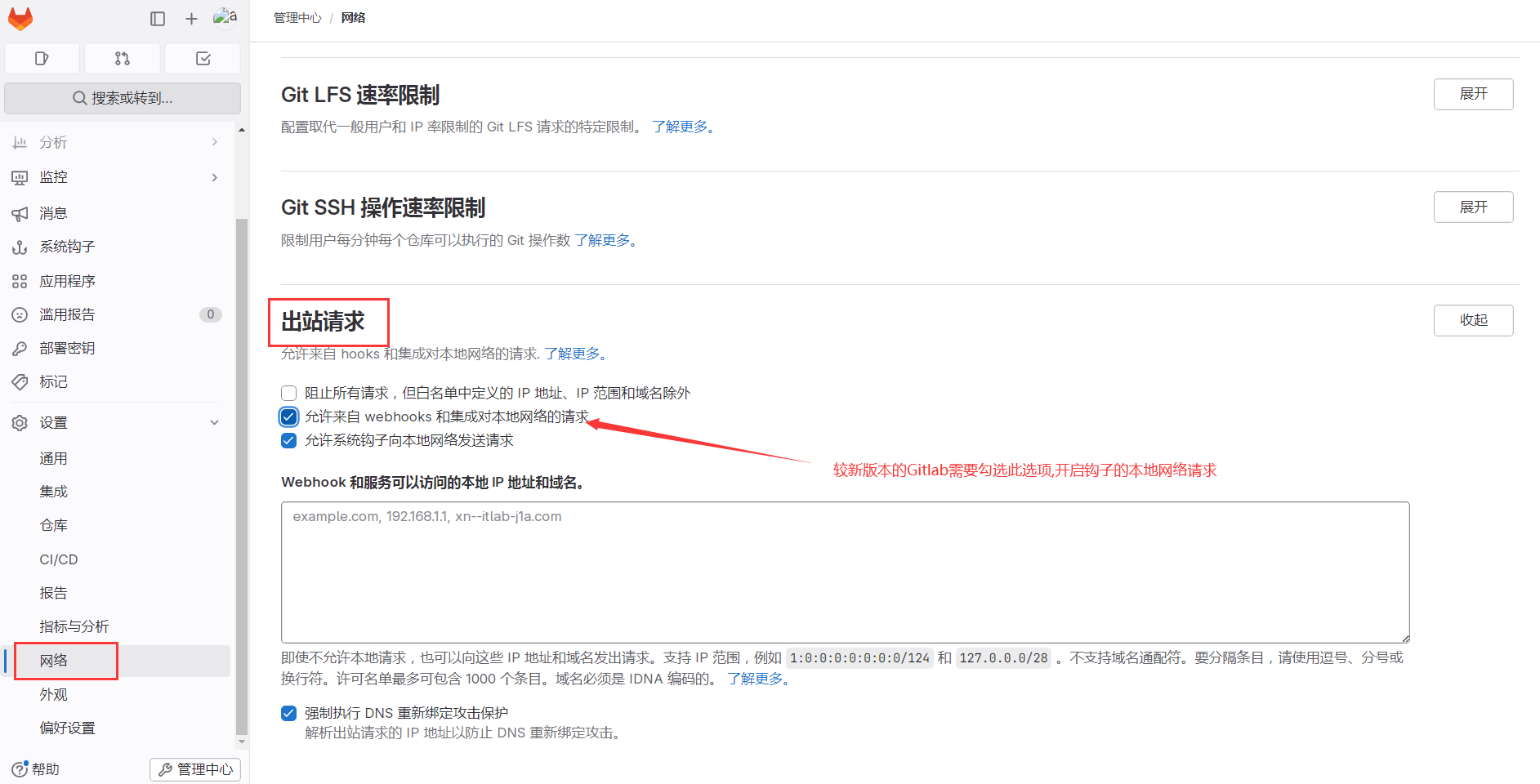
06. GitLab 実践#
1. グループを作成#
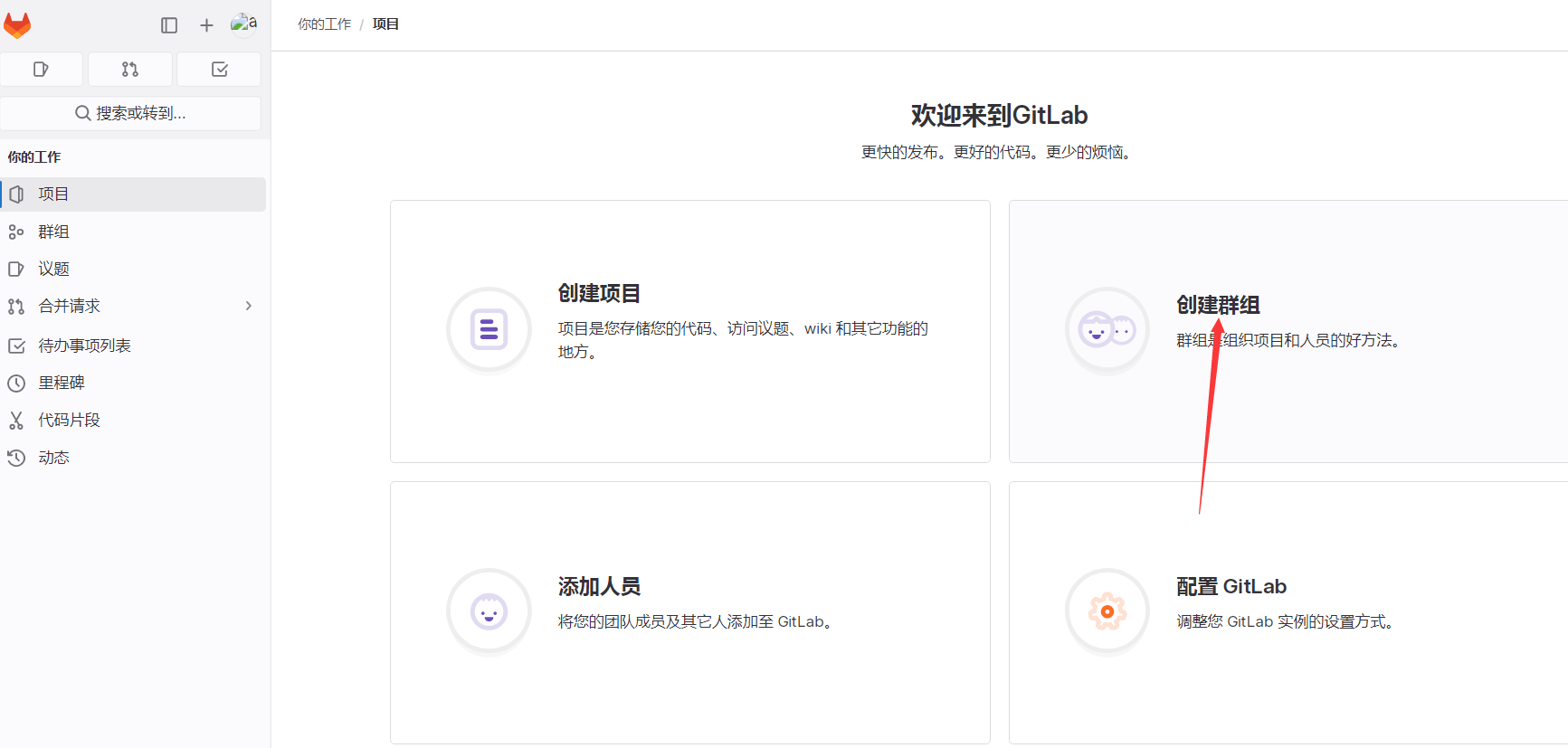
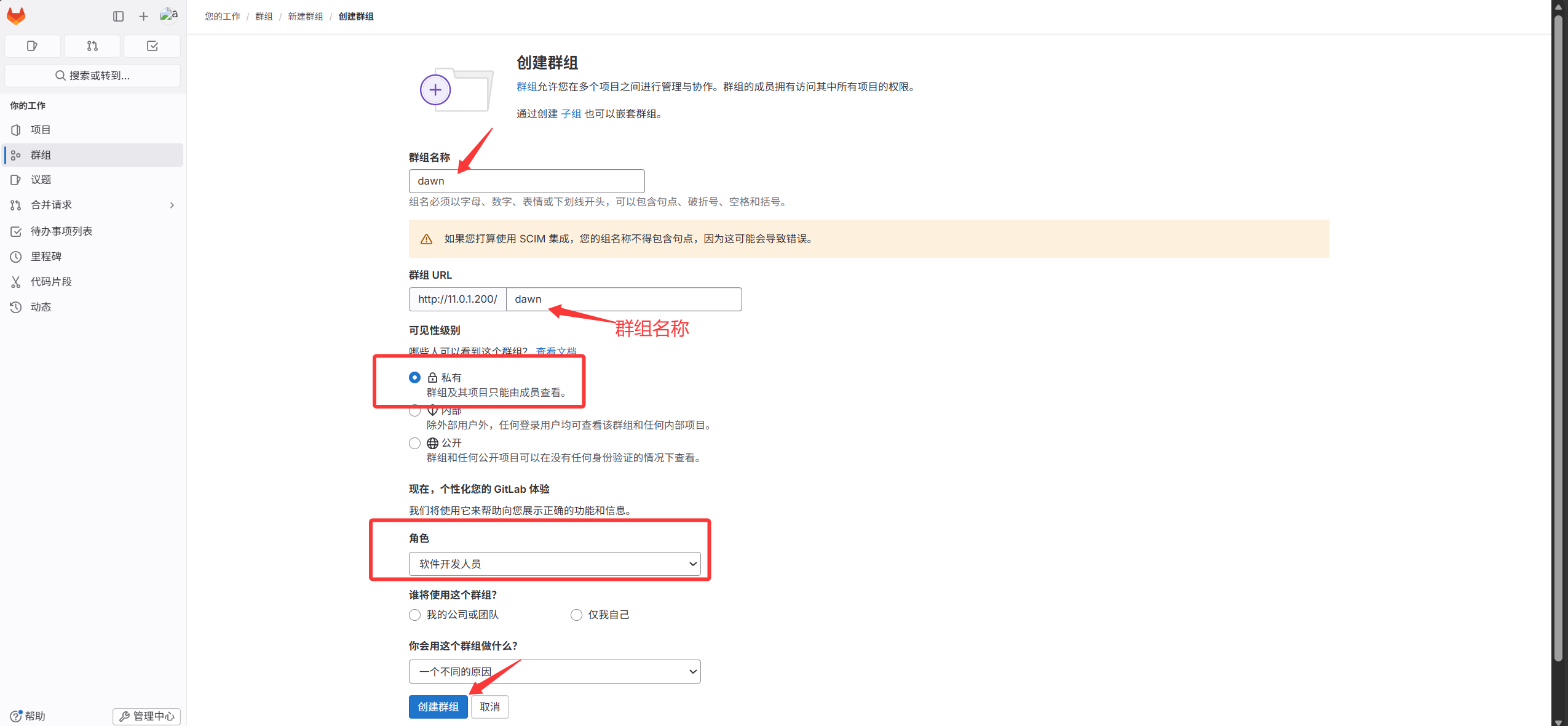
2. グループ配下にプロジェクトを作成#
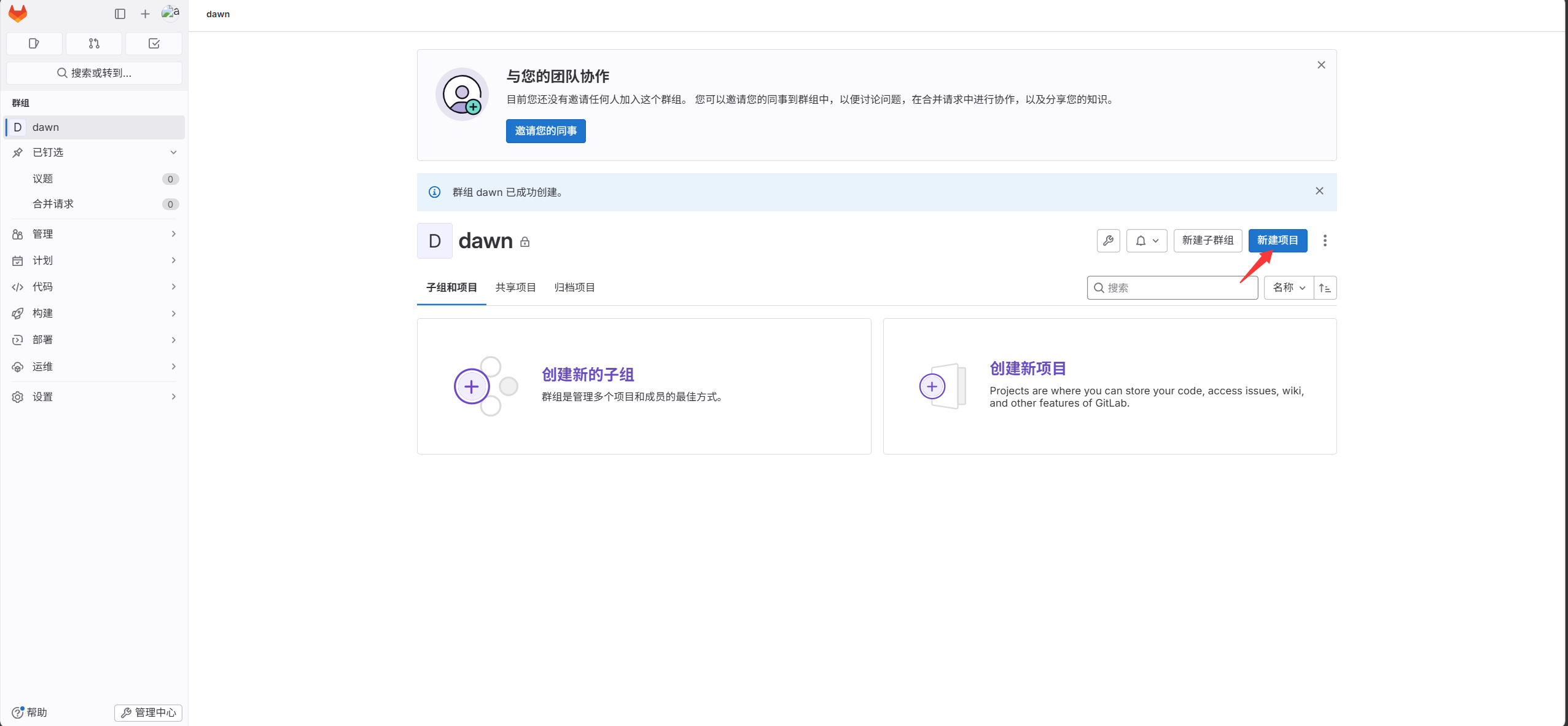
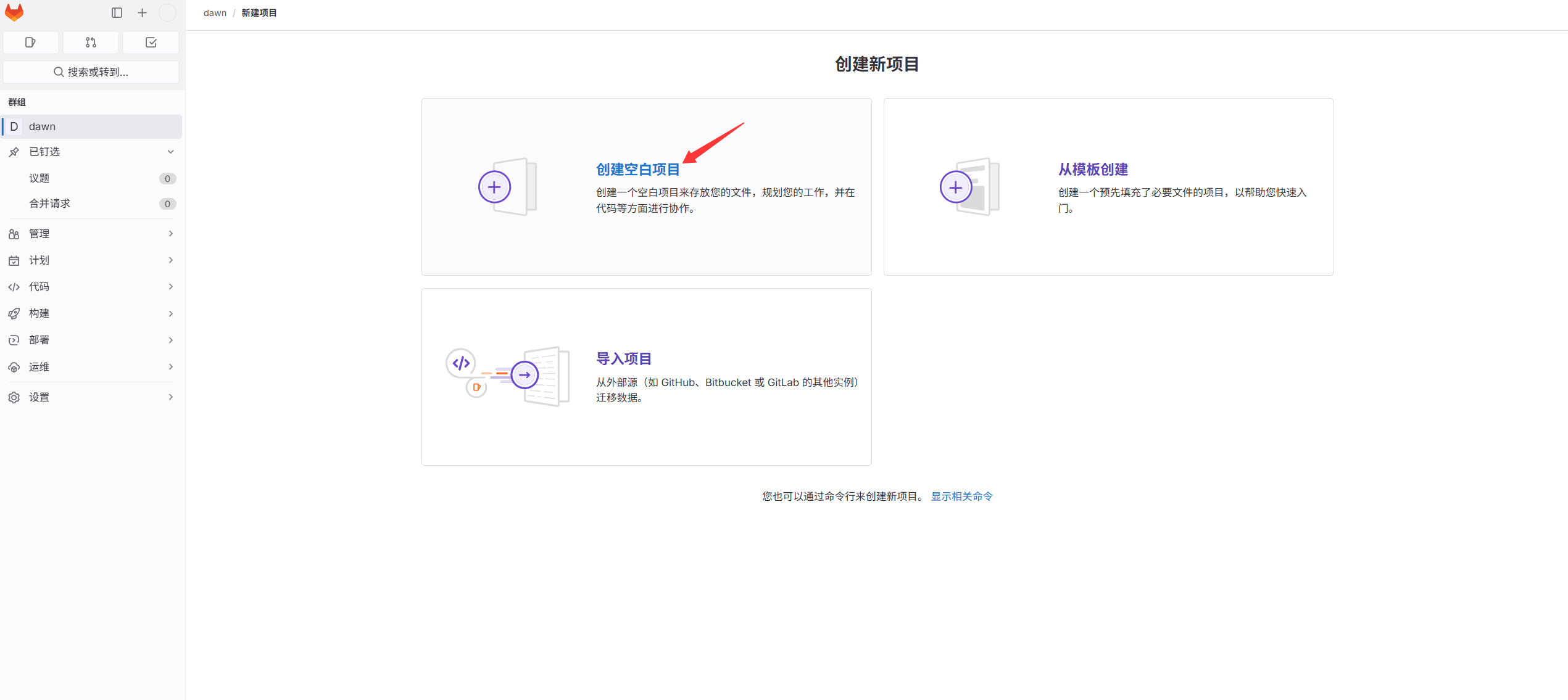
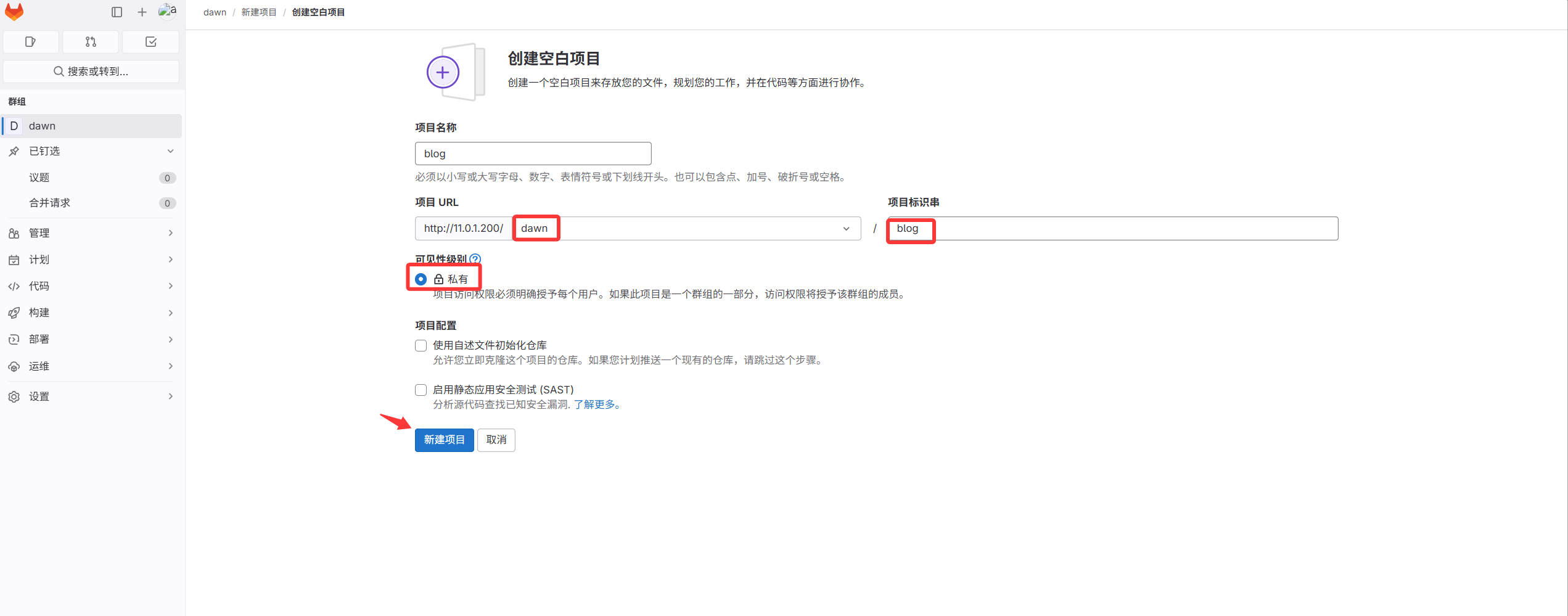
これで最初のコードリポジトリが作成されたが、中身は空。次にコードをアップロードする
3. コードをプロジェクトにコミット#
プロジェクト作成後、blog のコードをこのプロジェクトにアップロードする
サーバーとコードリポジトリの接続方法は 2 つある
1 つ目:ユーザー名とパスワードで接続
2 つ目:SSH 鍵認証(非対話)で接続
私たちは鍵認証方式を使う:便利でセキュリティも高い
- 鍵ペアを生成(ここでは GitLab サーバーを直接使用)
 1
 2
 3
 4
 5
 6
 7
 8
 9
10
11
12
13
14
15
16
17
18
19
20
21
22
23
24
25
26
27
28
29
30
|
[root@gitlab ~]#ssh-keygen
Generating public/private rsa key pair.
Enter file in which to save the key (/root/.ssh/id_rsa):
Created directory '/root/.ssh'.
Enter passphrase (empty for no passphrase):
Enter same passphrase again:
Your identification has been saved in /root/.ssh/id_rsa.
Your public key has been saved in /root/.ssh/id_rsa.pub.
The key fingerprint is:
SHA256:j3FozajJdufxM0ZRtgPa2ZNSwWKvo8bvxbMJl8F5V3M root@gitlab
The key's randomart image is:
+---[RSA 2048]----+
|             ... |
|            + =  |
|           + X +E|
|         =. =.B.+|
|        S +  ++oo|
|     . + =  +. +.|
|      = o.+o..*  |
|     . . o+o++ + |
|         ..++oo  |
+----[SHA256]-----+

鍵ペアを確認:
[root@gitlab ~]# ll .ssh/
total 8
-rw------- 1 root root 1679 May 14 15:02 id_rsa         # 秘密鍵
-rw-r--r-- 1 root root  393 May 14 15:02 id_rsa.pub     # 公開鍵
[root@gitlab ~]#cat .ssh/id_rsa.pub
ssh-rsa AAAAB3NzaC1yc2EAAAADAQABAAABAQDJGpCKL64eidZ3I/nAVNCNJwD8yeDqelZP0GUTwlcp6IdKaZ7wUOIRDCtGn5r+YnOCKNwMhUNzb3VCOSVLDVIE0x53dPrCMK4OKLmZ6OtTYFBveGOZWWwdYyGQITx2eP7zOSBxeW3AnEWcya/UZdiZrYXA/d29DWjMjCt5QAxOit0EWSir1Z4i2MkTPuljOmjk6A55XAoem0WJRdg/d8KKIiCdcGrj4adYq2kNJ8oYH/9QcnpASUW/ANhzrALnLIX2WaH/p0T3gisLvk2KDUe3rVKD3XaKDlyLgWIViQFm3Me6L2e4taRFiu3VdsbfFfzjDevfDtLaqKLOqPtaczlF root@gitlab
|
- 生成した公開鍵を GitLab の SSH 鍵管理ページに貼り付ける
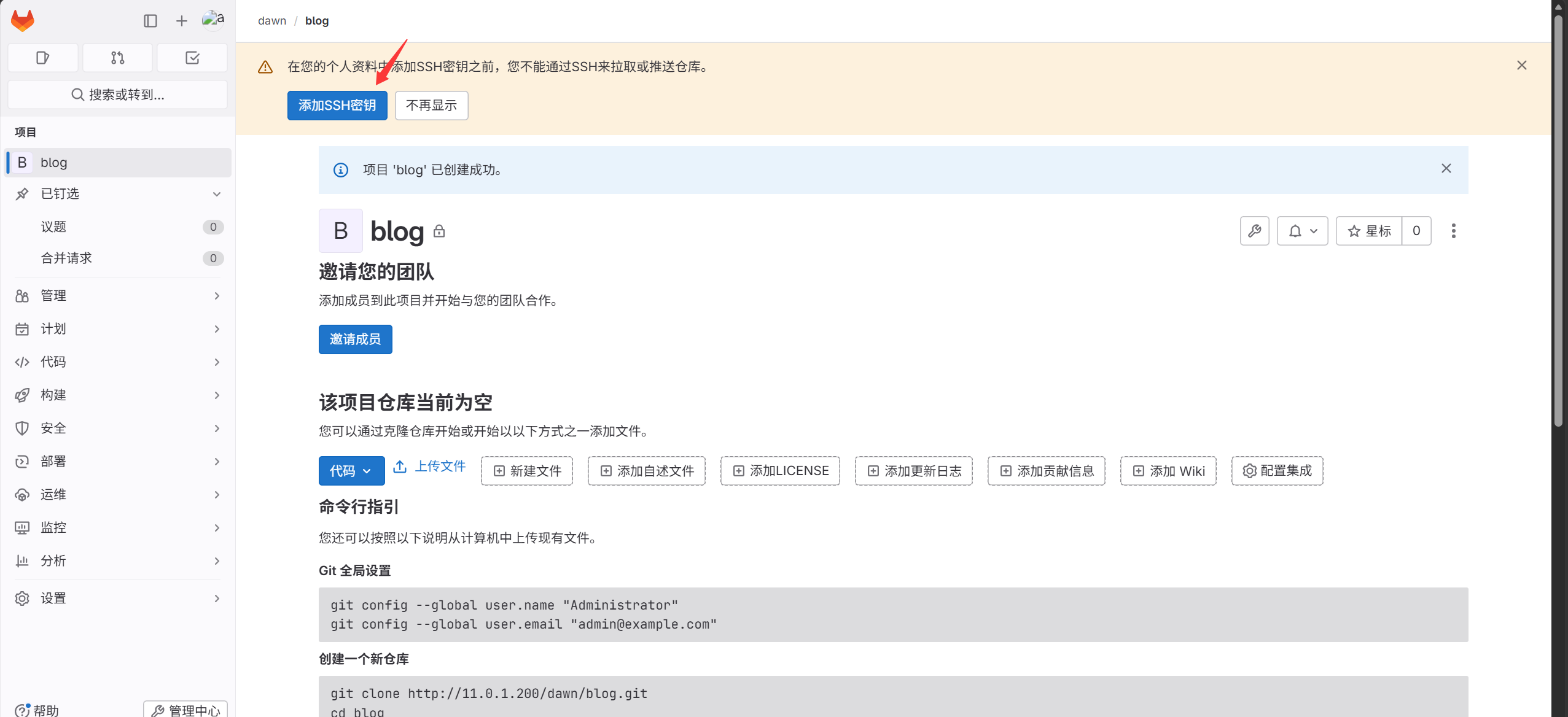
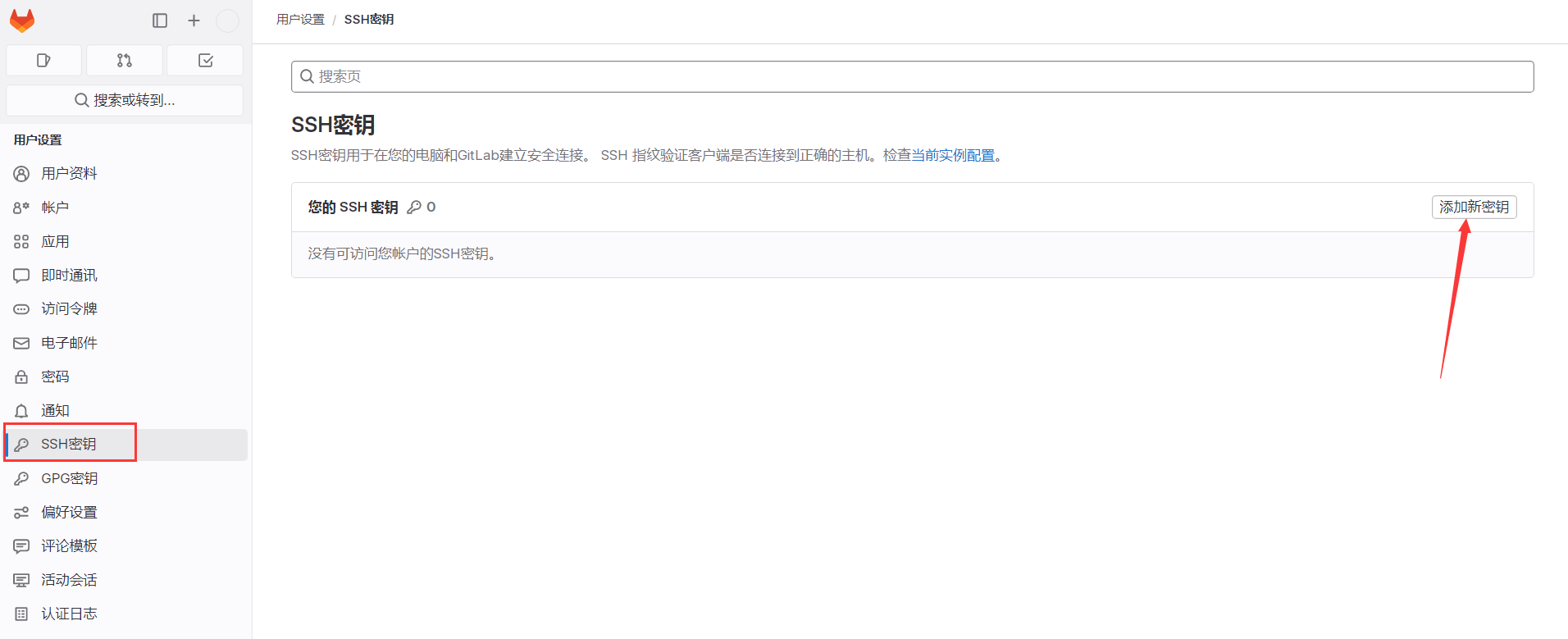
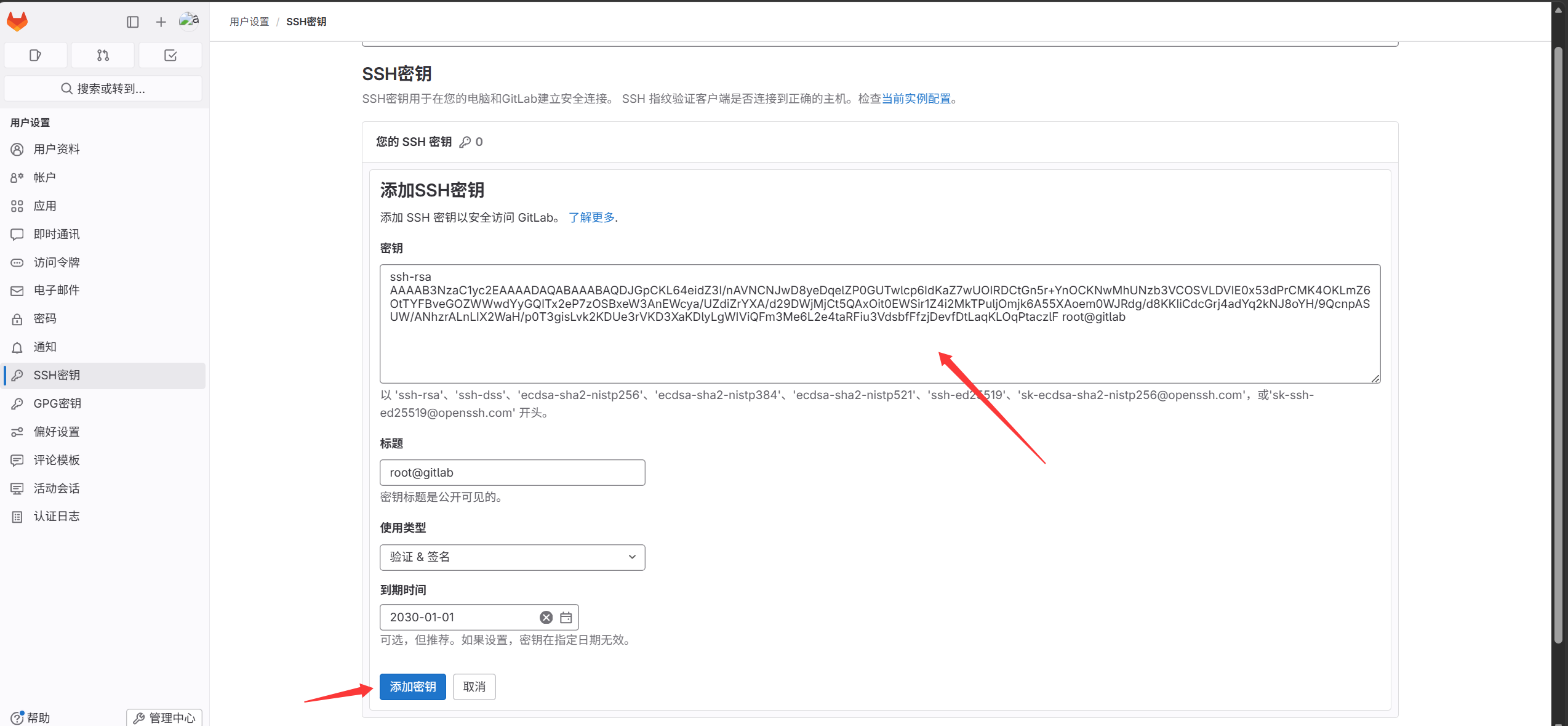
これでサーバーと GitLab UI 間の SSH 鍵認証が完了。次にコードを blog プロジェクトにプッシュする
コードをプッシュする方法は 2 つある:
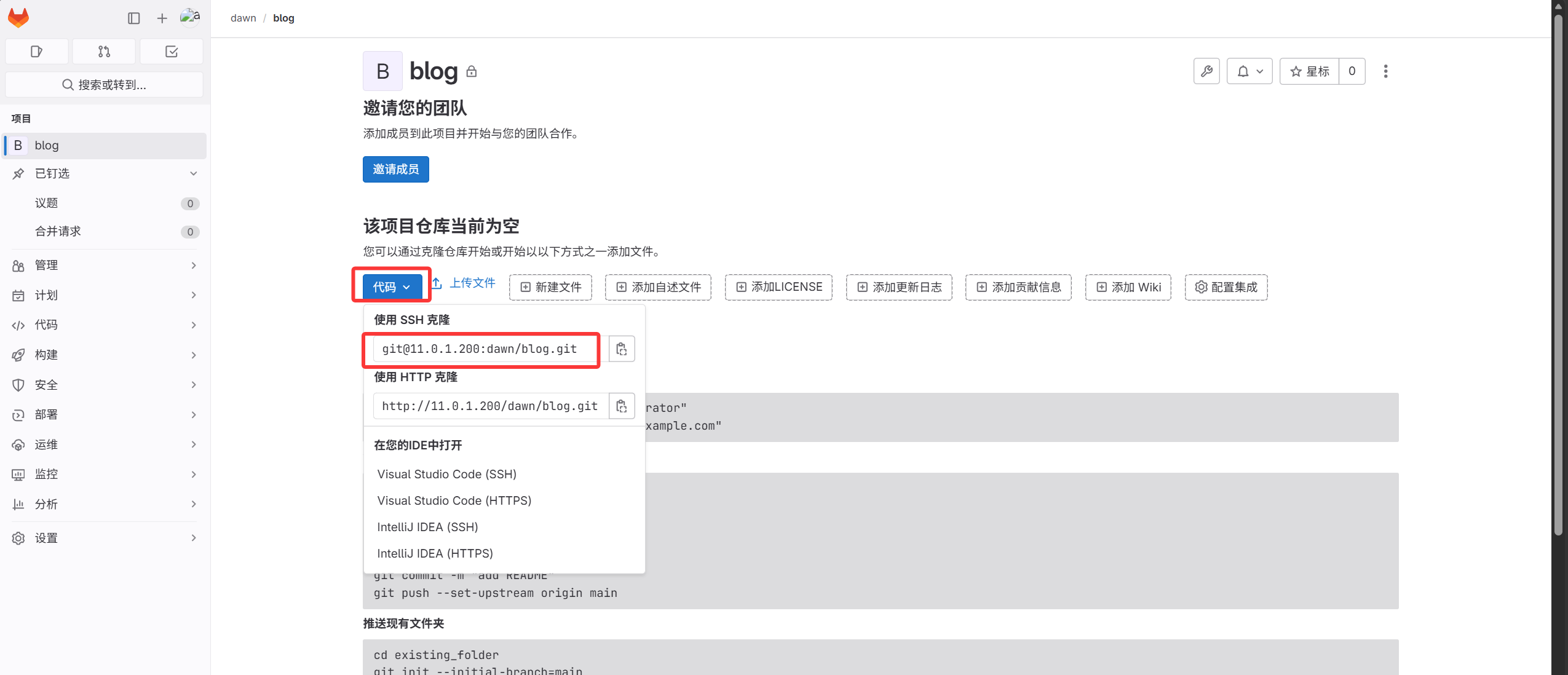
- 空のリポジトリをローカルにクローンし、コードをコピーしてからリモート GitLab にコミットする
プロジェクト内でリンクアドレスを確認する
 1
 2
 3
 4
 5
 6
 7
 8
 9
10
11
12
13
14
15
16
17
18
19
20
21
22
23
24
25
26
27
28
29
30
31
32
33
34
35
36
37
38
39
40
41
42
43
44
45
46
47
48
49
50
|
1. リンクをコピーして実行
[root@gitlab ~]#git clone git@11.0.1.200:dawn/blog.git
Cloning into 'blog'...
The authenticity of host '11.0.1.200 (11.0.1.200)' can't be established.
ECDSA key fingerprint is SHA256:Ldn1vBzBEFxynXs0qBNr0XzJ2lTx/0caMuK5yJtb+Zo.
ECDSA key fingerprint is MD5:3d:1d:28:3f:33:ec:ee:c1:69:83:af:14:a3:7f:79:ac.
Are you sure you want to continue connecting (yes/no)? yes
Warning: Permanently added '11.0.1.200' (ECDSA) to the list of known hosts.
warning: remote HEAD refers to nonexistent ref, unable to checkout.

2. blog リポジトリがローカルにダウンロードされたことを確認
[root@gitlab ~]#ll
total 1176964
drwxr-xr-x 3 root root         18 Oct  1 14:43 blog
-rw-r--r-- 1 root root   84579612 Oct  1 14:35 blog_backup_20261001-1435.tar.gz
drwxr-xr-x 3 root root         18 Sep 30 19:14 dawn
-rw-r--r-- 1 root root 1120627456 Sep 30 23:12 gitlab-ce-16.9.8-ce.0.el7.x86_64.rpm

3. blog ディレクトリに入る
[root@gitlab ~]#cd blog/

4. コードを展開:
[root@gitlab blog]#tar xf /root/blog_backup_20261001-1435.tar.gz -C .

5. コードをローカルリポジトリにコミット
[root@gitlab blog]#git add .
[root@gitlab blog]#git commit -m "DAWN’s Blog"
[master (root-commit) 5af4246] DAWN’s Blog
 3 files changed, 112 insertions(+)
 create mode 100644 blog_state.txt
 create mode 160000 myblog
 create mode 160000 myblog-deploy

6. コードをリモート GitLab の blog リポジトリにプッシュ
GitLab リポジトリを直接クローンしたため、ローカルディレクトリにはすでにリモート blog プロジェクトのアドレスが設定されている
リモートリポジトリを確認:
[root@gitlab blog]#git remote -v
origin  git@11.0.1.200:dawn/blog.git (fetch)
origin  git@11.0.1.200:dawn/blog.git (push)

ローカルの master をリモート origin にプッシュ
[root@gitlab blog]#git push -u origin master
Counting objects: 3, done.
Delta compression using up to 2 threads.
Compressing objects: 100% (3/3), done.
Writing objects: 100% (3/3), 1.23 KiB | 0 bytes/s, done.
Total 3 (delta 0), reused 0 (delta 0)
To git@11.0.1.200:dawn/blog.git
 * [new branch]      master -> master
Branch master set up to track remote branch master from origin.
|
blog プロジェクトを確認、コードのアップロード成功
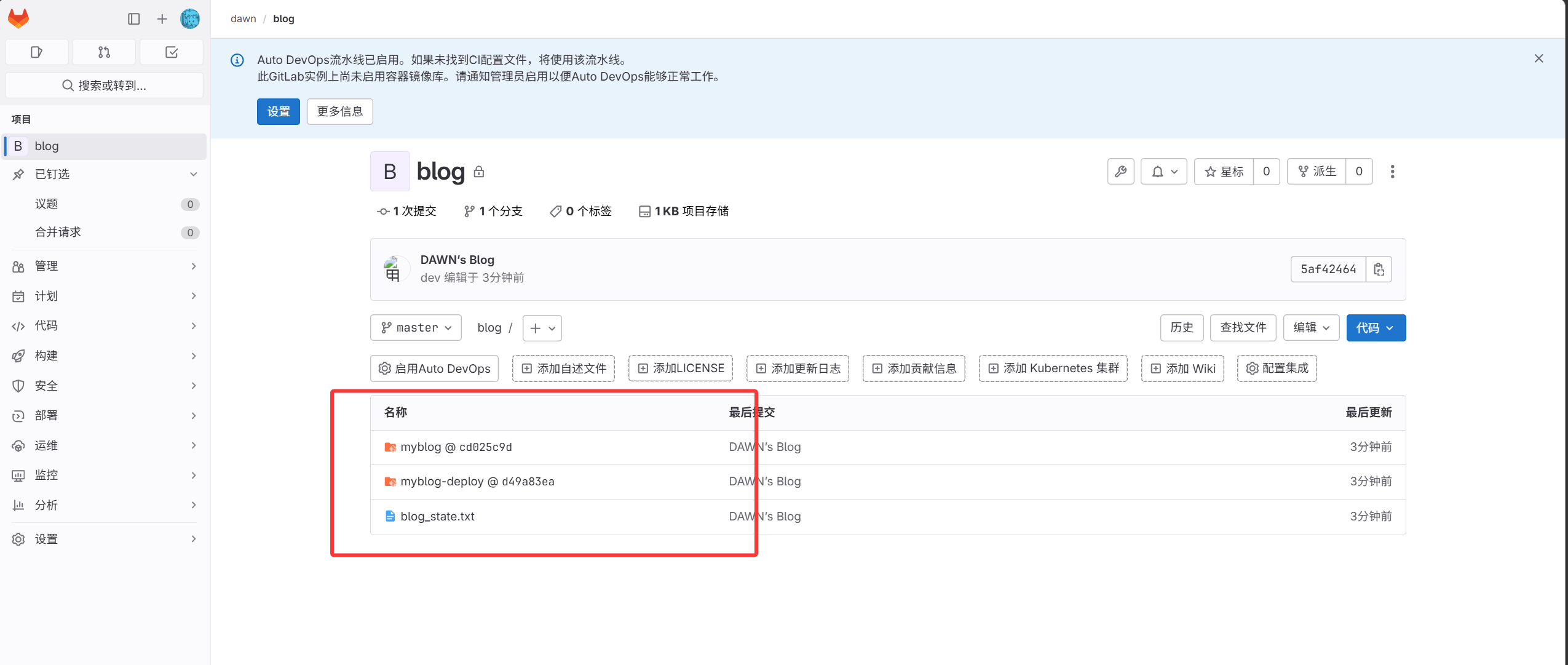
- ローカル Git リポジトリをリモート GitLab にプッシュ
 1
 2
 3
 4
 5
 6
 7
 8
 9
10
11
12
13
14
15
16
17
18
19
20
21
22
23
24
25
26
27
28
29
30
31
32
33
34
35
36
37
38
39
40
41
42
|
1. ローカルリポジトリを設定
[root@gitlab ~]#mkdir dawn
[root@gitlab ~]#cd dawn
2. リポジトリを初期化
[root@gitlab dawn]#git init
3. コードをアップロード
[root@gitlab dawn]#touch a.txt
[root@gitlab dawn]#git add .
[root@gitlab dawn]#git commit -m "test_v1"
[master (root-commit) 815c600] test_v1
 1 file changed, 0 insertions(+), 0 deletions(-)
 create mode 100644 a.txt

4. GitLab の blog リポジトリをローカルのリモートに設定
[root@gitlab dawn]#git remote add origin git@11.0.1.200:dawn/blog.git
5. ローカル内容をリモートにプッシュ(リモートにすでに内容があるため直接プッシュはエラーになる。リモート内容を保持するため、先に pull してマージしてからプッシュする)
[root@gitlab dawn]#git pull origin master
warning: no common commits
remote: Enumerating objects: 3, done.
remote: Counting objects: 100% (3/3), done.
remote: Compressing objects: 100% (3/3), done.
remote: Total 3 (delta 0), reused 0 (delta 0), pack-reused 0
Unpacking objects: 100% (3/3), done.
From 11.0.1.200:dawn/blog
 * branch            master     -> FETCH_HEAD
Merge made by the 'recursive' strategy.
 blog_state.txt | 110 ++++++++++++++++++++++++++++++++++++
 myblog         |   1 +
 myblog-deploy  |   1 +
 3 files changed, 112 insertions(+)
 create mode 100644 blog_state.txt
 create mode 160000 myblog
 create mode 160000 myblog-deploy
[root@gitlab dawn]#git push -u origin master
Counting objects: 6, done.
Delta compression using up to 2 threads.
Compressing objects: 100% (3/3), done.
Writing objects: 100% (5/5), 462 bytes | 0 bytes/s, done.
Total 5 (delta 1), reused 0 (delta 0)
To git@11.0.1.200:dawn/blog.git
   5af4246..0242e0a  master -> master
Branch master set up to track remote branch master from origin.
|
- 一般ユーザー dev を作成
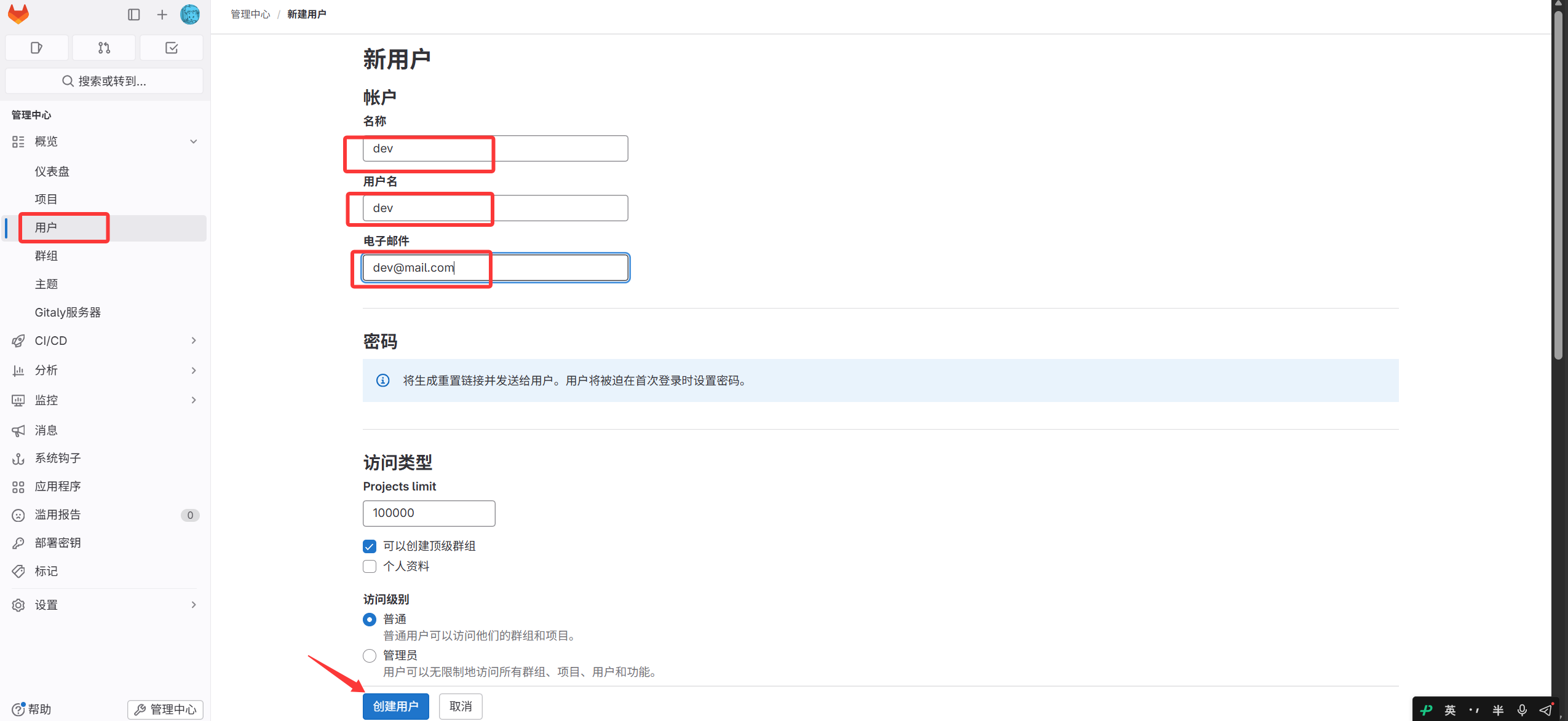
作成後、dev のパスワードを変更(ログアウトしないこと。ユーザー画面の編集をクリック)
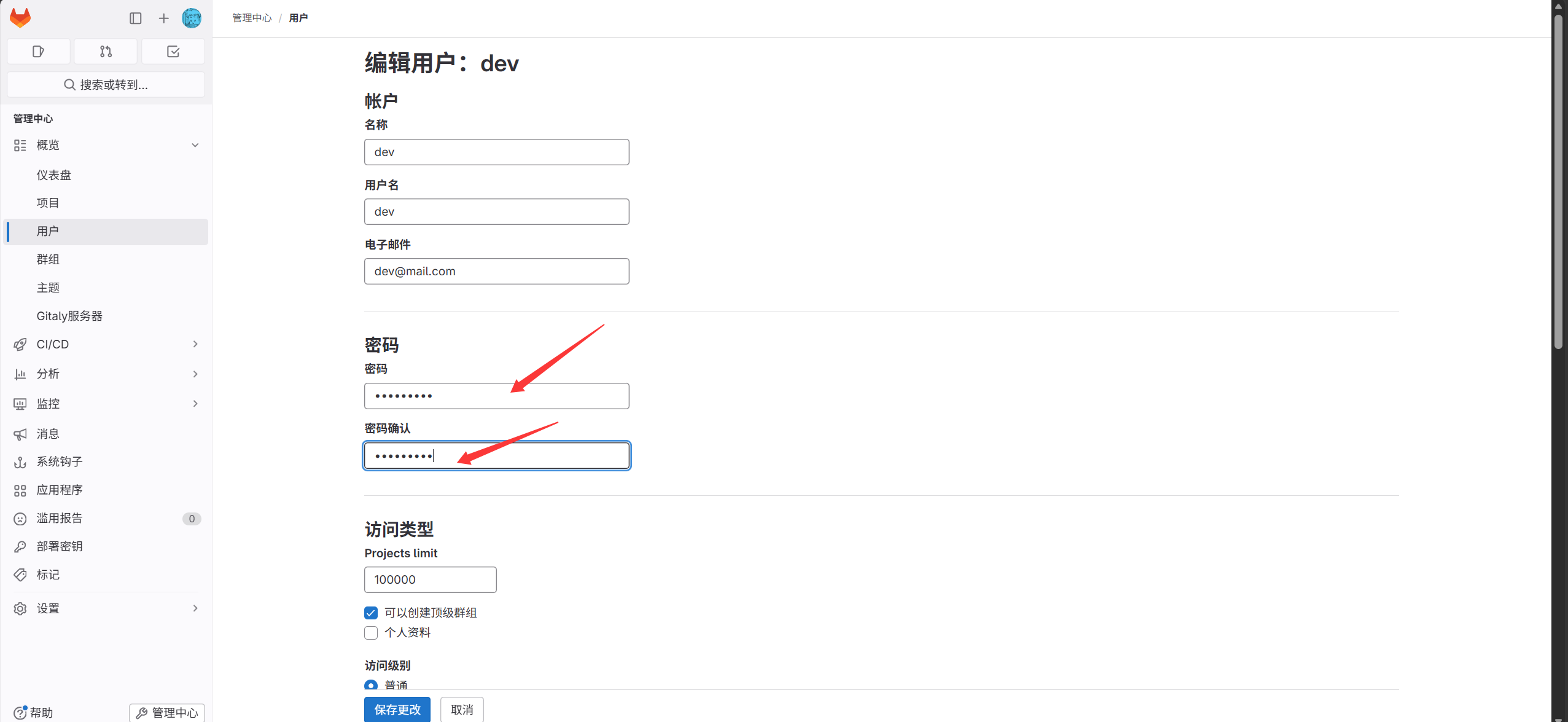
その後、dev で GitLab にログイン(初回ログイン時にパスワード変更が必要)
- dev ユーザーを dawn グループに追加
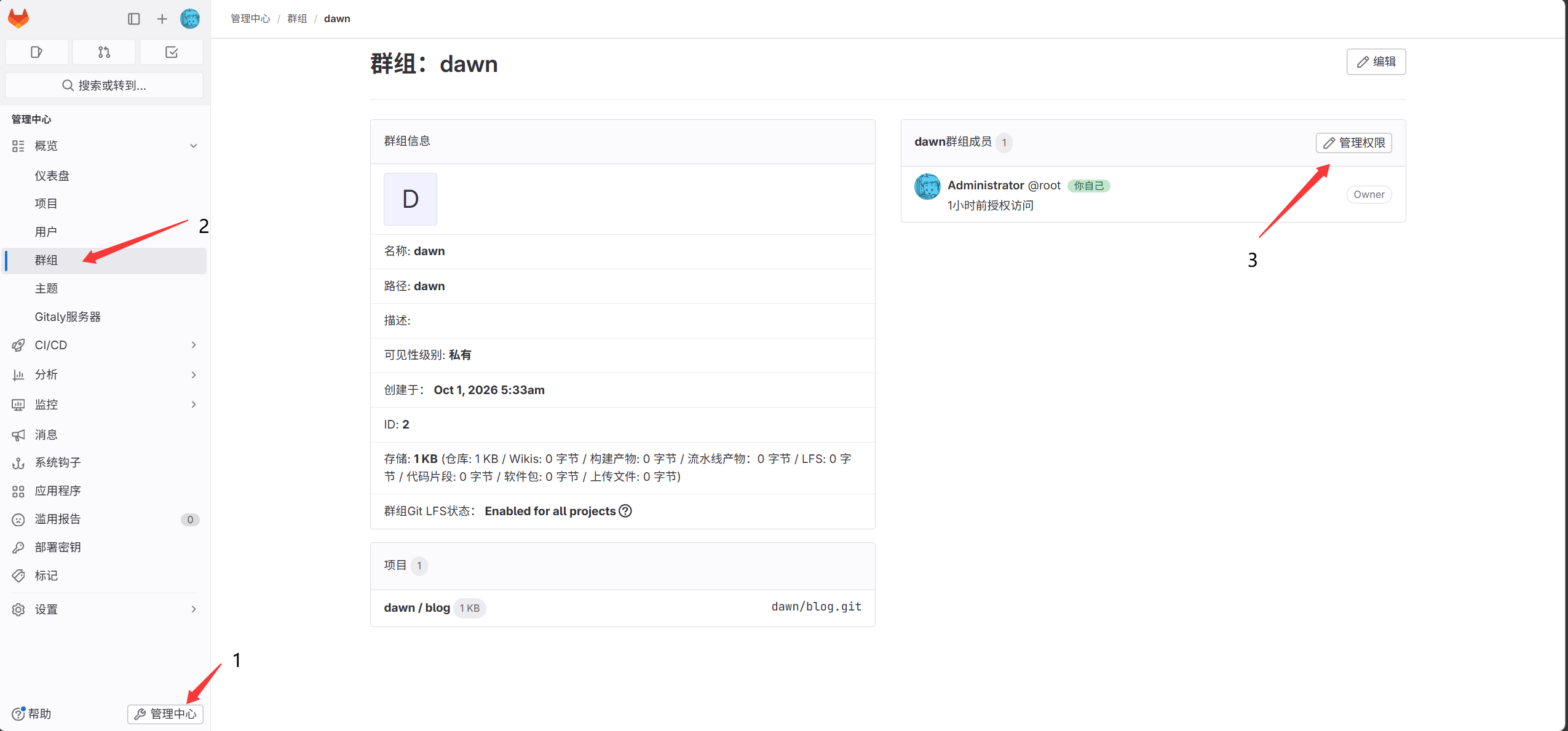
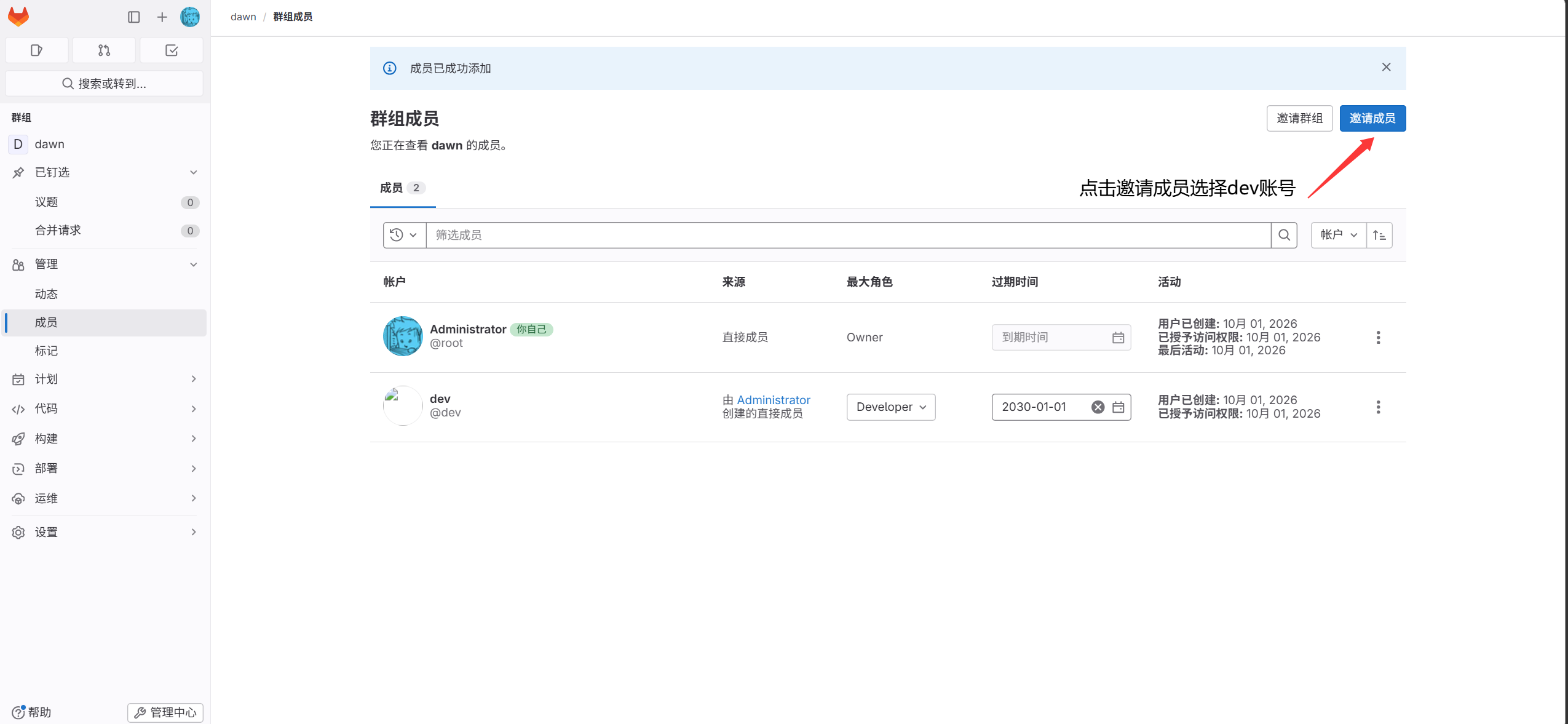
- dev サーバーで鍵ペアを生成
1
|
[root@lb01 ~]#ssh-keygen
|
- 生成した公開鍵を dev アカウントの SSH 鍵ページにコピー
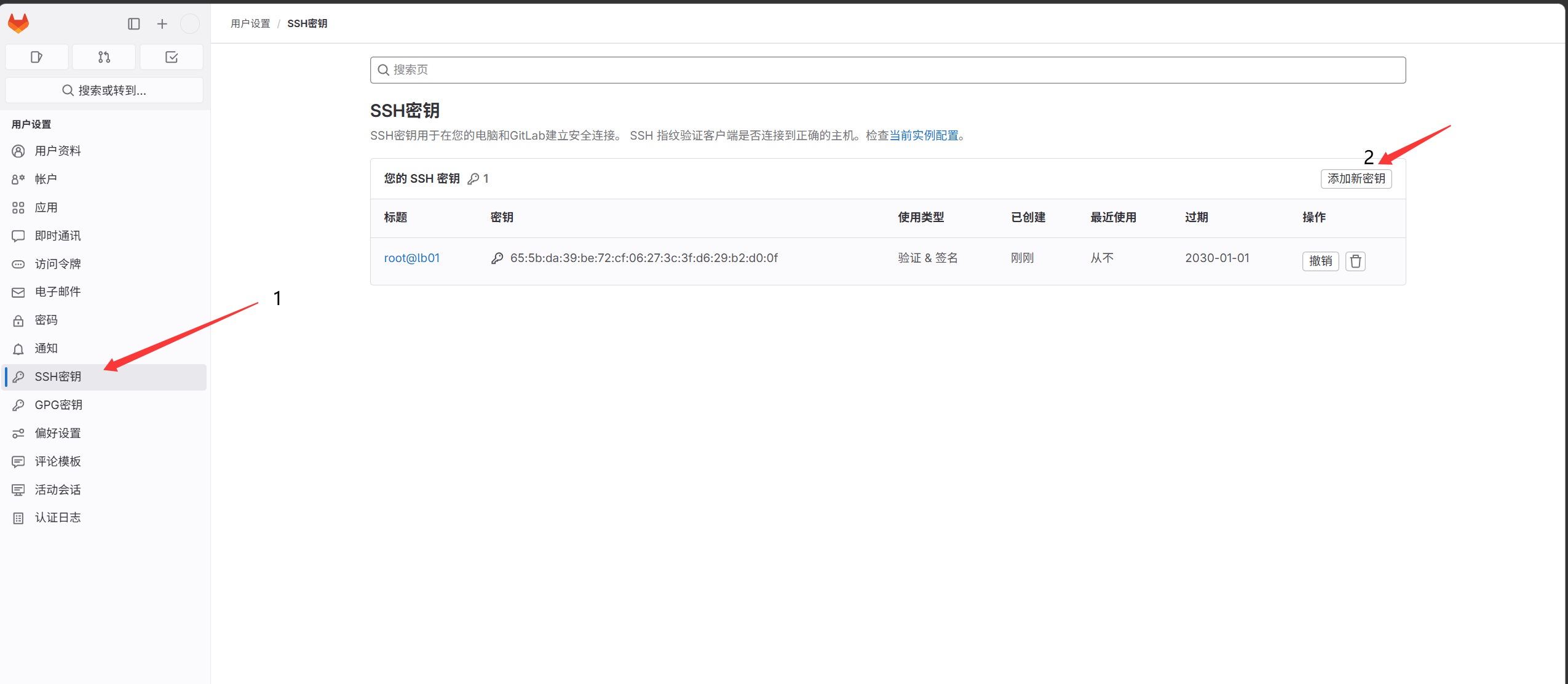
- コードを dev ホスト 11.0.1.5 にクローン
 1
 2
 3
 4
 5
 6
 7
 8
 9
10
11
12
13
|
[root@lb01 ~]#git clone git@11.0.1.200:dawn/blog.git
Cloning into 'blog'...
The authenticity of host '11.0.1.200 (11.0.1.200)' can't be established.
ECDSA key fingerprint is SHA256:Ldn1vBzBEFxynXs0qBNr0XzJ2lTx/0caMuK5yJtb+Zo.
ECDSA key fingerprint is MD5:3d:1d:28:3f:33:ec:ee:c1:69:83:af:14:a3:7f:79:ac.
Are you sure you want to continue connecting (yes/no)? yes
Warning: Permanently added '11.0.1.200' (ECDSA) to the list of known hosts.
remote: Enumerating objects: 8, done.
remote: Counting objects: 100% (8/8), done.
remote: Compressing objects: 100% (6/6), done.
remote: Total 8 (delta 1), reused 0 (delta 0), pack-reused 0
Receiving objects: 100% (8/8), done.
Resolving deltas: 100% (1/1), done.
|
- コードを修正してリモートリポジトリにアップロード
 1
 2
 3
 4
 5
 6
 7
 8
 9
10
11
12
13
14
15
16
17
18
19
20
21
22
23
24
25
26
|
11.0.1.5 のユーザーを設定
[root@lb01 blog]#git config --global user.email "dev@mail.com"
[root@lb01 blog]#git config --global user.name "dev"
[root@lb01 blog]#vim a.txt
123
[root@lb01 blog]#git commit -am "123"
リモートリポジトリにコミット
[root@lb01 blog]#git push -u origin master
Counting objects: 5, done.
Compressing objects: 100% (2/2), done.
Writing objects: 100% (3/3), 257 bytes | 0 bytes/s, done.
Total 3 (delta 1), reused 0 (delta 0)
remote: GitLab: You are not allowed to push code to protected branches on this project.To git@11.0.1.200:dawn/blog.git
 ! [remote rejected] master -> master (pre-receive hook declined)
error: failed to push some refs to 'git@11.0.1.200:dawn/blog.git'
# master ブランチへのプッシュは許可されていない

他のブランチにプッシュ:
1. dev ブランチを作成
[root@lb01 blog]#git branch dev
[root@lb01 blog]#git branch
  dev
* master

2. dev ブランチをリモートにプッシュ
[root@lb01 blog]#git push -u origin dev
|
マージリクエスト(MR)
- dev アカウントからマージリクエストを作成
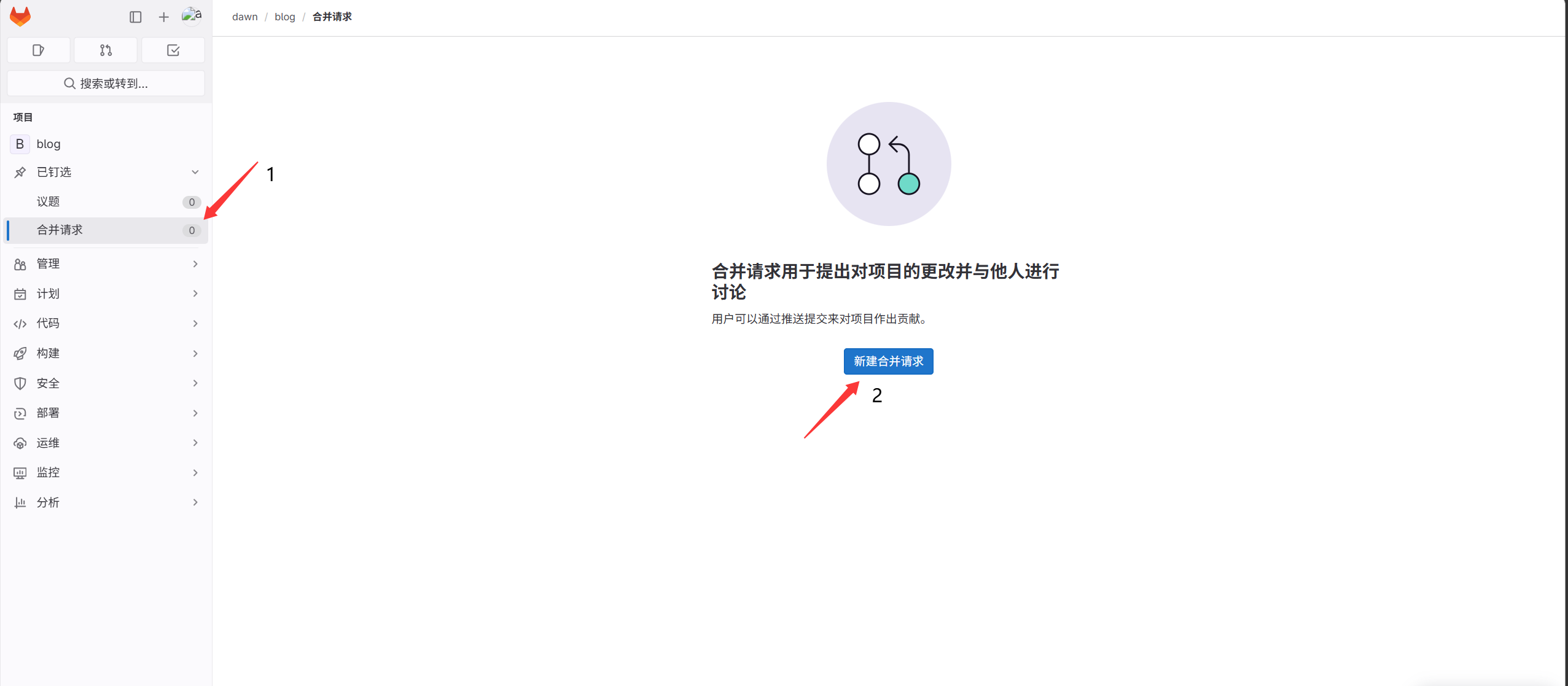
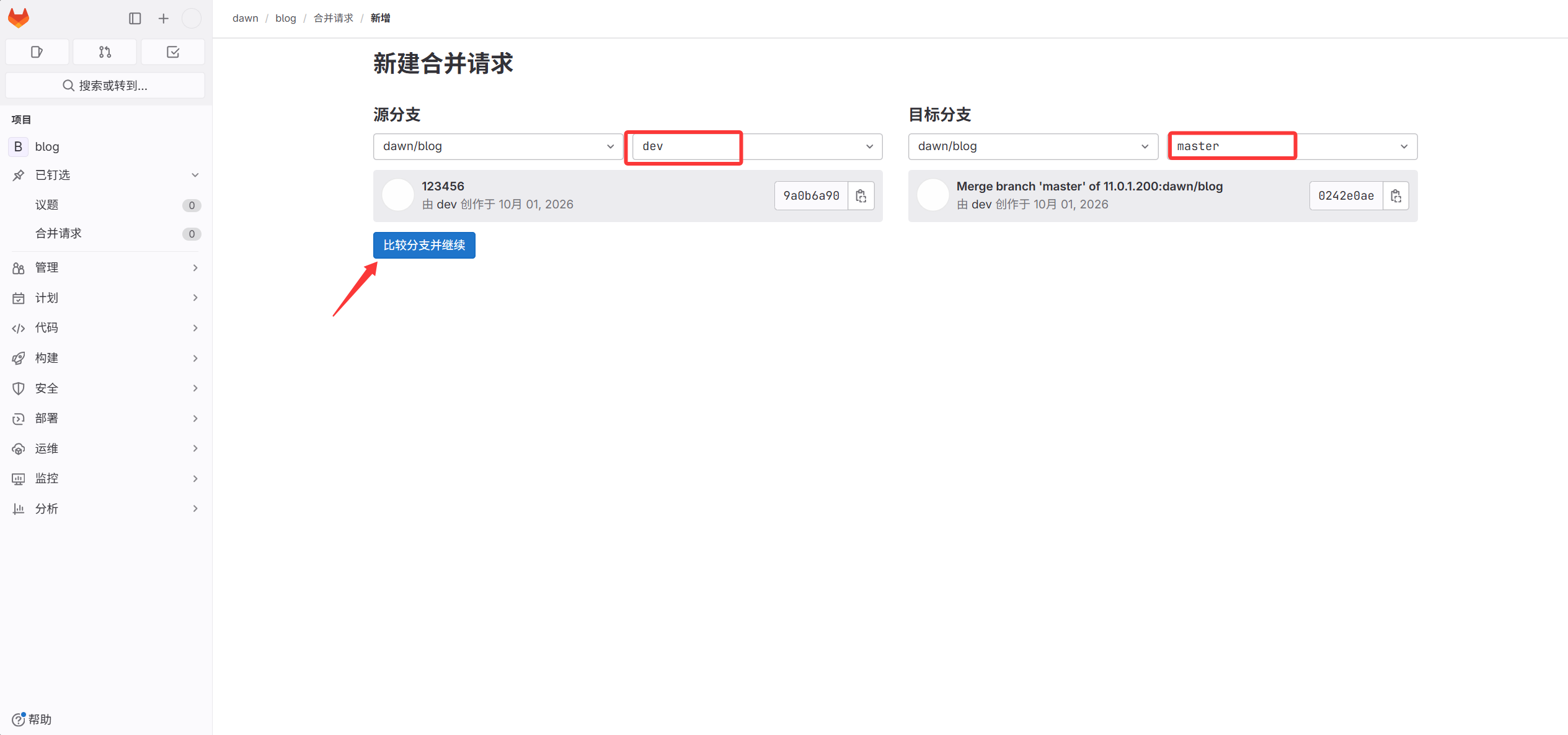
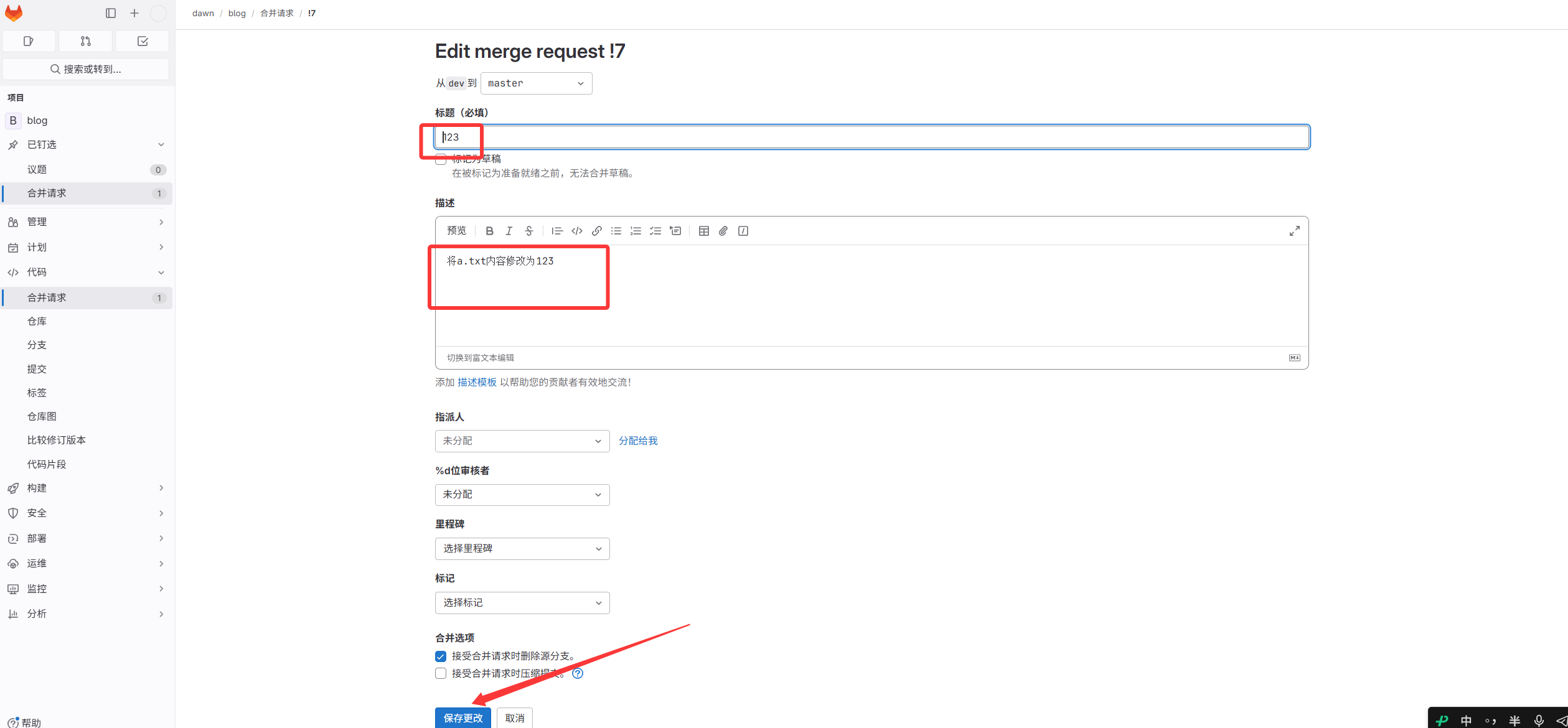
- root アカウントでマージを承認し、元の dev ブランチを削除
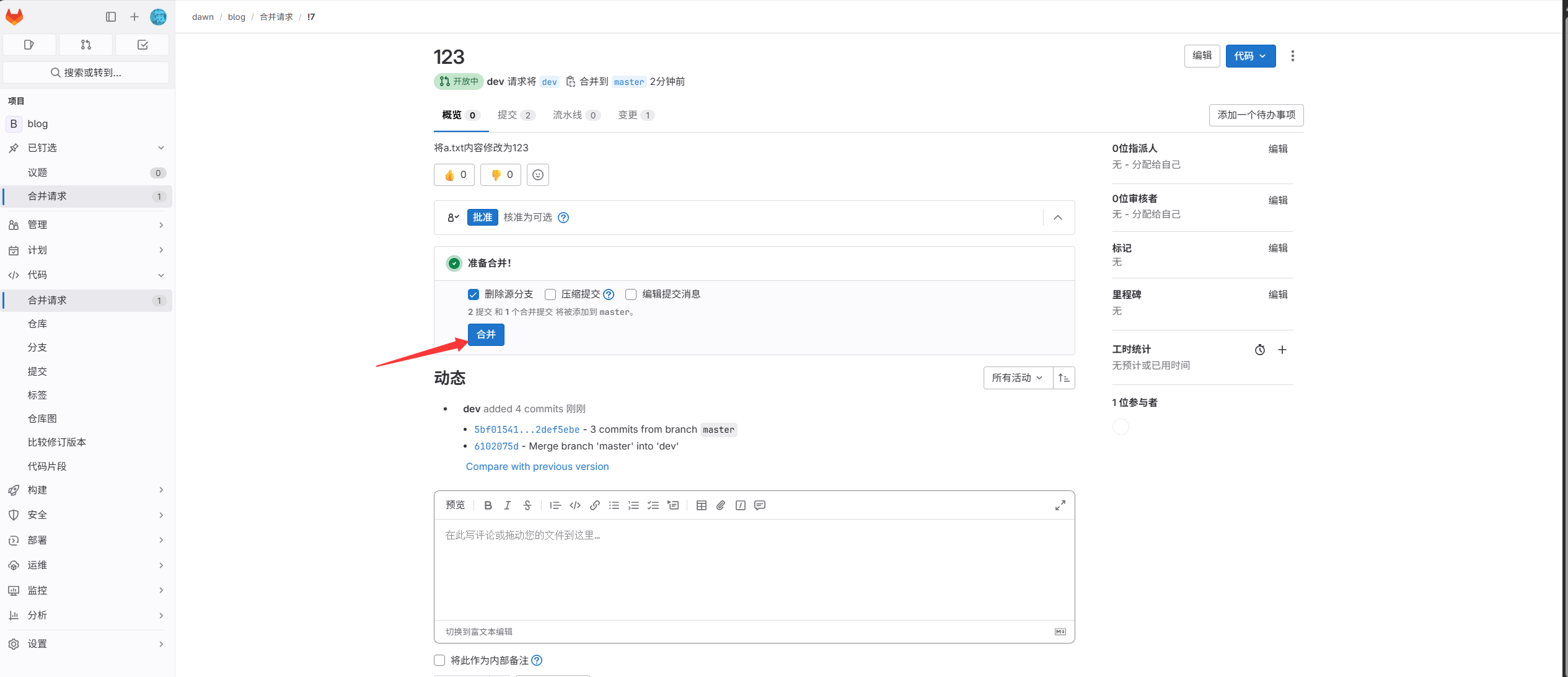
- Web サーバーでコードをダウンロード
1
2
|
[root@web01 ~]#git clone http://11.0.1.200/dawn/blog.git
ユーザー名とパスワードを入力
|