Keystone Service#
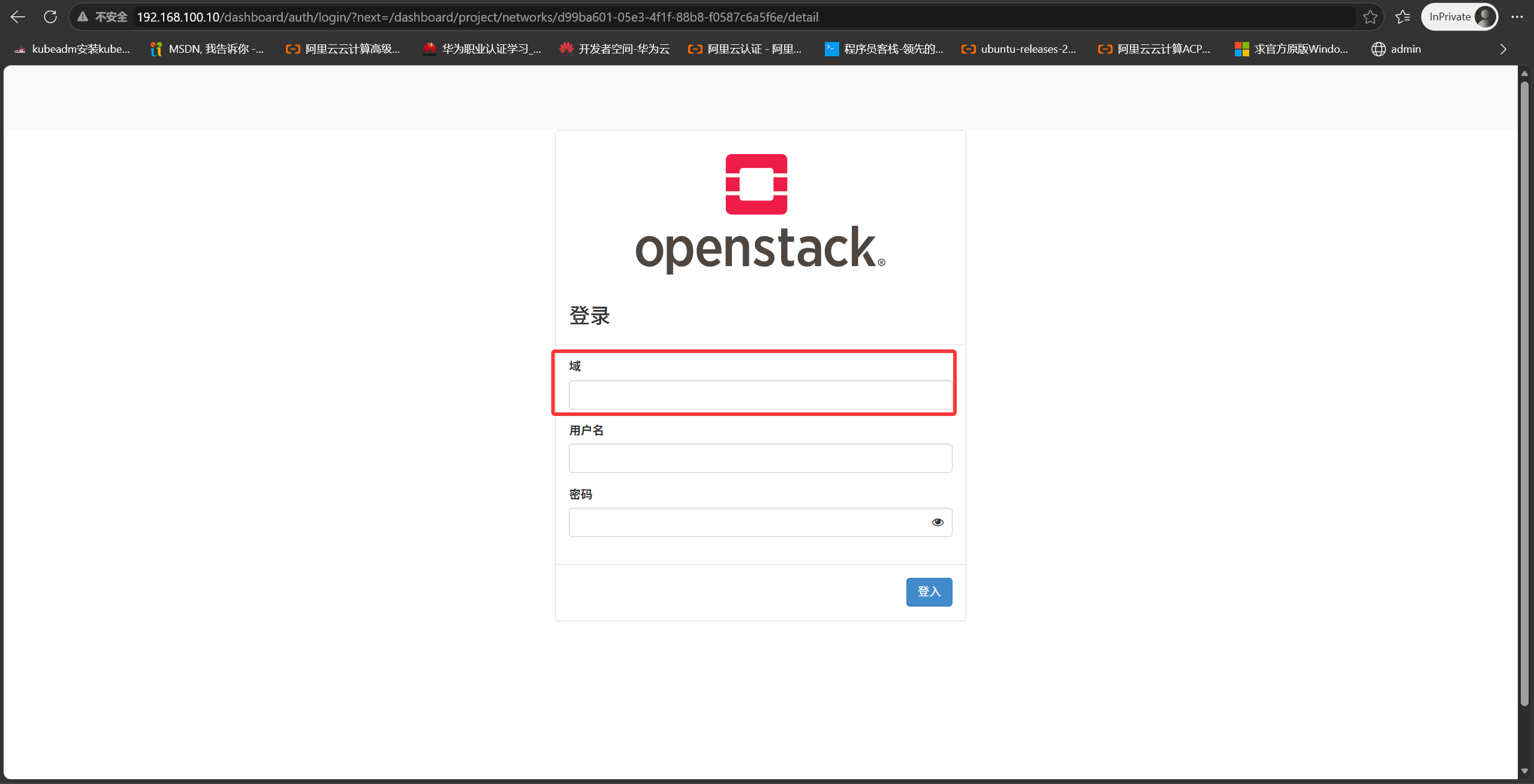
OpenStack multi-domain support
1
2
|
[root@Controller ~]# vim /etc/openstack-dashboard/local_settings
OPENSTACK_KEYSTONE_MULTIDOMAIN_SUPPORT = True
|
List all services in the system
1
|
[root@Controller ~(keystone_admin)]# openstack service list
|
Keystone address and API endpoint
1
|
OS_AUTH_URL=http://192.168.100.10:5000/v3
|
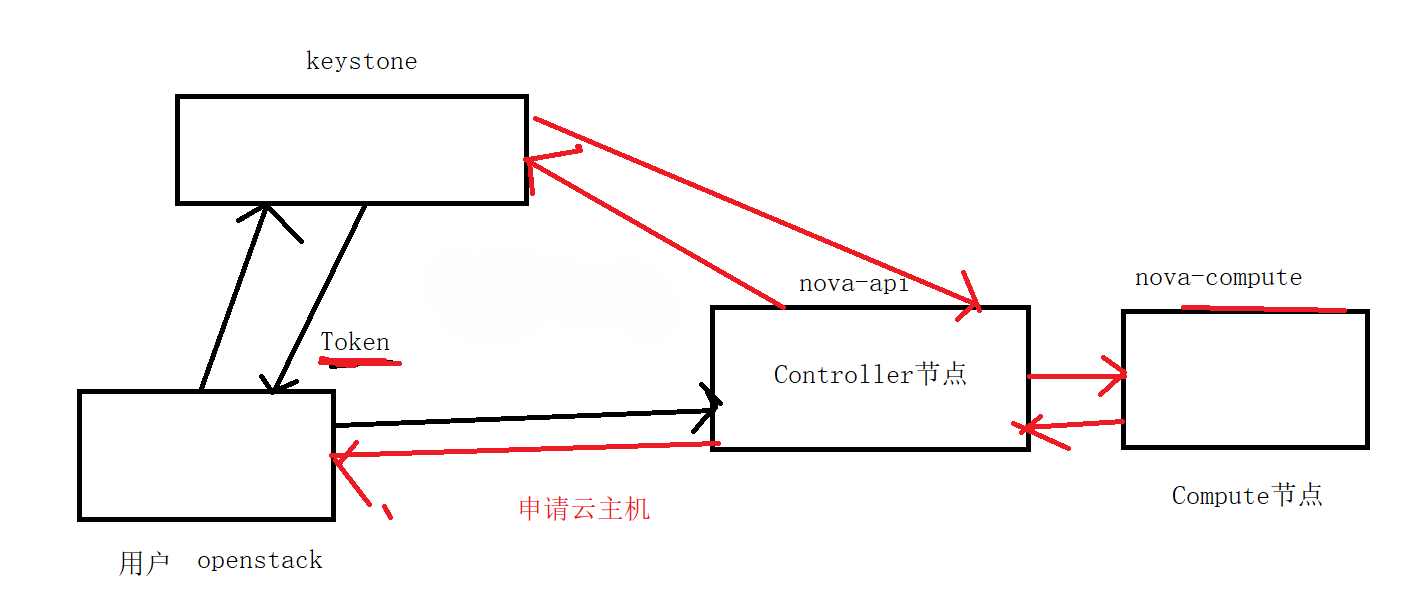
- All services know the Keystone address, because they need to ask Keystone to verify whether a user token is valid
- Keystone knows the addresses of all services, because every service registers itself with Keystone at creation time
Endpoint addresses
1
|
[root@Controller ~(keystone_admin)]# openstack endpoint list
|
Each service has three endpoint addresses; these three URLs may be identical or different
public url — the URL used by external users
admin url — the URL used by administrators
internal url — the URL used for access between internal components
Cloud server provisioning flow
- The user sends a request to Keystone with a username and password; once authentication succeeds, Keystone issues a token, and the user uses that token to send a create-cloud-server request to nova-api
- nova-api asks Keystone for help in validating whether that token is valid; if validation succeeds, the result is returned
- nova-api forwards the request to the nova-compute host
- The nova-compute host creates the cloud server according to the request and returns the result to nova-api
- nova-api returns the result to the user; the cloud server is created and its information is recorded in the database
When I send a request to nova-api to create a server, I don’t necessarily know the nova-api address—but I do know the Keystone address. I query Keystone for the nova-api address, because Keystone stores the endpoint addresses of all services. Therefore I only need to know the Keystone address. The following shows how to look up the Keystone address and use it to resolve other service addresses.
 1
 2
 3
 4
 5
 6
 7
 8
 9
10
11
12
13
14
15
16
17
18
19
20
21
22
23
24
25
26
27
28
29
30
31
32
33
34
35
36
37
38
39
40
41
42
43
44
45
46
47
48
49
50
51
52
53
54
55
56
57
58
59
60
61
62
63
64
65
66
67
68
69
70
71
72
73
74
75
76
77
78
79
80
81
82
83
84
85
86
87
88
89
90
91
92
93
94
95
|
[root@Controller ~(keystone_zlm)]# grep -E "^connection\s*=.*keystone" /etc/keystone/*.conf
/etc/keystone/keystone.conf:connection=mysql+pymysql://keystone_admin:c3fa63522e1f4586@192.168.100.10/keystone
# 用户名:keystone_admin
# 密码:c3fa63522e1f4586
[root@Controller ~(keystone_zlm)]# mysql -u keystone_admin  -p -D keystone
Enter password:
Reading table information for completion of table and column names
You can turn off this feature to get a quicker startup with -A

Welcome to the MariaDB monitor.  Commands end with ; or \g.
Your MariaDB connection id is 15494
Server version: 10.3.27-MariaDB MariaDB Server

Copyright (c) 2000, 2018, Oracle, MariaDB Corporation Ab and others.

Type 'help;' or '\h' for help. Type '\c' to clear the current input statement.

MariaDB [keystone]> SELECT s.type AS service_type,
    ->        e.interface,
    ->        e.url
    -> FROM endpoint e
    -> JOIN service s ON e.service_id = s.id
    -> ORDER BY s.type, e.interface;
+----------------+-----------+--------------------------------------------------+
| service_type   | interface | url                                              |
+----------------+-----------+--------------------------------------------------+
| alarming       | admin     | http://192.168.100.10:8042                       |
| alarming       | internal  | http://192.168.100.10:8042                       |
| alarming       | public    | http://192.168.100.10:8042                       |
| cloudformation | admin     | http://192.168.100.10:8000/v1                    |
| cloudformation | internal  | http://192.168.100.10:8000/v1                    |
| cloudformation | public    | http://192.168.100.10:8000/v1                    |
| compute        | admin     | http://192.168.100.10:8774/v2.1/%(tenant_id)s    |
| compute        | internal  | http://192.168.100.10:8774/v2.1/%(tenant_id)s    |
| compute        | public    | http://192.168.100.10:8774/v2.1/%(tenant_id)s    |
| identity       | admin     | http://192.168.100.10:5000                       |
| identity       | internal  | http://192.168.100.10:5000                       |
| identity       | public    | http://192.168.100.10:5000                       |
| image          | admin     | http://192.168.100.10:9292                       |
| image          | internal  | http://192.168.100.10:9292                       |
| image          | public    | http://192.168.100.10:9292                       |
| metering       | admin     | http://192.168.100.10:8777                       |
| metering       | internal  | http://192.168.100.10:8777                       |
| metering       | public    | http://192.168.100.10:8777                       |
| metric         | admin     | http://192.168.100.10:8041                       |
| metric         | internal  | http://192.168.100.10:8041                       |
| metric         | public    | http://192.168.100.10:8041                       |
| network        | admin     | http://192.168.100.10:9696                       |
| network        | internal  | http://192.168.100.10:9696                       |
| network        | public    | http://192.168.100.10:9696                       |
| object-store   | admin     | http://192.168.100.10:8080/v1/AUTH_%(tenant_id)s |
| object-store   | internal  | http://192.168.100.10:8080/v1/AUTH_%(tenant_id)s |
| object-store   | public    | http://192.168.100.10:8080/v1/AUTH_%(tenant_id)s |
| orchestration  | admin     | http://192.168.100.10:8004/v1/%(tenant_id)s      |
| orchestration  | internal  | http://192.168.100.10:8004/v1/%(tenant_id)s      |
| orchestration  | public    | http://192.168.100.10:8004/v1/%(tenant_id)s      |
| placement      | admin     | http://192.168.100.10:8778/placement             |
| placement      | internal  | http://192.168.100.10:8778/placement             |
| placement      | public    | http://192.168.100.10:8778/placement             |
| volumev2       | admin     | http://192.168.100.10:8776/v2/%(tenant_id)s      |
| volumev2       | internal  | http://192.168.100.10:8776/v2/%(tenant_id)s      |
| volumev2       | public    | http://192.168.100.10:8776/v2/%(tenant_id)s      |
| volumev3       | admin     | http://192.168.100.10:8776/v3/%(tenant_id)s      |
| volumev3       | internal  | http://192.168.100.10:8776/v3/%(tenant_id)s      |
| volumev3       | public    | http://192.168.100.10:8776/v3/%(tenant_id)s      |
+----------------+-----------+--------------------------------------------------+
39 rows in set (0.001 sec)

MariaDB [keystone]> SELECT s.type AS service_type,
    ->        e.interface,
    ->        e.url
    -> FROM endpoint e
    -> JOIN service s ON e.service_id = s.id
    -> WHERE e.interface = 'public'
    -> ORDER BY s.type;
+----------------+-----------+--------------------------------------------------+
| service_type   | interface | url                                              |
+----------------+-----------+--------------------------------------------------+
| alarming       | public    | http://192.168.100.10:8042                       |
| cloudformation | public    | http://192.168.100.10:8000/v1                    |
| compute        | public    | http://192.168.100.10:8774/v2.1/%(tenant_id)s    |
| identity       | public    | http://192.168.100.10:5000                       |
| image          | public    | http://192.168.100.10:9292                       |
| metering       | public    | http://192.168.100.10:8777                       |
| metric         | public    | http://192.168.100.10:8041                       |
| network        | public    | http://192.168.100.10:9696                       |
| object-store   | public    | http://192.168.100.10:8080/v1/AUTH_%(tenant_id)s |
| orchestration  | public    | http://192.168.100.10:8004/v1/%(tenant_id)s      |
| placement      | public    | http://192.168.100.10:8778/placement             |
| volumev2       | public    | http://192.168.100.10:8776/v2/%(tenant_id)s      |
| volumev3       | public    | http://192.168.100.10:8776/v3/%(tenant_id)s      |
+----------------+-----------+--------------------------------------------------+
13 rows in set (0.000 sec)

MariaDB [keystone]>
|
When deploying OpenStack, a service is created
- Enter the database and create a database—for example, glance
- Create the database user glance and grant it ALL privileges (insert, delete, update, select) on all tables in the glance database
- Create the glance service and register the glance-api address (endpoint address) in the database
When a user needs to access glance-api, they send a request to Keystone, which looks up the glance api endpoint address in its database
1
2
|
#示例 如果将zlm用户加入admin角色,那他就拥有了admin角色权限
[root@Controller ~(keystone_admin)]# openstack role add --user zlm --project LMandMY_HOME admin
|
When a user sends a request to nova-api, nova-api asks Keystone to verify the user’s identity and whether the token is still valid. It does not decide whether the user is authorized to create a cloud server—that depends on each service’s policy file
1
2
3
4
5
6
7
8
9
|
[root@Controller nova]# cd /etc/openstack-dashboard/
[root@Controller openstack-dashboard]# ls
cinder_policy.json  keystone_policy.json  neutron_policy.json  nova_policy.json
glance_policy.json  local_settings        nova_policy.d
[root@Controller nova(keystone_user)]# cp /etc/openstack-dashboard/glance_policy.json /etc/glance/policy.json
[root@Controller nova(keystone_user)]# openstack image create --container-format bare
--disk-format qcow2 --file /root/cirros-0.3.5-x86_64-disk.img --public    test2
[root@Controller nova(keystone_user)]# chgrp glance /etc/glance/policy.json
[root@Controller nova(keystone_user)]# systemctl restart openstack-glance-api.service
|
Nova Service#
Controller node
nova-api module
nova-scheduler module
nova-conductor module
nova-novncproxy module
Compute node
nova-compute module
nova-api
Handles the externally exposed REST interface
Validates and constrains the incoming parameters
Checks and reserves quotas for the requested resources
Create, update, delete and query operations on resources
The entry point of the virtual machine lifecycle
Can be deployed scaled out horizontally
nova-conductor
It decouples nova-compute from direct database access: when a user requests a cloud server and creation succeeds, the nova-conductor module writes the server information into the database
database — stores information related to that component, such as cloud server info, image info and network info
nova-scheduler
When the OpenStack environment has multiple Compute nodes and a user creates a cloud server, the nova-scheduler module decides which compute node it runs on based on each compute host’s weight
HAProxy provides load balancing: when a user wants to access nova-api, the request is handed to HAProxy, and depending on the load of each nova-api it decides which API node receives the request
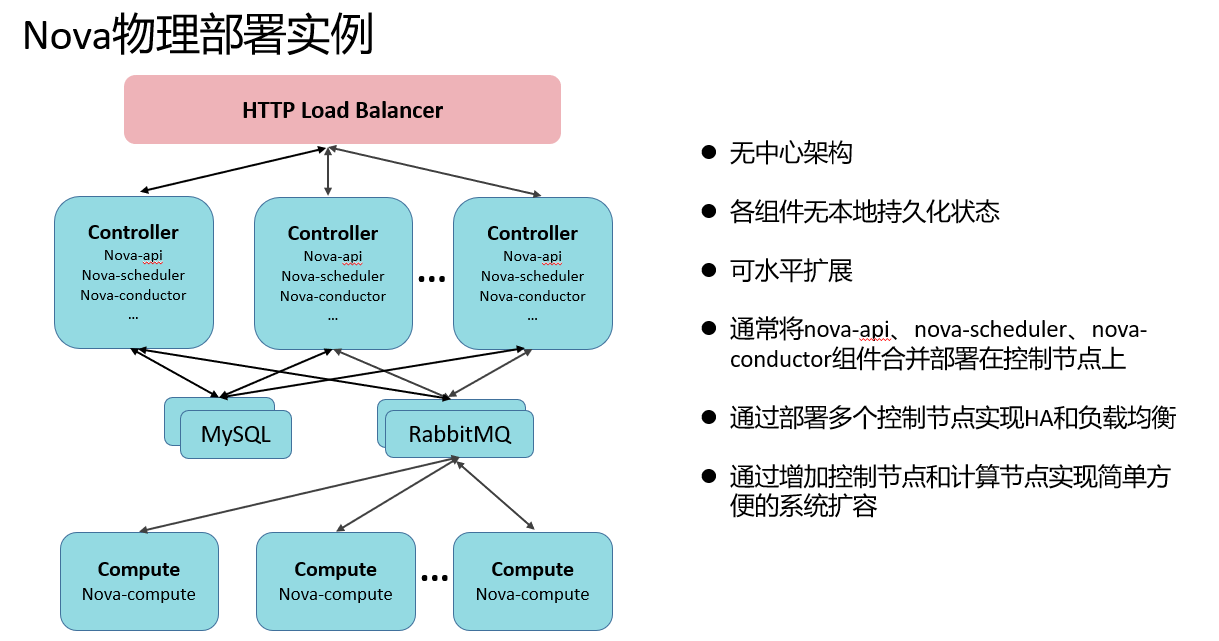
MQ — Message Queue (message queue)
When a component consists of multiple modules, communication between modules goes through the message queue for congestion control and so on
If 1000 users send requests to nova-api
nova-api sends the requests to nova-compute
nova-api sends these 1000 requests to the message queue, which then delivers them to the nova-compute nodes in an orderly fashion according to each compute host’s message consumption and processing progress
nova-compute
The module that actually runs virtual machines
nova-novncproxy
How it works: the nova-compute host opens a dedicated VNC Server port for each running virtual machine
The nova-compute host must not expose that port to the outside; otherwise any host on the Internet could access the port and the virtual machine
To solve this, a nova-novncproxy service is started on the controller node and exposed externally. When a user opens that VM’s console, the request first goes to nova-novncproxy, which uses the supplied information (VM UUID, token, etc.) to find out which nova-compute runs the VM, and then forwards the request to that Compute host.
How opening a VM console via VNC works
vncserver — port 5900
vncviewer — vncviewer
The client does not need to install vncviewer; instead the functionality is integrated into browser HTML via the noVNC protocol
Glance and Swift Service#
I. Deploying a cloud server:
After the user issues a command to deploy a cloud server and it is validated, the nova-compute host downloads the image from the glance image server to local storage (the server itself also runs locally) — /var/lib/nova/instances/_base/
After the cloud server boots, a differential disk is created; new writes go into that differential disk
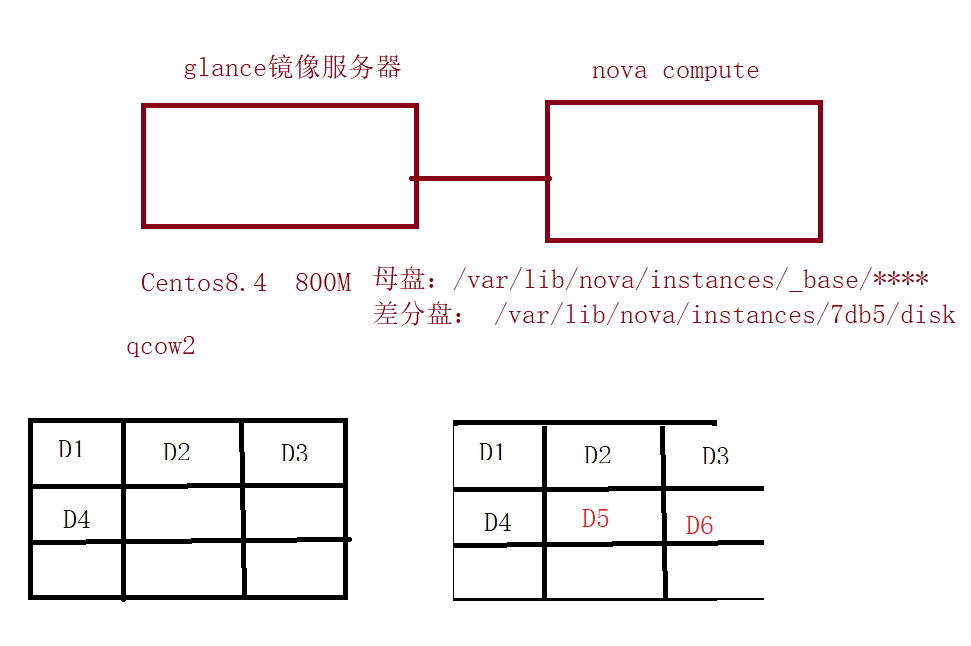
Lab: store glance images in Swift object storage instead of on glance’s local disk
 1
 2
 3
 4
 5
 6
 7
 8
 9
10
11
12
13
14
15
16
17
18
|
[root@Controller ~]# cd /etc/glance/
[root@Controller glance]# cp glance-api.conf glance-api.conf.bak
[root@Controller ~]# vim /etc/glance/glance-api.conf
3057 stores=file,http,swift
3111 default_store=swift
3982 swift_store_region = RegionOne
4032 swift_store_endpoint_type = publicURL
4090 swift_store_container = public
4118 swift_store_large_object_size = 5120
4142 swift_store_large_object_chunk_size = 100
4160 swift_store_create_container_on_put = True
4182 swift_store_multi_tenant = True
4230 swift_store_admin_tenants = services
4382 swift_store_auth_version = 2
4391 swift_store_auth_address = http://192.168.100.10:5000/v3
4399 swift_store_user = zlm
4408 swift_store_key = 000000
[root@Controller ~]# systemctl restart openstack-glance-api.service
|
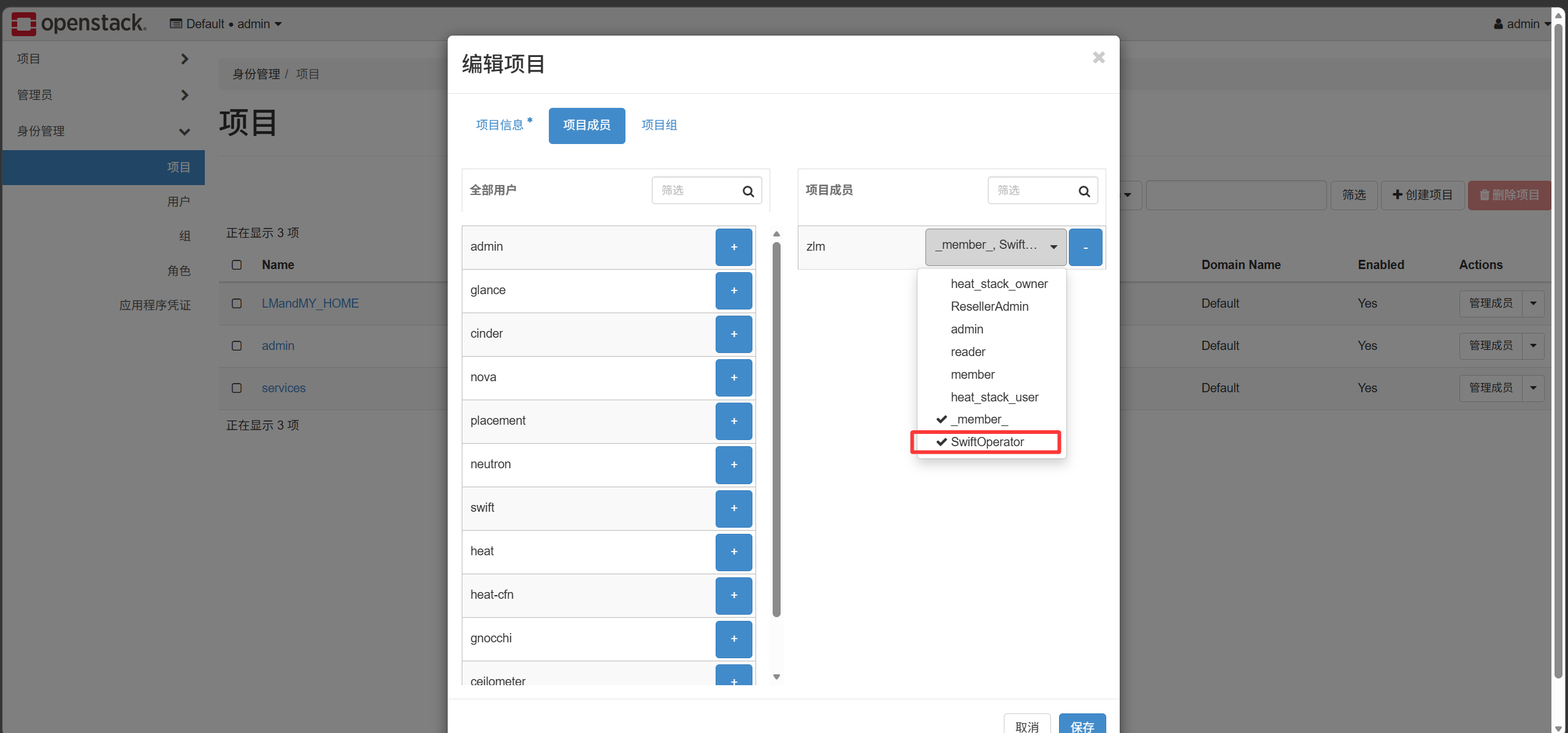
Note: the zlm user must be granted the swiftOperator role before it is allowed to operate on Swift