01. GitLab Websites#
-
Official site: https://about.gitlab.com/
-
China mirror: https://mirrors.tuna.tsinghua.edu.cn/gitlab-ce/yum/
02. GitLab Deployment#
 1
 2
 3
 4
 5
 6
 7
 8
 9
10
11
12
13
14
15
16
17
18
19
20
21
22
23
24
25
26
27
28
29
30
|
I. Environment preparation
1. OS: CentOS 7.9
2. Memory: 4G for lab, at least 8G for production
3. Disable the firewall and turn off SELinux

II. Download the GitLab RPM package
[root@gitlab ~]# wget https://mirrors.tuna.tsinghua.edu.cn/gitlab-ce/yum/el7/gitlab-ce-16.9.8-ce.0.el7.x86_64.rpm

III. Install GitLab
# During installation, dependencies are required
[root@gitlab ~]# rpm -ivh gitlab-ce-16.9.8-ce.0.el7.x86_64.rpm
warning: gitlab-ce-16.9.8-ce.0.el7.x86_64.rpm: Header V4 RSA/SHA1 Signature, key ID f27eab47: NOKEY
error: Failed dependencies:
    policycoreutils-python is needed by gitlab-ce-16.9.8-ce.0.el7.x86_64
# install dependencies
[root@gitlab ~]# yum -y install policycoreutils-python
# continue installing GitLab after dependencies are ready
[root@gitlab ~]# rpm -ivh gitlab-ce-16.9.8-ce.0.el7.x86_64.rpm
warning: gitlab-ce-16.9.8-ce.0.el7.x86_64.rpm: Header V4 RSA/SHA1 Signature, key ID f27eab47: NOKEY
Preparing...                          ################################# [100%]
Updating / installing...
   1:gitlab-ce-16.9.8-ce.0.el7        ################################# [100%]

IV. Configure the access domain or IP before starting
[root@gitlab ~]#  vim /etc/gitlab/gitlab.rb
...
external_url 'http://11.0.1.200'
...
After the configuration, run the command:
[root@gitlab ~]# gitlab-ctl reconfigure
|
03. GitLab Components#
1
2
3
4
5
6
7
|
nginx:           static web server
gitlab-workhorse: lightweight reverse proxy
logrotate:       log file management tool
postgresql:      database
redis:           cache database
sidekiq:         runs queued background jobs (asynchronously). (Ruby)
unicorn: An HTTP server for Rack applications; the GitLab Rails app is hosted on it. (Ruby Web Server, written mainly in Ruby)
|
04. Common GitLab Commands#
1
2
3
4
5
|
gitlab-ctl start                # start GitLab (services start by default after gitlab-ctl reconfigure)
gitlab-ctl status               # check the running status of all GitLab services
gitlab-ctl stop                 # stop GitLab services
gitlab-ctl stop nginx           # stop a single service
gitlab-ctl tail                 # view logs of all services
|
05. GitLab Web UI Configuration#
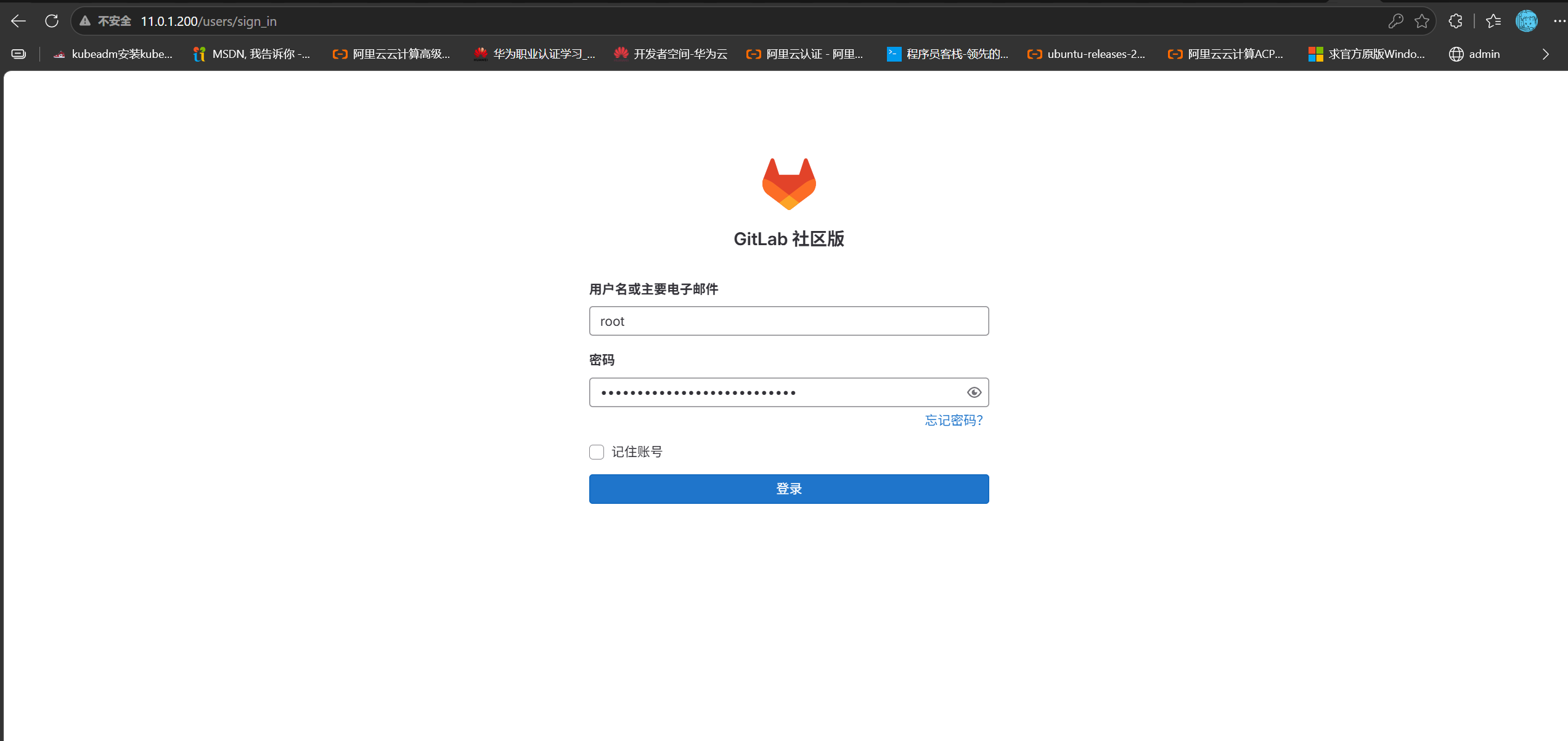
Log in to GitLab at: 11.0.1.200
1. Login password#
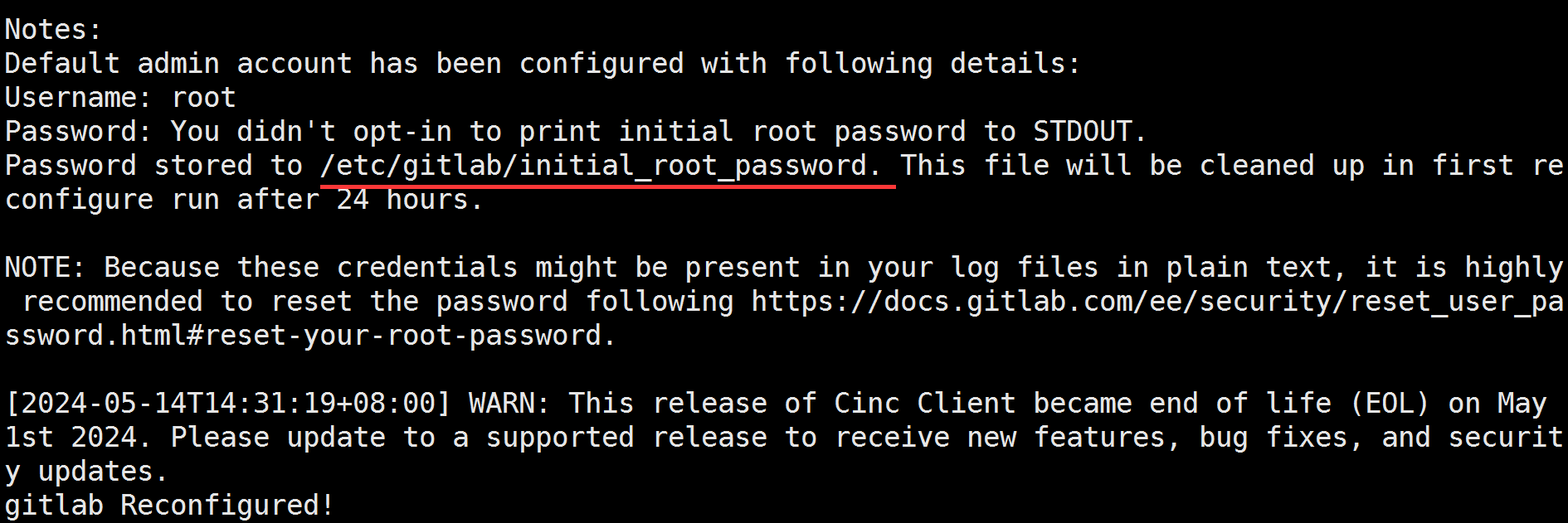
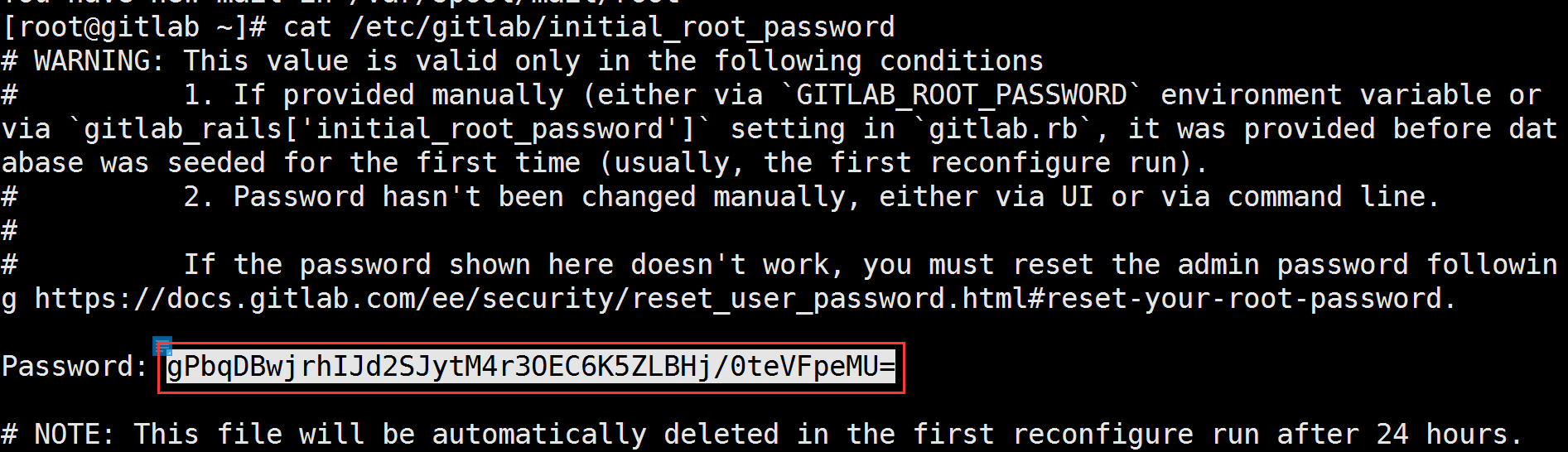
After gitlab-ctl reconfigure finishes, it shows where the password is stored:
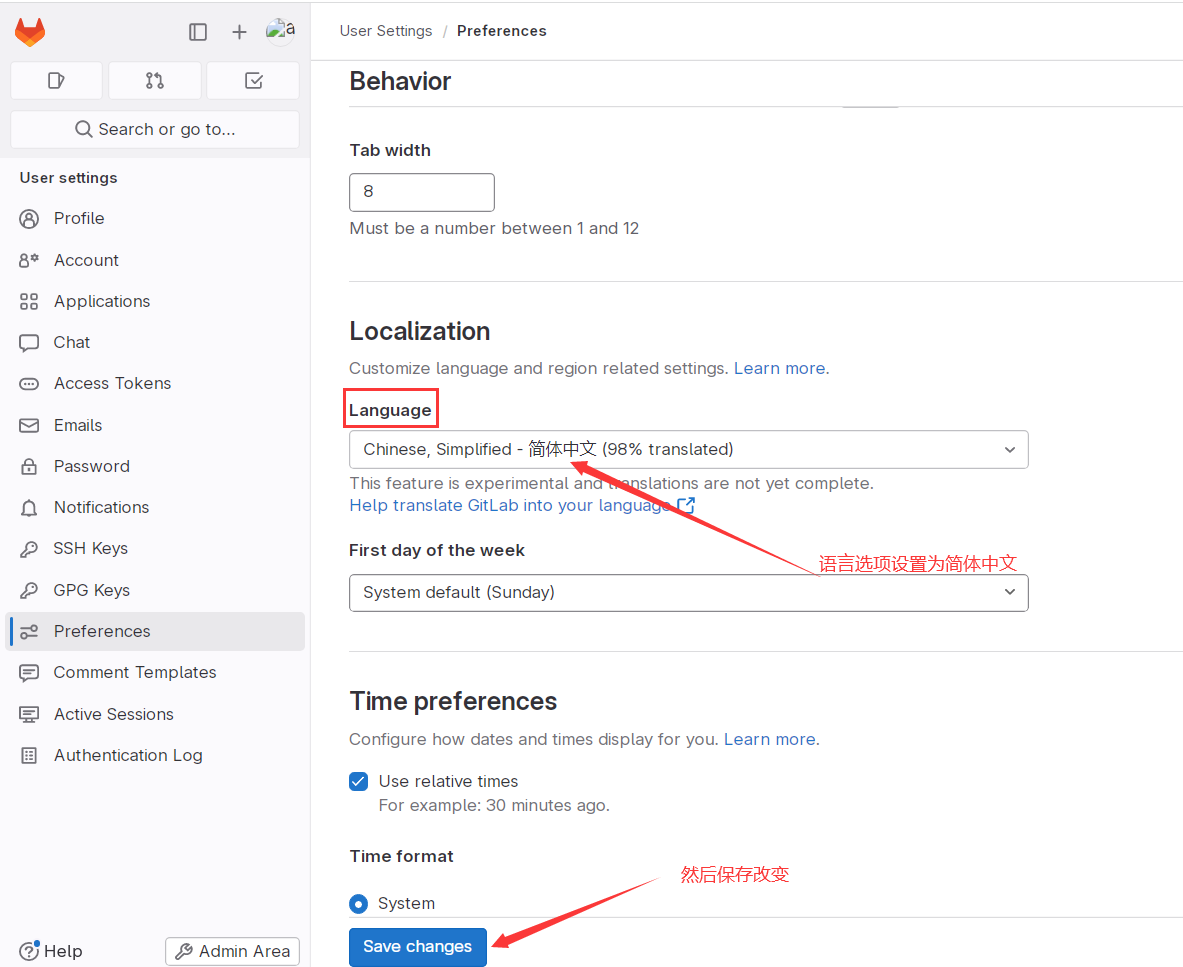
2. Switch the UI language to Chinese#
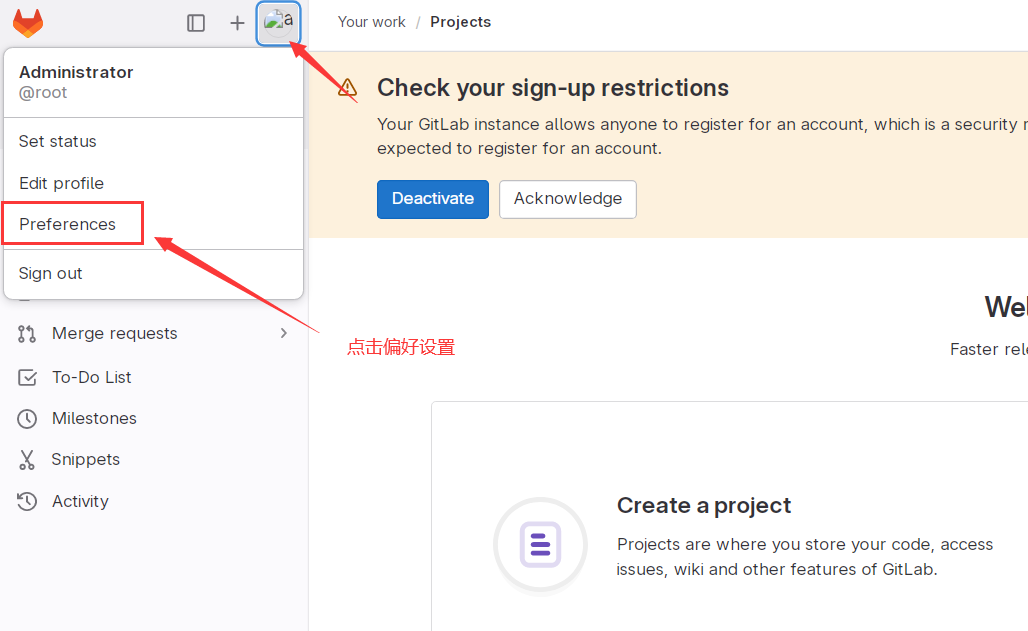
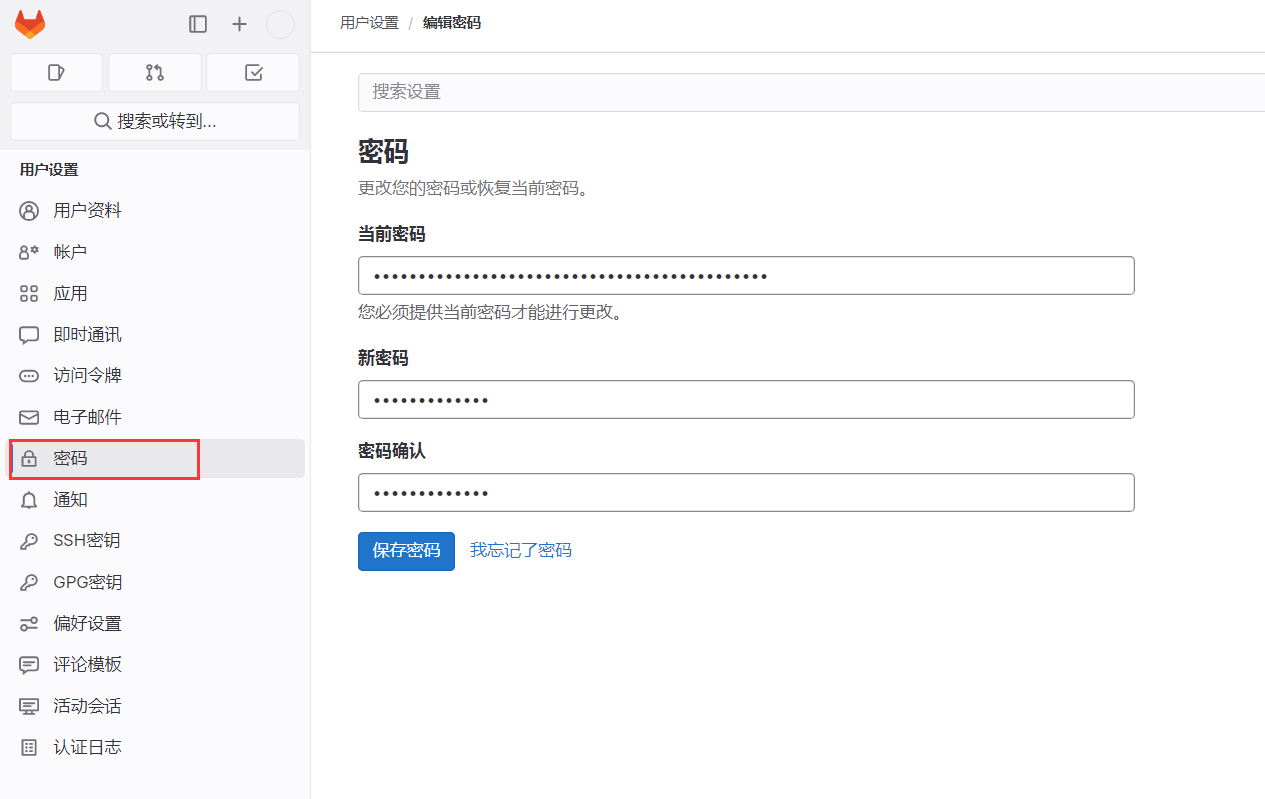
3. Change the default password#
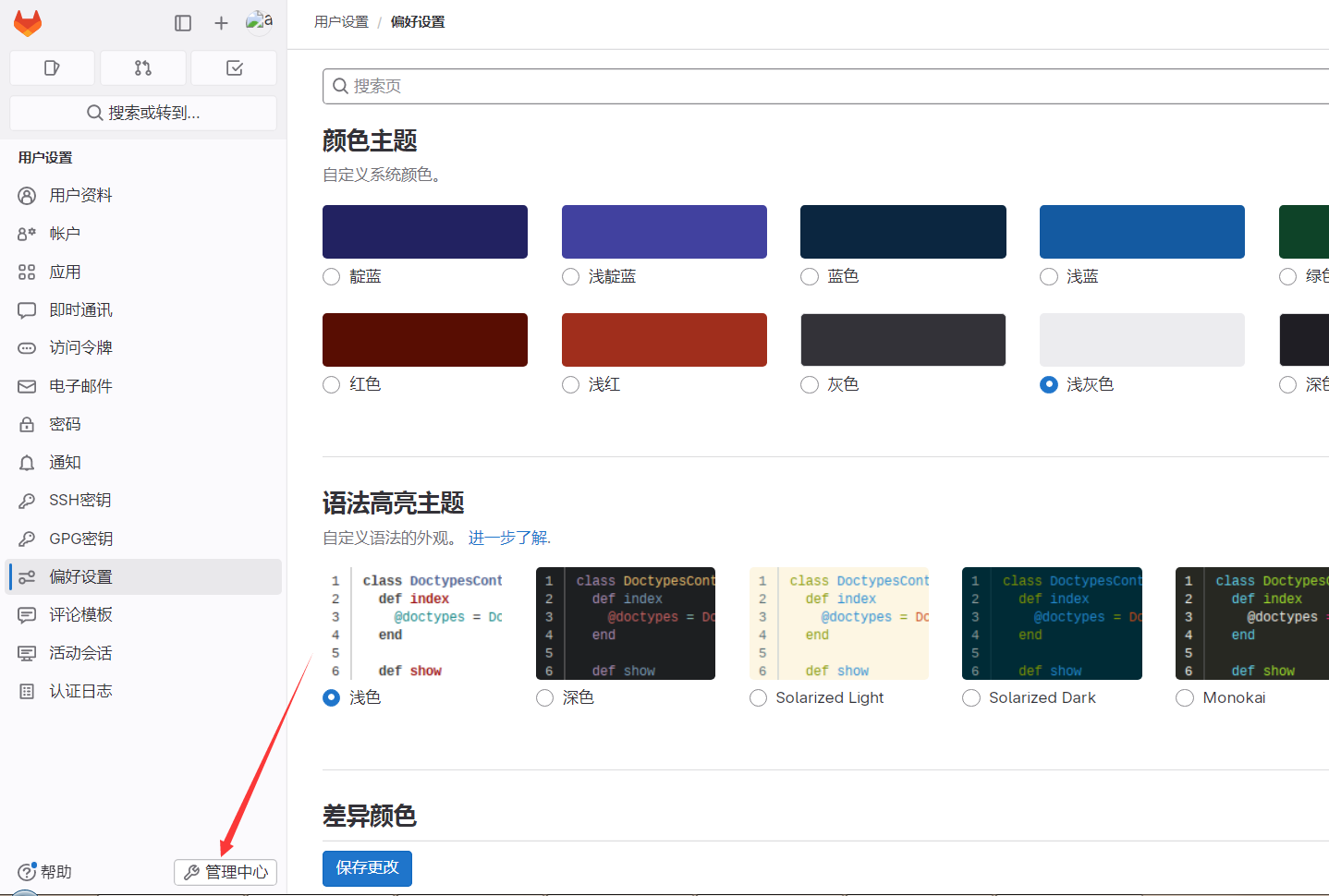
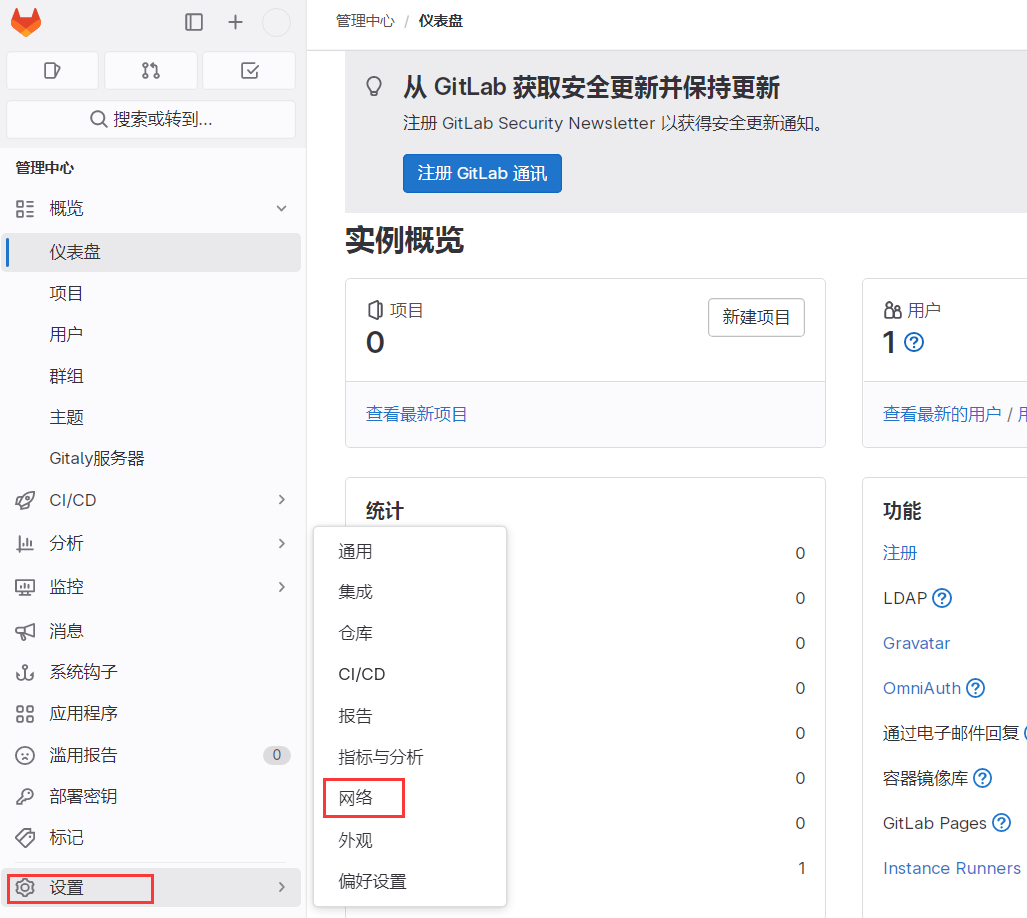
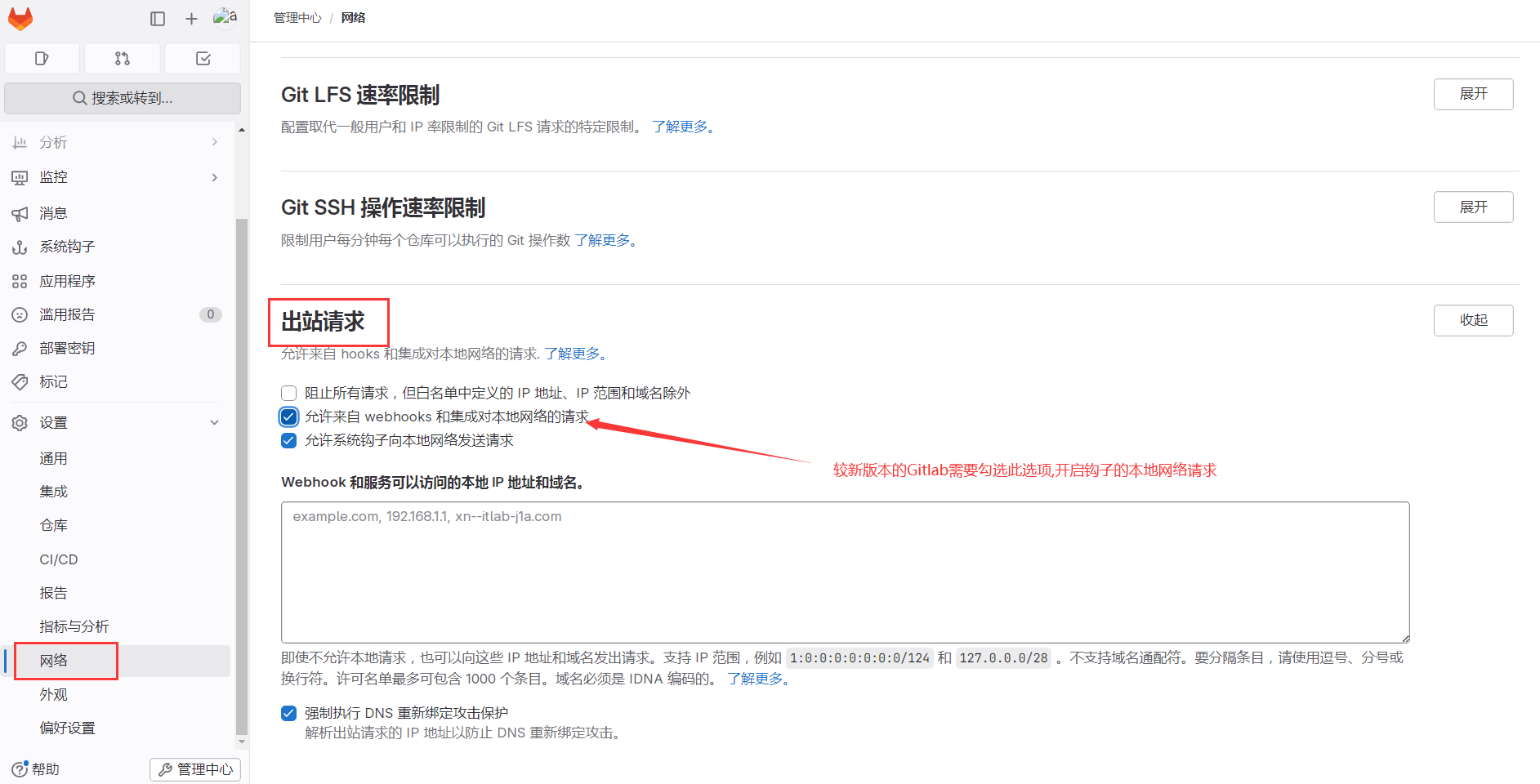
4. Allow local network requests for webhooks#
06. GitLab Hands-on#
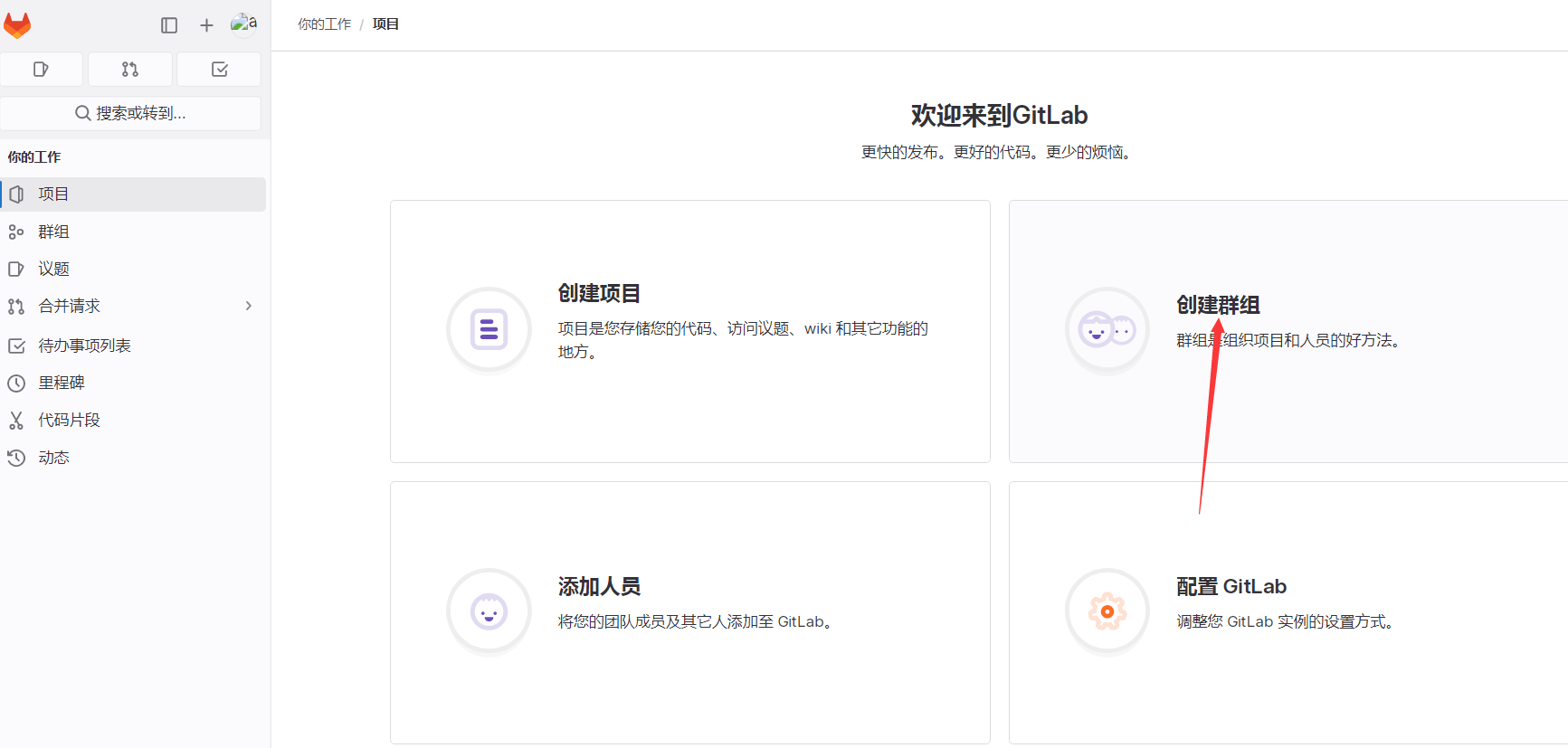
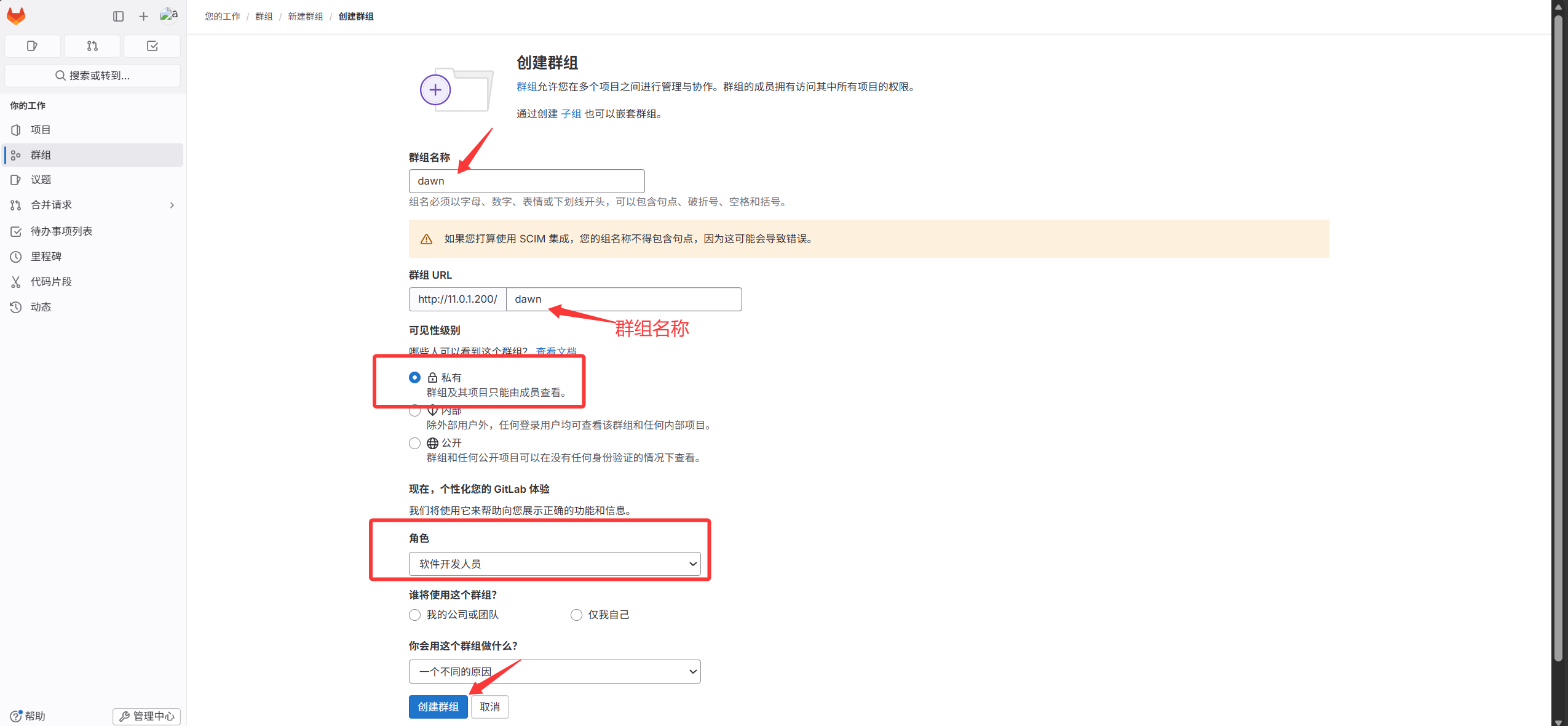
1. Create a group#
2. Create a project under the group#
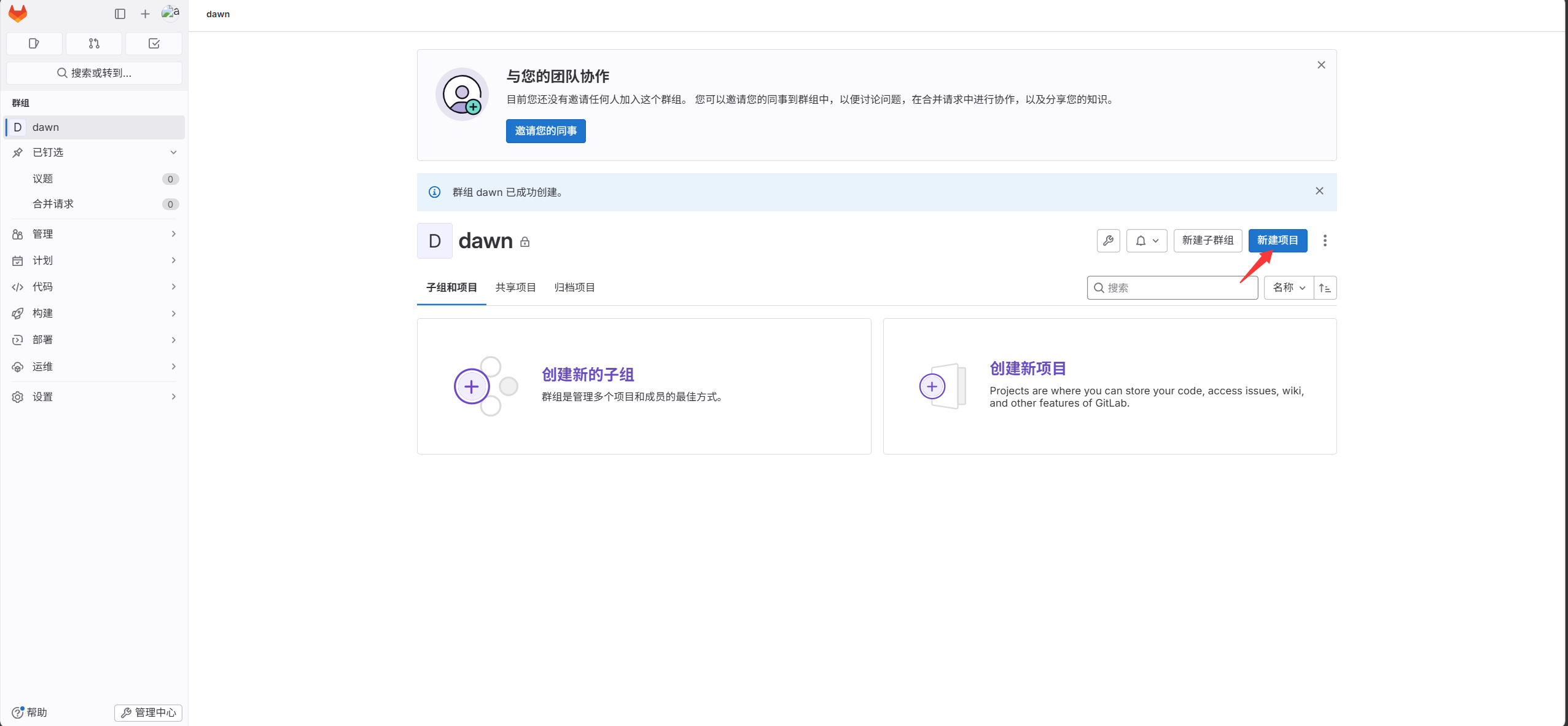
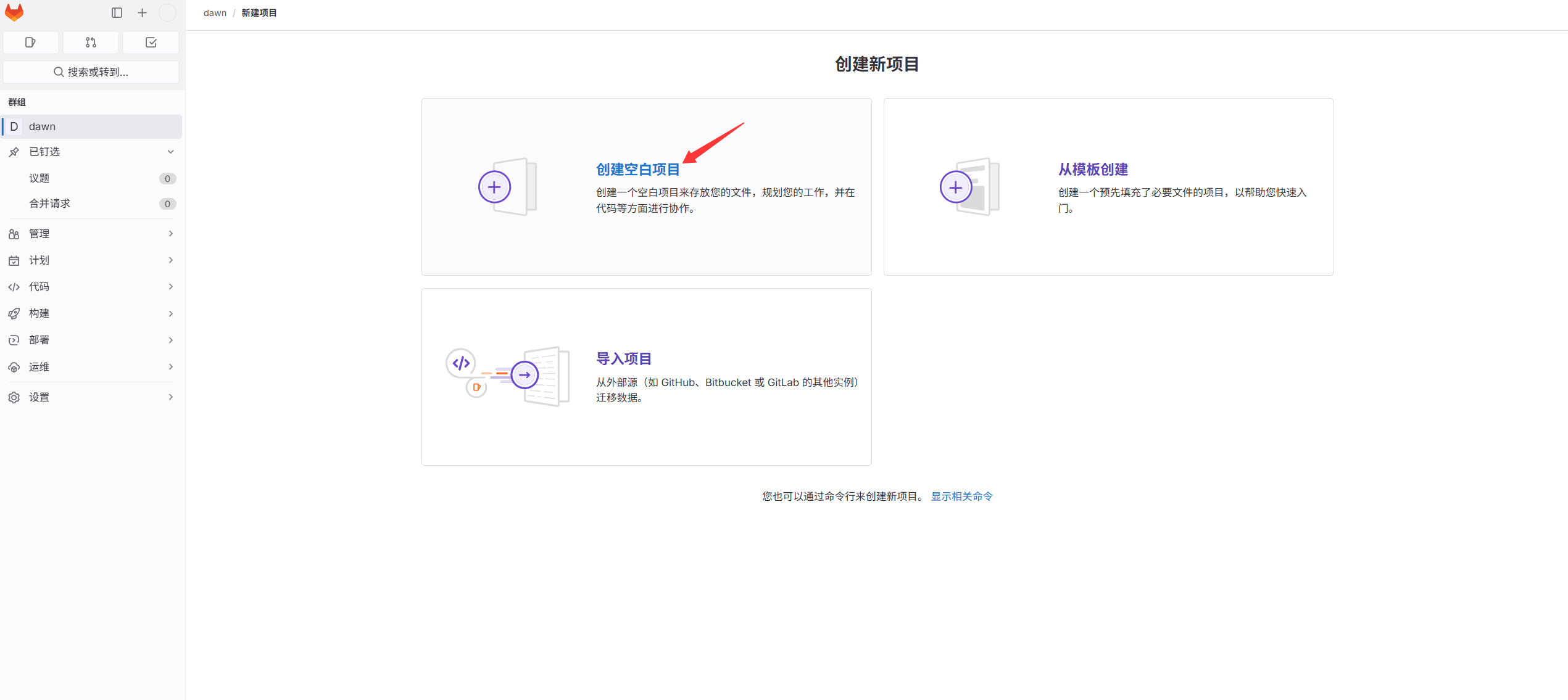
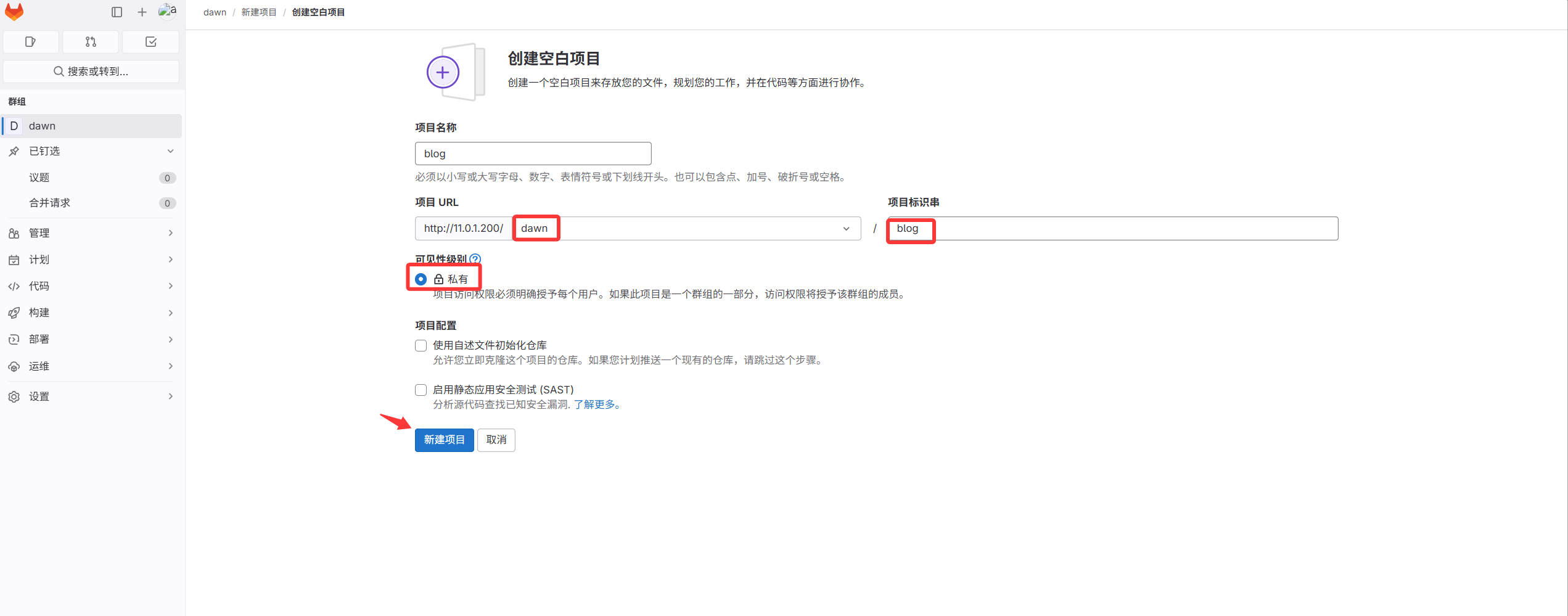
At this point the first code repository is created, but it is empty. Next, upload code.
3. Commit code into the project#
After the project is created, upload the blog code into this project.
There are two ways to connect the server with the code repository:
First: connect using username and password.
Second: connect via SSH keyless authentication.
We use the keyless (SSH) method: convenient and more secure.
- Generate a key pair (here we use the GitLab server directly).
 1
 2
 3
 4
 5
 6
 7
 8
 9
10
11
12
13
14
15
16
17
18
19
20
21
22
23
24
25
26
27
28
29
30
|
[root@gitlab ~]#ssh-keygen
Generating public/private rsa key pair.
Enter file in which to save the key (/root/.ssh/id_rsa):
Created directory '/root/.ssh'.
Enter passphrase (empty for no passphrase):
Enter same passphrase again:
Your identification has been saved in /root/.ssh/id_rsa.
Your public key has been saved in /root/.ssh/id_rsa.pub.
The key fingerprint is:
SHA256:j3FozajJdufxM0ZRtgPa2ZNSwWKvo8bvxbMJl8F5V3M root@gitlab
The key's randomart image is:
+---[RSA 2048]----+
|             ... |
|            + =  |
|           + X +E|
|         =. =.B.+|
|        S +  ++oo|
|     . + =  +. +.|
|      = o.+o..*  |
|     . . o+o++ + |
|         ..++oo  |
+----[SHA256]-----+

View the key pair:
[root@gitlab ~]# ll .ssh/
total 8
-rw------- 1 root root 1679 May 14 15:02 id_rsa         # private key
-rw-r--r-- 1 root root  393 May 14 15:02 id_rsa.pub     # public key
[root@gitlab ~]#cat .ssh/id_rsa.pub
ssh-rsa AAAAB3NzaC1yc2EAAAADAQABAAABAQDJGpCKL64eidZ3I/nAVNCNJwD8yeDqelZP0GUTwlcp6IdKaZ7wUOIRDCtGn5r+YnOCKNwMhUNzb3VCOSVLDVIE0x53dPrCMK4OKLmZ6OtTYFBveGOZWWwdYyGQITx2eP7zOSBxeW3AnEWcya/UZdiZrYXA/d29DWjMjCt5QAxOit0EWSir1Z4i2MkTPuljOmjk6A55XAoem0WJRdg/d8KKIiCdcGrj4adYq2kNJ8oYH/9QcnpASUW/ANhzrALnLIX2WaH/p0T3gisLvk2KDUe3rVKD3XaKDlyLgWIViQFm3Me6L2e4taRFiu3VdsbfFfzjDevfDtLaqKLOqPtaczlF root@gitlab
|
- Paste the generated public key into the SSH key management page of the GitLab UI.
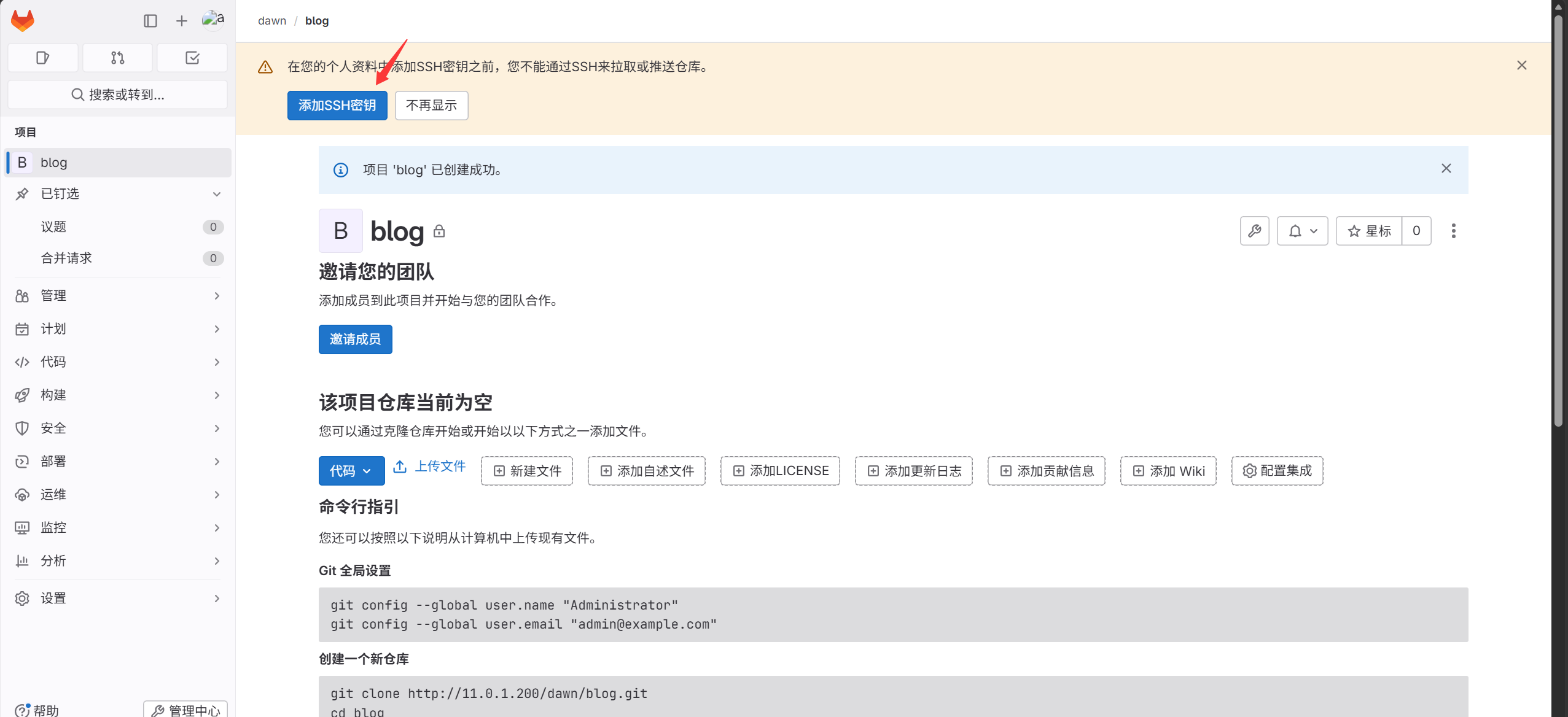
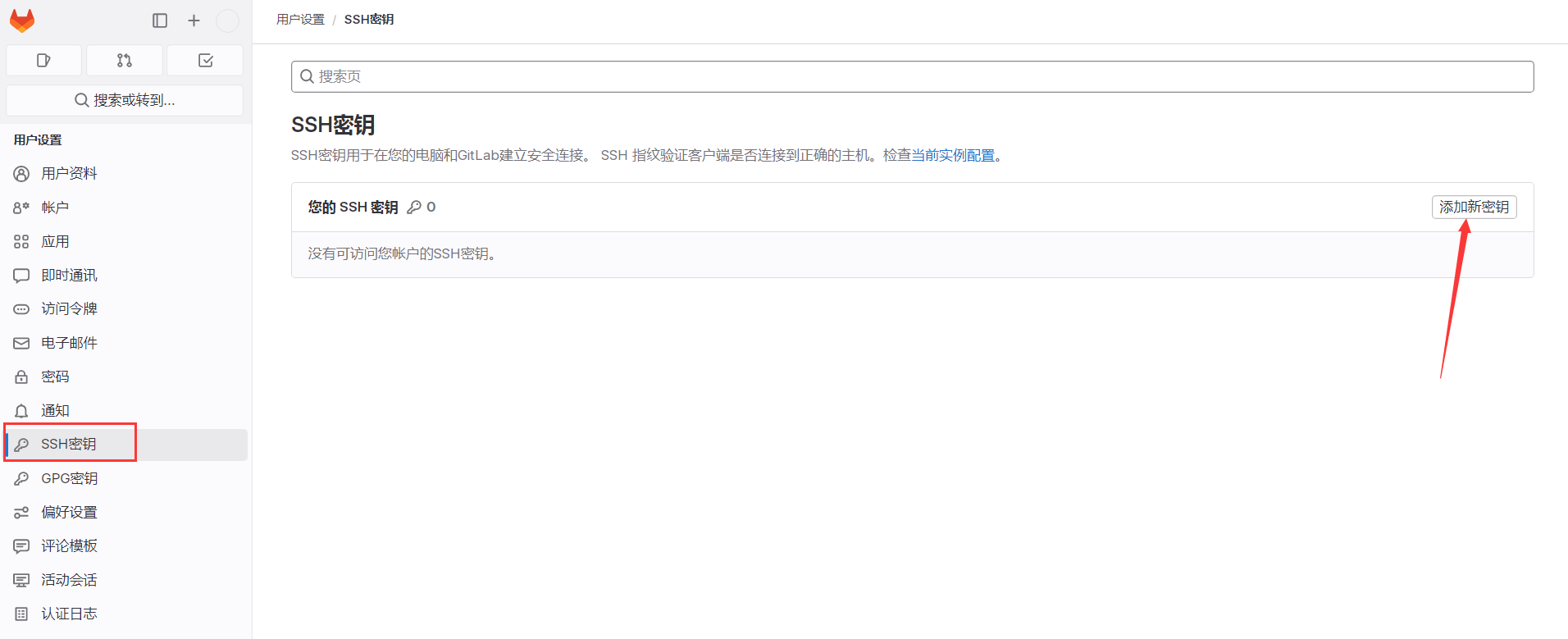
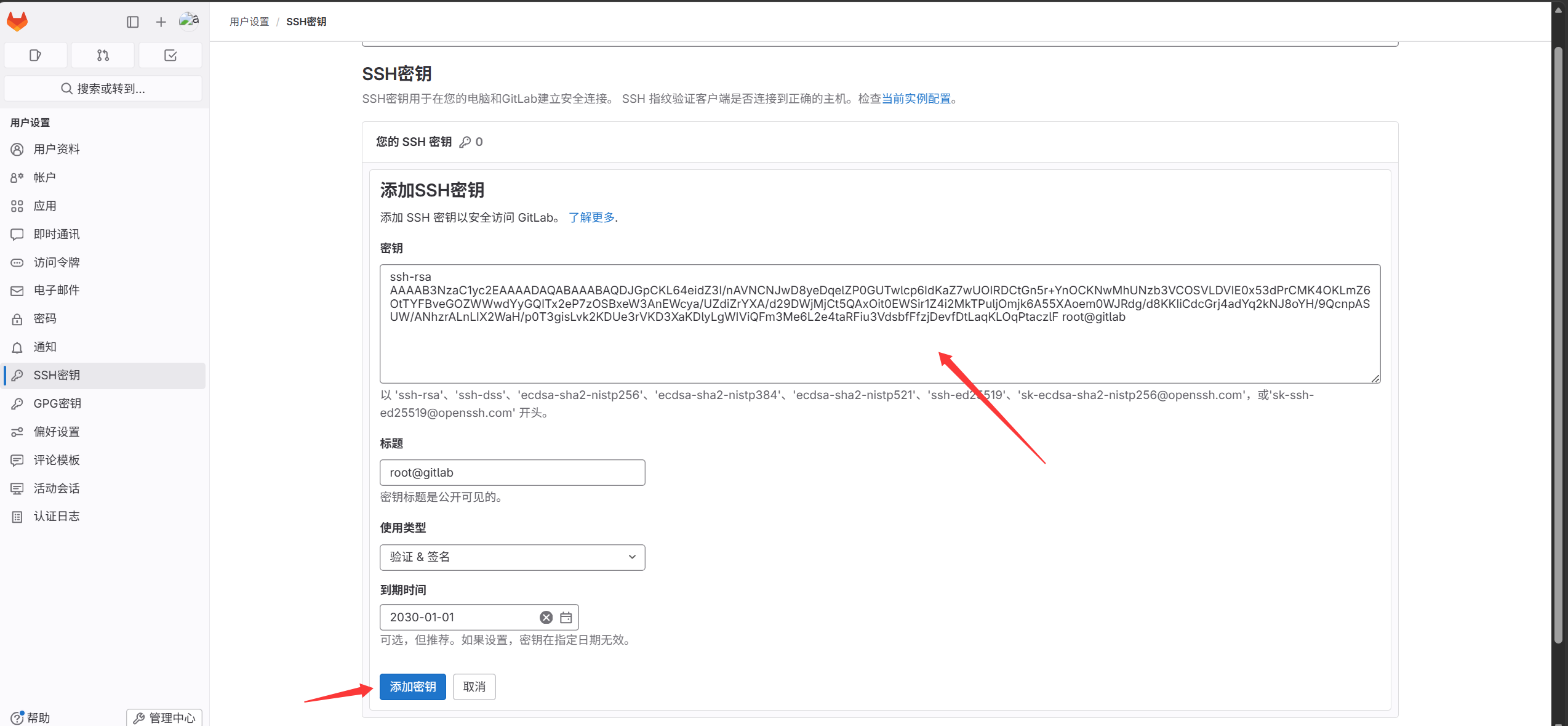
This completes the SSH keyless setup between the server and the GitLab UI. Next, push the code into the blog project.
There are two ways to push code:
- Clone the empty repo locally, copy the code into it, then commit to the remote GitLab repo.
Go into the project and find the project URL.
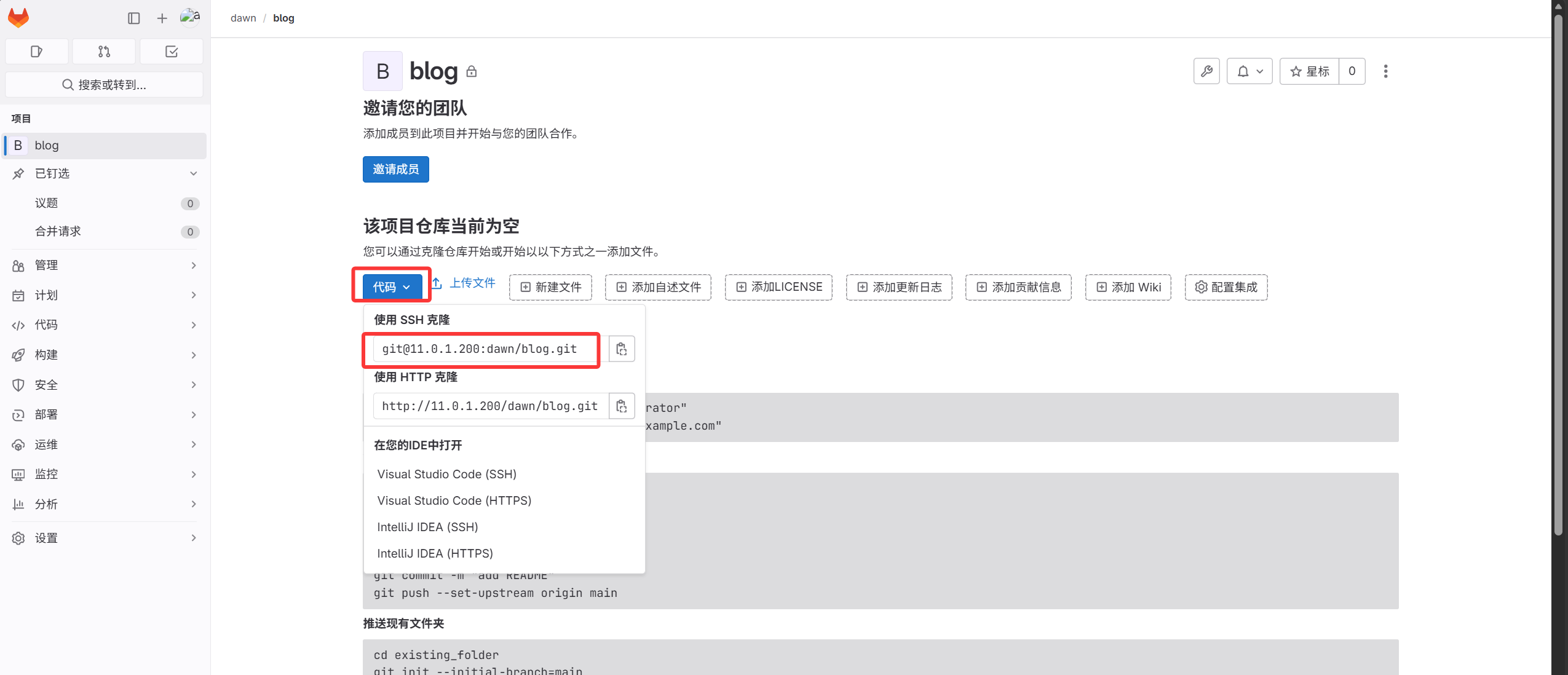
 1
 2
 3
 4
 5
 6
 7
 8
 9
10
11
12
13
14
15
16
17
18
19
20
21
22
23
24
25
26
27
28
29
30
31
32
33
34
35
36
37
38
39
40
41
42
43
44
45
46
47
48
49
50
|
1. Copy the link and run the command.
[root@gitlab ~]#git clone git@11.0.1.200:dawn/blog.git
Cloning into 'blog'...
The authenticity of host '11.0.1.200 (11.0.1.200)' can't be established.
ECDSA key fingerprint is SHA256:Ldn1vBzBEFxynXs0qBNr0XzJ2lTx/0caMuK5yJtb+Zo.
ECDSA key fingerprint is MD5:3d:1d:28:3f:33:ec:ee:c1:69:83:af:14:a3:7f:79:ac.
Are you sure you want to continue connecting (yes/no)? yes
Warning: Permanently added '11.0.1.200' (ECDSA) to the list of known hosts.
warning: remote HEAD refers to nonexistent ref, unable to checkout.

2. Verify the blog repo was downloaded locally.
[root@gitlab ~]#ll
total 1176964
drwxr-xr-x 3 root root         18 Oct  1 14:43 blog
-rw-r--r-- 1 root root   84579612 Oct  1 14:35 blog_backup_20261001-1435.tar.gz
drwxr-xr-x 3 root root         18 Sep 30 19:14 dawn
-rw-r--r-- 1 root root 1120627456 Sep 30 23:12 gitlab-ce-16.9.8-ce.0.el7.x86_64.rpm

3. Enter the blog directory.
[root@gitlab ~]#cd blog/

4. Extract the code:
[root@gitlab blog]#tar xf /root/blog_backup_20261001-1435.tar.gz -C .

5. Commit the code to the local repository.
[root@gitlab blog]#git add .
[root@gitlab blog]#git commit -m "DAWN’s Blog"
[master (root-commit) 5af4246] DAWN’s Blog
 3 files changed, 112 insertions(+)
 create mode 100644 blog_state.txt
 create mode 160000 myblog
 create mode 160000 myblog-deploy

6. Push the code to the blog repo on the remote GitLab.
Since we cloned the GitLab repo directly, the local directory already has the remote blog project address.
Check the remote repository:
[root@gitlab blog]#git remote -v
origin  git@11.0.1.200:dawn/blog.git (fetch)
origin  git@11.0.1.200:dawn/blog.git (push)

Push the local master branch to the remote origin.
[root@gitlab blog]#git push -u origin master
Counting objects: 3, done.
Delta compression using up to 2 threads.
Compressing objects: 100% (3/3), done.
Writing objects: 100% (3/3), 1.23 KiB | 0 bytes/s, done.
Total 3 (delta 0), reused 0 (delta 0)
To git@11.0.1.200:dawn/blog.git
 * [new branch]      master -> master
Branch master set up to track remote branch master from origin.
|
View the blog project; the code upload succeeded.
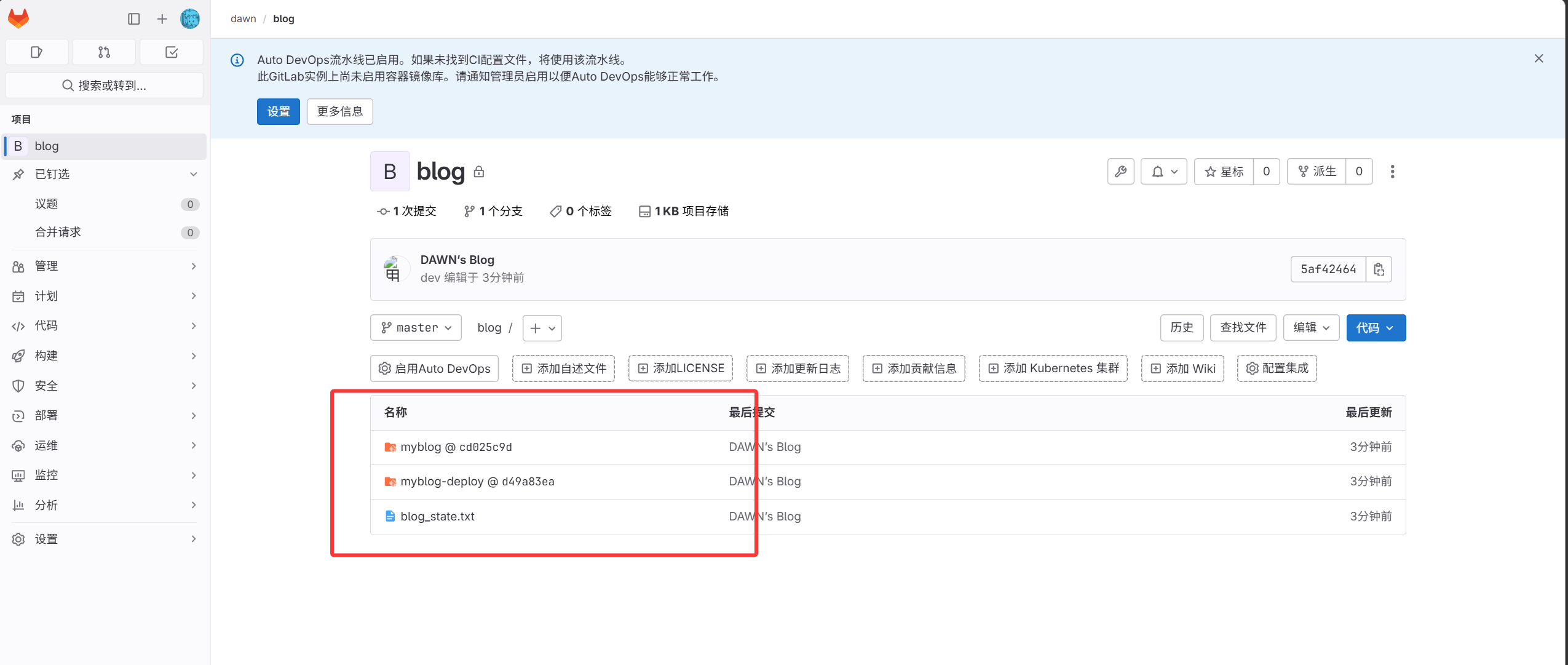
- Push a local Git repo to the remote GitLab.
 1
 2
 3
 4
 5
 6
 7
 8
 9
10
11
12
13
14
15
16
17
18
19
20
21
22
23
24
25
26
27
28
29
30
31
32
33
34
35
36
37
38
39
40
41
42
|
1. Set up a local repository.
[root@gitlab ~]#mkdir dawn
[root@gitlab ~]#cd dawn
2. Initialize the repository.
[root@gitlab dawn]#git init
3. Upload the code.
[root@gitlab dawn]#touch a.txt
[root@gitlab dawn]#git add .
[root@gitlab dawn]#git commit -m "test_v1"
[master (root-commit) 815c600] test_v1
 1 file changed, 0 insertions(+), 0 deletions(-)
 create mode 100644 a.txt

4. Set the GitLab blog repo as the local remote.
[root@gitlab dawn]#git remote add origin git@11.0.1.200:dawn/blog.git
5. Push local content to the remote (the remote already has content, so a direct push errors; keep the remote content by pulling/merging first, then pushing).
[root@gitlab dawn]#git pull origin master
warning: no common commits
remote: Enumerating objects: 3, done.
remote: Counting objects: 100% (3/3), done.
remote: Compressing objects: 100% (3/3), done.
remote: Total 3 (delta 0), reused 0 (delta 0), pack-reused 0
Unpacking objects: 100% (3/3), done.
From 11.0.1.200:dawn/blog
 * branch            master     -> FETCH_HEAD
Merge made by the 'recursive' strategy.
 blog_state.txt | 110 ++++++++++++++++++++++++++++++++++++
 myblog         |   1 +
 myblog-deploy  |   1 +
 3 files changed, 112 insertions(+)
 create mode 100644 blog_state.txt
 create mode 160000 myblog
 create mode 160000 myblog-deploy
[root@gitlab dawn]#git push -u origin master
Counting objects: 6, done.
Delta compression using up to 2 threads.
Compressing objects: 100% (3/3), done.
Writing objects: 100% (5/5), 462 bytes | 0 bytes/s, done.
Total 5 (delta 1), reused 0 (delta 0)
To git@11.0.1.200:dawn/blog.git
   5af4246..0242e0a  master -> master
Branch master set up to track remote branch master from origin.
|
- Create a normal user “dev”.
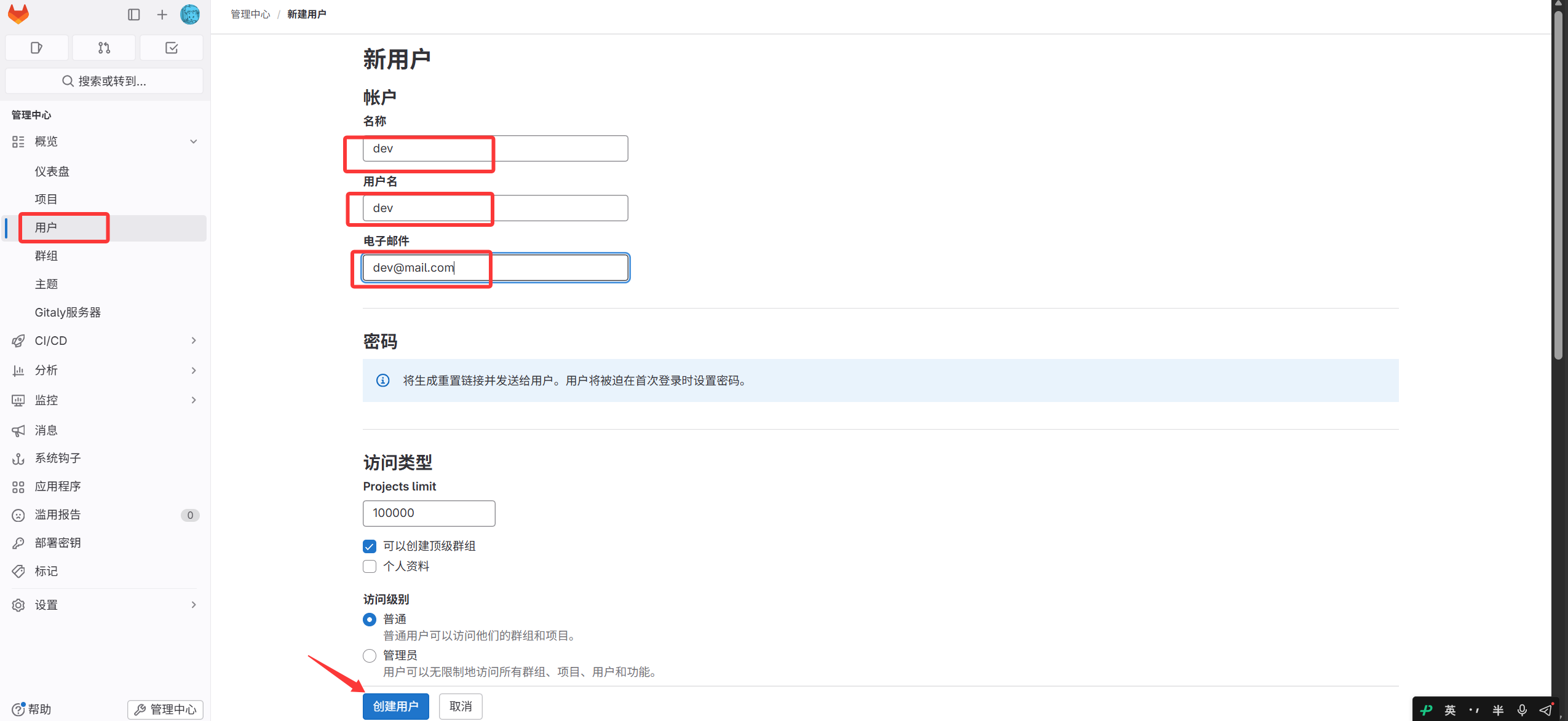
After creation, change the dev password — do not log out; click Edit on the user page.
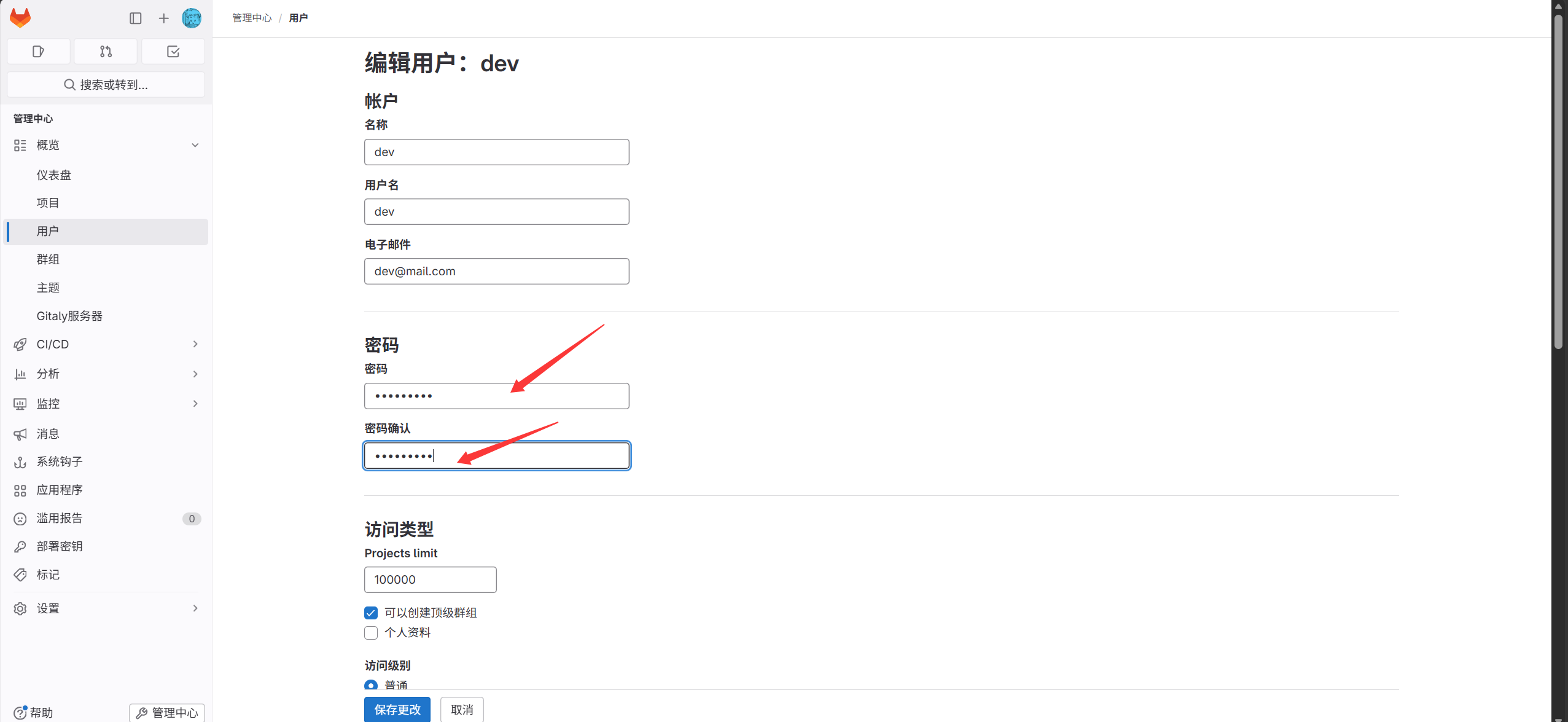
After that, log in to GitLab as dev (you must change the password on first login).
- Add the dev user to the dawn group.
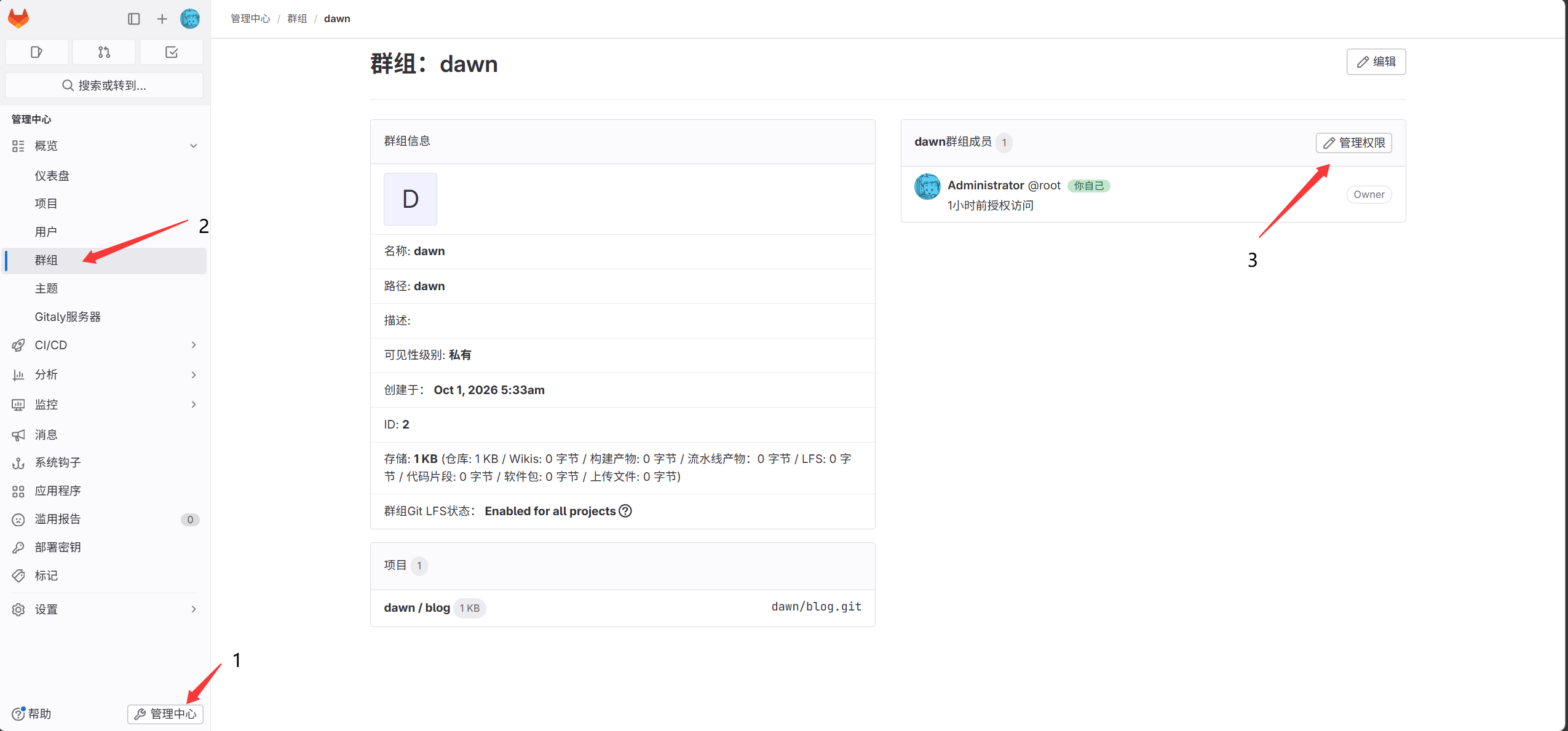
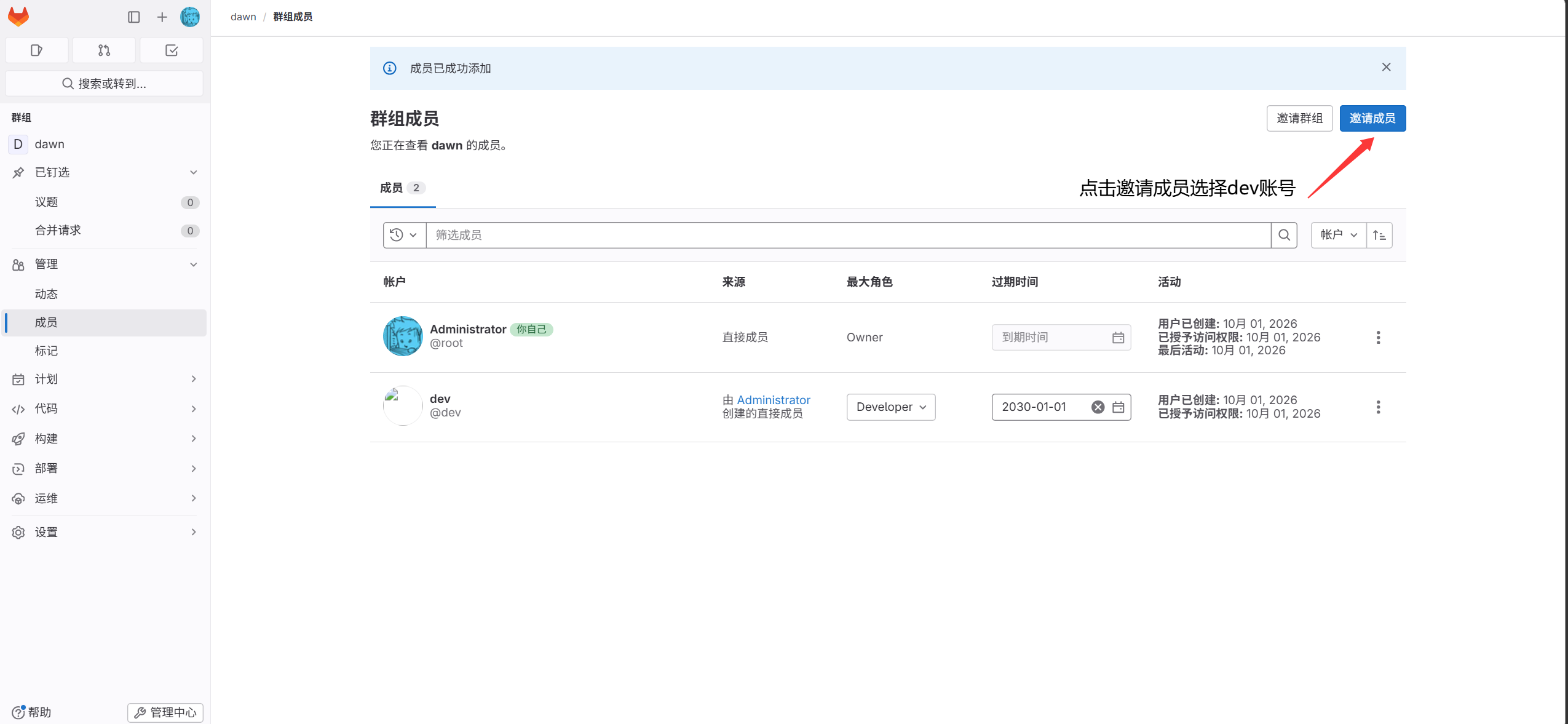
- Generate a key pair on the dev server.
1
|
[root@lb01 ~]#ssh-keygen
|
- Copy the generated public key into the SSH-key page under the dev account.
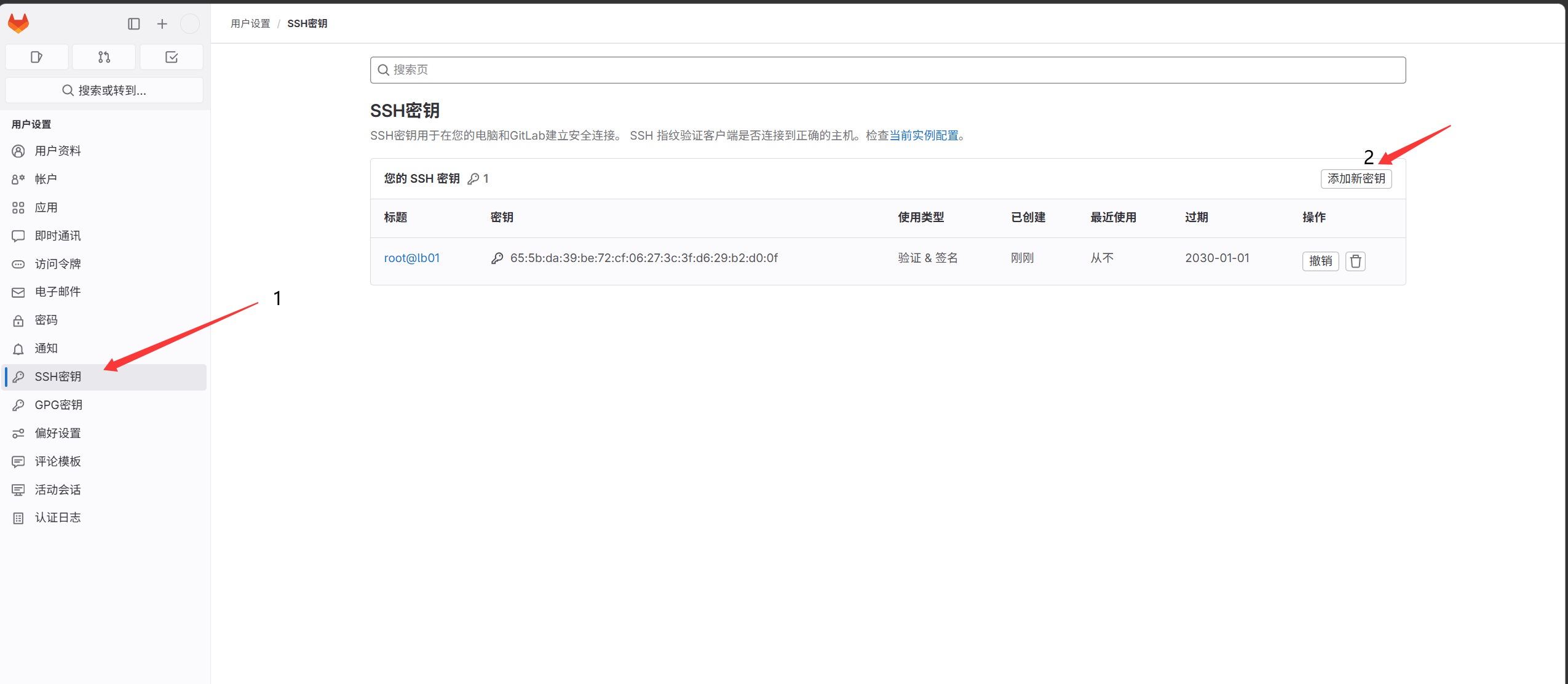
- Clone the code to the dev host 11.0.1.5.
 1
 2
 3
 4
 5
 6
 7
 8
 9
10
11
12
13
|
[root@lb01 ~]#git clone git@11.0.1.200:dawn/blog.git
Cloning into 'blog'...
The authenticity of host '11.0.1.200 (11.0.1.200)' can't be established.
ECDSA key fingerprint is SHA256:Ldn1vBzBEFxynXs0qBNr0XzJ2lTx/0caMuK5yJtb+Zo.
ECDSA key fingerprint is MD5:3d:1d:28:3f:33:ec:ee:c1:69:83:af:14:a3:7f:79:ac.
Are you sure you want to continue connecting (yes/no)? yes
Warning: Permanently added '11.0.1.200' (ECDSA) to the list of known hosts.
remote: Enumerating objects: 8, done.
remote: Counting objects: 100% (8/8), done.
remote: Compressing objects: 100% (6/6), done.
remote: Total 8 (delta 1), reused 0 (delta 0), pack-reused 0
Receiving objects: 100% (8/8), done.
Resolving deltas: 100% (1/1), done.
|
- Modify and upload code to the remote repository.
 1
 2
 3
 4
 5
 6
 7
 8
 9
10
11
12
13
14
15
16
17
18
19
20
21
22
23
24
25
26
|
Set the user identity on 11.0.1.5.
[root@lb01 blog]#git config --global user.email "dev@mail.com"
[root@lb01 blog]#git config --global user.name "dev"
[root@lb01 blog]#vim a.txt
123
[root@lb01 blog]#git commit -am "123"
Commit to the remote repository.
[root@lb01 blog]#git push -u origin master
Counting objects: 5, done.
Compressing objects: 100% (2/2), done.
Writing objects: 100% (3/3), 257 bytes | 0 bytes/s, done.
Total 3 (delta 1), reused 0 (delta 0)
remote: GitLab: You are not allowed to push code to protected branches on this project.To git@11.0.1.200:dawn/blog.git
 ! [remote rejected] master -> master (pre-receive hook declined)
error: failed to push some refs to 'git@11.0.1.200:dawn/blog.git'
# pushing to the master branch is not allowed

Push to another branch:
1. Create the dev branch.
[root@lb01 blog]#git branch dev
[root@lb01 blog]#git branch
  dev
* master

2. Push the dev branch to the remote.
[root@lb01 blog]#git push -u origin dev
|
Merge Request (MR)
- Initiate a merge request from the dev account.
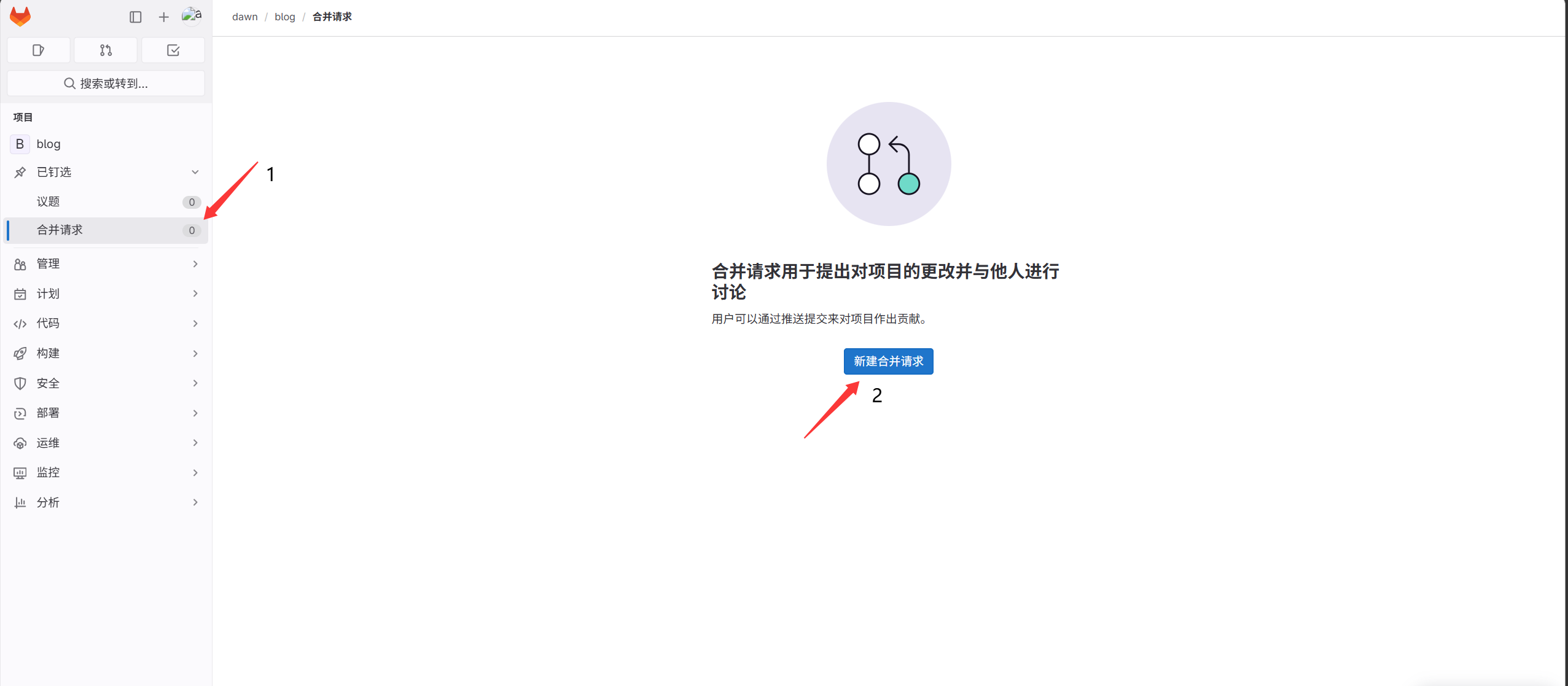
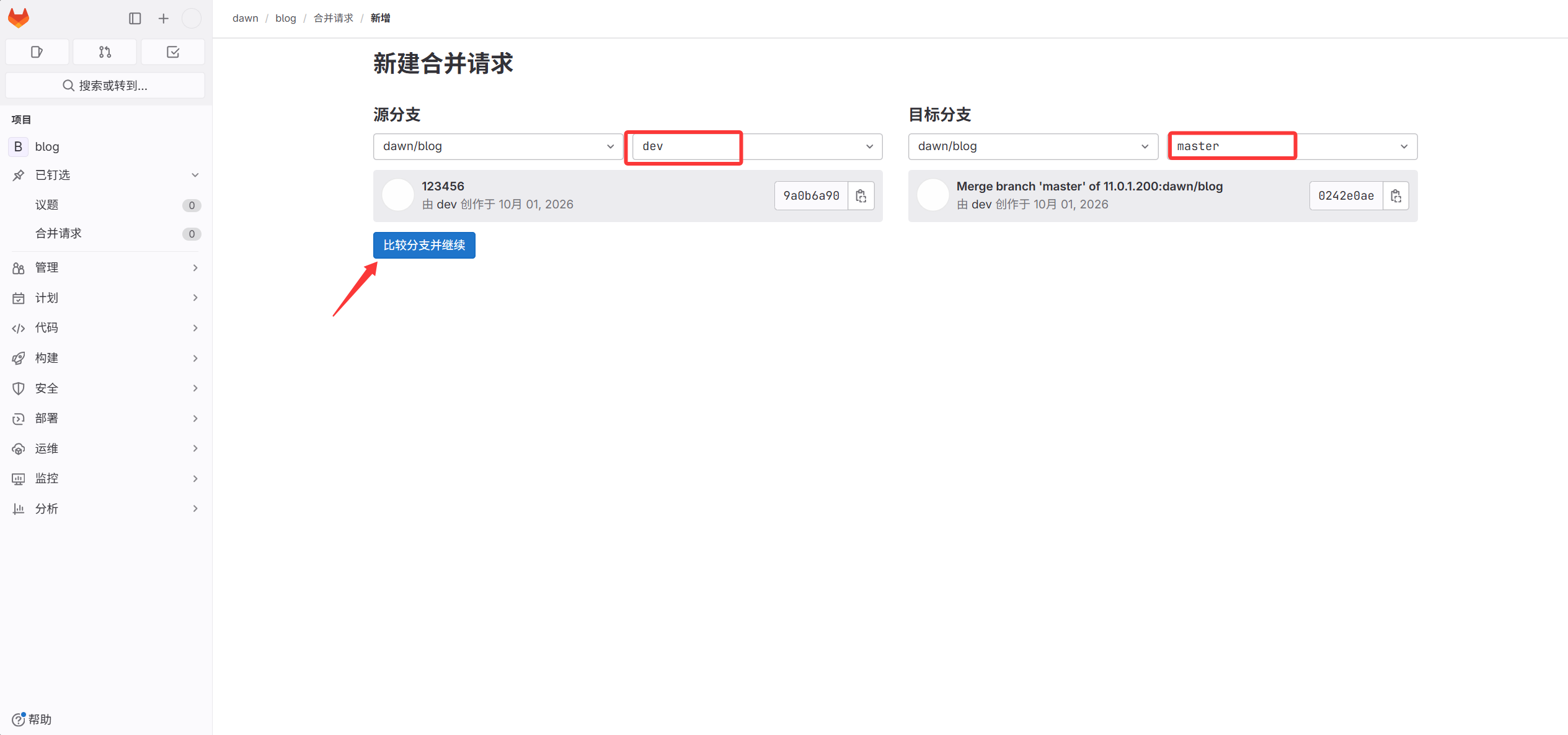
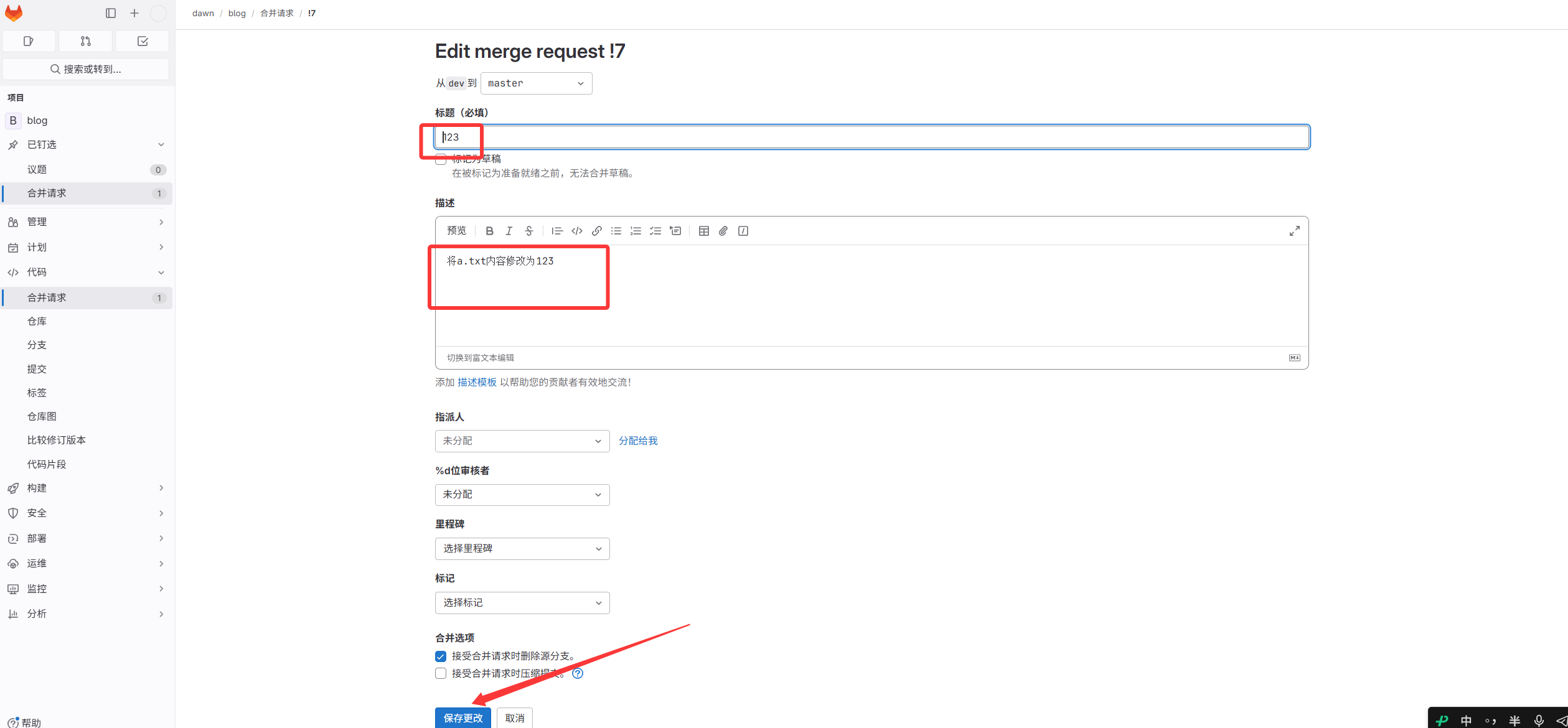
- In the root account, approve the merge and delete the source dev branch.
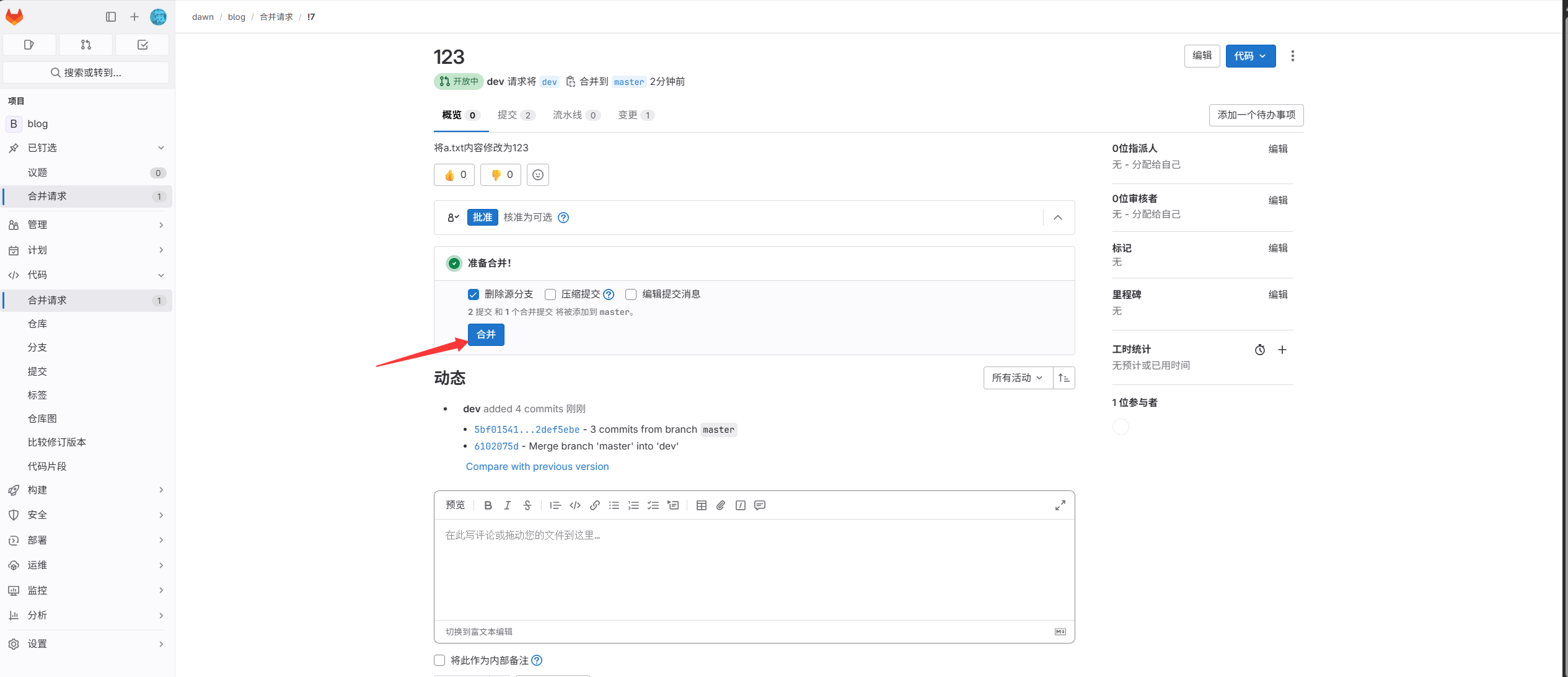
- Download the code on the web server.
1
2
|
[root@web01 ~]#git clone http://11.0.1.200/dawn/blog.git
Enter the username and password.
|