flannel in Action: Building Docker Cross-Host Container Networks from Scratch#
I. Network Environment Planning#
- etcd host IP: 192.168.8.88 hostname: docker-network
- Host1 IP: 192.168.8.188 hostname: web01
- Host2 IP: 192.168.8.99 hostname: web02
II. etcd Host Configuration#
Step 1: Download and Extract etcd#
- Download etcd-v3.6.0-linux-amd64.tar.gz package from github.com
- Copy the package to the etcd host /root directory and extract:
1
|
[root@docker-network ~]# tar -zxvf etcd-v3.6.0-linux-amd64.tar.gz
|
Step 2: Install etcd Executable Files#
1
2
|
[root@docker-network ~]# cd etcd-v3.6.0-linux-amd64
[root@docker-network etcd-v3.6.0-linux-amd64]# cp etcd* /usr/local/bin/
|
Step 3: Create Data Directory#
1
|
[root@docker-network ~]# mkdir /var/lib/etcd
|
- Create etcd.service file:
1
|
[root@docker-network ~]# vim /usr/lib/systemd/system/etcd.service
|
1
2
3
4
5
6
|
[Unit]
Description=etcd_service
[Service]
ExecStart=/usr/local/bin/etcd --name etcd1 --data-dir /var/lib/etcd --listen-client-urls http://192.168.8.88:2379,http://127.0.0.1:2379 --advertise-client-urls http://192.168.8.88:2379,http://127.0.0.1:2379
[Install]
WantedBy=multi-user.target
|
- Reload system service configuration and start etcd:
1
2
3
|
[root@docker-network ~]# systemctl daemon-reload
[root@docker-network ~]# systemctl enable etcd.service
[root@docker-network ~]# systemctl restart etcd.service
|
- Verify etcd listening status:
1
2
3
|
[root@docker-network ~]# netstat -tulnp |grep :2379
tcp        0      0 192.168.8.88:2379       0.0.0.0:*               LISTEN      1912/etcd
tcp        0      0 127.0.0.1:2379          0.0.0.0:*               LISTEN      1912/etcd
|
Step 5: Add flannel Network Configuration to etcd#
1
|
etcdctl --endpoints http://127.0.0.1:2379 put /coreos.com/network/config '{"Network": "172.16.0.0/16", "SubnetLen": 24, "SubnetMin": "172.16.1.0","SubnetMax": "172.16.10.0", "Backend": {"Type": "vxlan"}}'
|
The above content is all on one line. Verify that the configuration was written successfully
1
|
etcdctl --endpoints http://192.168.8.88:2379 get /coreos.com/network/config
|
Configuration description:
- Network: Flannel address pool
- SubnetLen: Subnet mask length assigned to a single host’s docker0 (24 bits means 255.255.255.0)
- SubnetMin/SubnetMax: Allocatable subnet range (example is 172.16.1.0/24 to 172.16.10.0/24)
- Backend: Data forwarding mode (vxlan supports cross-host communication)
Step 6: Disable Firewall#
1
2
|
[root@docker-network ~]# systemctl disable firewalld
[root@docker-network ~]# systemctl stop firewalld
|
III. web01 Host Configuration (Host1: 192.168.8.188)#
Step 1: Download and Extract flannel#
- Download flannel-v0.26.7-linux-amd64.tar.gz to the host
- Extract the file:
1
|
[root@web01 ~]# tar -zxvf flannel-v0.26.7-linux-amd64.tar.gz
|
Step 2: Install flannel Executable Files#
1
|
[root@web01 ~]# cp -p flanneld mk-docker-opts.sh /usr/local/bin/
|
- Create flanneld.service file:
1
|
[root@web01 ~]# vim /usr/lib/systemd/system/flanneld.service
|
 1
 2
 3
 4
 5
 6
 7
 8
 9
10
11
12
13
14
|
[Unit]
Description=Flanneld
Documentation=https://github.com/coreos/flannel
After=network.target
Before=docker.service
[Service]
User=root
ExecStartPost=/usr/local/bin/mk-docker-opts.sh
ExecStart=/usr/local/bin/flanneld --etcd-endpoints=http://192.168.8.88:2379 --iface=192.168.8.188 --ip-masq=true --etcd-prefix=/coreos.com/network
Restart=on-failure
Type=notify
LimitNOFILE=65536
[Install]
WantedBy=multi-user.target
|
Parameter description:
--iface=192.168.8.188: Specify the local IP for connecting to etcd--etcd-endpoints: etcd server address
Reload service configuration and start flannel:
1
2
3
|
[root@web01 ~]# systemctl daemon-reload
[root@web01 ~]# systemctl enable flanneld.service
[root@web01 ~]# systemctl restart flanneld.service
|
Step 4: Verify flannel Network Interface#
1
|
[root@web01 ~]# ifconfig
|
Should display flannel.1 interface (example output):
1
2
3
4
5
6
7
8
|
flannel.1: flags=4163<UP,BROADCAST,RUNNING,MULTICAST>  mtu 1450
        inet 172.16.5.0  netmask 255.255.255.255  broadcast 0.0.0.0
        inet6 fe80::f06c:96ff:fefe:b7ab  prefixlen 64  scopeid 0x20<link>
        ether f2:6c:96:fe:b7:ab  txqueuelen 0  (Ethernet)
        RX packets 315  bytes 26460 (25.8 KiB)
        RX errors 0  dropped 0  overruns 0  frame 0
        TX packets 314  bytes 34636 (33.8 KiB)
        TX errors 0  dropped 29 overruns 0  carrier 0  collisions 0
|
Step 5: Modify Docker Configuration File#
- View subnet environment variables generated by flannel:
1
|
[root@web01 ~]# cat /run/flannel/subnet.env
|
Example output:
1
2
3
4
|
FLANNEL_NETWORK=172.16.0.0/16
FLANNEL_SUBNET=172.16.5.1/24
FLANNEL_MTU=1450
FLANNEL_IPMASQ=true
|
1
|
[root@web01 ~]# cat /run/docker_opts.env
|
Example output:
1
2
3
4
|
DOCKER_OPT_BIP="--bip=172.16.5.1/24"
DOCKER_OPT_IPMASQ="--ip-masq=false"
DOCKER_OPT_MTU="--mtu=1450"
DOCKER_OPTS=" --bip=172.16.5.1/24 --ip-masq=false --mtu=1450"
|
- Modify docker service configuration:
1
|
[root@web01 ~]# vim /usr/lib/systemd/system/docker.service
|
Add to the [Service] section:
1
2
3
|
ExecStart=/usr/bin/dockerd $DOCKER_OPTS -H fd:// --containerd=/run/containerd/containerd.sock
ExecReload=/bin/kill -s HUP $MAINPID
EnvironmentFile=-/run/docker_opts.env
|
- Restart docker service:
1
2
|
[root@web01 ~]# systemctl daemon-reload
[root@web01 ~]# systemctl restart docker.service
|
Step 6: Verify Docker Network#
- Create nginx container and enter it:
1
2
3
4
5
6
7
8
9
|
[root@web01 ~]# ifconfig
docker0: flags=4163<UP,BROADCAST,RUNNING,MULTICAST>  mtu 1450
        inet 172.16.5.1  netmask 255.255.255.0  broadcast 172.16.5.255
        inet6 fe80::42:f6ff:fe5d:5423  prefixlen 64  scopeid 0x20<link>
        ether 02:42:f6:5d:54:23  txqueuelen 0  (Ethernet)
        RX packets 10073  bytes 407167 (397.6 KiB)
        RX errors 0  dropped 0  overruns 0  frame 0
        TX packets 48185  bytes 38083646 (36.3 MiB)
        TX errors 0  dropped 0 overruns 0  carrier 0  collisions 0
|
1
2
|
[root@web01 ~]# docker run -d -p 8800:80 nginx
[root@web01 ~]# docker exec -it <container_id> /bin/bash
|
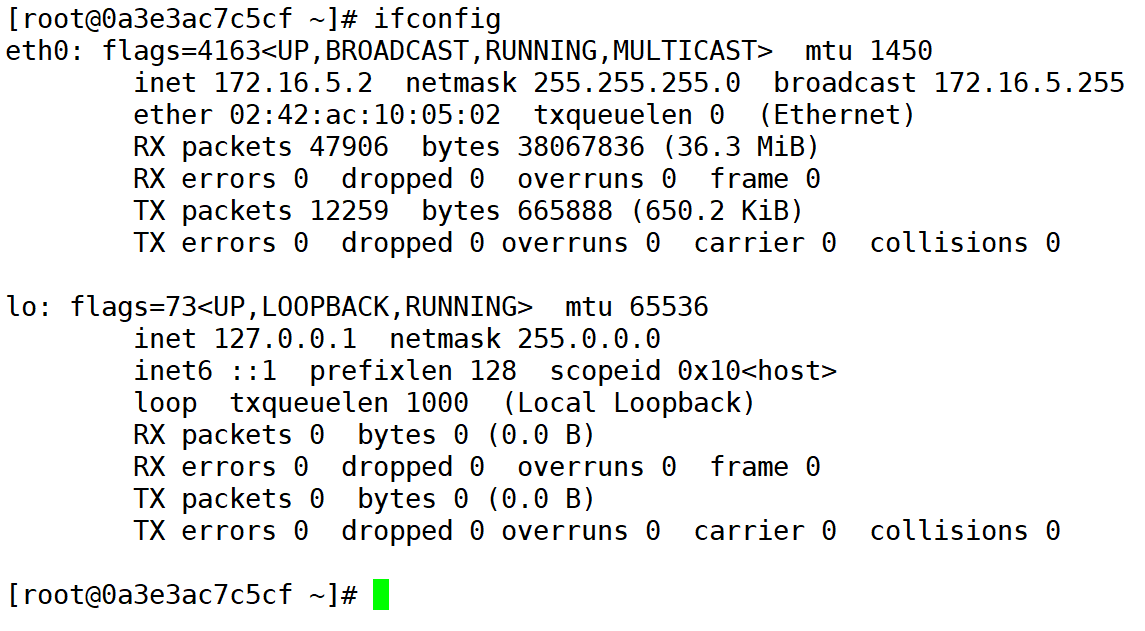
- View container IP (example is 172.16.5.3):
1
2
|
root@container_id:/# ifconfig
eth0: inet 172.16.5.3 netmask 255.255.255.0
|
IV. web02 Host Configuration (Host2: 192.168.0.208)#
Step Description#
- Configuration steps are identical to web01, only need to modify the following parameters:
--iface=192.168.8.99 (local IP)- Docker container IP example: 172.16.5.2 (automatically assigned by flannel)
V. Experiment Verification#
Ping web02 container IP (example: 172.16.9.2) from web01 container:
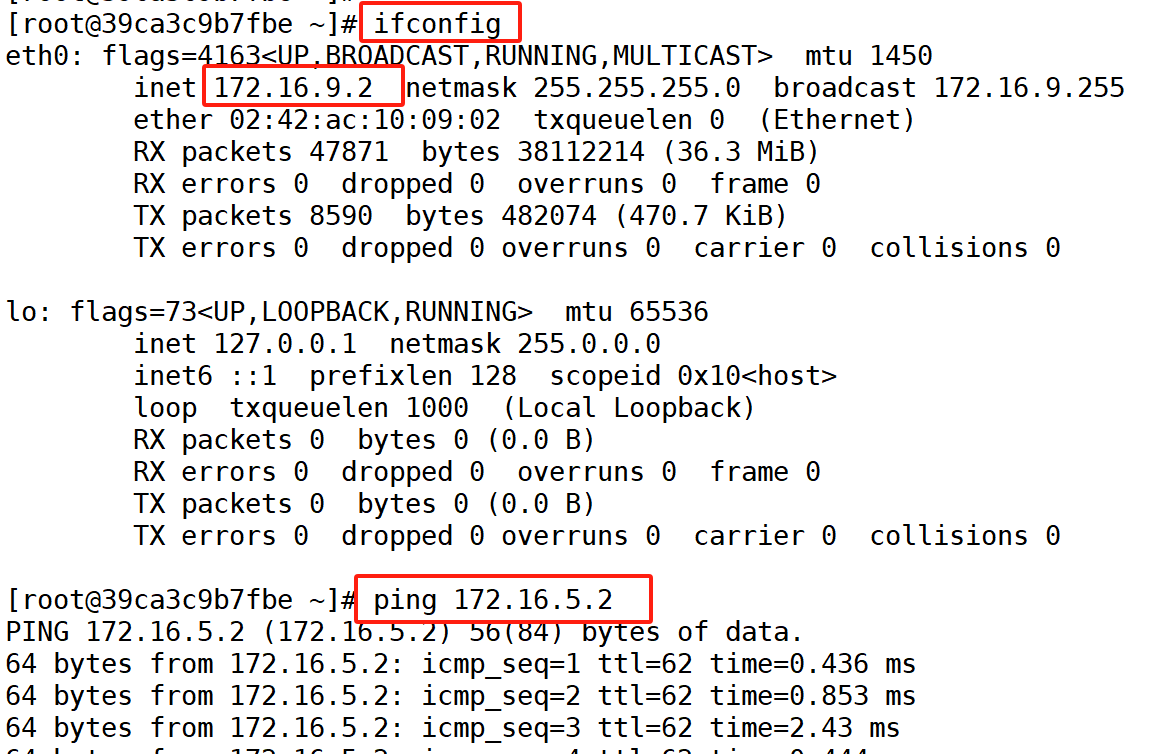
Create a container in web02 and view the container IP address
Result: Inter-container communication successful, flannel network configuration complete.
Appendix: etcd Network Configuration Query#
1
2
3
|
[root@docker-network ~]# etcdctl --endpoints=http://127.0.0.1:2379 get /coreos.com/network/config
/coreos.com/network/config
{"Network": "172.16.0.0/16", "SubnetLen": 24, "SubnetMin": "172.16.1.0","SubnetMax": "172.16.10.0", "Backend": {"Type": "vxlan"}}
|
1
2
3
|
[root@docker-network ~]# etcdctl --endpoints=http://127.0.0.1:2379 get /coreos.com/network/subnets --prefix --keys-only
/coreos.com/network/subnets/172.16.5.0-24
/coreos.com/network/subnets/172.16.9.0-24
|
1
2
3
|
[root@docker-network ~]# etcdctl --endpoints=http://127.0.0.1:2379 get /coreos.com/network/subnets/172.16.5.0-24
/coreos.com/network/subnets/172.16.5.0-24
{"PublicIP":"192.168.8.188","PublicIPv6":null,"BackendType":"vxlan","BackendData":{"VNI":1,"VtepMAC":"5a:67:18:61:6a:5d"}}
|